Ultralytics YOLO26
Visão geral#
Ultralytics YOLO26 é uma família unificada de modelos de visão em tempo real descrita no artigo do Ultralytics YOLO26. Ela introduz inferência ponta a ponta nativa, uma cabeça de detecção mais leve, uma receita de treinamento atualizada e cabeças específicas para detecção, segmentação, classificação, estimativa de pose e detecção orientada.
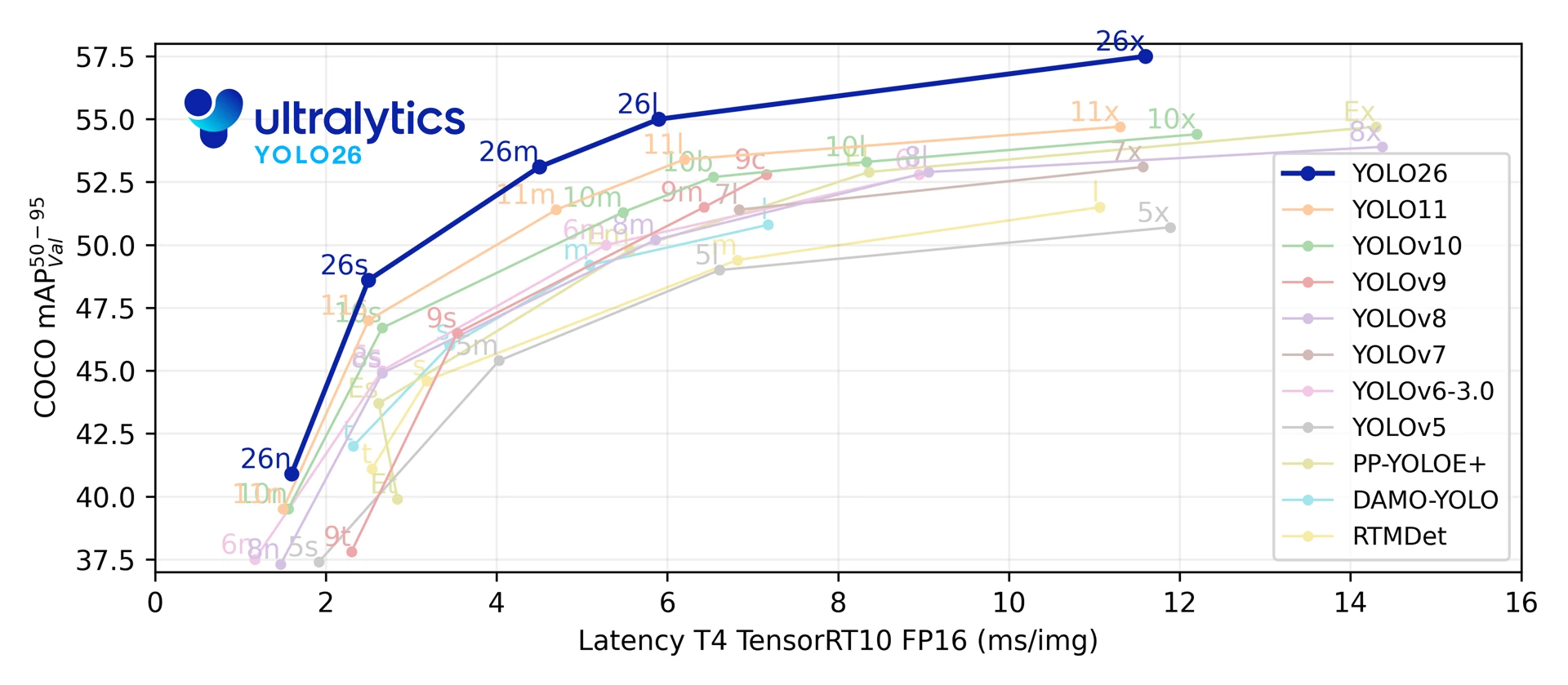
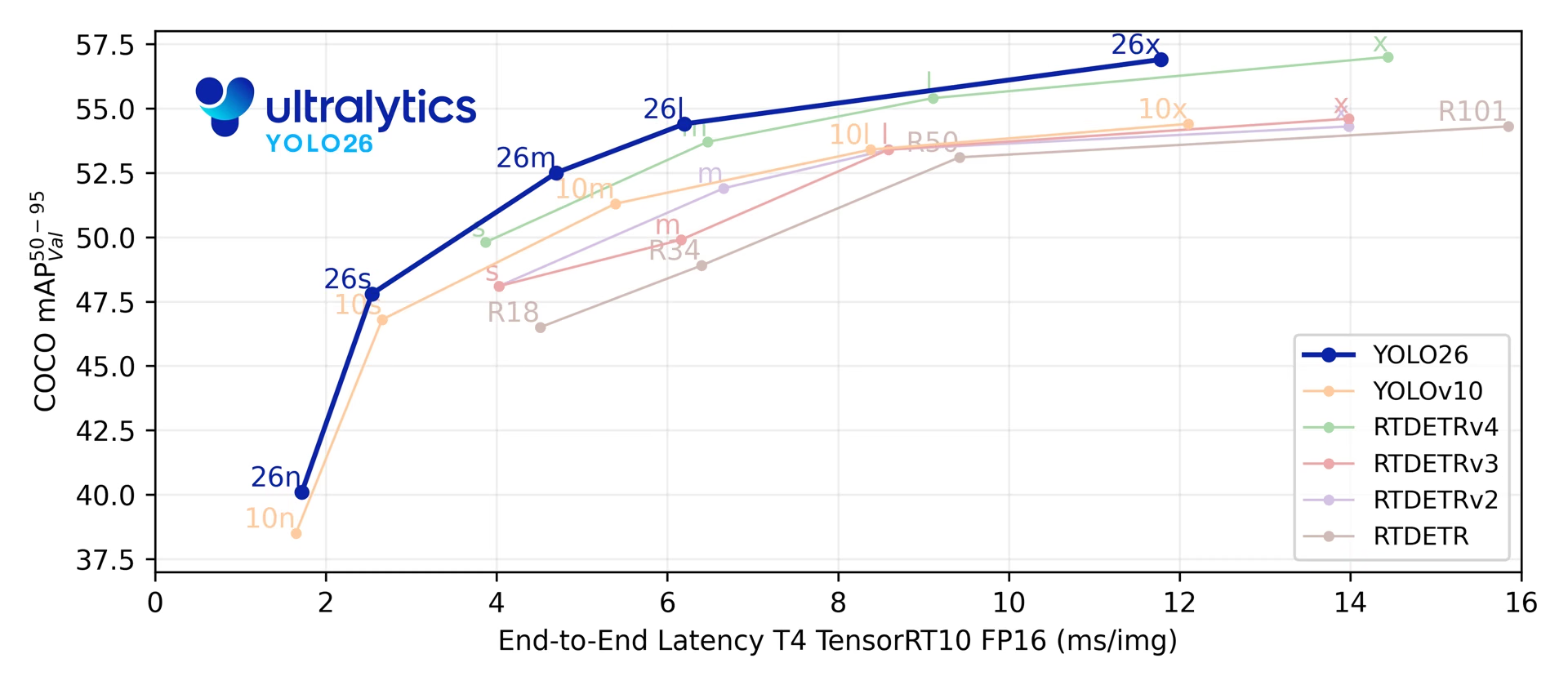
Nas suas cinco escalas de deteção, YOLO26 alcança 40.9-57.5 mAP no COCO com latência de 1.7-11.8 ms em T4 TensorRT. O artigo também indica uma inferência ONNX na CPU até 43% mais rápida para YOLO26n em comparação com YOLO11n numa CPU Intel Xeon a 2.00 GHz.
Consulta a pré-visualização do YOLO27 ainda não lançado para conhecer a arquitetura planeada, as tarefas e os benchmarks preliminares.
from ultralytics import YOLO

model = YOLO("yolo26n.pt")  # carrega um modelo YOLO26n pré-treinado
results = model("path/to/bus.jpg") # executa a inferênciaExplora e executa modelos YOLO26 diretamente na plataforma Ultralytics.
A família de modelos YOLO26 assenta em quatro áreas de design:
- Inferência ponta a ponta nativa: a cabeça de detecção opcional one-to-one gera previsões sem supressão não máxima (NMS), simplificando a implantação e reduzindo o pós-processamento.
- Regressão de caixas mais leve: YOLO26 remove Distribution Focal Loss (DFL), reduzindo a complexidade da cabeça de deteção e preservando um intervalo de regressão sem restrições.
- Atualizações na receita de treinamento: o pipeline de treinamento combina MuSGD (um otimizador híbrido Muon + SGD), Progressive Loss e STAL (atribuição de rótulos com reconhecimento de alvos pequenos) para melhorar a otimização, direcionar a supervisão para a cabeça usada durante a inferência e manter a cobertura de rótulos positivos para objetos pequenos. Os hiperparâmetros completos dos checkpoints lançados estão documentados no guia da receita de treinamento do YOLO26.
- Cabeças e funções de perda específicas para cada tarefa: YOLO26 acrescenta designs específicos para segmentação de instâncias, variantes de segmentação semântica, estimativa de pose e deteção orientada, mantendo um único pipeline de modelo para todas as tarefas.
Em conjunto, estas atualizações melhoram o equilíbrio entre precisão e latência em várias escalas de modelo e alvos de implementação.
Principais funcionalidades#
-
Regressão sem DFL YOLO26 remove Distribution Focal Loss (DFL), reduzindo a complexidade da cabeça de deteção e simplificando a exportação.
-
Inferência de ponta a ponta sem NMS YOLO26 é compatível com inferência nativa de ponta a ponta com
nms=False, produzindo predições sem uma etapa NMS separada. O percurso predefinido um-para-muitos usa NMS para garantir a precisão. -
Progressive Loss + STAL Progressive Loss direciona a ênfase do treino para a cabeça usada no momento da inferência, enquanto STAL melhora a cobertura positiva de rótulos para objetos pequenos.
-
Otimizador MuSGD Um otimizador híbrido que combina SGD com Muon, adaptando ideias de otimização do treino de modelos de linguagem de grande dimensão à visão computacional.
-
Implementação eficiente A cabeça simplificada e o percurso opcional sem NMS reduzem a sobrecarga da inferência em vários alvos de exportação e perfis de hardware, incluindo a aceleração ONNX na CPU indicada no artigo para YOLO26n em comparação com YOLO11n.
-
Aprimoramentos na segmentação de instâncias Introduz uma perda de segmentação semântica para melhorar a convergência do modelo e um módulo proto atualizado que usa informações de várias escalas para melhorar a qualidade das máscaras. O artigo relata ganhos em relação ao YOLO11 de até +2.5 AP de caixa e +3.7 AP de máscara na segmentação de instâncias do COCO.
-
Estimativa precisa de pose Integra Residual Log-Likelihood Estimation (RLE) para localizar pontos-chave com maior precisão e otimiza o processo de descodificação para aumentar a velocidade de inferência. O artigo indica até +7.2 AP em relação ao YOLO11 na estimativa de pose do COCO.
-
Descodificação OBB refinada Introduz uma função de perda de ângulo especializada para melhorar a precisão de deteção de objetos quadrados e otimiza a descodificação OBB para resolver problemas de descontinuidade nos limites. O artigo indica até +3.4 mAP em relação ao YOLO11 na deteção orientada do DOTA-v1.0.
Tarefas e modos compatíveis#
YOLO26 é compatível com o conjunto padrão de tarefas da Ultralytics em cinco escalas de modelo:
| Modelo | Nomes de arquivo | Tarefa | Treinamento | Validação | Inferência | Exportar |
|---|---|---|---|---|---|---|
| YOLO26 | yolo26n.pt yolo26s.pt yolo26m.pt yolo26l.pt yolo26x.pt | Detecção | ✅ | ✅ | ✅ | ✅ |
| YOLO26-seg | yolo26n-seg.pt yolo26s-seg.pt yolo26m-seg.pt yolo26l-seg.pt yolo26x-seg.pt | Segmentação de instâncias | ✅ | ✅ | ✅ | ✅ |
| YOLO26-sem | yolo26n-sem.pt yolo26s-sem.pt yolo26m-sem.pt yolo26l-sem.pt yolo26x-sem.pt | Segmentação semântica | ✅ | ✅ | ✅ | ✅ |
| YOLO26-depth | yolo26n-depth.pt yolo26s-depth.pt yolo26m-depth.pt yolo26l-depth.pt yolo26x-depth.pt | Estimativa de profundidade | ✅ | ✅ | ✅ | ✅ |
| YOLO26-cls | yolo26n-cls.pt yolo26s-cls.pt yolo26m-cls.pt yolo26l-cls.pt yolo26x-cls.pt | Classificação | ✅ | ✅ | ✅ | ✅ |
| YOLO26-pose | yolo26n-pose.pt yolo26s-pose.pt yolo26m-pose.pt yolo26l-pose.pt yolo26x-pose.pt | Pose/Pontos-chave | ✅ | ✅ | ✅ | ✅ |
| YOLO26-obb | yolo26n-obb.pt yolo26s-obb.pt yolo26m-obb.pt yolo26l-obb.pt yolo26x-obb.pt | Detecção orientada | ✅ | ✅ | ✅ | ✅ |
Esta estrutura unificada abrange deteção em tempo real, segmentação de instâncias, segmentação semântica, estimativa monocular de profundidade, classificação, estimativa de pose e deteção de objetos orientados, com suporte para treino, validação, inferência e exportação.
yolo26-p2.yaml e yolo26-p6.yaml acrescentam uma cabeça de deteção P2 (objetos pequenos) ou P6 (entrada grande) e são fornecidos apenas como arquiteturas YAML. Não são lançados pesos yolo26*-p2.pt nem yolo26*-p6.pt específicos para cada escala. Cria uma instância de uma configuração escalada a partir de YAML (por exemplo, YOLO("yolo26n-p6.yaml")) e treina-a ou ajusta-a conforme necessário.
Métricas de desempenho#
Consulta a documentação de deteção para ver exemplos de utilização destes modelos treinados no COCO, que incluem 80 classes pré-treinadas.
| Modelo | tamanho (pixels) | mAPval50-95 | mAPval50-95 (e2e) | Velocidade CPU ONNX (ms) | Velocidade T4 TensorRT10 (ms) | parâmetros (M) | FLOPs (B) |
|---|---|---|---|---|---|---|---|
| YOLO26n | 640 | 40.9 | 40.1 | 38.9 ± 0.7 | 1.7 ± 0.0 | 2.4 | 5.5 |
| YOLO26s | 640 | 48.6 | 47.8 | 87.2 ± 0.9 | 2.5 ± 0.0 | 9.5 | 20.9 |
| YOLO26m | 640 | 53.1 | 52.5 | 220.0 ± 1.4 | 4.7 ± 0.1 | 20.4 | 68.4 |
| YOLO26l | 640 | 55.0 | 54.4 | 286.2 ± 2.0 | 6.2 ± 0.2 | 24.8 | 86.8 |
| YOLO26x | 640 | 57.5 | 56.9 | 525.8 ± 4.0 | 11.8 ± 0.2 | 55.7 | 194.4 |
Os valores de Params e FLOPs são do modelo fundido após a fusão de Conv/BatchNorm e a remoção do ramo de detecção não utilizado. As medições de velocidade selecionam a cabeça sem NMS com nms=False. Os checkpoints pré-treinados mantêm a arquitetura completa de treinamento e podem apresentar contagens maiores.
Exemplos de uso#
Esta seção apresenta exemplos simples de treinamento e inferência com YOLO26.
O exemplo abaixo treina um modelo YOLO26 Detect para deteção de objetos no conjunto de dados de exemplo COCO8.
Os modelos *.pt pré-treinados em PyTorch, assim como os ficheiros de configuração *.yaml, podem ser passados à classe YOLO() para criar uma instância do modelo em Python:
from ultralytics import YOLO

# Carregar um modelo YOLO26n pré-treinado com COCO
model = YOLO("yolo26n.pt")

# Executar inferência com o modelo YOLO26n na imagem 'bus.jpg'
results = model("path/to/bus.jpg")

# Treina o modelo no conjunto de dados de exemplo COCO8 durante 100 épocas
results = model.train(data="coco8.yaml", epochs=100, imgsz=640)Os modelos de deteção YOLO26 usam uma arquitetura de cabeça dupla que oferece flexibilidade para diferentes cenários de implementação:
- Cabeça one-to-many (predefinição): Gera as saídas tradicionais de YOLO, que requerem pós-processamento NMS, produzindo
(N, nc + 4, 8400), em quencé o número de classes. Esta cabeça costuma alcançar uma precisão ligeiramente superior, à custa de processamento adicional. - Cabeça one-to-one (
nms=False): Produz previsões de ponta a ponta sem NMS, gerando(N, 300, 6)com um máximo de 300 deteções por imagem. Esta cabeça está otimizada para inferência rápida e implementação simplificada.
Podes alternar entre cabeças durante a exportação, a previsão ou a validação:
from ultralytics import YOLO

model = YOLO("yolo26n.pt")

# Usar a cabeça one-to-many (predefinição; a Ultralytics aplica NMS)
results = model.predict("image.jpg")  # inference
metrics = model.val(data="coco.yaml")  # validation
model.export(format="onnx")  # export

# Ativar a cabeça one-to-one sem NMS
results = model.predict("image.jpg", nms=False)  # inference
metrics = model.val(data="coco.yaml", nms=False)  # validation
model.export(format="onnx", nms=False)  # export
A previsão e a validação usam por predefinição a cabeça one-to-many para privilegiar a precisão. Usa nms=False para inferência sem NMS ou nms=True para incorporar NMS numa exportação compatível. Ambas as cabeças são treinadas, independentemente desta escolha. Consulta o guia de deteção de ponta a ponta para ver os formatos de saída e a compatibilidade de exportação.
YOLOE-26: deteção e segmentação de vocabulário aberto#
YOLO26 também serve de base para o YOLOE-26, uma variante de vocabulário aberto que detecta e segmenta categorias de objetos a partir de prompts de texto, prompts visuais ou de um modo sem prompts, em vez de usar uma lista fixa de classes aprendida durante o treinamento. YOLOE-26 mantém a cabeça opcional do YOLO26, de ponta a ponta (e2e) e sem NMS, assim a inferência de vocabulário aberto continua rápida o suficiente para ambientes dinâmicos nos quais as categorias-alvo mudam ao longo do tempo. YOLOE-26x atinge 40.6 AP no minival do LVIS com prompts de texto, 38.5 AP com prompts visuais e 31.1 AP sem prompts — os valores Non-E2E do artigo, que superam os resultados da cabeça de ponta a ponta em 1.1, 2.3 e 1.2 AP.
Consulta a documentação de YOLOE para ver tabelas de desempenho por escala, variantes sem prompts e exemplos de utilização completos.
Citações e agradecimentos#
Para uma descrição técnica completa da arquitetura YOLO26, da receita de treino, das cabeças de tarefa e da extensão de vocabulário aberto YOLOE-26, lê Ultralytics YOLO26: modelos de visão unificados, em tempo real e de ponta a ponta. Se usares YOLO26 na tua investigação, cita:
@misc{jocher2026ultralyticsyolo26unifiedrealtime,
  title = {Ultralytics YOLO26: Unified Real-Time End-to-End Vision Models},
  author = {Glenn Jocher and Jing Qiu and Mengyu Liu and Shuai Lyu and Fatih Cagatay Akyon and Muhammet Esat Kalfaoglu},
  year = {2026},
  eprint = {2606.03748},
  archivePrefix = {arXiv},
  primaryClass = {cs.CV},
  doi = {10.48550/arXiv.2606.03748},
  url = {https://arxiv.org/abs/2606.03748},
}
O código, os modelos e a documentação de YOLO26 estão disponíveis no repositório GitHub da Ultralytics e na documentação da Ultralytics, ao abrigo das licenças AGPL-3.0 e Enterprise.
Perguntas frequentes#
- Regressão sem DFL: Simplifica a cabeça de deteção e o processo de exportação
- Inferência de ponta a ponta sem NMS: Suporta inferência sem NMS com
nms=False - Progressive Loss + STAL: Melhora o alinhamento do treino e a cobertura de rótulos de objetos pequenos
- Otimizador MuSGD: Combina SGD com otimização inspirada no Muon para um treino estável
- Cabeças e funções de perda específicas da tarefa: Melhora o suporte à segmentação, à pose e à deteção orientada
YOLO26 é uma família de modelos unificada, que oferece suporte de ponta a ponta para várias tarefas de visão por computador:
- Deteção de objetos
- Segmentação de instâncias
- Segmentação semântica
- Estimativa de profundidade monocular
- Classificação de imagens
- Estimativa de pose
- Deteção de objetos orientados (OBB)
Cada variante de tamanho (n, s, m, l, x) suporta todas as tarefas, bem como versões de vocabulário aberto através de YOLOE-26.
YOLO26 melhora a eficiência da implementação com:
- Inferência nativa opcional de ponta a ponta sem NMS (
nms=False) - Regressão sem DFL e uma cabeça de deteção mais leve
- Exportação do modelo fundido, que remove componentes auxiliares usados apenas no treino
- Inferência ONNX na CPU até 43% mais rápida com YOLO26n do que com YOLO11n num Intel Xeon CPU @ 2.00 GHz
- Formatos de exportação flexíveis, incluindo TensorRT, ONNX, CoreML, LiteRT e OpenVINO
- Inferência nativa opcional de ponta a ponta sem NMS (
Os modelos YOLO26 estão disponíveis para transferência através do pacote
ultralytics. Instala ou atualiza o pacote e carrega um modelo:from ultralytics import YOLO # Carregar um modelo nano YOLO26 pré-treinado model = YOLO("yolo26n.pt") # Executa a inferência numa imagem results = model("image.jpg")Consulta a secção Exemplos de utilização para obter instruções de treino, validação e exportação.


Comentários117
Faz uma pergunta, partilha os teus resultados ou ajuda alguém.
hongzhuoxx
除了监督模型,我还期待着ultralytics可以推出高效准确易用的非监督瑕疵检测模型!
4Syedshajib55
How do I modify the architectural components (Head and Neck) of YOLOv26?
What is the process for inserting a Dropout layer at the end of the backbone in the YOLOv26 configuration?
2 Glenn JocherUltralytics
YOLO26 (no “v”) architecture edits are done in the model YAML, so start by copying
ultralytics/cfg/models/26/yolo26.yamlinto your project, modify thebackbone:/head:layer lists (the “neck” is part ofhead:), and train from that YAML following the Model YAML Configuration Guide.# yolo26_custom.yaml backbone: # ... existing backbone layers ... - [-1, 1, nn.Dropout, [0.2]] # add dropout at end of backbone (train-time only) head: # ... existing head/neck layers ...yolo train model=yolo26_custom.yaml data=your_dataset.yaml imgsz=640If you share which task model you’re editing (
detect/seg/pose/obb) and which variant (n/s/m/l/x), we can point you to the exact YAML to start from and where to insert the change in that graph.1Hi Glenn,
Thank you for the quick response and guidance! To answer your question: I am focusing on the detect task, and I will be experimenting with both the s (small) and m (medium) variants.
For context, I am working on a paper targeting a Q1 journal. My project focuses on Emotion Detection (5 classes: Angry, Happy, Sad, Neutral, Surprised) using the RAVDESS dataset. I have extracted peak emotion frames from the videos and augmented the dataset to roughly 21k images (640x640 resolution). My core research objective is to demonstrate that a customized YOLO26 architecture can outperform the standard baseline for detecting subtle facial micro-expressions. To achieve this, I want to modify the backbone—specifically by adding Batch Normalization and Dropout layers (potentially after the C2f blocks or may be after c3k2 blocks of that yolo26 architechtural images) to improve regularization and prevent overfitting on facial features.
Could you help me with the following?
-
Could you point me to the exact base YAML files for the yolo26s and yolo26m detection models to use as my starting point?
-
From an architectural standpoint, where exactly in the backbone would you theoretically recommend inserting these Dropout/BN layers? (e.g., after which specific layer index or block) to maximize accuracy without degrading the spatial feature maps necessary for facial detection?
Any insights on how to best structure this custom YAML would be incredibly helpful. Thanks again for your time!
-
- Baseline Reference: Finally, could you share the raw YAML configuration code that details the standard YOLO26 backbone and head? I would like to include this exact baseline structure in my paper’s methodology section to clearly contrast it with my proposed modifications.
hbzylilin
延迟了10天了,还没动静
1lwplw
真不错,期待开源
1- Glenn JocherUltralytics(editado)
@etemical 感谢建议!目前未原生支持行为识别/多目标行为检测;建议先用 YOLO26 组合
detect+track多目标跟踪与可选pose关键点作为上游信号,并在 GitHub 提交详细需求(数据标注格式与评测指标)为 Feature Request 模板 便于评估;参考 Track 模式文档 与 Pose 任务文档。yolo track model=yolo26n.pt source=your_video.mp4 tracker=bytetrack.yaml show=True yolo pose predict model=yolo26n-pose.pt source=your_video.mp4 show=True@lwplw 谢谢关注!YOLO26 现已发布,可阅读我们的 YOLO26 介绍博客 了解功能。
Jiahao Chen
请问如果我想要引用本页面的YOLO26和其他模型的对比曲线图,已经在文中索引了来源。但是期刊要求需要拿到作者的授权,请问如何申请授权呢?
 Paula DerrengerUltralytics
您好,针对期刊要求的图片书面授权,建议联系 Ultralytics 法务团队,说明申请转载 YOLO26 对比曲线图,并附上页面链接、具体图片、论文题目、期刊名称、是否修改图片,以及期刊的授权模板(如有),请求确认版权归属并提供书面许可。目前未找到该图专门的公开授权流程,因此这里不能代为授予许可;请以收到的正式书面回复为准。
cyberpunk-edgerunner
maybe
CIFAR-10-LTdataset can help. you do not need background images because our initial conversation started without that, for an image, there can be one to 15 object in one image The cause of the shared-memory increase will remain unconfirmed unless you runpython train.pyin your computer with an rtx gpuOn Sat, Oct 10, 2026 at 6:15 AM Paula Derrenger @.***> wrote:
Understood—you don’t need to interrupt your work for the batch=16 comparison. Could you name a public long-tailed dataset you consider representative and share your approximate class counts, background-image proportion, and typical/maximum objects per image? That would help define a reproduction using the configuration you already shared, without requiring your company’s data or another production run. The cause of the shared-memory increase remains unconfirmed.
— Reply to this email directly, view it on GitHub https://github.com/orgs/ultralytics/discussions/26446?email_source=notifications&email_token=BSIM7DUZ6A5KFG7YKF2H6KT5TGBBRA5CNFSNUABIM5UWIORPF5TWS5BNNB2WEL2ENFZWG5LTONUW63SDN5WW2ZLOOQXTCOBYGQ2DONBZUZZGKYLTN5XKOY3PNVWWK3TUUVSXMZLOOSWGM33PORSXEX3DNRUWG2Y#discussioncomment-18844749, or unsubscribe https://github.com/notifications/unsubscribe-auth/BSIM7DTBK4XV3HXIPMFHVXT5TGBBRAVCNFSNUABIKJSXA33TNF2G64TZHM2TGNJTGYYDINBVHNCGS43DOVZXG2LPNY5TCMBZGE3TMNRUUF3AE . Triage notifications, keep track of coding agent tasks and review pull requests on the go with GitHub Mobile for iOS https://github.com/notifications/mobile/ios/BSIM7DST66YNYHAKPWPY3PT5TGBBRA5CNFSNUABIM5UWIORPF5TWS5BNNB2WEL2ENFZWG5LTONUW63SDN5WW2ZLOOQXTCOBYGQ2DONBZUZZGKYLTN5XKOY3PNVWWK3TUUVSXMZLOOSVGM33PORSXEX3JN5ZQ and Android https://github.com/notifications/mobile/android/BSIM7DRDX2BJPHP7PHHKRG35TGBBRA5CNFSNUABIM5UWIORPF5TWS5BNNB2WEL2ENFZWG5LTONUW63SDN5WW2ZLOOQXTCOBYGQ2DONBZUZZGKYLTN5XKOY3PNVWWK3TUUVSXMZLOOSXGM33PORSXEX3BNZSHE33JMQ. Download it today! You are receiving this because you commented.Message ID: @.*** com>
- Paula DerrengerUltralytics
Thanks for clarifying the 1–15 objects per image; we can keep background-only images out of the reproduction.
CIFAR-10-LTis a long-tailed classification benchmark, so it would not directly reproduce your multi-object detection setup. I can’t executepython train.pyon an RTX GPU here, and I haven’t reproduced the shared-memory increase. Could you share a public-data version of the script, including dataset preparation, so someone with suitable hardware can run the same test without your company’s data?
I cannot run the same code with batch=16, reasons:
- I work in a company and have my own KPI to meet and improve
- I have added background image data in the dataset so it is no longer same.
- I am planning to add more images in future.
I suggest you download a long tailed distributed dataset to mimic my experiment.
thank you
On Fri, Oct 9, 2026 at 5:15 AM Paula Derrenger @.***> wrote:
Thanks for clarifying that it was 15 GB of shared GPU memory and sharing the configuration; sorry for requesting the script again. To test whether batch-related memory pressure contributes, could you compare your batch=64 run with batch=16, keeping all other settings unchanged? See the batch-size guidance https://docs.ultralytics.com/guides/model-training-tips#batch-size-and-gpu-utilization. Please share epoch 2–3 text logs and dedicated/shared GPU memory readings from the comparison; this will help narrow down the cause without assuming the memory change is a bug.
— Reply to this email directly, view it on GitHub https://github.com/orgs/ultralytics/discussions/26446?email_source=notifications&email_token=BSIM7DWLJ3KRNTXM7Y6Q4O35TARKLA5CNFSNUABIM5UWIORPF5TWS5BNNB2WEL2ENFZWG5LTONUW63SDN5WW2ZLOOQXTCOBYGI2TINRTUZZGKYLTN5XKOY3PNVWWK3TUUVSXMZLOOSWGM33PORSXEX3DNRUWG2Y#discussioncomment-18825463, or unsubscribe https://github.com/notifications/unsubscribe-auth/BSIM7DQLZ4KWCGA6TEUDIS35TARKLAVCNFSNUABIKJSXA33TNF2G64TZHM2TGNJTGYYDINBVHNCGS43DOVZXG2LPNY5TCMBZGE3TMNRUUF3AE . Triage notifications, keep track of coding agent tasks and review pull requests on the go with GitHub Mobile for iOS https://github.com/notifications/mobile/ios/BSIM7DV53PCZWPENVMYYNYT5TARKLA5CNFSNUABIM5UWIORPF5TWS5BNNB2WEL2ENFZWG5LTONUW63SDN5WW2ZLOOQXTCOBYGI2TINRTUZZGKYLTN5XKOY3PNVWWK3TUUVSXMZLOOSVGM33PORSXEX3JN5ZQ and Android https://github.com/notifications/mobile/android/BSIM7DX2XUXERTKYLIDJ2C35TARKLA5CNFSNUABIM5UWIORPF5TWS5BNNB2WEL2ENFZWG5LTONUW63SDN5WW2ZLOOQXTCOBYGI2TINRTUZZGKYLTN5XKOY3PNVWWK3TUUVSXMZLOOSXGM33PORSXEX3BNZSHE33JMQ. Download it today! You are receiving this because you commented.Message ID: @.*** com>
- Paula DerrengerUltralytics
Understood—you don’t need to interrupt your work for the
batch=16comparison. Could you name a public long-tailed dataset you consider representative and share your approximate class counts, background-image proportion, and typical/maximum objects per image? That would help define a reproduction using the configuration you already shared, without requiring your company’s data or another production run. The cause of the shared-memory increase remains unconfirmed.
- I have shared you exact code in this email thread(check my second reply) and the command to run it was `python .\det_yoloM_5-10.py' .
- yes, it was 15GB of shared GPU
- sorry, I do not have
separate dedicated/shared memory readings at comparable batch positions in each epoch, but there was a steady consumption of about 15GB of shared memory throughout the training. however I can provide you argos.yaml
task: detect mode: train model: yolo26m.pt data: yoloDet_clsAgnostic_split/data.yaml epochs: 200 time: null patience: 20 batch: 64 imgsz: 640 save: true save_period: -1 cache: false device: '0' workers: 6 project: null name: train-2 exist_ok: false pretrained: true cls_remap: true optimizer: auto verbose: false seed: 0 deterministic: true single_cls: false rect: false cos_lr: false close_mosaic: 10 resume: false amp: true fraction: 1.0 profile: false freeze: null multi_scale: 0.0 compile: false channels_last: null overlap_mask: true mask_ratio: 4 dropout: 0.0 val: true split: val save_json: false conf: null iou: 0.7 max_det: 300 quantize: null dnn: false plots: true nms: null source: null vid_stride: 1 stream_buffer: false visualize: false augment: false agnostic_nms: false classes: null retina_masks: false embed: null show: false save_frames: false save_txt: false save_conf: false save_crop: false show_labels: true show_conf: true show_boxes: true line_width: null format: torchscript keras: false optimize: false dynamic: false simplify: true opset: null workspace: null lr0: 0.01 lrf: 0.01 momentum: 0.937 weight_decay: 0.0005 warmup_epochs: 3.0 warmup_momentum: 0.8 warmup_bias_lr: 0.1 distill_model: null dis: 6.0 box: 7.5 cls: 0.5 cls_pw: 0.0 dfl: 1.5 pose: 12.0 kobj: 1.0 rle: 1.0 angle: 1.0 dlog: 1.0 dgrad: 0.5 dlam: 1.0 nbs: 64 hsv_h: 0.015 hsv_s: 0.7 hsv_v: 0.4 degrees: 0.0 translate: 0.1 scale: 0.5 shear: 0.0 perspective: 0.0 flipud: 0.0 fliplr: 0.5 bgr: 0.0 mosaic: 1.0 mixup: 0.0 cutmix: 0.0 copy_paste: 0.0 copy_paste_mode: flip auto_augment: randaugment erasing: 0.4 cfg: null tracker: tracktrack.yaml save_dir: C:\Training9\runs\detect\train-2On Thu, Oct 8, 2026 at 6:07 AM Paula Derrenger @.***> wrote:
Thanks for the complete checks and text logs. Epoch 2 is faster (14:27 versus 1:02:39), despite GPU_mem dropping from 28.6G to 17.4G, so these readings alone don’t establish GPU underutilization. Could you paste your exact training command or script, including the model and training settings? Also, does “around 15 epoch” mean 15 GB of shared GPU memory in both epochs? Please provide separate dedicated/shared memory readings at comparable batch positions in each epoch so we can investigate the discrepancy.
— Reply to this email directly, view it on GitHub https://github.com/orgs/ultralytics/discussions/26446?email_source=notifications&email_token=BSIM7DQKA3GIYQSCDVEWEJ35S3OWHA5CNFSNUABIM5UWIORPF5TWS5BNNB2WEL2ENFZWG5LTONUW63SDN5WW2ZLOOQXTCOBYGAZTKNJWUZZGKYLTN5XKOY3PNVWWK3TUUVSXMZLOOSWGM33PORSXEX3DNRUWG2Y#discussioncomment-18803556, or unsubscribe https://github.com/notifications/unsubscribe-auth/BSIM7DX34MSUWFFX5WDRXW35S3OWHAVCNFSNUABIKJSXA33TNF2G64TZHM2TGNJTGYYDINBVHNCGS43DOVZXG2LPNY5TCMBZGE3TMNRUUF3AE . Triage notifications, keep track of coding agent tasks and review pull requests on the go with GitHub Mobile for iOS https://github.com/notifications/mobile/ios/BSIM7DSVPQ3LAONGDZOZWWD5S3OWHA5CNFSNUABIM5UWIORPF5TWS5BNNB2WEL2ENFZWG5LTONUW63SDN5WW2ZLOOQXTCOBYGAZTKNJWUZZGKYLTN5XKOY3PNVWWK3TUUVSXMZLOOSVGM33PORSXEX3JN5ZQ and Android https://github.com/notifications/mobile/android/BSIM7DQHEDECXNLNQEWJLC35S3OWHA5CNFSNUABIM5UWIORPF5TWS5BNNB2WEL2ENFZWG5LTONUW63SDN5WW2ZLOOQXTCOBYGAZTKNJWUZZGKYLTN5XKOY3PNVWWK3TUUVSXMZLOOSXGM33PORSXEX3BNZSHE33JMQ. Download it today! You are receiving this because you commented.Message ID: @.*** com>
- Paula DerrengerUltralytics
Thanks for clarifying that it was 15 GB of shared GPU memory and sharing the configuration; sorry for requesting the script again. To test whether batch-related memory pressure contributes, could you compare your
batch=64run withbatch=16, keeping all other settings unchanged? See the batch-size guidance. Please share epoch 2–3 text logs and dedicated/shared GPU memory readings from the comparison; this will help narrow down the cause without assuming the memory change is a bug.
here are my yolo checks yolo checks Ultralytics 8.4.155 Python-3.13.12 torch-2.12.0.dev20260408+cu128 CUDA:0 (NVIDIA GeForce RTX 5090, 32607MiB) Setup complete (24 CPUs, 63.5 GB RAM, 1738.9/1881.5 GB disk)
OS Windows-11-10.0.26200-SP0 Environment Windows Python 3.13.12 Install pip Path C:\Users\devth\miniconda3\Lib\site-packages\ultralytics RAM 63.46 GB Disk 1738.9/1881.5 GB CPU Intel Core Ultra 9 285K CPU count 24 GPU NVIDIA GeForce RTX 5090, 32607MiB GPU count 1 CUDA 12.8
cloudpickle 3.1.2>=3.1.1 filelock 3.29.0>=3.16.1 numpy 2.4.4>=1.23.0; platform_system != "Darwin" numpy 2.4.4!=2.0.,!=2.1.,!=2.2.*,!=2.3.0,!=2.3.1,!=2.3.2,!=2.3.3,!=2.3.4,>=1.23.0; platform_system == "Darwin" matplotlib 3.10.8>=3.3.0 opencv-python 4.13.0.92!=4.13.0.90,>=4.7.0 pillow 12.2.0>=7.1.2 pyyaml 6.0.3>=5.3.1 requests 2.32.5>=2.23.0 torch 2.12.0.dev20260408+cu128>=1.8.0 torch 2.12.0.dev20260408+cu128!=2.4.0,>=1.8.0; sys_platform == "win32" torchvision 0.27.0.dev20260407+cu128>=0.9.0 psutil 7.2.2>=5.8.0 polars 1.40.1>=0.20.0 nvidia-ml-py 13.610.43>=12.0.0 ultralytics-thop 2.1.6>=2.1.6 ultralytics-platform 0.1.48>=0.1.45; python_version >= "3.11"
(shared memory used in first and second epoch was around 15 epoch) these are the first two epoch details in Text
 Epoch    GPU_mem   box_loss   cls_loss    l1_loss  Instances       Size
  1/200      28.6G      1.174      1.891    0.01363         90
640: 33% ━━━╸──────── 1561/4702 1.1it/s 23:55<49:25libpng warning: iCCP: known incorrect sRGB profile 1/200 28.6G 1.15 1.582 0.01327 91 640: 56% ━━━━━━╸───── 2674/4702 1.3it/s 40:45<26:43libpng warning: iCCP: known incorrect sRGB profile 1/200 28.6G 1.144 1.475 0.01325 77 640: 72% ━━━━━━━━╸─── 3419/4702 1.3it/s 49:44<16:45libpng warning: iCCP: known incorrect sRGB profile 1/200 28.6G 1.144 1.471 0.01325 84 640: 73% ━━━━━━━━╸─── 3451/4702 1.4it/s 50:07<14:41libpng warning: iCCP: known incorrect sRGB profile 1/200 28.6G 1.146 1.395 0.01332 84 640: 92% ━━━━━━━━━━━─ 4370/4702 5.0it/s 1:01:16<1:07libpng warning: iCCP: known incorrect sRGB profile 1/200 28.6G 1.146 1.373 0.01335 74 640: 100% ━━━━━━━━━━━━ 4702/4702 1.3it/s 1:02:39 Class Images Instances Box(P R mAP50 mAP50-95): 22% ━━╸───────── 57/256 2.5it/s 26.7s<1:19libpng warning: iCCP: known incorrect sRGB profile Class Images Instances Box(P R mAP50 mAP50-95): 47% ━━━━━╸────── 122/256 2.3it/s 1:10<59.4slibpng warning: iCCP: known incorrect sRGB profile Class Images Instances Box(P R mAP50 mAP50-95): 100% ━━━━━━━━━━━━ 256/256 1.9it/s 2:17 all 32677 47931 0.863 0.726 0.818 0.584
Epoch GPU_mem box_loss cls_loss l1_loss InstancesSize 2/200 17.4G 1.183 1.123 0.01413 74 640: 29% ━━━╸──────── 1380/4702 5.1it/s 4:16<10:45libpng warning: iCCP: known incorrect sRGB profile 2/200 17.4G 1.196 1.133 0.01441 107 640: 55% ━━━━━━╸───── 2615/4702 5.8it/s 8:09<6:02libpng warning: iCCP: known incorrect sRGB profile 2/200 17.4G 1.193 1.126 0.01434 99 640: 64% ━━━━━━━╸──── 3020/4702 5.5it/s 9:20<5:06libpng warning: iCCP: known incorrect sRGB profile 2/200 17.4G 1.193 1.125 0.01435 106 640: 67% ━━━━━━━━──── 3179/4702 5.6it/s 9:50<4:33libpng warning: iCCP: known incorrect sRGB profile 2/200 17.4G 1.192 1.121 0.01434 109 640: 81% ━━━━━━━━━╸── 3847/4702 5.5it/s 11:52<2:36libpng warning: iCCP: known incorrect sRGB profile 2/200 17.4G 1.195 1.12 0.01437 86 640: 100% ━━━━━━━━━━━━ 4702/4702 5.4it/s 14:27 Class Images Instances Box(P R mAP50 mAP50-95): 22% ━━╸───────── 57/256 2.5it/s 20.6s<1:21libpng warning: iCCP: known incorrect sRGB profile Class Images Instances Box(P R mAP50 mAP50-95): 47% ━━━━━╸────── 122/256 2.1it/s 50.3s<1:04libpng warning: iCCP: known incorrect sRGB profile Class Images Instances Box(P R mAP50 mAP50-95): 100% ━━━━━━━━━━━━ 256/256 2.3it/s 1:51 all 32677 47931 0.889 0.778 0.87 0.638
On Tue, Oct 6, 2026 at 10:29 AM Paula Derrenger @.***> wrote:
No—by “yolo checks output,” I mean the terminal’s software/hardware summary, not results.csv. Please activate the same Python environment used for training, run yolo checks in PowerShell, and paste its complete text output; it reports your Ultralytics, Python, PyTorch, and GPU details (environment checks reference https://docs.ultralytics.com/reference/utils/checks#ultralytics.utils.checks.check_yolo). (docs.ultralytics.com https://docs.ultralytics.com/reference/utils/checks) Thanks for sharing the driver information. Please also provide separate dedicated/shared GPU-memory readings at matching points in epochs 1 and 2, plus your training command or configuration, so we can investigate without assuming the memory drop indicates hardware underutilization.
— Reply to this email directly, view it on GitHub https://github.com/orgs/ultralytics/discussions/26446?email_source=notifications&email_token=BSIM7DSK7MKPVE56RJJGI435SR33BA5CNFSNUABIM5UWIORPF5TWS5BNNB2WEL2ENFZWG5LTONUW63SDN5WW2ZLOOQXTCOBXG4YDKNJSUZZGKYLTN5XKOY3PNVWWK3TUUVSXMZLOOSWGM33PORSXEX3DNRUWG2Y#discussioncomment-18770552, or unsubscribe https://github.com/notifications/unsubscribe-auth/BSIM7DRBVYTDNBPWAZRUQXL5SR33BAVCNFSNUABIKJSXA33TNF2G64TZHM2TGNJTGYYDINBVHNCGS43DOVZXG2LPNY5TCMBZGE3TMNRUUF3AE . Triage notifications, keep track of coding agent tasks and review pull requests on the go with GitHub Mobile for iOS https://github.com/notifications/mobile/ios/BSIM7DXMRZI3YZR75VFDAGT5SR33BA5CNFSNUABIM5UWIORPF5TWS5BNNB2WEL2ENFZWG5LTONUW63SDN5WW2ZLOOQXTCOBXG4YDKNJSUZZGKYLTN5XKOY3PNVWWK3TUUVSXMZLOOSVGM33PORSXEX3JN5ZQ and Android https://github.com/notifications/mobile/android/BSIM7DRXQCNW5JUZNGVDHU35SR33BA5CNFSNUABIM5UWIORPF5TWS5BNNB2WEL2ENFZWG5LTONUW63SDN5WW2ZLOOQXTCOBXG4YDKNJSUZZGKYLTN5XKOY3PNVWWK3TUUVSXMZLOOSXGM33PORSXEX3BNZSHE33JMQ. Download it today! You are receiving this because you commented.Message ID: @.*** com>
- Paula DerrengerUltralytics
Thanks for the complete checks and text logs. Epoch 2 is faster (14:27 versus 1:02:39), despite
GPU_memdropping from 28.6G to 17.4G, so these readings alone don’t establish GPU underutilization. Could you paste your exact training command or script, including the model and training settings? Also, does “around 15 epoch” mean 15 GB of shared GPU memory in both epochs? Please provide separate dedicated/shared memory readings at comparable batch positions in each epoch so we can investigate the discrepancy.
pls explain what is yolo checks output? what do you mean by that ? are you referring to results.csv from runs folder??
here is my driver detail PS C:\Training9> nvidia-smi Tue Oct 6 09:22:05 2026 +-----------------------------------------------------------------------------------------+ | NVIDIA-SMI 610.60 KMD Version: 610.60 CUDA UMD Version: 13.3 | +-----------------------------------------+------------------------+----------------------+ | GPU Name Driver-Model | Bus-Id Disp.A | Volatile Uncorr. ECC | | Fan Temp Perf Pwr:Usage/Cap | Memory-Usage | GPU-Util Compute M. | | | | MIG M. | |=========================================+========================+======================| | 0 NVIDIA GeForce RTX 5090 WDDM | 00000000:01:00.0 On | N/A | | 57% 73C P1 479W / 575W | 19362MiB / 32607MiB | 80% Default | | | | N/A | +-----------------------------------------+------------------------+----------------------+
PS C:\Training9> nvcc --version nvcc: NVIDIA (R) Cuda compiler driver Copyright (c) 2005-2025 NVIDIA Corporation Built on Wed_Jan_15_19:38:46_Pacific_Standard_Time_2025 Cuda compilation tools, release 12.8, V12.8.61 Build cuda_12.8.r12.8/compiler.35404655_0
epoch 1 vram usage(in terminal) = 28.6 GB and in task manager ~29.1 GB epoch 2 to epoch 73 vram usage (in terminal) = 17.4 GB and in task manager vram usage is 18.1 GB
73rd epoch
Epoch GPU_mem box_loss cls_loss l1_loss InstancesSize 73/200 17.4G 0.9935 0.7903 0.01002 86 640: 0% ──────────── 4/4702 4.4it/s 1.0s<17:51libpng warning: iCCP: known incorrect sRGB profile 73/200 17.4G 1.023 0.7368 0.01159 84 640: 9% ━─────────── 446/4702 5.8it/s 1:17<12:17libpng warning: iCCP: known incorrect sRGB profile 73/200 17.4G 1.024 0.7397 0.01152 93 640: 63% ━━━━━━━╸──── 2990/4702 5.6it/s 8:41<5:06libpng warning: iCCP: known incorrect sRGB profile 73/200 17.4G 1.024 0.7402 0.01151 119 640: 65% ━━━━━━━╸──── 3080/4702 5.3it/s 8:57<5:06libpng warning: iCCP: known incorrect sRGB profile 73/200 17.4G 1.026 0.7422 0.01152 113 640: 76% ━━━━━━━━━─── 3586/4702 5.6it/s 10:28<3:20libpng warning: iCCP: known incorrect sRGB profile 73/200 17.4G 1.029 0.7459 0.01156 78 640: 100% ━━━━━━━━━━━━ 4702/4702 5.7it/s 13:46 Class Images Instances Box(P R mAP50 mAP50-95): 22% ━━╸───────── 57/256 2.7it/s 20.9s<1:13libpng warning: iCCP: known incorrect sRGB profile Class Images Instances Box(P R mAP50 mAP50-95): 47% ━━━━━╸────── 122/256 2.1it/s 48.9s<1:02libpng warning: iCCP: known incorrect sRGB profile Class Images Instances Box(P R mAP50 mAP50-95): 100% ━━━━━━━━━━━━ 256/256 2.4it/s 1:47 all 32677 47931 0.927 0.855 0.93 0.724
since you are trying to replicate my detection code , I must tell you in my train folder I have around 150000 images with txt files, 32000 in val and 31000 in test
while you are at it, I need a change in the ultralytics package, since it can detect and restore corrupt JPG(and many more errors), would it possible for you to make this change permanent? since it a type of fix and everyone wants that and no one wants to ultralytics package to just internally fix the images i know it won't be implemented by of security reasons by just keep in future todo list
to be honest , in my view, the ultralytics package does not fully utilise the hardware. I have run barebone code that using just the pytorch and few more basic codes and they utilise
thank you in advance
On Mon, Oct 5, 2026 at 10:42 PM Paula Derrenger @.***> wrote:
Thanks for sharing the script. A plausible explanation for the drop from 28.6G to 17.4G is cache cleanup between epochs: the training loop https://docs.ultralytics.com/reference/engine/trainer#ultralytics.engine.trainer.BaseTrainer._do_train conditionally clears reserved memory before validation and at epoch end when usage exceeds 50% of device capacity. This could explain the drop, but does not establish why Windows reports shared-memory usage. ( docs.ultralytics.com https://docs.ultralytics.com/reference/engine/trainer) Please share yolo checks output, your NVIDIA driver version, and dedicated/shared GPU-memory readings as text at matching points in both epochs so we can check your installed version and distinguish the two observations.
— Reply to this email directly, view it on GitHub https://github.com/orgs/ultralytics/discussions/26446?email_source=notifications&email_token=BSIM7DSOVWTY24AP4M6GU5D5SPI7FA5CNFSNUABIM5UWIORPF5TWS5BNNB2WEL2ENFZWG5LTONUW63SDN5WW2ZLOOQXTCOBXGYZTCOJVUZZGKYLTN5XKOY3PNVWWK3TUUVSXMZLOOSWGM33PORSXEX3DNRUWG2Y#discussioncomment-18763195, or unsubscribe https://github.com/notifications/unsubscribe-auth/BSIM7DUUEOVQC4A4Q7SCGUL5SPI7FAVCNFSNUABIKJSXA33TNF2G64TZHM2TGNJTGYYDINBVHNCGS43DOVZXG2LPNY5TCMBZGE3TMNRUUF3AE . Triage notifications, keep track of coding agent tasks and review pull requests on the go with GitHub Mobile for iOS https://github.com/notifications/mobile/ios/BSIM7DVWK73UY4PTSMIRTTL5SPI7FA5CNFSNUABIM5UWIORPF5TWS5BNNB2WEL2ENFZWG5LTONUW63SDN5WW2ZLOOQXTCOBXGYZTCOJVUZZGKYLTN5XKOY3PNVWWK3TUUVSXMZLOOSVGM33PORSXEX3JN5ZQ and Android https://github.com/notifications/mobile/android/BSIM7DW6Q4F7VJMCOTRDMPD5SPI7FA5CNFSNUABIM5UWIORPF5TWS5BNNB2WEL2ENFZWG5LTONUW63SDN5WW2ZLOOQXTCOBXGYZTCOJVUZZGKYLTN5XKOY3PNVWWK3TUUVSXMZLOOSXGM33PORSXEX3BNZSHE33JMQ. Download it today! You are receiving this because you commented.Message ID: @.*** com>
- Paula DerrengerUltralytics
No—by “
yolo checksoutput,” I mean the terminal’s software/hardware summary, notresults.csv. Please activate the same Python environment used for training, runyolo checksin PowerShell, and paste its complete text output; it reports your Ultralytics, Python, PyTorch, and GPU details (environment checks reference). (docs.ultralytics.com) Thanks for sharing the driver information. Please also provide separate dedicated/shared GPU-memory readings at matching points in epochs 1 and 2, plus your training command or configuration, so we can investigate without assuming the memory drop indicates hardware underutilization.