Перенос обучения с замороженными слоями в YOLOv5
В этом руководстве объясняется, как замораживать слои YOLOv5 при использовании переноса обучения. Перенос обучения — это метод машинного обучения (ML), который позволяет быстро переобучить модель на новых данных, не обучая всю сеть с нуля. Замораживая веса начальных слоёв и обновляя только параметры более поздних слоёв, ты можешь значительно снизить требования к вычислительным ресурсам и время обучения. Однако такой подход может немного снизить итоговую точность модели. В пакете ultralytics аргумент freeze для обучения выполняет ту же функцию.
Перед началом#
Для начала клонируй репозиторий YOLOv5 и установи необходимые зависимости, перечисленные в requirements.txt. Убедись, что у тебя установлена среда Python>=3.8.0 с PyTorch>=1.8. Предварительно обученные модели и необходимые наборы данных будут автоматически загружены из последнего релиза YOLOv5.
git clone https://github.com/ultralytics/yolov5 # clone repository
cd yolov5
pip install -r requirements.txt # install dependencies
Как работает заморозка слоёв#
Замораживая слои в нейронной сети, ты запрещаешь обновлять их параметры (веса и смещения) во время обучения. В PyTorch для этого атрибуту requires_grad тензоров слоя присваивается значение False. В результате для этих слоёв не вычисляются градиенты во время обратного распространения ошибки, что экономит вычислительные ресурсы и память.
Вот как YOLOv5 реализует заморозку слоёв в скрипте обучения:
# Freeze specified layers
freeze = [f"model.{x}." for x in (freeze if len(freeze) > 1 else range(freeze[0]))]  # layers to freeze
for k, v in model.named_parameters():
    v.requires_grad = True  # Ensure all parameters are initially trainable
    if any(x in k for x in freeze):
        print(f"Freezing layer: {k}")
        v.requires_grad = False  # Disable gradient calculation for frozen layers
Изучение архитектуры модели#
Чтобы решить, какие слои заморозить, важно понимать структуру модели YOLOv5. С помощью следующего фрагмента Python можно просмотреть имена всех модулей и их параметры:
# Предполагается, что «model» — это загруженный экземпляр модели YOLOv5
for name, param in model.named_parameters():
    print(name)

"""
Example Output:
model.0.conv.weight
model.0.bn.weight
model.0.bn.bias
model.1.conv.weight
model.1.bn.weight
model.1.bn.bias
model.2.cv1.conv.weight
model.2.cv1.bn.weight
...
"""
Архитектура YOLOv5 обычно состоит из базовой сети (слои 0–9 в стандартных конфигурациях, таких как YOLOv5s/m/l/x), отвечающей за извлечение признаков, и головы (остальные слои), выполняющей обнаружение объектов.
# Example YOLOv5 v6.0 backbone structure
backbone:
    # [from, number, module, args]
    - [-1, 1, Conv, [64, 6, 2, 2]]  # Layer 0: Initial convolution (P1/2 stride)
    - [-1, 1, Conv, [128, 3, 2]] # Layer 1: Downsampling convolution (P2/4 stride)
    - [-1, 3, C3, [128]]          # Layer 2: C3 module
    - [-1, 1, Conv, [256, 3, 2]] # Layer 3: Downsampling convolution (P3/8 stride)
    - [-1, 6, C3, [256]]          # Layer 4: C3 module
    - [-1, 1, Conv, [512, 3, 2]] # Layer 5: Downsampling convolution (P4/16 stride)
    - [-1, 9, C3, [512]]          # Layer 6: C3 module
    - [-1, 1, Conv, [1024, 3, 2]]# Layer 7: Downsampling convolution (P5/32 stride)
    - [-1, 3, C3, [1024]]         # Layer 8: C3 module
    - [-1, 1, SPPF, [1024, 5]]    # Layer 9: Spatial Pyramid Pooling Fast

# Example YOLOv5 v6.0 head structure
head:
    - [-1, 1, Conv, [512, 1, 1]] # Layer 10
    - [-1, 1, nn.Upsample, [None, 2, "nearest"]] # Layer 11
    - [[-1, 6], 1, Concat, [1]] # Layer 12: Concatenate with backbone P4 (from layer 6)
    - [-1, 3, C3, [512, False]] # Layer 13: C3 module
    # ... subsequent head layers for feature fusion and detection
Варианты заморозки#
Ты можешь управлять тем, какие слои замораживаются, с помощью аргумента --freeze в команде обучения. Этот аргумент задаёт индекс первого незамороженного модуля; веса всех модулей перед ним будут заморожены. Если вместо этого передать несколько индексов, например --freeze 0 1 2, заморожены будут только указанные модули. Используй model.model (объект nn.Sequential), чтобы проверить порядок модулей и определить, какие индексы соответствуют нужному блоку.
Заморозка только базовой сети#
Чтобы заморозить всю базовую сеть (слои с 0 по 9), что часто делают при адаптации модели к новым классам объектов с сохранением возможностей извлечения общих признаков, полученных на большом наборе данных, таком как COCO:
python train.py --weights yolov5m.pt --data your_dataset.yaml --freeze 10Эта стратегия эффективна, если целевой набор данных содержит низкоуровневые визуальные признаки (границы, текстуры), похожие на признаки исходных обучающих данных (например, COCO), но включает другие категории объектов.
Заморозка всех слоёв, кроме финальных слоёв обнаружения#
Чтобы заморозить почти всю сеть, оставив обучаемыми только финальные свёрточные слои выходного уровня (часть модуля Detect, обычно последнего модуля, например модуля 24 в YOLOv5s):
python train.py --weights yolov5m.pt --data your_dataset.yaml --freeze 24Этот подход полезен, если нужно главным образом адаптировать модель к другому количеству выходных классов, сохранив большинство изученных признаков. Для дообучения он требует наименьшего объёма вычислительных ресурсов.
Сравнение производительности#
Чтобы показать влияние заморозки слоёв, мы обучили YOLOv5m на наборе данных Pascal VOC в течение 50 эпох, используя официальные предварительно обученные на COCO веса (yolov5m.pt). Мы сравнили три сценария: обучение всех слоёв (--freeze 0), заморозку базовой сети (--freeze 10) и заморозку всех слоёв, кроме финальных слоёв обнаружения (--freeze 24).
# Example command for training with backbone frozen
python train.py --batch 48 --weights yolov5m.pt --data voc.yaml --epochs 50 --cache --img 512 --hyp data/hyps/hyp.VOC.yaml --freeze 10
Результаты по точности#
Результаты показывают, что заморозка слоёв может значительно ускорить обучение, но привести к небольшому снижению итоговой mAP (средней точности). Обучение всех слоёв обычно обеспечивает наилучшую точность, а заморозка большего числа слоёв ускоряет обучение ценой возможного снижения производительности.
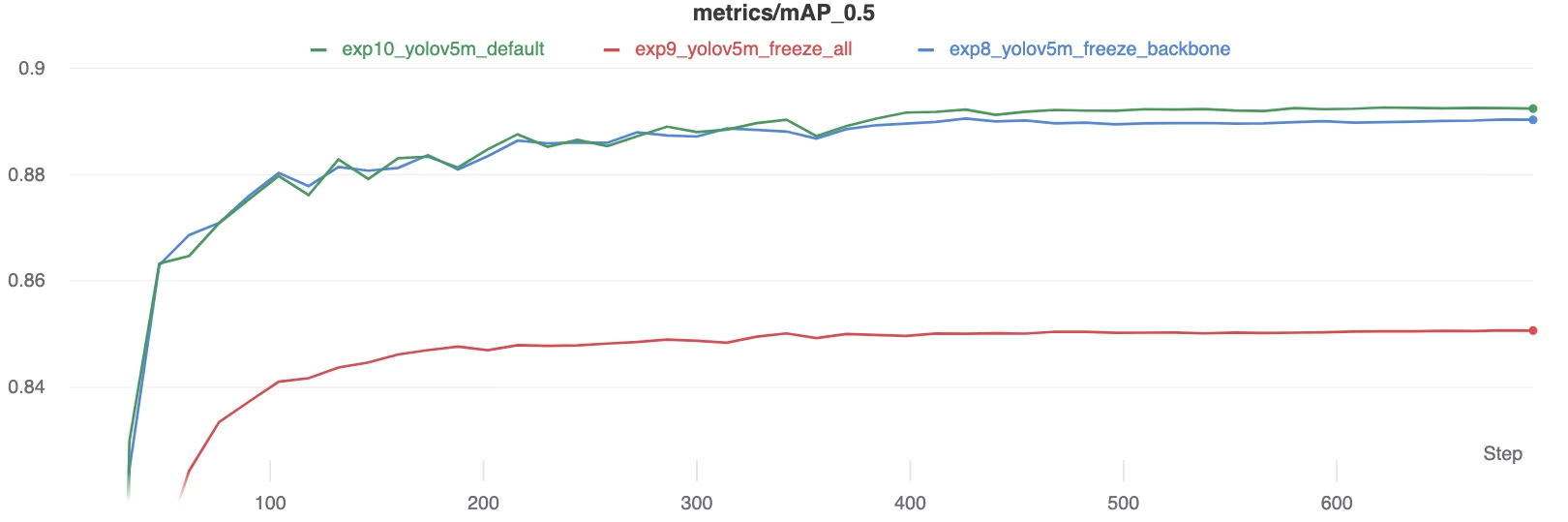 Сравнение mAP50 в ходе обучения
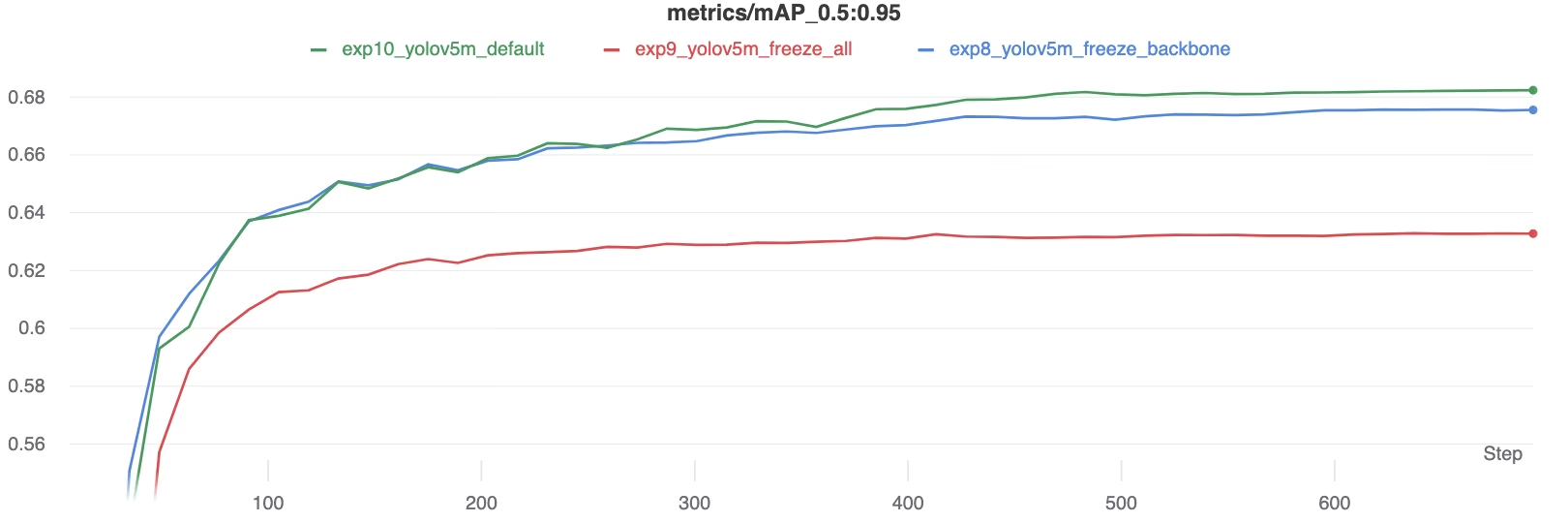 Сравнение mAP50-95 в ходе обучения
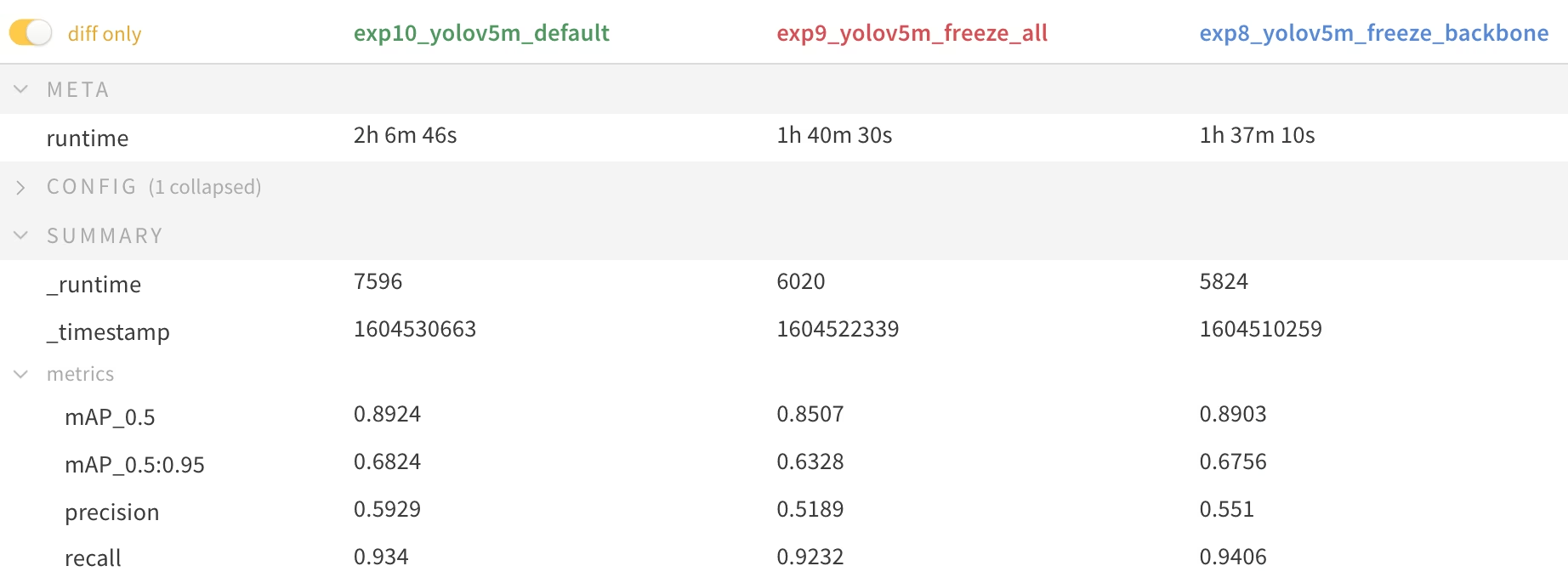 *Сводная таблица метрик производительности*
Использование ресурсов#
Заморозка большего числа слоёв существенно сокращает потребление памяти GPU и общую нагрузку на него. Поэтому перенос обучения с замороженными слоями — привлекательный вариант при ограниченных аппаратных ресурсах: он позволяет обучать более крупные модели или использовать больший размер изображений, чем это было бы возможно в противном случае.
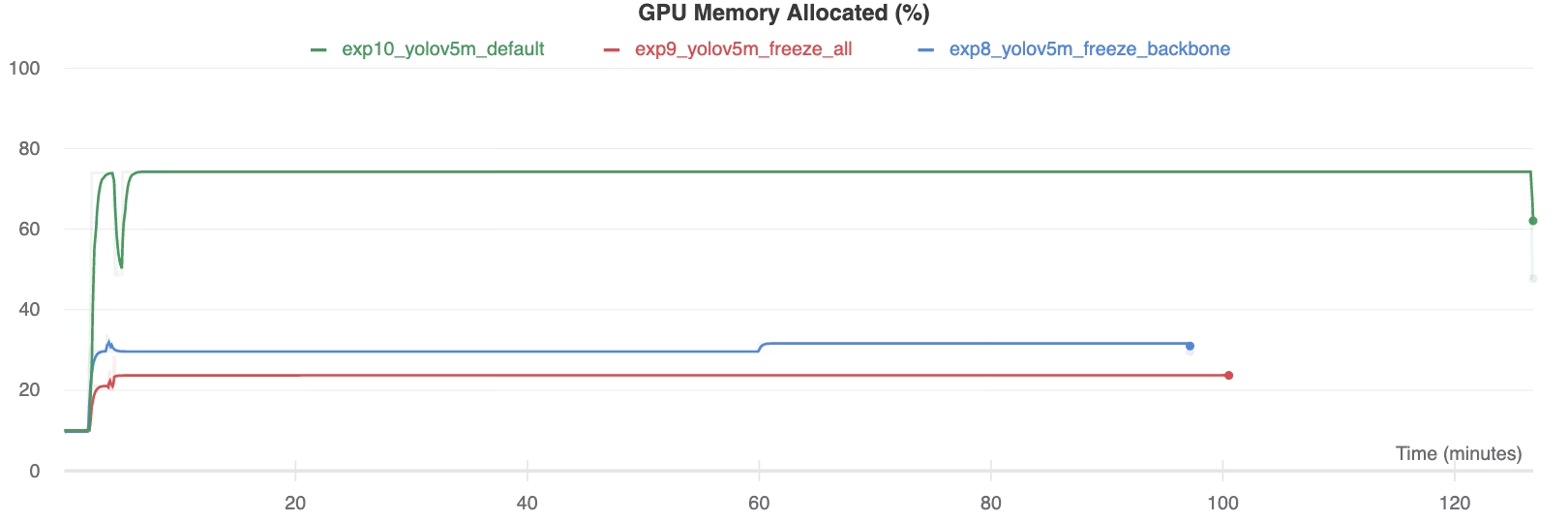 Выделенная память GPU (%)
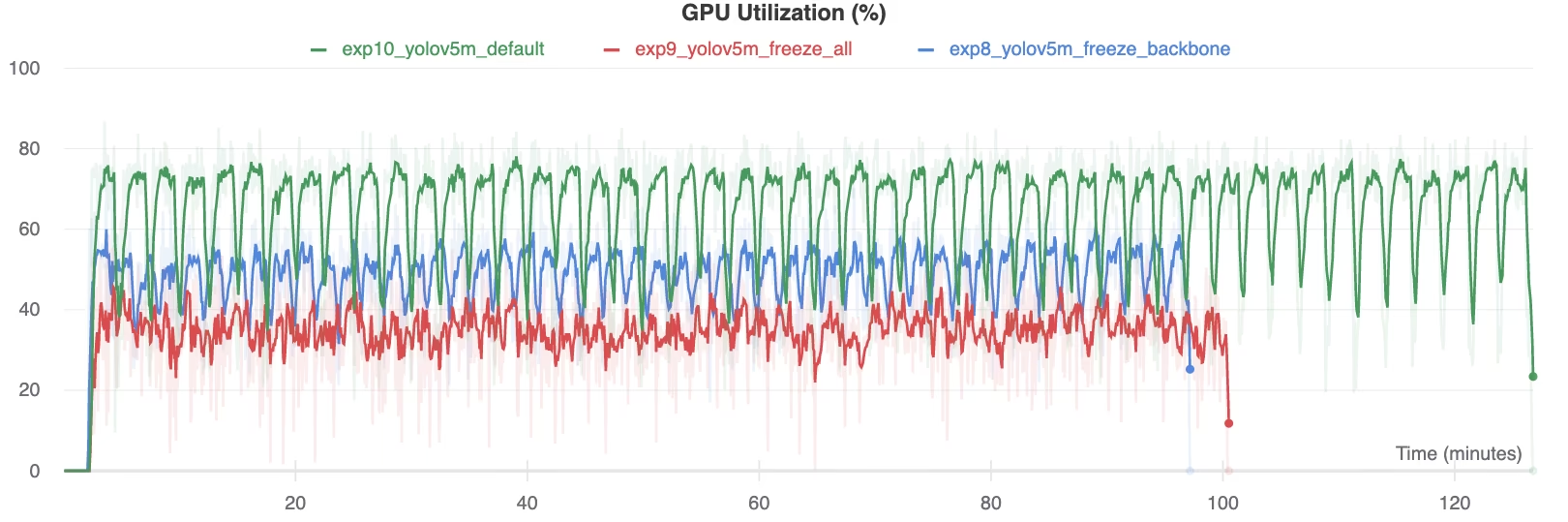 Использование GPU (%)
Когда стоит замораживать слои#
Заморозка слоёв при переносе обучения особенно полезна в нескольких ситуациях:
- Ограниченные вычислительные ресурсы: если у тебя ограничена память GPU или вычислительная мощность.
- Небольшие наборы данных: если целевой набор данных значительно меньше исходного набора для предварительного обучения, заморозка помогает предотвратить переобучение.
- Быстрое прототипирование: если тебе нужно быстро адаптировать существующую модель к новой задаче или предметной области для первоначальной оценки.
- Похожие области признаков: если низкоуровневые признаки в новом наборе данных очень похожи на признаки набора данных, на котором предварительно обучалась модель.
Чтобы ещё больше повысить качество, рассмотри эволюцию гиперпараметров.
Поддерживаемые среды#
Ultralytics предлагает различные готовые окружения с предварительно установленными основными зависимостями, такими как CUDA, cuDNN, Python и PyTorch.
- Бесплатные ноутбуки с GPU:



- Google Cloud: краткое руководство по GCP
- Amazon: краткое руководство по AWS
- Azure: краткое руководство по AzureML
- Docker: краткое руководство по Docker

Статус проекта#

Этот значок подтверждает, что все тесты GitHub Actions для YOLOv5 в рамках непрерывной интеграции (CI) успешно пройдены. Эти тесты CI тщательно проверяют функциональность и производительность YOLOv5 в ключевых операциях: обучении, валидации, инференсе, экспорте и тестировании производительности. Они обеспечивают стабильную и надёжную работу в macOS, Windows и Ubuntu, автоматически запускаясь каждые 24 часа и при каждом новом коммите кода.
Часто задаваемые вопросы#
Он замораживает первые
Nмодулейmodel.model, поэтому их веса остаются неизменными и градиенты для них не вычисляются.--freeze 10замораживает базовую сеть, а--freeze 24замораживает всё, кроме финального модуляDetect.В приведённом выше эксперименте с VOC обучение всех слоёв обеспечило наилучшую mAP, заморозка базовой сети немного снизила точность, а заморозка всех слоёв, кроме головы обнаружения, привела к наибольшему снижению. Зато обучение с замороженными слоями проходит быстрее и требует гораздо меньше памяти GPU.
Когда изображения имеют общие низкоуровневые признаки с данными для предварительного обучения, набор данных небольшой или тебе нужен быстрый базовый результат на ограниченном оборудовании. Если набор данных увеличится или понадобится выжать из mAP последние несколько пунктов, обучай все слои.
Да. Запусти новое обучение с весами замороженной модели из
best.pt, не указывая--freeze, чтобы дообучить всю сеть, обычно с меньшей скоростью обучения.


Комментарии
Задай вопрос, поделись результатами или помоги кому-нибудь.