Ultralytics Platform



Ultralytics Platform, veri hazırlığından model dağıtımına kadar tüm ML iş akışını kolaylaştıran kapsamlı, uçtan uca bir bilgisayar görüşü platformudur. Altyapı karmaşıklığı olmadan üretime hazır bilgisayar görüşü çözümlerine ihtiyaç duyan ekipler ve bireyler için geliştirilmiştir.
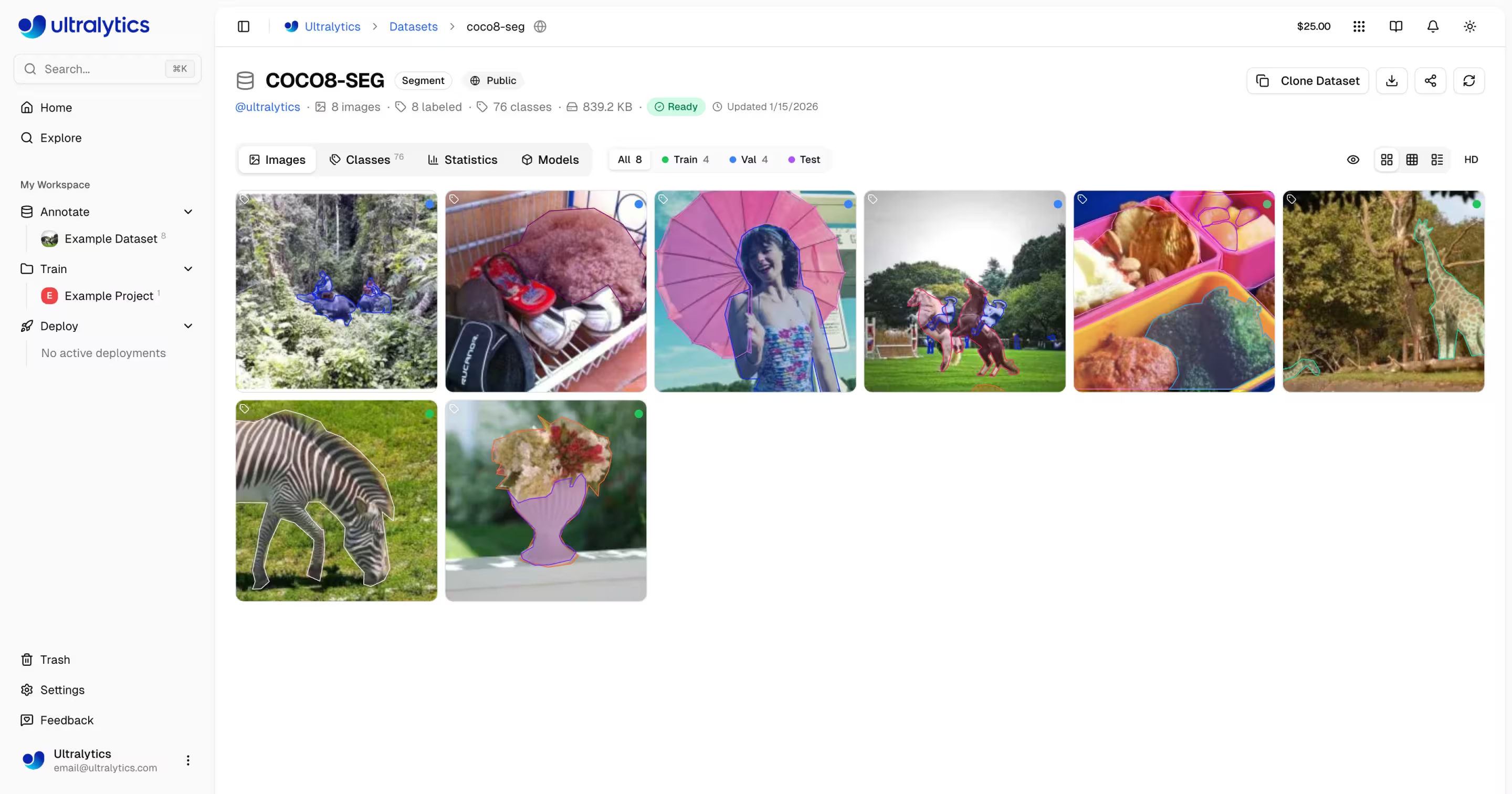
Ultralytics Platform Nedir?
Ultralytics Platform, parçalı ML araçlarını birleşik bir çözümle değiştirmek üzere tasarlanmıştır. Aşağıdaki yetenekleri bir araya getirir:
- Roboflow - Veri yönetimi ve açıklama
- Weights & Biases - Deney track'i
- SageMaker - Bulut eğitimi
- HuggingFace - Model dağıtımı
- Arize - İzleme
Yerel YOLO26 ve YOLO11 modelleri desteğiyle hepsi bir arada platform.
İş Akışı: Yükle → Etiketle → Eğit → Dışa Aktar → Dağıt
Platform, uçtan uca bir iş akışı sağlar:
graph LR
    subgraph Data["📁 Data"]
        A[Upload] --> B[Annotate]
        B --> C[Analyze]
    end
    subgraph Train["🚀 Train"]
        D[Configure] --> E[Train on GPU]
        E --> F[View Metrics]
    end
    subgraph Deploy["🌐 Deploy"]
        G[Export] --> H[Deploy Endpoint]
        H --> I[Monitor]
    end
Data --> Train --> Deploy| Aşama | Özellikler |
|---|---|
| Yükle | Otomatik işlemeli görüntüler (50MB), videolar (1GB), ZIP arşivleri (10GB) |
| Açıklama Ekle | Tüm 5 görev türü için manuel araçlar, SAM akıllı açıklama, YOLO otomatik etiketleme (bkz. desteklenen görevler) |
| Eğit | Bulut GPU'ları (RTX 2000 Ada'dan B200'e kadar 22 seçenek), gerçek zamanlı metrikler, proje organizasyonu |
| Dışa aktar | 17 dağıtım formatı (ONNX, TensorRT, CoreML, TFLite, vb.; desteklenen formatlara bakın) |
| Dağıt | Özel uç noktalar, otomatik ölçeklendirme ve izleme özellikli 43 küresel bölge |
Yapabilecekleriniz:
- Eğitim veri kümeleri oluşturmak için görüntüleri, videoları ve ZIP arşivlerini yükleyin
- Görselleştirin: Tüm 5 YOLO görev türü için etkileşimli katmanlarla ek açıklamaları (desteklenen görevlere bakın)
- Eğitin: Modelleri 22 bulut GPU türünde gerçek zamanlı metriklerle eğitin
- Dışa Aktarın: 17 dağıtım formatına (ONNX, TensorRT, CoreML, TFLite, vb.)
- Tek tıklamayla özel uç noktalarla 43 küresel bölgeye dağıtım yapın
- Eğitim ilerlemesini, dağıtım sağlığını ve kullanım metriklerini izleyin
- Projeleri ve veri kümelerini topluluk için herkese açık hale getirerek iş birliği yapın
Çok Bölgeli Altyapı
Verileriniz bölgenizde kalır. Ultralytics Platform, altyapısını üç küresel bölgede işletmektedir:
| Bölge | Etiket | Konum | En Uygun Olduğu Alan |
|---|---|---|---|
| ABD | Amerika Kıtası | Iowa, ABD | Amerika kullanıcıları, Amerika için en hızlı |
| AB | Avrupa, Orta Doğu ve Afrika | Belçika, Avrupa | Avrupalı kullanıcılar, GDPR uyumluluğu |
| AP | Asya Pasifik | Hong Kong, Asya-Pasifik | Asya-Pasifik kullanıcıları, en düşük APAC gecikmesi |
Katılım sırasında bölgenizi seçersiniz ve tüm verileriniz, modelleriniz ve dağıtımlarınız o bölgede kalır.
Bölge Kalıcıdır
Hesap oluşturulduktan sonra veri bölgeniz değiştirilemez. Kullanıcı alımı sırasında platform, her bölgeye olan gecikmeyi ölçer ve en yakın olanı önerir. Dikkatli seçin.
Temel Özellikler
Veri Hazırlığı
- Veri Kümesi Yönetimi: Otomatik işlemeyle görüntüleri, videoları veya ZIP arşivlerini yükleyin
- Ek Açıklama Düzenleyici: Tüm 5 YOLO görev türü için manuel ek açıklama (detect, segment, pose, OBB, classify; desteklenen görevlere bakın)
- İskelet Şablonları: Tek tıklamayla poz ek açıklaması için yerleşik (İnsan, El, Yüz, Köpek, Kutu) ve özel iskelet şablonları
- SAM Akıllı Açıklama: 5 modelle tıklama tabanlı akıllı açıklama — SAM 2.1 (Tiny, Small, Base, Large) ve en yüksek doğruluk için yeni SAM 3. Açıklama araç çubuğundan görüntü başına modelleri değiştirin.
- Otomatik Ek Açıklama: Yeni verileri önceden etiketlemek için eğitilmiş modelleri kullanın
- Veri Seti Sürümleme: Tekrarlanabilir eğitim için açıklamalarla numaralandırılmış NDJSON anlık görüntüleri oluşturun
- İstatistikler: Sınıf dağılımı, konum ısı haritaları ve boyut analizi
graph LR
    A[Upload ZIP/Images/Video] --> B[Auto-Process]
    B --> C[Browse & Filter]
    C --> D{Annotate}
    D --> E[Manual Tools]
    D --> F[SAM Smart]
    D --> G[YOLO Auto-Label]
    E --> H[Train-Ready Dataset]
    F --> H
    G --> H
Desteklenen Görev Türleri
Ek açıklama düzenleyici tüm 5 YOLO görev türünü destekler: detect (sınırlayıcı kutular), segment (çokgenler), pose (anahtar noktalar), OBB (yönlendirilmiş kutular) ve classify (görüntü seviyesi etiketleri). Her görev türü, özel çizim araçlarına ve klavye kısayollarına sahiptir.
Model Eğitimi
- Bulut Eğitimi: 22 bulut GPU türünde gerçek zamanlı metriklerle eğitim yapın
- Uzaktan Eğitim: Her yerde eğitim yapın ve metrikleri platforma aktarın (W&B tarzı)
- Proje Organizasyonu: İlgili modelleri gruplandırın, deneyleri karşılaştırın, etkinliği takip edin
- 17 Dışa Aktarma Formatı: ONNX, TensorRT, CoreML, TFLite ve daha fazlası (desteklenen formatlara bakın)
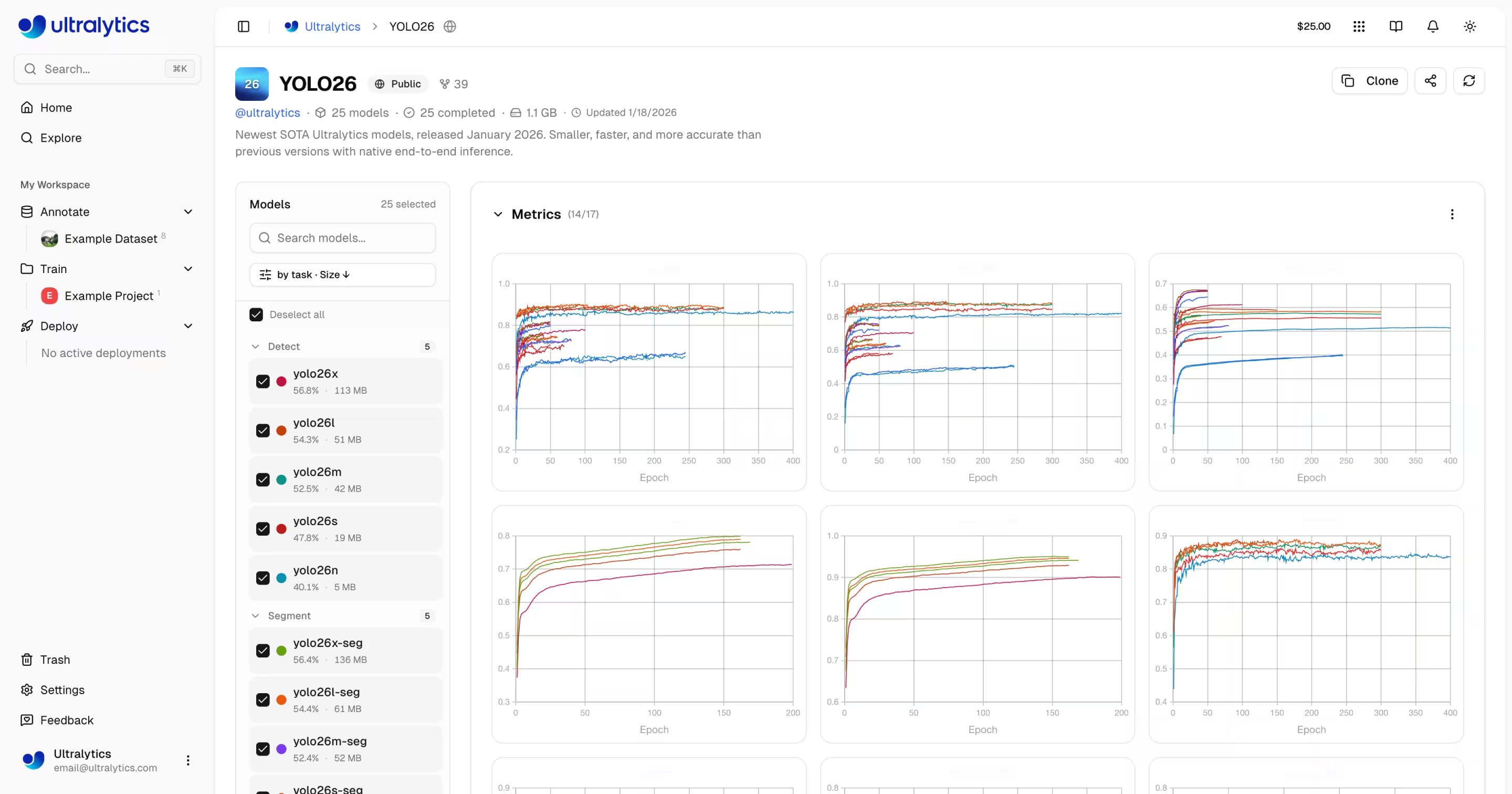
Modelleri web kullanıcı arayüzü (bulut eğitimi) aracılığıyla veya kendi makinenizden (uzaktan eğitim) eğitebilirsiniz:
- Projenize gidin
- Tıklayın
Train Model - Veri kümesi, model, GPU ve epoch seçin
- Gerçek zamanlı kayıp eğrilerini ve metrikleri izleyin
# Install ultralytics
pip install "ultralytics>=8.4.14"

# Set your API key
export ULTRALYTICS_API_KEY="your_api_key"

# Train and stream metrics to the platform
yolo train model=yolo26n.pt data=coco.yaml epochs=100 project=username/my-project name=exp1
import os

from ultralytics import YOLO

os.environ["ULTRALYTICS_API_KEY"] = "your_api_key"

model = YOLO("yolo26n.pt")
model.train(
    data="coco.yaml",
    epochs=100,
    project="username/my-project",
    name="exp1",
)
# Metrics stream to Platform automatically
Dağıtım
- Çıkarım Testi: Özel görüntülerle modelleri doğrudan tarayıcıda test edin
- Özel Uç Noktalar: Otomatik ölçeklendirme ile 43 küresel bölgeye dağıtım yapın
- İzleme: Gerçek zamanlı metrikler, istek günlükleri ve performans panoları
graph LR
    A[Trained Model] --> B{Action}
    B --> C[Browser Predict]
    B --> D[Export Format]
    B --> E[Deploy Endpoint]
    D --> F[ONNX / TensorRT / CoreML / TFLite / ...]
    E --> G[43 Global Regions]
    G --> H[API Endpoint URL]
    H --> I[Monitor & Scale]
Dağıtıldıktan sonra, uç noktanızı herhangi bir dilden çağırın:
import requests

url = "https://your-endpoint-url/predict"
headers = {"Authorization": "Bearer your_api_key"}

with open("image.jpg", "rb") as f:
    response = requests.post(url, headers=headers, files={"file": f})

print(response.json())
curl -X POST "https://your-endpoint-url/predict" \
  -H "Authorization: Bearer your_api_key" \
  -F "file=@image.jpg"
const form = new FormData();
form.append("file", fileInput.files[0]);

const response = await fetch("https://your-endpoint-url/predict", {
    method: "POST",
    headers: { Authorization: "Bearer your_api_key" },
    body: form,
});

const results = await response.json();
console.log(results);
Hesap Yönetimi
- Ekipler ve Kuruluşlar: Ekip üyeleriyle işbirliği yapın, rolleri ve davetleri yönetin
- API Anahtarları: Uzaktan eğitim ve API erişimi için güvenli anahtar yönetimi
- Krediler ve Faturalandırma: Şeffaf fiyatlandırma ile kullandıkça öde eğitimi
- Etkinlik Akışı: Tüm hesap etkinliklerini ve eylemlerini track edin
- Çöp Kutusu ve Geri Yükleme: Öğe kurtarma özellikli 30 günlük geçici silme
- GDPR Uyumluluğu: Veri dışa aktarımı ve hesap silme
Plan Katmanları
| Özellik | Ücretsiz | Pro (aylık 29$) | Kurumsal |
|---|---|---|---|
| Kayıt Kredisi | $5 / $25* | - | Özel |
| Aylık Kredi | - | $30/koltuk/ay | Özel |
| Modeller | 100 | 500 | Sınırsız |
| Eşzamanlı Eğitimler | 3 | 10 | Sınırsız |
| Dağıtımlar | 3 | 10 (hazır başlangıç) | Sınırsız |
| Depolama | 100 GB | 500 GB | Sınırsız |
| Takımlar | - | En fazla 5 üye | 50'ye kadar |
| Destek | Topluluk | Öncelik | Özel |
*Kaydolurken 5 dolar veya doğrulanmış bir şirket/iş e-postası ile 25 dolar.
Hızlı Bağlantılar
Bu kaynaklarla başlayın:
- Hızlı Başlangıç: İlk projenizi oluşturun ve dakikalar içinde bir model eğitin
- Veri Kümeleri: Eğitim verilerinizi yükleyin ve yönetin
- Etiketleme: Verilerinizi manuel ve yapay zeka destekli araçlarla etiketleyin
- Projeler: Modellerinizi ve deneylerinizi düzenleyin
- Bulut Eğitimi: Bulut GPU'larında eğitim yapın
- Çıkarım: Modellerinizi test edin
- Uç Noktalar: Modelleri üretime dağıtın
- İzleme: Dağıtım performansını izleyin
- API Anahtarları: API erişimini yönetin
- Faturalandırma: Krediler ve ödeme
- Etkinlik: Hesap etkinliklerini track edin
- Çöp Kutusu: Silinen öğeleri kurtarın
- REST API: API referansı
SSS
Ultralytics Platform'a nasıl başlarım?
Ultralytics Platformu ile başlamak için:
- Kaydolun: platform.ultralytics.com adresinden bir hesap oluşturun
- Bölge Seçin: Kayıt sırasında veri bölgenizi (ABD, AB veya AP) seçin
- Veri Kümesi Yükleyin: Verilerinizi yüklemek için Veri Kümeleri bölümüne gidin
- Model Eğitin: Bir proje oluşturun ve bulut GPU'larında eğitime başlayın
- Dağıtın: Modelinizi test edin ve özel bir uç noktaya dağıtın
Ayrıntılı bir kılavuz için Hızlı Başlangıç sayfasına bakın.
Ultralytics Platform'un faydaları nelerdir?
Ultralytics Platformu şunları sunar:
- Birleşik İş Akışı: Veri, eğitim ve dağıtım tek bir yerde
- Çoklu Bölge: ABD, AB veya AP bölgelerinde veri yerleşimi
- Kodsuz Eğitim: Kod yazmadan gelişmiş YOLO modelleri eğitin
- Gerçek Zamanlı Metrikler: Eğitim ilerlemesini yayınlayın ve dağıtımları izleyin
- 43 Dağıtım Bölgesi: Modelleri dünya çapındaki kullanıcılarınıza yakın yerlerde dağıtın
- 5 Görev Türü: detection, segmentation, pose, OBB ve classification için destek (görev belgelerine bakın)
- Yapay Zeka Destekli Etiketleme: Veri hazırlığını hızlandırmak için SAM ve otomatik etiketleme
Bulut eğitimi için hangi GPU seçenekleri mevcuttur?
Ultralytics Platformu, bulut eğitimi için birden fazla GPU türünü destekler:
| GPU | VRAM | Saatlik Maliyet | En Uygun Olduğu Alan |
|---|---|---|---|
| RTX 2000 Ada | 16 GB | $0.24 | Küçük veri setleri, test etme |
| RTX A4500 | 20 GB | $0.24 | Küçük-orta veri kümeleri |
| RTX A5000 | 24 GB | $0.26 | Orta boyutlu veri setleri |
| RTX 4000 Ada | 20 GB | $0.38 | Orta boyutlu veri setleri |
| L4 | 24 GB | $0.39 | Çıkarım için optimize edilmiş |
| A40 | 48 GB | $0.40 | Daha büyük yığın boyutları |
| RTX 3090 | 24 GB | $0.46 | Genel eğitim |
| RTX A6000 | 48 GB | $0.49 | Büyük modeller |
| RTX 4090 | 24 GB | $0.59 | Harika fiyat/performans |
| RTX 6000 Ada | 48 GB | $0.77 | Büyük yığın eğitimi |
| L40S | 48 GB | $0.86 | Büyük yığın eğitimi |
| RTX 5090 | 32 GB | $0.89 | En yeni nesil |
| L40 | 48 GB | $0.99 | Büyük modeller |
| A100 PCIe | 80 GB | $1.39 | Üretim eğitimi |
| A100 SXM | 80 GB | $1.49 | Üretim eğitimi |
| RTX PRO 6000 | 96 GB | $1.89 | Önerilen varsayılan |
| H100 PCIe | 80 GB | $2.39 | En hızlı eğitim |
| H100 SXM | 80 GB | $2.69 | En hızlı eğitim |
| H100 NVL | 94 GB | $3.07 | Yüksek bellekli eğitim |
| H200 NVL | 143 GB | $3.39 | Maksimum bellek |
| H200 SXM | 141 GB | $3.59 | Maksimum performans |
| B200 | 180 GB | $4.99 | En büyük modeller |
Eksiksiz fiyatlandırma ve GPU seçenekleri için Bulut Eğitimi bölümüne bakın.
Uzaktan eğitim nasıl çalışır?
Modelleri kendi donanımınızda eğitebilir ve Weights & Biases'a benzer şekilde gerçek zamanlı metrikleri platforma aktarabilirsiniz.
Paket Sürüm Gereksinimi
Platform entegrasyonu ultralytics>=8.4.14 sürümünü gerektirir. Daha düşük sürümler Platform ile ÇALIŞMAZ.
pip install "ultralytics>=8.4.14"
# Set your API key
export ULTRALYTICS_API_KEY="your_api_key"

# Train with project/name to stream metrics
yolo train model=yolo26n.pt data=coco.yaml epochs=100 project=username/my-project name=exp1
import os

from ultralytics import YOLO

os.environ["ULTRALYTICS_API_KEY"] = "your_api_key"

model = YOLO("yolo26n.pt")
model.train(
    data="coco.yaml",
    epochs=100,
    project="username/my-project",
    name="exp1",
)
# Train using a Platform dataset directly
export ULTRALYTICS_API_KEY="your_api_key"

yolo train model=yolo26n.pt data=ul://username/datasets/my-dataset epochs=100 project=username/my-project name=exp1
Uzaktan eğitim hakkında daha fazla bilgi için Bulut Eğitimi bölümüne bakın.
Hangi açıklama araçları mevcuttur?
Platform, şunları destekleyen tam özellikli bir etiketleme düzenleyici içerir:
- Manuel Araçlar: Sınırlayıcı kutular, poligonlar, iskelet şablonlu anahtar noktalar, yönlendirilmiş kutular, sınıflandırma
- İskelet Şablonları: Yerleşik (İnsan, El, Yüz, Köpek, Kutu) veya özel şablonları kullanarak tüm anahtar noktaları tek seferde yerleştirin
- SAM Akıllı Açıklama: Hassas maskeler oluşturmak için tıklayın — araç çubuğu model seçicisi aracılığıyla SAM 2.1 Tiny/Small/Base/Large veya yeni SAM 3 arasından seçim yapın.
- Klavye Kısayolları: Kısayol tuşlarıyla verimli iş akışları
| Kısayol | Eylem |
|---|---|
V | Mod seç |
S | SAM akıllı açıklama modu |
A | Otomatik açıklama modu |
1 - 9 | Sayıya göre sınıf seç |
Delete | Seçili açıklamayı sil |
Ctrl+Z | Geri al |
Ctrl+Y | Yinele |
Escape | Mevcut eylemi iptal et |
Tam kılavuz için Etiketleme bölümüne bakın.
Hangi dışa aktarma formatları destekleniyor?
Platform 17 dağıtım formatını destekler:
| Format | Dosya Uzantısı | Kullanım Durumu |
|---|---|---|
| ONNX | .onnx | Çapraz platform dağıtımı |
| TorchScript | .torchscript | C++ dağıtımı |
| OpenVINO | _openvino_model | Intel donanımı |
| TensorRT | .engine | NVIDIA GPU çıkarımı |
| CoreML | .mlpackage | Apple cihazları |
| TFLite | .tflite | Mobil/uç cihazlar |
| TF SavedModel | _saved_model | TensorFlow ekosistemi |
| TF GraphDef | .pb | TensorFlow eski sürümü |
| PaddlePaddle | _paddle_model | Baidu ekosistemi |
| NCNN | _ncnn_model | Mobil (Android/ARM) |
| Edge TPU | _edgetpu.tflite | Google Coral cihazları |
| TF.js | _web_model | Tarayıcı dağıtımı |
| MNN | .mnn | Alibaba mobil |
| RKNN | _rknn_model | Rockchip NPU |
| IMX500 | _imx_model | Sony IMX500 sensörü |
| Axelera | _axelera_model | Axelera AI hızlandırıcıları |
| ExecuTorch | _executorch_model | PyTorch mobil |
Formata özel seçenekler için Modelleri Dışa Aktarma, Dışa Aktarma modu kılavuzu ve Entegrasyonlar dizini'ne bakın.
Sorun Giderme
Veri Kümesi Sorunları
| Sorun | Çözüm |
|---|---|
| Veri kümesi işlenmiyor | Dosya formatının desteklendiğini kontrol edin (JPEG, PNG, WebP vb.). Maksimum dosya boyutu: görseller 50MB, videolar 1GB, ZIP 10GB |
| Eksik etiketlemeler | Etiketlerin şurada olduğundan emin olun YOLO formatı ile .txt görüntü dosya adlarıyla eşleşen dosyalar |
| "Eğitim ayrımı gerekli" | Ekle train/ klasörünü veri kümesi yapınıza ekleyin veya şurada bölmeler oluşturun veri kümesi ayarları |
| Sınıf adları tanımlanmamış | Bir ekle data.yaml ile dosya names: listesi (bakınız YOLO formatı), veya veri kümesi ayarlarında sınıfları tanımlayın |
Eğitim Sorunları
| Sorun | Çözüm |
|---|---|
| Eğitim başlamıyor | Kredi bakiyesini Ayarlar > Faturalandırma bölümünde kontrol edin. Pozitif bakiye gereklidir. |
| Bellek yetersizliği hatası | Yığın boyutunu azaltın, daha küçük bir model (n/s) kullanın veya daha fazla VRAM'e sahip bir GPU seçin |
| Kötü metrikler | Veri kümesi kalitesini kontrol edin, epoch sayısını artırın, veri artırma deneyin, sınıf dengesini doğrulayın |
| Eğitim yavaş | Daha hızlı bir GPU seçin, görüntü boyutunu azaltın, veri kümesinin darboğaz oluşturmadığından emin olun |
Dağıtım Sorunları
| Sorun | Çözüm |
|---|---|
| Uç nokta yanıt vermiyor | Uç nokta durumunu kontrol edin (Hazır vs Durduruldu). Soğuk başlatma 5-15 saniye sürebilir. |
| 401 Yetkisiz | API anahtarının doğru olduğunu ve gerekli kapsam izinlerine sahip olduğunu doğrulayın |
| Yavaş çıkarım | Model boyutunu kontrol edin, TensorRT dışa aktarımını değerlendirin, daha yakın bir bölge seçin |
| Dışa aktarma başarısız oldu | Bazı formatlar belirli model mimarileri gerektirir. En geniş uyumluluk için ONNX'i deneyin |
Sıkça Sorulan Sorular
Kaydolduktan sonra kullanıcı adımı değiştirebilir miyim?
Hayır, kullanıcı adları kalıcıdır ve değiştirilemez. Kayıt sırasında dikkatli seçin.
Veri bölgemi değiştirebilir miyim?
Hayır, veri bölgesi kayıt sırasında seçilir ve değiştirilemez. Bölge değiştirmek için yeni bir hesap oluşturun ve verilerinizi yeniden yükleyin.
Daha fazla kredi nasıl alabilirim?
Ayarlar > Faturalandırma > Kredi Ekle bölümüne gidin. 5 ila 1000 dolar arasında kredi satın alın. Satın alınan kredilerin süresi asla dolmaz.
Eğitim başarısız olursa ne olur?
Yalnızca tamamlanan hesaplama süresi için ücretlendirilirsiniz. Kontrol noktaları kaydedilir ve eğitime devam edebilirsiniz.
Eğitilmiş modelimi indirebilir miyim?
Evet, herhangi bir model sayfasındaki indirme simgesine tıklayarak .pt dosyasını veya dışa aktarılan formatları indirebilirsiniz.
Çalışmamı herkese açık olarak nasıl paylaşabilirim?
Projenizin veya veri kümenizin ayarlarını düzenleyin ve görünürlüğü "Herkese Açık" olarak değiştirin. Herkese açık içerik Keşfet sayfasında görünür.
Dosya boyutu limitleri nelerdir?
Görseller: 50MB, Videolar: 1GB, ZIP arşivleri: 10GB. Daha büyük dosyalar için birden fazla yüklemeye bölün.
Silinen öğeler Çöp Kutusu'nda ne kadar süreyle tutulur?
30 gün. Bu sürenin sonunda öğeler kalıcı olarak silinir ve kurtarılamaz.
Platform modellerini ticari olarak kullanabilir miyim?
Ücretsiz ve Pro planlar AGPL lisansı kullanır. AGPL gereksinimleri olmadan ticari kullanım için, Kurumsal lisanslama için sales@ultralytics.com ile iletişime geçin.


