Ultralytics YOLO를 사용한 방향 지정 바운딩 박스 감지#
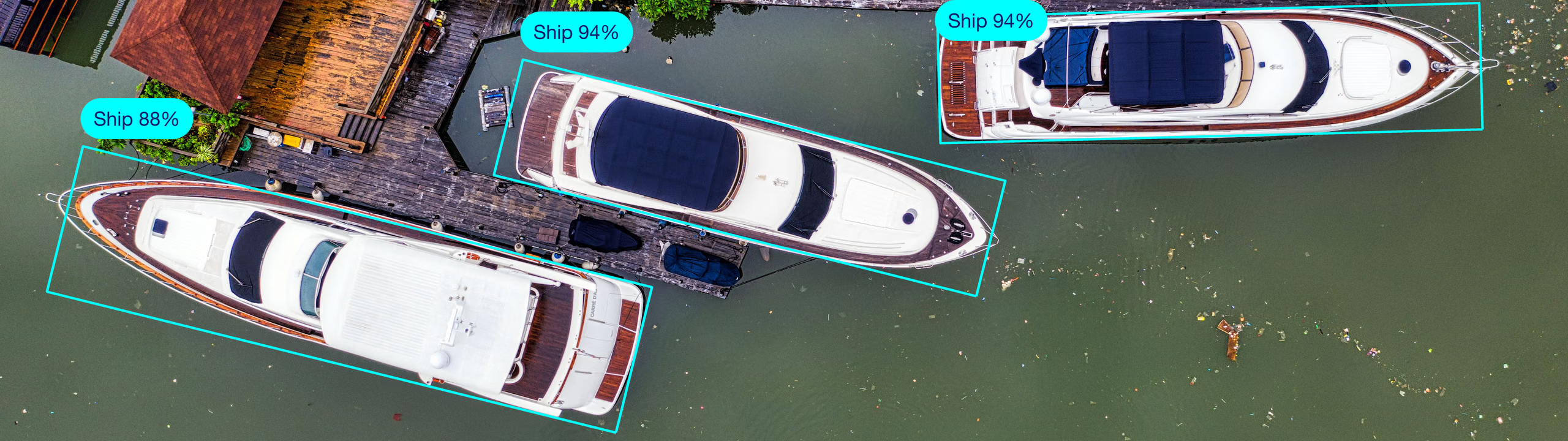
방향 지정 객체 감지는 표준 객체 감지에 각도 정보를 추가하여 이미지에서 객체의 위치를 더욱 정확하게 찾습니다.
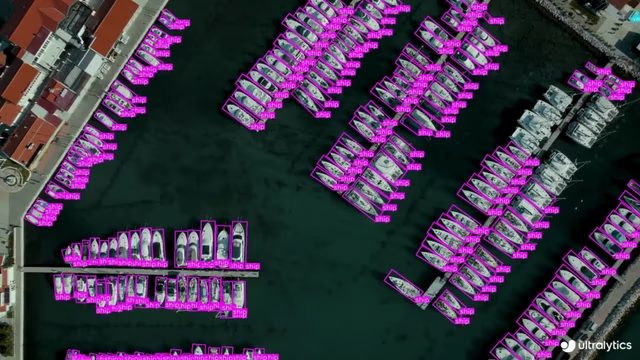
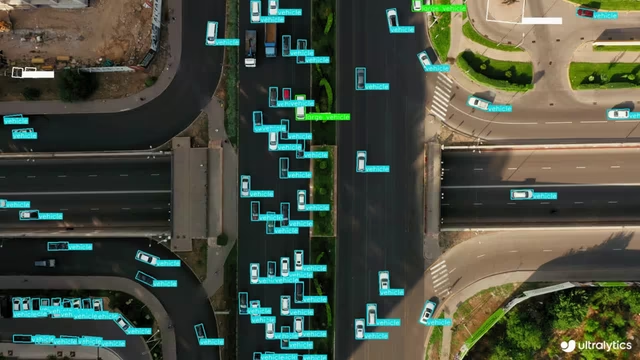
방향 지정 객체 감지기의 출력은 이미지 속 객체를 정밀하게 둘러싸는 회전된 바운딩 박스 집합이며, 각 박스의 클래스 라벨과 신뢰도 점수도 포함합니다. 방향 지정 바운딩 박스는 항공 이미지처럼 객체가 다양한 각도로 나타나는 경우 특히 유용합니다. 기존의 축 정렬 바운딩 박스는 불필요한 배경을 포함할 수 있습니다. 일반적인 활용 사례로는 위성과 드론을 이용한 선박 및 차량 감지, 도시 계획을 위한 건물 및 기반 시설 분석, 작물 모니터링, 태양광 패널 및 풍력 터빈 검사 등이 있습니다.
시청: Ultralytics YOLO26 방향 경계 상자(OBB)로 객체를 감지하고 추적하는 방법 | 선박 추적 🚢
YOLO26 OBB 모델은 -obb 접미사(예: yolo26n-obb.pt)를 사용하며, DOTAv1로 사전 학습됩니다.
| OBB를 사용한 선박 감지 | OBB를 사용한 차량 감지 |
|---|---|
 |  |
모델#
DOTAv1 데이터셋으로 사전 학습된 YOLO26 OBB 모델은 아래와 같습니다.
모델은 처음 사용할 때 최신 Ultralytics 릴리스에서 자동으로 다운로드됩니다.
| 모델 | 크기 (픽셀) | mAPtest 50-95(e2e) | mAPtest 50(e2e) | 속도 CPU ONNX (ms) | 속도 T4 TensorRT10 (ms) | 파라미터 (M) | FLOPs (B) |
|---|---|---|---|---|---|---|---|
| YOLO26n-obb | 1024 | 52.4 | 78.9 | 97.7 ± 0.9 | 2.8 ± 0.0 | 2.4 | 14.8 |
| YOLO26s-obb | 1024 | 54.8 | 80.9 | 218.0 ± 1.4 | 4.9 ± 0.1 | 9.8 | 56.7 |
| YOLO26m-obb | 1024 | 55.3 | 81.0 | 579.2 ± 3.8 | 10.2 ± 0.3 | 21.2 | 184.9 |
| YOLO26l-obb | 1024 | 56.2 | 81.6 | 735.6 ± 3.1 | 13.0 ± 0.2 | 25.6 | 232.4 |
| YOLO26x-obb | 1024 | 56.7 | 81.7 | 1485.7 ± 11.5 | 30.5 ± 0.9 | 57.6 | 520.1 |
- mAPtest 값은 DOTAv1 데이터셋에서 단일 모델, 멀티스케일로 측정한 값입니다.
yolo obb val data=DOTAv1.yaml device=0 split=test nms=False로 재현한 후 병합 결과를 DOTA 평가에 제출하세요. - 속도는 CPU에서 ONNX를 사용하고 NVIDIA T4 GPU에서 TensorRT10을 사용하여 DOTAv1 검증 이미지의 평균값을 측정했습니다.
yolo obb val data=DOTAv1.yaml batch=1 device=0|cpu nms=False로 재현할 수 있습니다. - Params 및 FLOPs 값은 Conv/BatchNorm 폴딩과 사용하지 않는 감지 브랜치 제거 후의 융합 모델 기준입니다. 사전 학습된 체크포인트에는 전체 학습 아키텍처가 유지되므로 값이 더 높을 수 있습니다.
예비 DOTAv1 결과는 미출시 YOLO27 미리 보기를 참조하세요.
학습#
이미지 크기 640으로 DOTA8 데이터셋에서 YOLO26n-obb를 100 에포크 동안 학습합니다. 사용 가능한 전체 인수 목록은 구성 페이지를 참조하세요.
OBB와 180° 회전한 OBB는 동일하므로 회전은 180°를 기준으로 정의되며 박스에는 방향이 없습니다. 학습 라벨은 긴 변을 기준으로 정규화됩니다. 박스 너비 w는 긴 변이며, 각도는 양의 x축에서 w 변의 방향까지 시계 방향으로 측정하고 라디안 단위로 [-π/4, 3π/4) ([-45°, 135°))에 저장됩니다. 예측은 정규화되지 않으므로 예측 박스에서 짧은 변이 w로 표시될 수 있습니다. 결과 출력을 참조하세요. [0°, 90°) 형식은 정규화된 DOTA 스타일 규칙이며 학습이나 추론에는 적용되지 않습니다.
from ultralytics import YOLO

# 모델 로드
model = YOLO("yolo26n-obb.yaml")  # YAML에서 새 모델을 생성합니다.
model = YOLO("yolo26n-obb.pt")  # 사전 학습된 모델을 불러옵니다(학습에 권장).
model = YOLO("yolo26n-obb.yaml").load("yolo26n-obb.pt")  # YAML에서 모델을 생성하고 가중치를 전이합니다.

# 모델 학습
results = model.train(data="dota8.yaml", epochs=100, imgsz=640)
시청: Ultralytics Platform을 사용하여 DOTA 데이터셋에서 Ultralytics YOLO-OBB(방향 경계 상자) 모델을 학습하는 방법
전체 train 모드 세부 정보는 학습 페이지를 참조하세요. Ultralytics Platform 클라우드 학습을 사용하여 OBB 모델을 학습할 수도 있습니다.
데이터셋 형식#
OBB 데이터셋 형식에 대한 자세한 내용은 데이터셋 가이드를 참조하세요. YOLO OBB 형식에서는 다음 구조에 따라 네 모서리의 좌표를 0과 1 사이로 정규화하여 바운딩 박스를 지정합니다. Ultralytics Platform 주석은 전용 방향 지정 바운딩 박스 그리기 도구와 OBB 라벨을 지원합니다.
class_index x1 y1 x2 y2 x3 y3 x4 y4내부적으로 YOLO는 xywhr 형식으로 손실과 출력을 처리합니다. 이 형식은 바운딩 박스의 중심점(xy), 너비, 높이 및 회전을 나타냅니다.
검증#
학습된 YOLO26n-obb 모델의 정확도를 DOTA8 데이터셋에서 검증합니다. 의도한 데이터셋 YAML을 검증에 사용하도록 data을 명시적으로 전달하세요.
from ultralytics import YOLO

# 모델 로드
model = YOLO("yolo26n-obb.pt")  # 공식 모델을 불러옵니다
model = YOLO("path/to/best.pt")  # 사용자 지정 모델 로드

# 모델을 검증합니다
metrics = model.val(data="dota8.yaml")  # DOTA8 데이터셋에서 검증
metrics.box.map  # map50-95(B)
metrics.box.map50  # map50(B)
metrics.box.map75  # map75(B)
metrics.box.maps  # 각 카테고리의 mAP50-95(B)가 포함된 목록
metrics.box.image_metrics # 정밀도, 재현율, F1, TP, FP, FN이 포함된 이미지별 지표 사전예측#
학습된 YOLO26n-obb 모델을 사용하여 이미지에서 예측을 수행합니다.
from ultralytics import YOLO

# 모델 로드
model = YOLO("yolo26n-obb.pt")  # 공식 모델을 불러옵니다
model = YOLO("path/to/best.pt")  # 사용자 지정 모델 로드

# 모델로 예측을 수행합니다
results = model("https://ultralytics.com/images/boats.jpg")  # 이미지에 대해 예측을 수행합니다

# 결과에 액세스합니다
for result in results:
    xywhr = result.obb.xywhr  # 중심 x, 중심 y, 너비, 높이, 각도(라디안)
    xyxyxyxy = result.obb.xyxyxyxy  # 4개 점으로 구성된 다각형 형식
    names = [result.names[cls.item()] for cls in result.obb.cls.int()]  # 각 박스의 클래스 이름
    confs = result.obb.conf  # 각 박스의 신뢰도 점수
Predict 페이지에서 predict 모드의 전체 세부 정보를 확인하세요.
save_crop=True을 전달하면 각 OBB의 박스 크기에 맞춰 회전 정렬된 크롭을 저장하며, ObjectCropper도 동일하게 작동합니다.
결과 출력#
방향 지정 바운딩 박스 감지는 이미지마다 Results 객체 하나를 반환합니다. 주요 예측 필드는 result.obb이며, 여기에는 감지된 각 객체의 회전 박스, 클래스 ID 및 신뢰도 점수가 포함됩니다.
| 속성 | 유형 | 형태 | 설명 |
|---|---|---|---|
result.obb | OBB | (N) | 회전된 박스입니다. |
result.obb.data | torch.float32 | (N,7/8) | 신뢰도/클래스 정보가 포함된 원시 회전 박스입니다. |
result.obb.xywhr | torch.float32 | (N,5) | xywhr 회전 박스입니다. |
result.obb.xyxyxyxy | torch.float32 | (N,4,2) | 네 개의 모서리 점입니다. |
result.obb.conf | torch.float32 | (N,) | 신뢰도 점수입니다. |
라벨은 긴 변 규칙에 따라 정규화되지만 예측은 정규화되지 않으므로 result.obb.xywhr은 회전이 짧은 변을 기준으로 측정된 상태에서 w이 h보다 작다고 표시할 수 있습니다. 두 형식은 동일한 직사각형을 나타내므로 어느 형식이든 result.obb.xyxyxyxy은 올바릅니다. 후속 코드에서 긴 변 형식이 필요한 경우 꼭짓점을 변환하되, 박스 매개변수를 다시 작성하면 꼭짓점 순서가 순환 이동할 수 있다는 점에 유의하세요.
from ultralytics.utils.ops import xyxyxyxy2xywhr

xywhr = xyxyxyxy2xywhr(result.obb.xyxyxyxy)  # w >= h, 회전 각도는 [-pi/4, 3pi/4)입니다
모든 작업에서 작업별 Results 필드를 확인하려면 작업별 예측 결과 섹션을 참조하세요.
내보내기#
YOLO26n-obb 모델을 ONNX, CoreML 등 다른 형식으로 내보냅니다.
from ultralytics import YOLO

# 모델 로드
model = YOLO("yolo26n-obb.pt")  # 공식 모델을 불러옵니다
model = YOLO("path/to/best.pt")  # 사용자 지정 모델 로드

# 모델을 내보냅니다
model.export(format="onnx")
사용 가능한 YOLO26-obb 내보내기 형식은 아래 표에 나와 있습니다. format 인수를 사용하면 모든 형식으로 내보낼 수 있습니다. 예를 들어 format='onnx' 또는 format='engine'를 사용할 수 있습니다. 내보낸 모델에서 직접 예측하거나 검증할 수도 있습니다. 예를 들어 yolo predict model=yolo26n-obb.onnx을 사용할 수 있습니다. 내보내기가 완료되면 해당 모델의 사용 예제가 표시됩니다.
| 형식 | format 인수 | 모델 | 메타데이터 | 인수 |
|---|---|---|---|---|
| PyTorch | - | yolo26n-obb.pt | ✅ | - |
| TorchScript | torchscript | yolo26n-obb.torchscript | ✅ | imgsz, quantize, dynamic, nms, batch, device |
| ONNX | onnx | yolo26n-obb.onnx | ✅ | imgsz, quantize, dynamic, simplify, opset, nms, batch, data, fraction, device |
| OpenVINO | openvino | yolo26n-obb_openvino_model/ | ✅ | imgsz, quantize, dynamic, nms, batch, data, fraction, device |
| TensorRT | engine | yolo26n-obb.engine | ✅ | imgsz, quantize, dynamic, simplify, opset, workspace, nms, batch, data, fraction, device |
| CoreML | coreml | yolo26n-obb.mlpackage | ✅ | imgsz, dynamic, quantize, nms, batch, device |
| Apple Core AI | coreai | yolo26n-obb.aimodel | ✅ | imgsz, batch, quantize |
| TF SavedModel | saved_model | yolo26n-obb_saved_model/ | ✅ | imgsz, quantize, opset, nms, batch, data, fraction, device |
| TF GraphDef | pb | yolo26n-obb.pb | ❌ | imgsz, opset, batch, device |
| TF Edge TPU | edgetpu | yolo26n-obb_edgetpu.tflite | ✅ | imgsz, quantize, opset, data, fraction, device |
| LiteRT | litert | yolo26n-obb.tflite | ✅ | imgsz, quantize, batch, data, fraction, device |
| PaddlePaddle | paddle | yolo26n-obb_paddle_model/ | ✅ | imgsz, batch, device |
| MNN | mnn | yolo26n-obb.mnn | ✅ | imgsz, batch, dynamic, quantize, simplify, opset, nms, device |
| NCNN | ncnn | yolo26n-obb_ncnn_model/ | ✅ | imgsz, quantize, batch, device |
| IMX500 | imx | yolo26n-obb_imx_model/ | ✅ | imgsz, quantize, data, fraction, nms, device |
| RKNN | rknn | yolo26n-obb_rknn_model/ | ✅ | imgsz, batch, name, quantize, simplify, opset, data, fraction, device |
| ExecuTorch | executorch | yolo26n-obb_executorch_model/ | ✅ | imgsz, batch, device |
| Axelera | axelera | yolo26n-obb_axelera_model/ | ✅ | imgsz, batch, quantize, data, fraction, device |
| DEEPX | deepx | yolo26n-obb_deepx_model/ | ✅ | imgsz, quantize, simplify, opset, data, optimize, device |
| Qualcomm QNN | qnn | yolo26n-obb_qnn.onnx | ✅ | imgsz, batch, name, quantize, simplify, opset, data, fraction, device |
| Hailo | hailo | yolo26n-obb_hailo_model/ | ✅ | imgsz, name, quantize, data, fraction, simplify, conf, iou, device |
| Huawei Ascend | ascend | yolo26n-obb_ascend_model/ | ✅ | imgsz, batch, name, quantize, opset, simplify, nms, device |
| AMD Xilinx | xilinx | yolo26n-obb_xilinx_model/ | ✅ | imgsz, name, quantize, data, fraction, opset, simplify, device |
nms=None은 외부 NMS를 위한 원시 출력을 기본값으로 사용합니다. 사용 가능한 NMS-free head를 선택하려면 nms=False을 설정합니다. 지원되지 않는 형식은 해당 형식의 기본 출력 경로로 대체됩니다. 위의 nms 항목은 nms=True을 사용해 NMS를 포함할 수 있는 형식을 나타냅니다.
자세한 export 내용은 내보내기 페이지를 참조하세요.
자주 묻는 질문#
회전 경계 상자(OBB)에는 이미지에서 객체 위치를 더 정확하게 찾기 위한 각도가 추가됩니다. 축에 정렬된 직사각형인 일반 경계 상자와 달리 OBB는 객체의 방향에 더 잘 맞도록 회전할 수 있습니다. 이는 항공 이미지나 위성 이미지처럼 객체의 위치를 정밀하게 파악해야 하는 애플리케이션에 특히 유용합니다(데이터셋 가이드).
사용자 지정 데이터셋으로 YOLO26n-obb 모델을 학습하려면 아래 예제를 따라 Python 또는 CLI를 사용하세요.
예제from ultralytics import YOLO # 사전 학습된 모델 불러오기 model = YOLO("yolo26n-obb.pt") # 모델 학습 results = model.train(data="path/to/custom_dataset.yaml", epochs=100, imgsz=640)자세한 학습 인수는 구성 섹션을 확인하세요.
아래와 같이 Python 또는 CLI 명령을 사용하여 YOLO26n-obb 모델을 검증할 수 있습니다.
예제from ultralytics import YOLO # 모델 로드 model = YOLO("yolo26n-obb.pt") # 모델을 검증합니다 metrics = model.val(data="dota8.yaml")전체 검증 세부 정보는 Val 섹션을 참조하세요.
Python 또는 CLI를 사용하면 YOLO26-OBB 모델을 ONNX 형식으로 간편하게 내보낼 수 있습니다.
예제from ultralytics import YOLO # 모델 로드 model = YOLO("yolo26n-obb.pt") # 모델을 내보냅니다 model.export(format="onnx")다른 내보내기 형식과 자세한 내용은 Export 페이지를 참조하세요.