Objekterkennung mit Ultralytics YOLO#
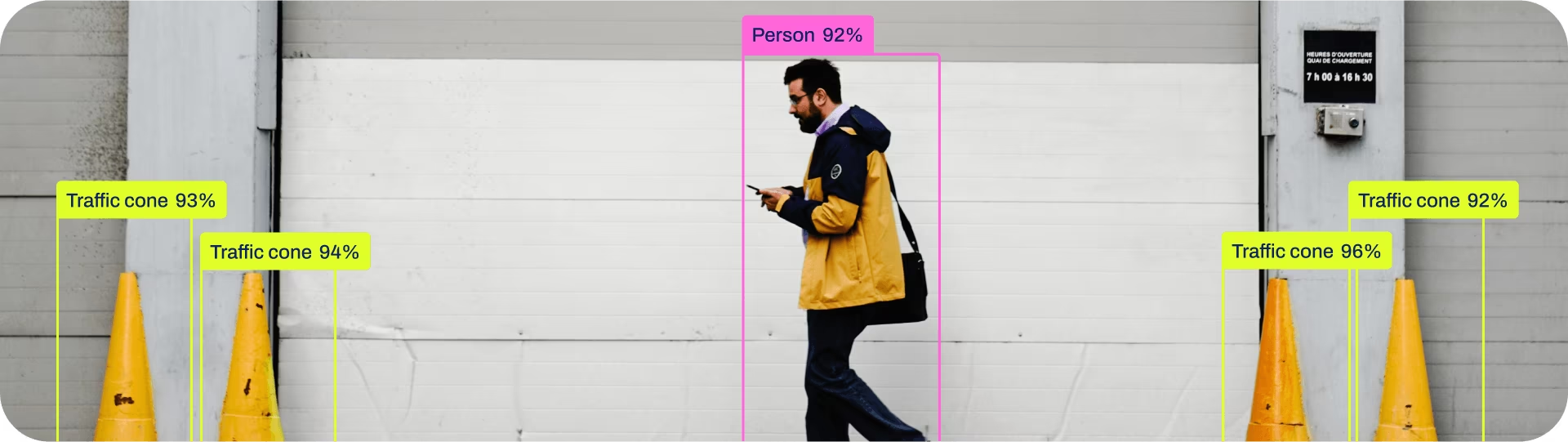
Objekterkennung ist eine Aufgabe, bei der Objekte in einem Bild oder Videostream erkannt und ihre Position sowie Klasse bestimmt werden.
Die Ausgabe eines Objektdetektors besteht aus Begrenzungsrahmen, die die Objekte im Bild umschließen, sowie Klassenbezeichnungen und Konfidenzwerten für jeden Rahmen. Die Objekterkennung eignet sich, wenn du Objekte von Interesse in einer Szene erkennen musst, ihre genaue Form aber nicht kennen musst.
Ansehen: Objekterkennung mit einem vortrainierten Ultralytics-YOLO-Modell.
YOLO26-Detect-Modelle sind die Standardmodelle von YOLO26, also yolo26n.pt, und wurden mit COCO vortrainiert.
Modelle#
Die mit dem Datensatz COCO vortrainierten YOLO26-Detect-Modelle sind unten aufgeführt.
Modelle werden bei der ersten Verwendung automatisch aus der neuesten Ultralytics-Version heruntergeladen.
| Modell | Größe (Pixel) | mAPval 50-95 | mAPval 50-95(e2e) | Geschwindigkeit CPU ONNX (ms) | Geschwindigkeit T4 TensorRT10 (ms) | Parameter (M) | FLOPs (B) |
|---|---|---|---|---|---|---|---|
| YOLO26n | 640 | 40.9 | 40.1 | 38.9 ± 0.7 | 1.7 ± 0.0 | 2.4 | 5.5 |
| YOLO26s | 640 | 48.6 | 47.8 | 87.2 ± 0.9 | 2.5 ± 0.0 | 9.5 | 20.9 |
| YOLO26m | 640 | 53.1 | 52.5 | 220.0 ± 1.4 | 4.7 ± 0.1 | 20.4 | 68.4 |
| YOLO26l | 640 | 55.0 | 54.4 | 286.2 ± 2.0 | 6.2 ± 0.2 | 24.8 | 86.8 |
| YOLO26x | 640 | 57.5 | 56.9 | 525.8 ± 4.0 | 11.8 ± 0.2 | 55.7 | 194.4 |
- mAPval-Werte gelten für ein einzelnes Modell mit einer Bildskalierung auf dem Datensatz COCO val2017.
Mityolo detect val data=coco.yaml device=0reproduzieren.nms=Falsehinzufügen, um die e2e-Spalte zu reproduzieren. - Geschwindigkeit: Durchschnitt über COCO-val-Bilder mit ONNX auf einer CPU und TensorRT10 auf einer NVIDIA-T4-GPU.
Mityolo detect val data=coco.yaml batch=1 device=0|cpu nms=Falsereproduzieren - Die Werte für Parameter und FLOPs gelten für zusammengeführte Modelle nach dem Zusammenführen von Conv/BatchNorm und dem Entfernen des ungenutzten Erkennungszweigs. Vortrainierte Prüfpunkte behalten die vollständige Trainingsarchitektur bei und können daher höhere Werte aufweisen.
Vorläufige Ergebnisse der COCO-Erkennung findest du in der unveröffentlichten YOLO27-Vorschau.
Trainieren#
Trainiere YOLO26n 100 Epochen lang mit dem Datensatz COCO8 und einer Bildgröße von 640. Eine vollständige Liste der verfügbaren Argumente findest du auf der Seite Konfiguration.
from ultralytics import YOLO

# Ein Modell laden
model = YOLO("yolo26n.yaml")  # ein neues Modell aus YAML erstellen
model = YOLO("yolo26n.pt")  # ein vortrainiertes Modell laden (für das Training empfohlen)
model = YOLO("yolo26n.yaml").load("yolo26n.pt")  # aus YAML erstellen und Gewichte übertragen

# Das Modell trainieren
results = model.train(data="coco8.yaml", epochs=100, imgsz=640)
Ausführliche Informationen zum Modus train findest du auf der Seite Trainieren. Erkennungsmodelle lassen sich auch mit dem Cloud-Training der Ultralytics Platform trainieren.
Datensatzformat#
Eine ausführliche Beschreibung des YOLO-Formats für Erkennungsdatensätze findest du im Leitfaden zu Datensätzen. Um einen vorhandenen COCO-JSON-Datensatz in das YOLO-Format umzuwandeln, verwende die integrierte Funktion convert_coco, die im Leitfaden zur Umwandlung von COCO in YOLO beschrieben ist. Mit den KI-gestützten Anmerkungswerkzeugen der Ultralytics Platform kannst du außerdem Erkennungsdatensätze annotieren und verwalten.
Validieren#
Überprüfe die Genauigkeit des trainierten YOLO26n-Modells. Es sind keine Argumente erforderlich, da model die Trainings-data und Argumente als Modellattribute speichert: path/to/best.pt aus dem Beispiel Trainieren validiert mit COCO8. In offiziellen Gewichten ist ein Trainingsdatensatzpfad gespeichert, der auf deinem Rechner nicht vorhanden ist. Deshalb wird mit einer Warnung auf den Standardwert coco8.yaml für die Aufgabe zurückgegriffen. Übergib data, um einen anderen Datensatz für die Validierung zu verwenden.
from ultralytics import YOLO

# Ein Modell laden
model = YOLO("yolo26n.pt")  # Ein offizielles Modell laden
model = YOLO("path/to/best.pt")  # Ein benutzerdefiniertes Modell laden

# Das Modell validieren
metrics = model.val()  # Keine Argumente erforderlich, Datensatz und Einstellungen werden gespeichert
metrics.box.map  # map50-95
metrics.box.map50  # map50
metrics.box.map75  # map75
metrics.box.maps  # Eine Liste mit mAP50-95-Werten für jede Kategorie
metrics.box.image_metrics # Kennzahlenverzeichnis pro Bild mit Präzision, Trefferquote, F1, TP, FP und FNVorhersagen#
Verwende ein trainiertes YOLO26n-Modell, um Vorhersagen für Bilder zu erstellen.
from ultralytics import YOLO

# Ein Modell laden
model = YOLO("yolo26n.pt")  # Ein offizielles Modell laden
model = YOLO("path/to/best.pt")  # Ein benutzerdefiniertes Modell laden

# Mit dem Modell Vorhersagen erstellen
results = model("https://ultralytics.com/images/bus.jpg")  # Eine Vorhersage für ein Bild erstellen

# Auf die Ergebnisse zugreifen
for result in results:
    xywh = result.boxes.xywh  # Mittelpunkt-x, Mittelpunkt-y, Breite, Höhe
    xywhn = result.boxes.xywhn  # normalized
    xyxy = result.boxes.xyxy  # Oben-links-x, oben-links-y, unten-rechts-x, unten-rechts-y
    xyxyn = result.boxes.xyxyn  # normalized
    names = [result.names[cls.item()] for cls in result.boxes.cls.int()]  # Klassenname jedes Rahmens
    confs = result.boxes.conf  # Konfidenzwert jedes Rahmens
Ausführliche Informationen zum Modus predict findest du auf der Seite Vorhersagen.
Ausgabe der Ergebnisse#
Die Objekterkennung gibt für jedes Bild ein Results-Objekt zurück. Das zentrale Vorhersagefeld ist result.boxes; es enthält Rahmenkoordinaten, Klassen-IDs und Konfidenzwerte für jedes erkannte Objekt.
| Attribut | Typ | Form | Beschreibung |
|---|---|---|---|
result.boxes | Boxes | (N) | Erkennungsrahmen. |
result.boxes.data | torch.float32 | (N,6/7) | Rohe [x1,y1,x2,y2,conf,cls] sowie optionale Tracking-ID. |
result.boxes.xyxy | torch.float32 | (N,4) | Pixelrahmen xyxy. |
result.boxes.conf | torch.float32 | (N,) | Konfidenzwerte. |
result.boxes.cls | torch.float32 | (N,) | Klassen-IDs; wandle sie für die Namen in int um. |
Task-spezifische Results-Felder für alle Aufgaben findest du im Abschnitt Vorhersageergebnisse nach Aufgabe.
Exportieren#
Exportiere ein YOLO26n-Modell in ein anderes Format wie ONNX, CoreML usw.
from ultralytics import YOLO

# Ein Modell laden
model = YOLO("yolo26n.pt")  # Ein offizielles Modell laden
model = YOLO("path/to/best.pt")  # Ein benutzerdefiniertes Modell laden

# Modell exportieren
model.export(format="onnx")
Die verfügbaren YOLO26-Exportformate sind in der Tabelle unten aufgeführt. Mit dem Argument format kannst du in jedes Format exportieren, zum Beispiel mit format='onnx' oder format='engine'. Du kannst Vorhersagen direkt mit exportierten Modellen erstellen oder sie validieren, zum Beispiel mit yolo predict model=yolo26n.onnx. Nach Abschluss des Exports werden Beispiele zur Verwendung deines Modells angezeigt.
| Format | Argument format | Modell | Metadaten | Argumente |
|---|---|---|---|---|
| PyTorch | - | yolo26n.pt | ✅ | - |
| TorchScript | torchscript | yolo26n.torchscript | ✅ | imgsz, quantize, dynamic, nms, batch, device |
| ONNX | onnx | yolo26n.onnx | ✅ | imgsz, quantize, dynamic, simplify, opset, nms, batch, data, fraction, device |
| OpenVINO | openvino | yolo26n_openvino_model/ | ✅ | imgsz, quantize, dynamic, nms, batch, data, fraction, device |
| TensorRT | engine | yolo26n.engine | ✅ | imgsz, quantize, dynamic, simplify, opset, workspace, nms, batch, data, fraction, device |
| CoreML | coreml | yolo26n.mlpackage | ✅ | imgsz, dynamic, quantize, nms, batch, device |
| Apple Core AI | coreai | yolo26n.aimodel | ✅ | imgsz, batch, quantize |
| TF SavedModel | saved_model | yolo26n_saved_model/ | ✅ | imgsz, quantize, opset, nms, batch, data, fraction, device |
| TF GraphDef | pb | yolo26n.pb | ❌ | imgsz, opset, batch, device |
| TF Edge TPU | edgetpu | yolo26n_edgetpu.tflite | ✅ | imgsz, quantize, opset, data, fraction, device |
| LiteRT | litert | yolo26n.tflite | ✅ | imgsz, quantize, batch, data, fraction, device |
| PaddlePaddle | paddle | yolo26n_paddle_model/ | ✅ | imgsz, batch, device |
| MNN | mnn | yolo26n.mnn | ✅ | imgsz, batch, dynamic, quantize, simplify, opset, nms, device |
| NCNN | ncnn | yolo26n_ncnn_model/ | ✅ | imgsz, quantize, batch, device |
| IMX500 | imx | yolo26n_imx_model/ | ✅ | imgsz, quantize, data, fraction, nms, device |
| RKNN | rknn | yolo26n_rknn_model/ | ✅ | imgsz, batch, name, quantize, simplify, opset, data, fraction, device |
| ExecuTorch | executorch | yolo26n_executorch_model/ | ✅ | imgsz, batch, device |
| Axelera | axelera | yolo26n_axelera_model/ | ✅ | imgsz, batch, quantize, data, fraction, device |
| DEEPX | deepx | yolo26n_deepx_model/ | ✅ | imgsz, quantize, simplify, opset, data, optimize, device |
| Qualcomm QNN | qnn | yolo26n_qnn.onnx | ✅ | imgsz, batch, name, quantize, simplify, opset, data, fraction, device |
| Hailo | hailo | yolo26n_hailo_model/ | ✅ | imgsz, name, quantize, data, fraction, simplify, conf, iou, device |
| Huawei Ascend | ascend | yolo26n_ascend_model/ | ✅ | imgsz, batch, name, quantize, opset, simplify, nms, device |
| AMD Xilinx | xilinx | yolo26n_xilinx_model/ | ✅ | imgsz, name, quantize, data, fraction, opset, simplify, device |
nms=None gibt standardmäßig Rohdaten für die externe NMS aus. Lege nms=False fest, um einen verfügbaren Kopf ohne NMS auszuwählen; nicht unterstützte Formate greifen auf ihren nativen Ausgabepfad zurück. Die obigen Einträge nms kennzeichnen Formate, die NMS mit nms=True integrieren können.
Ausführliche Informationen zu export findest du auf der Seite Export.
Häufig gestellte Fragen#
Ja. Der Schnellstart der Ultralytics Platform beschreibt einen browserbasierten Arbeitsablauf zum Annotieren von Datensätzen, Trainieren von Erkennungsmodellen auf Cloud-GPUs und Bereitstellen dieser Modelle an Inferenzendpunkten.
Das Training eines YOLO26-Modells mit einem eigenen Datensatz umfasst einige Schritte:
- Datensatz vorbereiten: Stelle sicher, dass dein Datensatz im YOLO-Format vorliegt. Eine Anleitung findest du in unserem Leitfaden zu Datensätzen.
- Modell laden: Lade mit der Ultralytics-YOLO-Bibliothek ein vortrainiertes Modell oder erstelle ein neues Modell aus einer YAML-Datei.
- Modell trainieren: Führe die Methode
trainin Python oder den Befehlyolo detect trainin der CLI aus.
Beispielfrom ultralytics import YOLO # Vortrainiertes Modell laden model = YOLO("yolo26n.pt") # Das Modell mit deinem eigenen Datensatz trainieren model.train(data="my_custom_dataset.yaml", epochs=100, imgsz=640)Ausführliche Konfigurationsoptionen findest du auf der Seite Konfiguration.
Ultralytics YOLO26 bietet verschiedene vortrainierte Modelle für die Objekterkennung, Instanzsegmentierung, semantische Segmentierung, Tiefenschätzung, Klassifizierung, Posenschätzung und orientierte Begrenzungsrahmen. Diese Modelle wurden mit dem COCO-Datensatz, Cityscapes für die semantische Segmentierung, einer Mischung mehrerer Datensätze für die Tiefenschätzung, ImageNet für die Klassifizierung oder DOTAv1 für OBB vortrainiert. Hier sind einige der verfügbaren Modelle:
Eine ausführliche Liste und Leistungskennzahlen findest du im Abschnitt Modelle.
Um die Genauigkeit deines trainierten YOLO26-Modells zu überprüfen, kannst du die Methode
.val()in Python oder den Befehlyolo detect valin der CLI verwenden. Dadurch erhältst du Kennzahlen wie mAP50-95, mAP50 und weitere.Beispielfrom ultralytics import YOLO # Das Modell laden model = YOLO("path/to/best.pt") # Das Modell validieren metrics = model.val() print(metrics.box.map) # mAP50-95Weitere Informationen zur Validierung findest du auf der Seite Validieren.
Mit Ultralytics YOLO26 kannst du Modelle in verschiedene Formate exportieren, darunter ONNX, TensorRT, CoreML und weitere, um die Kompatibilität mit verschiedenen Plattformen und Geräten sicherzustellen.
Beispielfrom ultralytics import YOLO # Das Modell laden model = YOLO("yolo26n.pt") # Exportiere das Modell in das ONNX-Format model.export(format="onnx")Die vollständige Liste der unterstützten Formate und Anweisungen findest du auf der Seite Exportieren.
Ultralytics YOLO26 wurde entwickelt, um bei der Objekterkennung, Instanzsegmentierung, semantischen Segmentierung und Posenschätzung Spitzenleistung zu bieten. Zu den wichtigsten Vorteilen zählen:
- Vortrainierte Modelle: Nutze Modelle, die mit beliebten Datensätzen wie COCO und ImageNet vortrainiert wurden, um die Entwicklung zu beschleunigen.
- Hohe Genauigkeit: Erzielt beeindruckende mAP-Werte und sorgt so für eine zuverlässige Objekterkennung.
- Geschwindigkeit: Für Echtzeit-Inferenz optimiert und damit ideal für Anwendungen, die eine schnelle Verarbeitung erfordern.
- Flexibilität: Exportiere Modelle in verschiedene Formate wie ONNX und TensorRT, um sie auf unterschiedlichen Plattformen bereitzustellen.
Entdecke in unserem Blog Anwendungsfälle und Erfolgsgeschichten rund um YOLO26.