K-Fold Cross Validation with Ultralytics
Introduction#
This guide shows how to implement K-Fold Cross Validation for object detection datasets in the Ultralytics ecosystem. It uses the YOLO detection format and Python libraries such as scikit-learn, pandas, and PyYAML to walk through the setup, generating feature vectors, and running a K-Fold dataset split.
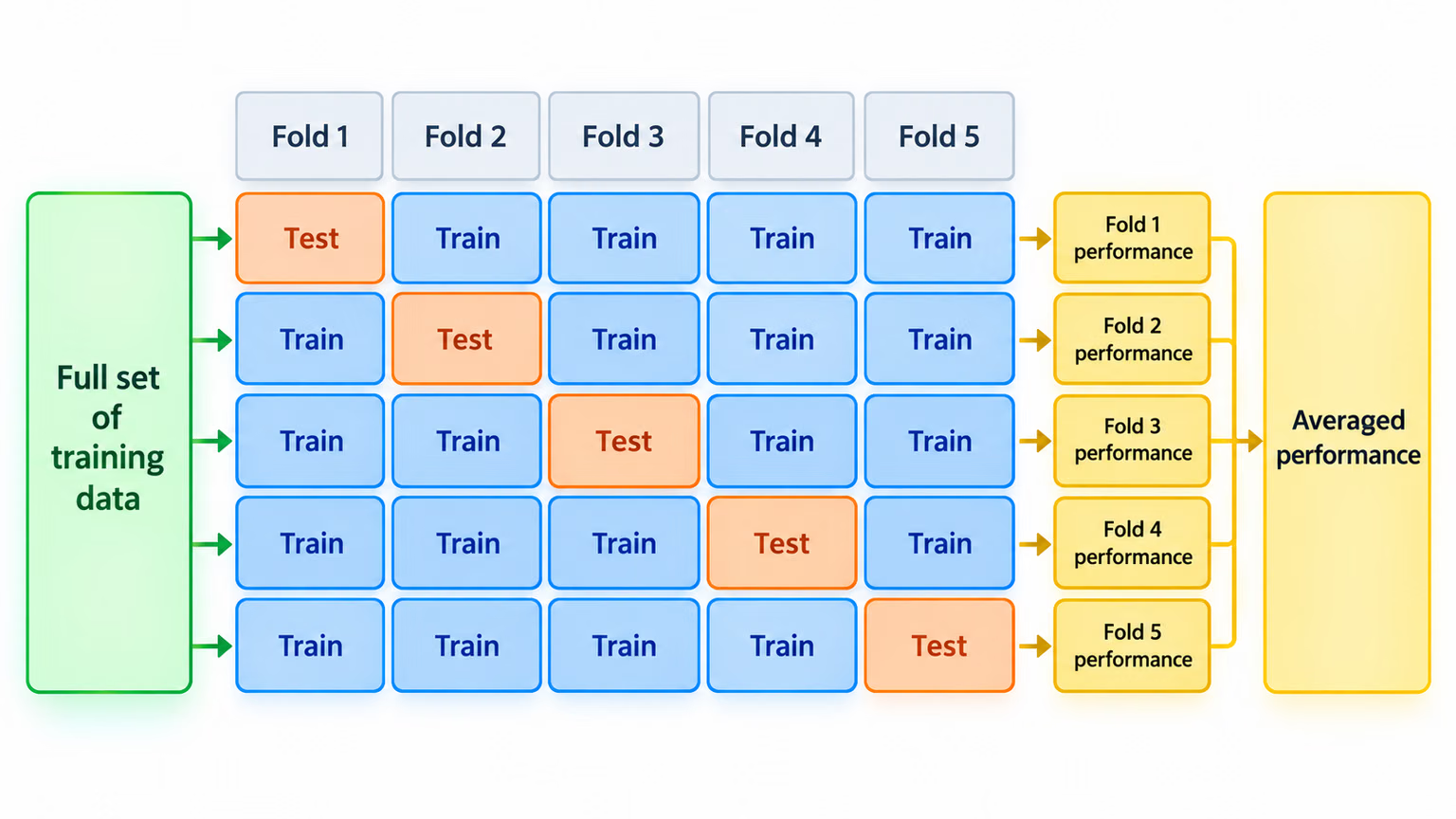
Whether your project involves the Fruit Detection dataset or a custom data source, this tutorial helps you understand and apply K-Fold Cross Validation to improve the reliability and robustness of your machine learning models. While we're applying k=5 folds for this tutorial, keep in mind that the optimal number of folds can vary depending on your dataset and the specifics of your project. K-Fold Cross Validation delivers the most value when your dataset is small, noisy, or highly variable; for large, diverse datasets, a well-constructed train/val/test split is usually sufficient.
Setup#
-
Your annotations should be in the YOLO detection format.
-
This guide assumes that annotation files are locally available.
-
For our demonstration, we use the Fruit Detection dataset.
- This dataset contains a total of 8479 images.
- It includes 6 class labels, each with its total instance counts listed below.
| Class Label | Instance Count |
|---|---|
| Apple | 7049 |
| Grapes | 7202 |
| Pineapple | 1613 |
| Orange | 15549 |
| Banana | 3536 |
| Watermelon | 1976 |
-
Necessary Python packages include:
ultralyticssklearnpandaspyyaml
-
This tutorial operates with
k=5folds. However, you should determine the best number of folds for your specific dataset.
-
Create a new Python virtual environment (
venv) for your project and activate it. Usepip(or your preferred package manager) to install:- The Ultralytics library:
pip install -U ultralytics. Alternatively, you can clone the official repo. - Scikit-learn, pandas, and PyYAML:
pip install -U scikit-learn pandas pyyaml.
- The Ultralytics library:
-
Verify that your annotations are in the YOLO detection format.
- For this tutorial, all annotation files are found in the
Fruit-Detection/labelsdirectory.
- For this tutorial, all annotation files are found in the
Generating Feature Vectors for Object Detection Dataset#
-
Start by creating a new
example.pyPython file for the steps below. -
Load the training and validation images listed in your dataset YAML with the Ultralytics
YOLODatasetclass, leaving the test split untouched.from pathlib import Path from ultralytics.data.dataset import YOLODataset from ultralytics.data.utils import check_det_dataset yaml_file = "path/to/data.yaml" data = check_det_dataset(yaml_file) dataset_path = Path(data["path"]) sources = [] for split in ("train", "val"): source = data.get(split) if source: sources.extend(source if isinstance(source, list) else [source]) dataset = YOLODataset(sources, data=data, augment=False) images = [Path(p) for p in dataset.im_files] -
Now, read the contents of the dataset YAML file and extract the indices of the class labels.
classes = data["names"] cls_idx = sorted(classes.keys()) -
Initialize an empty
pandasDataFrame.import pandas as pd labels_df = pd.DataFrame(0.0, columns=cls_idx, index=images) -
Count the instances of each class label present in the annotation files.
from collections import Counter for image, label in zip(images, dataset.labels): lbl_counter = Counter(label["cls"].flatten().astype(int)) labels_df.loc[image, list(lbl_counter)] = list(lbl_counter.values()) -
The following is a sample view of the populated DataFrame:
                                                       0    1    2    3    4    5
'0000a16e4b057580_jpg.rf.00ab48988370f64f5ca8ea4...'  0.0  0.0  0.0  0.0  0.0  7.0
'0000a16e4b057580_jpg.rf.7e6dce029fb67f01eb19aa7...'  0.0  0.0  0.0  0.0  0.0  7.0
'0000a16e4b057580_jpg.rf.bc4d31cdcbe229dd022957a...'  0.0  0.0  0.0  0.0  0.0  7.0
'00020ebf74c4881c_jpg.rf.508192a0a97aa6c4a3b6882...'  0.0  0.0  0.0  1.0  0.0  0.0
'00020ebf74c4881c_jpg.rf.5af192a2254c8ecc4188a25...'  0.0  0.0  0.0  1.0  0.0  0.0
 ...                                                  ...  ...  ...  ...  ...  ...
'ff4cd45896de38be_jpg.rf.c4b5e967ca10c7ced3b9e97...'  0.0  0.0  0.0  0.0  0.0  2.0
'ff4cd45896de38be_jpg.rf.ea4c1d37d2884b3e3cbce08...'  0.0  0.0  0.0  0.0  0.0  2.0
'ff5fd9c3c624b7dc_jpg.rf.bb519feaa36fc4bf630a033...'  1.0  0.0  0.0  0.0  0.0  0.0
'ff5fd9c3c624b7dc_jpg.rf.f0751c9c3aa4519ea3c9d6a...'  1.0  0.0  0.0  0.0  0.0  0.0
'fffe28b31f2a70d4_jpg.rf.7ea16bd637ba0711c53b540...'  0.0  6.0  0.0  0.0  0.0  0.0
The rows use absolute image paths, and the columns correspond to class-label indices. Missing labels remain all-zero background rows. This data structure enables the application of K-Fold Cross Validation to an object detection dataset.
K-Fold Dataset Split#
-
Now we will use the
KFoldclass fromsklearn.model_selectionto generateksplits of the dataset.- Important:
- Setting
shuffle=Trueensures a randomized distribution of classes in your splits. - By setting
random_state=MwhereMis a chosen integer, you can obtain repeatable results.
- Setting
from sklearn.model_selection import KFold ksplit = 5 kf = KFold(n_splits=ksplit, shuffle=True, random_state=20) # setting random_state for repeatable results kfolds = list(kf.split(labels_df)) - Important:
-
The dataset has now been split into
kfolds, each having a list oftrainandvalindices. We will construct a DataFrame to display these results more clearly.folds = [f"split_{n}" for n in range(1, ksplit + 1)] folds_df = pd.DataFrame(index=labels_df.index, columns=folds) for i, (train, val) in enumerate(kfolds, start=1): folds_df.loc[labels_df.index[train], f"split_{i}"] = "train" folds_df.loc[labels_df.index[val], f"split_{i}"] = "val" -
Now we will calculate the distribution of class labels for each fold as a ratio of the classes present in
valto those present intrain.fold_lbl_distrb = pd.DataFrame(index=folds, columns=cls_idx) for n, (train_indices, val_indices) in enumerate(kfolds, start=1): train_totals = labels_df.iloc[train_indices].sum() val_totals = labels_df.iloc[val_indices].sum() # To avoid division by zero, we add a small value (1E-7) to the denominator ratio = val_totals / (train_totals + 1e-7) fold_lbl_distrb.loc[f"split_{n}"] = ratioThe ideal scenario is for all class ratios to be reasonably similar for each split and across classes. This, however, will be subject to the specifics of your dataset.
-
Write image lists and a dataset YAML for each split. Text lists avoid copying the dataset
ktimes.import yaml save_path = dataset_path.parent / f"{ksplit}-Fold_Cross-val" save_path.mkdir(parents=True, exist_ok=True) ds_yamls = [] for split in folds_df.columns: for partition in ("train", "val"): split_images = folds_df.index[folds_df[split] == partition] paths = "\n".join(map(str, split_images)) (save_path / f"{split}_{partition}.txt").write_text(f"{paths}\n") dataset_yaml = save_path / f"{split}.yaml" ds_yamls.append(dataset_yaml) with open(dataset_yaml, "w") as ds_y: yaml.safe_dump( { "path": save_path.as_posix(), "train": f"{split}_train.txt", "val": f"{split}_val.txt", "names": classes, }, ds_y, )
Save Records (Optional)#
Optionally, you can save the records of the K-Fold split and label distribution DataFrames as CSV files for future reference.
folds_df.to_csv(save_path / "kfold_datasplit.csv")
fold_lbl_distrb.to_csv(save_path / "kfold_label_distribution.csv")
Train YOLO using K-Fold Data Splits#
-
First, load the YOLO model.
from ultralytics import YOLO weights_path = "path/to/weights.pt" # use yolo26n.pt for a small model model = YOLO(weights_path, task="detect") -
Next, iterate over the dataset YAML files to run training. The results will be saved to a directory specified by the
projectandnamearguments. By default, this directory isruns/detect/train#, where#is an integer index.results = {} # Define your additional arguments here batch = 16 project = "kfold_demo" epochs = 100 for k, dataset_yaml in enumerate(ds_yamls): model = YOLO(weights_path, task="detect") results[k] = model.train( data=dataset_yaml, epochs=epochs, batch=batch, project=project, name=f"fold_{k + 1}" ) # include any additional train arguments -
You can also use the Ultralytics autosplit function for automatic dataset splitting:
from ultralytics.data.split import autosplit

# Automatically split dataset into train/val/test
autosplit(path="path/to/images", weights=(0.8, 0.2, 0.0), annotated_only=True)
Conclusion#
In this guide, we have explored the process of using K-Fold cross-validation for training the YOLO object detection model. We learned how to split the training and validation pool into K partitions and use the generated ratio table to inspect class balance after random splitting.
We also explored the procedure for creating report DataFrames to visualize the data splits and label distributions across these splits, giving a clear view of the structure of our training and validation sets.
Optionally, we saved our records for future reference, which could be particularly useful in large-scale projects or when troubleshooting model performance.
Finally, we implemented the actual model training using each split in a loop, saving our training results for further analysis and comparison.
This technique of K-Fold cross-validation is a robust way of making the most out of your available data, and it helps to ensure that your model performance is reliable and consistent across different data subsets. This results in a more generalizable and reliable model that is less likely to overfit to specific data patterns.
Remember that although we used YOLO in this guide, these steps are mostly transferable to other machine learning models. Understanding these steps allows you to apply cross-validation effectively in your own machine learning projects.
FAQ#
K-Fold Cross Validation is a technique where the dataset is divided into 'k' subsets (folds) to evaluate model performance more reliably. Each fold serves as both training and validation data. In the context of object detection, using K-Fold Cross Validation helps to ensure your Ultralytics YOLO model's performance is robust and generalizable across different data splits, enhancing its reliability. For detailed instructions on setting up K-Fold Cross Validation with Ultralytics YOLO, refer to K-Fold Cross Validation with Ultralytics.
To implement K-Fold Cross Validation with Ultralytics YOLO, you need to follow these steps:
- Verify annotations are in the YOLO detection format.
- Use Python libraries like
sklearn,pandas, andpyyaml. - Create feature vectors from your dataset.
- Split your dataset using
KFoldfromsklearn.model_selection. - Train the YOLO model on each split.
For a comprehensive guide, see the K-Fold Dataset Split section in our documentation.
The workflow in this guide targets the YOLO detection format, but the same approach adapts to every YOLO task — the task changes how you compose the folds, not whether cross-validation helps:
Task Fold design detectSplit at the image level, balancing object and class distributions across folds. Keep related images (same patient, video sequence, camera, or site) within a single fold. segmentUse the same image-level strategy as detection, additionally preserving mask and class coverage in every fold. classifyPrefer stratified folds so class frequencies stay balanced between training and validation. poseSplit by subject or sequence so the same person or animal never appears on both sides of a fold. obbSplit at the image level, keeping tiles or crops from the same scene together — especially important for aerial imagery. Whatever the task, keep near-duplicate and related samples out of opposing folds: that kind of leakage inflates validation metrics well beyond what the model will achieve in production.
Ultralytics YOLO offers state-of-the-art, real-time object detection with high accuracy and efficiency. It's versatile, supporting multiple computer vision tasks such as detection, instance segmentation, semantic segmentation, and classification. Additionally, it integrates with tools like Ultralytics Platform for no-code model training and deployment.
Your annotations should follow the YOLO detection format. Each annotation file must list the object class, alongside its bounding box coordinates in the image. The YOLO format ensures streamlined and standardized data processing for training object detection models. For more information on proper annotation formatting, visit the YOLO detection format guide.
Yes, you can use K-Fold Cross Validation with any custom dataset as long as the annotations are in the YOLO detection format. Replace the dataset paths and class labels with those specific to your custom dataset. This flexibility ensures that any object detection project can benefit from robust model evaluation using K-Fold Cross Validation. For a practical example, review our Generating Feature Vectors section.


Comments21
Ask a question, share your results, or help someone else.
jingieboy
does this work with yolov8-cls? if so how would the folder structure look like? how are the data splits
 Glenn JocherUltralytics(edited)
Yes—K‑Fold works the same for classification; use the standard ImageNet-style layout per fold, and train each fold separately (YOLO infers classes from folder names). For YOLO26 (recommended) you can do:
dataset/
  split_1/
    train/
      class_a/ ...
      class_b/ ...
    val/
      class_a/ ...
      class_b/ ...
  split_2/
    train/...
    val/...
  ...
from ultralytics import YOLO weights = "yolo26n-cls.pt" # swap to 'yolov8n-cls.pt' if you prefer YOLOv8 splits = ["dataset/split_1", "dataset/split_2", "dataset/split_3"] for d in splits: model = YOLO(weights) model.train(data=d, epochs=20, batch=16) # d must contain 'train/' and 'val/' subfoldersFor building folds, use
StratifiedKFoldon image-level labels derived from parent folder names to keep class balance, or use the random splitter shown in the autosplit reference if stratification isn’t required. Classification usage details are in the classification task docs.thank you for this! I have also notice that everytime I run model.val(), the accuracies and confusion matrix values are slightly different this time. Is this normal or during evaluation, there is a small randomness when calling the function.
- Glenn JocherUltralytics
@jingieboy minor variations can occur from non-deterministic CUDA ops or multi-threading; validation itself doesn’t add randomness by default—set seeds and force deterministic ops to lock results:
import random, numpy as np, torch

seed = 0
random.seed(seed); np.random.seed(seed); torch.manual_seed(seed)
torch.backends.cudnn.deterministic = True
torch.backends.cudnn.benchmark = False

model.val()  # run evaluation
If differences are still large, double-check your eval args in the validation mode docs.
Nehasq
Hi, I am applying K-fold validation using the leave-one-out technique. My dataset consists of a single class and includes 21 images in total. For each split, I use 20 images for training and 1 image for testing. I am implementing the leave-one-out technique with the code above, setting ksplit=21.
I am not using a separate validation dataset, only training and testing data. Here is the code I am using:
results = {}
Define additional arguments here
batch = 16 project = "kfold_demo" epochs = 100
for k in range(ksplit): dataset_yaml = ds_yamls[k] model = YOLO(weights_path, task="detect") model.train(data=dataset_yaml, epochs=epochs, batch=batch, project=project) # Include any train arguments results[k] = model.metrics # Save output metrics for further analysis
In my data.yaml file, I have provided the validation path as the test set. When it trains and validates on the "1 test data," does this mean the model is being tested on data it has never seen during training? This is my first point of confusion.
my data.yaml file for each split looks like this: names:
- pothole path: ../ 2024-12-10_21-Fold_Cross-val/split_1 train: train val: test
My second question is about calculating the final performance. When I ran the above code, it calculated scores for each individual split. Do I need to calculate the final performance metrics manually, or is there any functionality in YOLOv8 to compute the aggregated performance automatically?
- Glenn JocherUltralytics
@Nehasq to address your first question, yes, the model is being tested on unseen data during each split, as the test set (1 image) is excluded from training and only used for validation. Regarding your second question, YOLO does not automatically aggregate metrics across splits. You need to compute the final performance metrics manually by averaging the results from all splits. For reference, you can review the K-Fold Cross Validation guide.
Thanks for your reply. I understand your point. So, are you saying that, for example, in my case, where I have 21 scores (precision, recall, etc.), I should simply add all the precision values together and divide the sum by 21 to get the final precision of the model? Is that correct?
Also, in y case of 20 images( training) and 1 images for test, what batch size would you suggest?
- Glenn JocherUltralytics
Yes, to calculate the final precision (or any metric), you average the values across all splits, i.e., sum all precision scores and divide by the number of splits (21 in your case). As for the batch size, given your small dataset, you could keep it low (e.g., 1 or 2) to ensure efficient utilization of the data while avoiding overfitting.
Thanks, that really helps! With a batch size of 1, I am keeping the epochs at 10. Should it be fewer? Also, to check for overfitting, I need to review the result graphs for each split. However, I can't definitively determine if it is overfitting since each split is separate, right?
- Glenn JocherUltralytics
Keeping epochs at 10 with a batch size of 1 is reasonable given your small dataset size. To check for overfitting, reviewing result graphs from each split can help, but overfitting may be harder to detect since each split involves different training and test data. Consider comparing trends across splits for consistent insights. For further details, you can reference the K-Fold Cross Validation guide.
semyon-v-dot
After the loop:
for ext in supported_extensions:
    images.extend(sorted((dataset_path / "images").rglob(f"*{ext}")))
Should be this line of code:
images = sorted(images)For
imagesmatching withlabelslist:labels = sorted(dataset_path.rglob("*labels/*.txt"))Otherwise the script creates background images because some images missing their labels.
- Glenn JocherUltralytics
@semyon-v-dot thank you for your suggestion. Sorting the
imageslist after extending it with supported extensions is a good practice to ensure alignment with thelabelslist. This helps prevent issues with missing labels.1
 sangeun jo
K-폴드 데이터 세트 분할 4번에서
images.extend(sorted((dataset_path / "images").rglob(f"*{ext}")))이 코드를images.extend(sorted(dataset_path.rglob(f"*images/*{ext}")))로 변환해야 작동했습니다.- Glenn JocherUltralytics
@sangeun-jo thank you for pointing that out. Your modification to
images.extend(sorted(dataset_path.rglob(f"*images/*{ext}")))is indeed correct and ensures the code works as intended. If you have any further questions or need additional assistance, feel free to ask!
kh-diab
is it usefult to use this k fold approach when I just have one class only but my issue is the class is detected as background or vice versa as per the attached Confusion matrix
- Glenn JocherUltralytics
@kh-diab using K-Fold Cross Validation can still be beneficial even with a single class. It helps ensure that your model's performance is robust and not overly dependent on a particular subset of the data. This can be particularly useful if you're experiencing issues with class detection accuracy, as it allows you to validate the model's performance across multiple splits and identify any inconsistencies. If your class is being detected as background or vice versa, K-Fold Cross Validation can help diagnose whether this issue is consistent across different data splits or specific to certain subsets. For more details, you can refer to our guide on K-Fold Cross Validation: https://docs.ultralytics.com/guides/kfold-cross-validation/.
alexander-sony
Good guide, consider adding it in a colab notebook.
In section "Train YOLO using K-Fold Data Splits", model should be re-initialized foe every k, i.e. it should be inside the for-loop: for k in range(ksplit).
- Glenn JocherUltralytics
@alexander-sony thank you for your feedback and suggestion! 😊
You're absolutely right about re-initializing the model within the loop for each fold to ensure a fresh start for every training iteration. This can help avoid any potential carryover effects from previous folds. Here's the corrected code snippet for the training section:
from ultralytics import YOLO

weights_path = "path/to/weights.pt"
results = {}

# Define your additional arguments here
batch = 16
project = "kfold_demo"
epochs = 100

for k in range(ksplit):
    model = YOLO(weights_path, task="detect")  # Re-initialize the model inside the loop
    dataset_yaml = ds_yamls[k]
    model.train(data=dataset_yaml, epochs=epochs, batch=batch, project=project)  # include any train arguments
    results[k] = model.metrics  # save output metrics for further analysis
Regarding your suggestion to add this guide to a Colab notebook, that's a fantastic idea! It would make the process more interactive and accessible for users. We'll consider creating a Colab version of this guide in the future.
For more details on K-Fold Cross Validation, you can refer to our comprehensive guide.
Thanks again for your valuable input! If you have any more suggestions or questions, feel free to share. Happy coding! 🚀
Likhith-Sugganahalli
@alexander-sony
woudnt that be a new model trained on each split, giving us n different models trained on 1/nth of the dataset?
 Fazri Gading
Is there any way to implement Stratified K-Fold Cross Validation with YOLOv8?
 Paula DerrengerUltralytics
Yes, you can implement Stratified K-Fold Cross Validation with YOLOv8! Stratified K-Fold ensures that each fold has a similar distribution of class labels, which can be particularly useful for imbalanced datasets.
To achieve this, you can use
StratifiedKFoldfromsklearn.model_selectioninstead ofKFold. Here's a brief example of how to modify the K-Fold implementation:from sklearn.model_selection import StratifiedKFold # Assuming labels_df is your DataFrame with class counts ksplit = 5 skf = StratifiedKFold(n_splits=ksplit, shuffle=True, random_state=20) # Generate stratified splits kfolds = list(skf.split(labels_df, labels_df.idxmax(axis=1))) # The rest of the process remains the sameFor a detailed guide on K-Fold Cross Validation, please refer to the Ultralytics documentation. If you have any more questions, feel free to ask! 😊
1