Ultralytics YOLO26을 사용한 영역 내 객체 계수
Ultralytics YOLO26의 RegionCounter 솔루션은 비디오 프레임 전반에서 객체를 추적하고, 매 프레임마다 사용자가 정의한 각 영역 안에 바운딩 박스 중심이 들어오는 객체의 수를 셉니다. 각 영역은 실시간 카운트와 함께 프레임에 표시되므로, Python 호출이나 CLI 명령 하나로 매장 통로, 도로 차선, 생산 구역 등 여러 구역을 모니터링할 수 있습니다.
시청: Ultralytics YOLO를 사용하여 여러 영역에서 객체 계수하기 | Ultralytics 솔루션
영역 계수를 사용하는 이유#
- 한 번에 여러 구역 처리: 이름이 지정된 폴리곤의 딕셔너리를 전달하면 각 구역의 계수가 독립적으로 프레임에 표시되므로 하나의 동영상 스트림으로 필요한 모든 영역을 처리할 수 있습니다.
- 추적 기능 내장: 이 솔루션은 내부적으로 YOLO26 탐지와 객체 추적을 실행하므로 별도의 추적 파이프라인을 연결할 필요가 없습니다.
- 프로그래밍 방식으로 읽을 수 있는 계수 결과: 처리된 모든 프레임은 영역 계수 딕셔너리가 포함된 결과 객체를 반환하며, 이 객체는 대시보드, 알림 또는 로깅에 바로 사용할 수 있습니다.
실제 애플리케이션#
| 소매 | 시장 거리 |
|---|---|
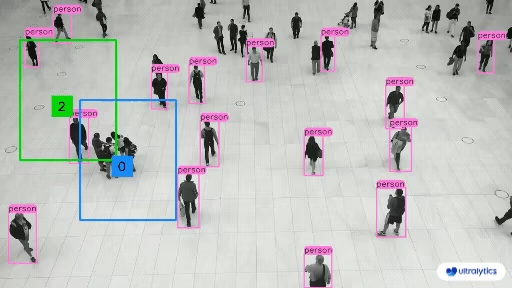 | 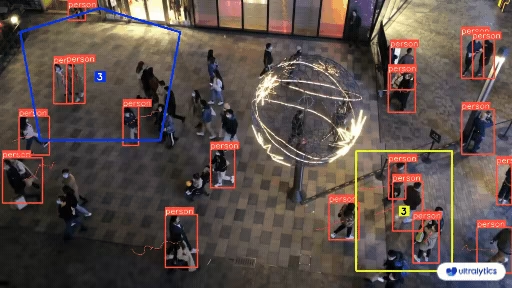 |
| Ultralytics YOLO를 사용한 영역 내 사람 계수 | Ultralytics YOLO를 사용한 영역 내 군중 계수 |
Ultralytics YOLO로 영역 내 객체를 계수하는 방법#
CLI 또는 Python에서 동영상 소스를 사용해 RegionCounter 솔루션을 실행합니다. 영역은 점 목록(단일 구역) 또는 구역 이름을 점 목록에 매핑하는 딕셔너리로 지정할 수 있습니다. 다음 Python 예제에서는 이름이 지정된 두 영역의 객체를 계수하고 처리된 프레임을 출력 동영상 파일에 기록합니다.
# Run a region counting example
yolo solutions region show=True

# Pass a source video
yolo solutions region source="path/to/video.mp4"

# Pass a custom region
yolo solutions region region="[(20, 400), (1080, 400), (1080, 360), (20, 360)]"
RegionCounter() 인수#
다음은 RegionCounter 인수 표입니다:
| 인수 | 유형 | 기본값 | 설명 |
|---|---|---|---|
model | str | None | Ultralytics YOLO 모델 파일의 경로입니다. |
region | list 또는 dict | None | 관심 영역을 정의하는 점입니다. (x, y) 튜플 목록 또는 여러 영역에 대해 영역 이름을 점 목록에 매핑하는 사전(RegionCounter만 해당)으로 지정할 수 있습니다. None이면 영역이 필요한 Solutions는 사전 정의된 기본값을 사용합니다. |
line_width | int | 2 | Solution에서 그리는 상자, 키포인트 및 개수 표시의 선 두께입니다. |
verbose | bool | True | 프레임별 입력 형태, 클래스 개수 및 처리 속도 로그를 활성화합니다. 추적 호출 자체는 항상 로그를 출력하지 않습니다. |
RegionCounter 솔루션에서는 객체 추적 매개변수를 사용할 수 있습니다.
| 인수 | 유형 | 기본값 | 설명 |
|---|---|---|---|
tracker | str | 'tracktrack.yaml' | 사용할 추적 알고리즘을 지정합니다. 기본 제공 옵션: botsort.yaml, bytetrack.yaml, ocsort.yaml, deepocsort.yaml, fasttrack.yaml, tracktrack.yaml. |
conf | float | 0.25 | 탐지에 대한 신뢰도 임계값을 설정합니다. 값을 낮추면 추적할 수 있는 객체가 늘어나지만 오탐이 포함될 수 있습니다. |
iou | float | 0.5 | 중복 탐지를 필터링하기 위한 교집합 대비 합집합 (IoU) 임계값을 설정합니다. |
classes | list | None | 클래스 인덱스로 결과를 필터링합니다. 예를 들어 classes=[0, 2, 3]은 지정된 클래스만 추적합니다. |
device | str | None | 추론에 사용할 장치를 지정합니다(예: cpu, cuda:0 또는 0). 사용자는 모델 실행에 사용할 CPU, 특정 GPU 또는 기타 연산 장치를 선택할 수 있습니다. |
imgsz | int or tuple | 640 | 추론 대상 이미지 크기입니다. 정사각형을 나타내는 정수 또는 (height, width) 쌍을 지정합니다. 모델 stride에 맞춰 형태가 조정됩니다. |
max_det | int | 300 | 추적 전에 프레임별로 유지할 최대 탐지 수를 지정하여 밀집된 장면에서 솔루션이 처리하는 객체 수를 제한합니다. |
quantize | int or str | None | 추론 정밀도: CPU 이외의 환경에서 PyTorch 및 TorchScript 모델은 16(FP16) 또는 32/unset(FP32)을 사용하며, 다른 형식은 아티팩트와 런타임이 선택하는 정밀도를 사용합니다. 더 이상 사용되지 않는 half 인수를 대체합니다. |
또한 다음 시각화 설정도 지원됩니다.
| 인수 | 유형 | 기본값 | 설명 |
|---|---|---|---|
show | bool | False | True이면 주석이 추가된 이미지나 비디오를 창에 표시합니다. 개발 또는 테스트 중 즉각적인 시각적 피드백을 얻는 데 유용합니다. |
show_conf | bool | True | 각 감지 결과의 레이블 옆에 신뢰도 점수를 표시합니다. 각 감지 결과에 대한 모델의 확신도를 파악할 수 있습니다. |
show_labels | bool | True | 시각화 출력에 각 감지 결과의 레이블을 표시합니다. 감지된 객체를 즉시 파악할 수 있습니다. |
영역 계수의 작동 방식#
RegionCounter 솔루션은 전달된 각 영역을 최소 세 개의 점으로 이루어진 폴리곤으로 변환합니다. 일반 점 목록은 Region#01이라는 이름의 단일 구역이 되고, 딕셔너리를 전달하면 사용자가 지정한 구역 이름이 유지됩니다. 각 구역은 Ultralytics 팔레트에서 가져온 고유 색상으로 표시됩니다. 이후 각 프레임은 다음 세 단계로 처리됩니다.
- YOLO26 추적은 프레임에 있는 모든 객체를 감지하고 추적합니다.
- 추적된 각 객체에 대해 솔루션은 바운딩 박스 중심을 계산하고, 해당 중심이 어느 영역 폴리곤에 포함되는지 확인합니다.
- 각 영역의 계수 결과는 영역 중심에 표시되며, 다음 프레임을 처리하기 전에 계수가 초기화됩니다.
계수는 매 프레임마다 초기화되므로 영역에 표시되는 수는 누적 합계가 아니라 현재 점유 수, 즉 현재 영역 안에 있는 객체 수입니다. 경계를 통과한 객체의 수를 누적하여 계수하려면 대신 ObjectCounter 솔루션을 사용하세요.
각 호출은 결과 객체도 반환합니다. plot_im 속성에는 주석이 추가된 프레임이 저장되고, region_counts 딕셔너리에는 영역 이름과 해당 계수가 매핑되어 있으므로 이 수치를 자체 애플리케이션 로직에 전달할 수 있습니다.
결론#
Ultralytics YOLO26 RegionCounter 솔루션은 몇 줄의 코드만으로 필요한 만큼 이름이 지정된 구역의 실시간 객체 계수를 모니터링합니다. 더 다양한 작업을 수행하려면 객체 계수로 경계 통과를 세고, TrackZone으로 단일 구역 내 객체를 추적하거나, 다른 Ultralytics Solutions을 살펴보세요.
자주 묻는 질문#
Ultralytics YOLO26은 프레임 내 모든 객체를 추적하고, 각 사용자 정의 폴리곤 안에 객체의 바운딩 박스 중심이 있는지 확인하여 영역 내 객체를 계수합니다. 영역에 표시되는 수는 누적 합계가 아니라 해당 프레임의 현재 점유 수입니다. 설정 옵션은
RegionCounter()인수 섹션에 나와 있습니다.주요 예제와 같이
region인수에 구역 이름을 점 목록에 매핑하는 딕셔너리를 전달합니다.from ultralytics import solutions region_points = { "region-01": [(50, 50), (250, 50), (250, 250), (50, 250)], "region-02": [(640, 640), (780, 640), (780, 720), (640, 720)], } regioncounter = solutions.RegionCounter(region=region_points, model="yolo26n.pt", show=True)이름이 지정된 각 구역은 고유한 색상으로 표시되며 독립적으로 계수됩니다.
각
regioncounter(im0)호출이 반환하는 객체에는 영역 이름과 계수를 매핑하는region_counts딕셔너리가 포함되어 있으며,plot_im(주석이 추가된 프레임)와total_tracks(추적된 객체 수)도 함께 제공됩니다. 사용 가능한 모든 필드를 확인하려면 결과 객체를 출력하세요.예. 유지할 클래스 인덱스와 함께
classes인수를 전달하면 됩니다. 예를 들어 COCO 사전 학습 모델로 사람만 계산하려면classes=[0]을 전달합니다. 추적 관련 인수 전체 목록은RegionCounter()인수 섹션에 있습니다.RegionCounter은 현재 프레임에서 각 다각형 구역 안에 있는 객체 수를 표시합니다. 반면 ObjectCounter는 객체가 선이나 구역 경계를 통과할 때 객체 수를 누적해 계산하고, 유입 및 유출 합계를 추적합니다. 하나 이상의 구역의 실시간 점유 현황에는RegionCounter를 사용하고, 진입 및 퇴장 계산에는ObjectCounter을 사용합니다. 선 모양 구역은ObjectCounter에서만 지원됩니다.


댓글99
질문을 하거나 결과를 공유하거나 다른 사람을 도와주세요.
pedmindset
Been trying to figure this out for a while now. I want to ask, can I use object counting in regions with instance sementation and tracking? You want to count vehicles that cross two specific regions, like so Object 001 crossed region A and region B. Is this possible to do
1 Glenn JocherUltralytics
@pedmindset yes, it is possible to count objects crossing multiple regions using Ultralytics YOLO11. You can utilize the
RegionCounterclass to define multiple regions and track objects across them. The objects' movement through these regions can be tracked using persistent IDs, enabling you to determine which object crossed which regions. For implementation details, refer to the Region Counting Guide.1
amulyaamaggididivami
import cv2
from ultralytics import solutions

# Load video file
cap = cv2.VideoCapture("retail-store.mp4")
assert cap.isOpened(), "Error reading video file"

# Define the counting line coordinates (adjust as per your scene)
region_points = [(1135, 714), (1134, 416)]

# Get video properties
w, h, fps = (int(cap.get(x)) for x in (
    cv2.CAP_PROP_FRAME_WIDTH,
    cv2.CAP_PROP_FRAME_HEIGHT,
    cv2.CAP_PROP_FPS,
))

# Setup video writer for output
video_writer = cv2.VideoWriter(
    "object_counting_output.mp4",
    cv2.VideoWriter_fourcc(*"mp4v"),
    fps,
    (w, h),
)

# Initialize the object counter
counter = solutions.ObjectCounter(
    show=False,                 # Don't show live preview
    region=region_points,       # Line coordinates
    model="yolo11n.pt",         # YOLO model
    classes=[0],                # Class 0 = person
    line_width=3,
)

# Process video frame by frame
while cap.isOpened():
    success, frame = cap.read()
    if not success:
        print("Video processing complete.")
        break

    # Run the counter on the frame
    results = counter(frame)

    # Write to output video
    video_writer.write(results.plot_im)

# Cleanup
cap.release()
video_writer.release()
cv2.destroyAllWindows()

print(f"✅ Processing complete. Saved as 'object_counting_output.mp4'")
I’m getting the count reversed — the number of people entering is shown as OUT, and those exiting are shown as IN. How can I fix this?
RizwanMunawar
@amulyaamaggididivami Hi, can you please try reversing the region coordinates, like mentioned? I believe this will work.
region_points = [(1134, 416), (1135, 714)]I have tried that, but it is not working
@amulyaamaggididivami, well, in that case, you can clone the
ultralyticsrepository and build it locally with the changes in the code line here: https://github.com/ultralytics/ultralytics/blob/fa5d0bffbd63adfc302e9c118ffe5caa6447a044/ultralytics/solutions/object_counter.py#L135Edit: Can you please also try using the region points, rather than line points?
Sure, thanks
1- Glenn JocherUltralytics
@SudhanshuBlaze IN/OUT for line counters is image-axis based, not compass: for a mostly vertical line, IN = motion to the right (+x) and OUT = left; for a mostly horizontal line, IN = down (+y) and OUT = up; you can relabel to N/S/E/W post-process like this:
def label_dirs(results, p1, p2):
    (x1, y1), (x2, y2) = p1, p2
    vertical = abs(x1 - x2) < abs(y1 - y2)
    return ({"eastbound": results.in_count, "westbound": results.out_count} if vertical
            else {"southbound": results.in_count, "northbound": results.out_count})
Details of the IN/OUT logic are in the count_objects method of the ObjectCounter reference.
Forlin12
Hello, I would like to know how it works to remove how many objects there are per instant region because I can't extract this information.
SudhanshuBlaze
Hi,
I was wondering in the case of LINE counters, if there's a thumb rule to translate the IN, OUT count to North->South, East-> West, something like this. How do I know which direction is IN and which direction is OUT in the case of LINE counters?
My coordinates: line_counter1 = [(842, 1434), (640, 2200)]
line_counter2 = [(1028, 1304), (1094, 1038)]
line_counter3 = [(1068, 1038), (684, 1048)]
line_counter4 = [(2498, 546), (3276, 572)]
line_counter5 = [(3244, 786), (3414, 904)]
line_counter6 = [(1830, 958), (1668, 710)]Thanks in advance
morussk
Hey, I am trying to use solutions.RegionCounter() with conf less than 0.25 but it seems to be ignoring it, is that by design? If I use conf > 0.25 it is taken into account and counts only detections with confidence higher than conf in particular region but lower then 0.25 seems to be ignored and those detections have not chance of being counted by solutions.RegionCounter(). Please advice.
@morussk Hi, thanks for sharing the details. The counting in region feature relies on object tracking rather than standalone predictions. As a result, detections with a confidence score below 0.25 are ignored by default.
However, this behaviour can be modified by adjusting the track_high_thresh parameter. Currently, the
Solutionsclass doesn’t support adjusting tracking configuration core options directly, but you can adjust it by cloning the code and modifying the tracker's configurations file.Note: We always recommend using the latest version of the Ultralytics Python package. You can update it by running:
pip install -U ultralytics.Thanks.
1
dimasfadhila
hello, what dataset do you use for object detection in this region?
- Glenn JocherUltralytics
@dimasfadhila for region-based object counting in the Ultralytics example, we use models pre-trained on the COCO dataset by default, which includes 80 common object classes. You can see the full class list in our COCO dataset documentation. If you need to count custom objects, you'll want to train on your own dataset using YOLO's training mode.
rejens
Process video
while cap.isOpened(): success, im0 = cap.read() # Read the video frame. if not success: break im0 = region.count(im0) # Count the objects in different regions of frame. cv2.imshow("frame", im0) if cv2.waitKey(1) & 0xFF == ord('q'): break
this successfully did count and display the objects inside the region, how can i retrieve the number of counts, seems region.count(im0) returns the image only.
thanks
- Glenn JocherUltralytics(수정됨)
@rejens
RegionCounterreturns a results object, so call it on each frame and read the per-region counts fromregion_counts:results = region(im0) print(results.region_counts) # e.g. {'Region#01': 3} im0 = results.plot_imThe counts are for the current frame (they reset on every frame). Let me know if you need further clarification!
Darkbutbright
hi,counter = solutions.ObjectCounter(paras),im0 = counter.count(im0),Can the type information, font size, and position of the count in the video be set?
- Glenn JocherUltralytics(수정됨)
@Darkbutbright yes, you can customize the text information, font size and position of the count by modifying the solution source code. For
ObjectCounter, the counts are drawn in itsdisplay_counts()method (inultralytics/solutions/object_counter.py) through theSolutionAnnotator, so you can adjust the text rendering there. You can also call the solution and draw your own text on the returnedplot_imwithcv2.putText(), usingresults.in_countandresults.out_count. Let me know if you need further clarification! Thank you for your patient answer, but I really don't know where to get the detailed instructions (documents) of the solutions class. Could you please tell me how to get it (including more clear instructions for using other classes of yolo)?
- Glenn JocherUltralytics
@Darkbutbright thank you for your question! You can find detailed instructions and documentation for the
solutionsclass and other YOLO functionalities in the Ultralytics Docs. For specific examples, such as region counting or object tracking, check the solutions guide or the respective sections in the repository. Let me know if you need assistance with a particular use case!
kemalfrk
Hello, select the area with mouse events how to write the code that counts these classes if it enters a class.Thanks
- Glenn JocherUltralytics
@kemalfrk to implement object counting in specific regions using mouse events, you can modify the region points dynamically by capturing mouse click events and updating the region coordinates in real-time. You can refer to the Ultralytics YOLOv8 region counting example for guidance on how to set up and use the
RegionCounter. If you have further questions or need additional customization, feel free to ask!
MuhammedEnesGurkan
Hello, I use object counter but ı want to count only sheeps how can ı set classes_names to sheeps. Please help me
- Glenn JocherUltralytics
@MuhammedEnesGurkan to count only sheep, use the
--classesargument to specify the class index for sheep in your model. For example, if sheep are class 2, run:python yolov8_region_counter.py --source "path/to/video.mp4" --classes 2. Adjust the class index as needed based on your model's class mapping.