Albumentations를 사용해 YOLO26 학습용 데이터셋 개선하기
컴퓨터 비전 모델을 구축할 때 학습 데이터의 품질과 다양성은 모델 성능에 큰 영향을 줄 수 있습니다. Albumentations는 다양한 이미지 변환을 빠르고 유연하고 효율적으로 적용해 모델이 실제 환경에 적응하는 능력을 개선하도록 지원합니다. Ultralytics YOLO26과 통합되며, 객체 탐지, 인스턴스 세그멘테이션, 시맨틱 세그멘테이션, 깊이 추정, 포즈 추정, 방향성 바운딩 박스 작업을 위한 견고한 데이터셋을 만드는 데 도움이 됩니다.
Albumentations는 기하학적 변환과 색상 조정 등의 기법을 YOLO26 학습 데이터에 추가합니다. 이 가이드에서는 Albumentations가 Ultralytics 데이터 증강 파이프라인에 어떻게 적용되는지, 프로젝트에 맞게 어떻게 사용자 지정하는지 설명합니다.
이미지 증강을 위한 Albumentations#
Albumentations는 2018년 6월에 만들어진 오픈 소스 이미지 증강 라이브러리입니다. 컴퓨터 비전에서 이미지 증강 과정을 간소화하고 가속하도록 설계되었습니다. 성능과 유연성을 고려해 개발되었으며, 회전과 뒤집기 같은 간단한 변환부터 밝기와 대비 조정 같은 복잡한 조정까지 다양한 증강 기법을 지원합니다. Albumentations는 개발자가 이미지 분류, 객체 탐지, 세그멘테이션과 같은 작업을 위해 풍부하고 다양한 데이터셋을 생성하도록 지원합니다.
Albumentations를 사용하면 이미지, 세그멘테이션 마스크, 바운딩 박스, 키포인트에 증강을 쉽게 적용하고 데이터셋의 모든 요소가 함께 변환되도록 할 수 있습니다. PyTorch, TensorFlow와 같은 널리 사용되는 딥러닝 프레임워크와 호환되므로 다양한 프로젝트에서 활용할 수 있습니다.
Albumentations는 소규모 데이터셋과 대규모 컴퓨터 비전 작업 모두에 적합합니다. 빠른 처리로 데이터 준비에 드는 시간이 줄어들며, 더 다양한 학습 데이터는 실제 애플리케이션에서 모델 성능을 개선할 수 있습니다.
Albumentations의 주요 기능#
Albumentations는 다양한 컴퓨터 비전 애플리케이션에서 복잡한 이미지 증강을 간소화하는 유용한 기능을 제공합니다. 주요 기능은 다음과 같습니다:
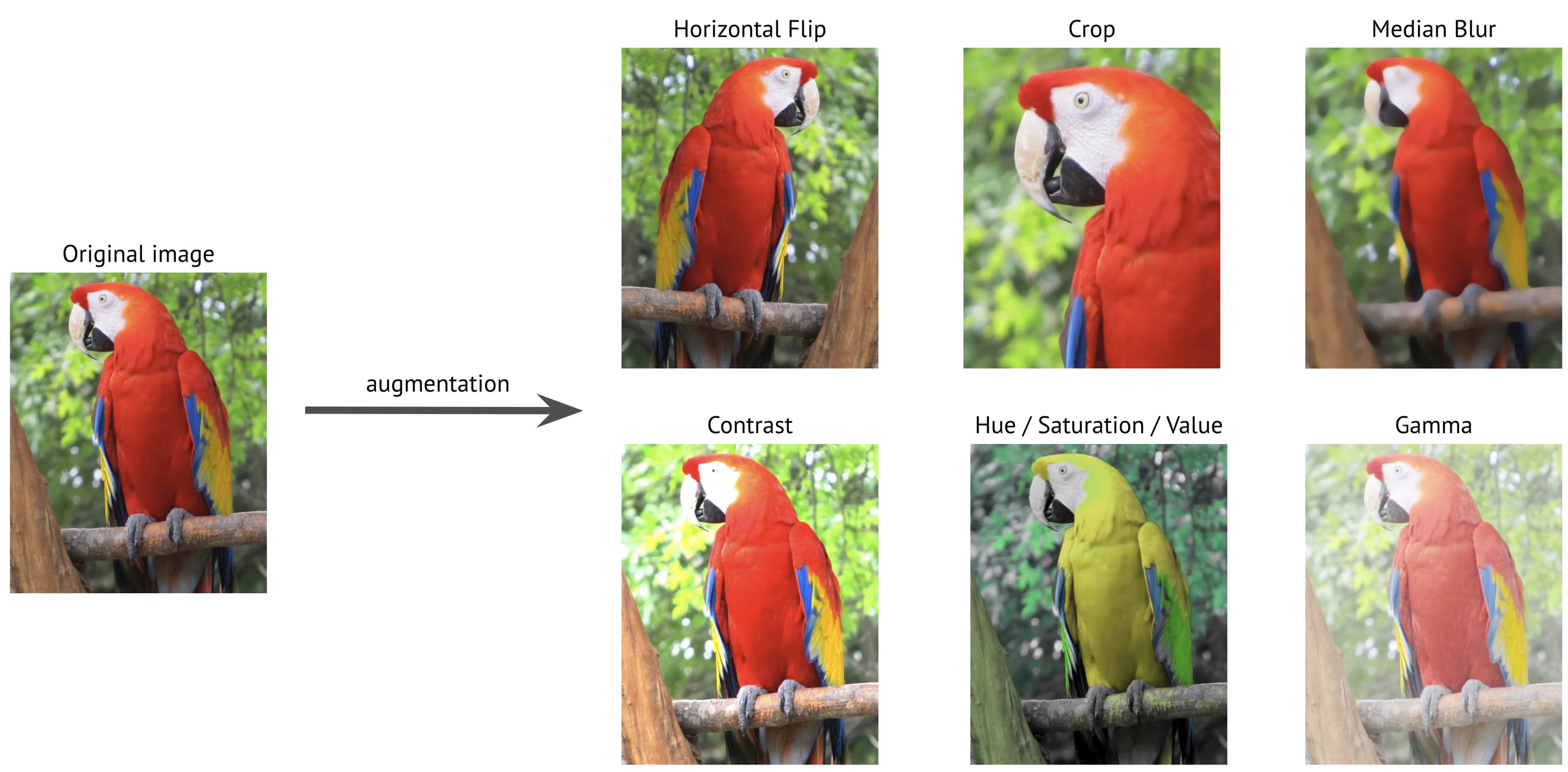
- 다양한 변환: Albumentations는 70가지가 넘는 변환을 제공하며, 여기에는 기하학적 변경(예: 회전, 반전), 색상 조정(예: 밝기, 대비), 노이즈 추가(예: 가우시안 노이즈)가 포함됩니다. 다양한 옵션을 통해 매우 다양하고 견고한 학습 데이터셋을 만들 수 있습니다.
-
고성능 최적화: OpenCV와 NumPy를 기반으로 구축된 Albumentations는 SIMD(Single Instruction, Multiple Data)와 같은 고급 최적화 기법을 사용해 여러 데이터 포인트를 동시에 처리함으로써 처리 속도를 높입니다. 대규모 데이터셋을 빠르게 처리하므로 이미지 증강에 사용할 수 있는 가장 빠른 옵션 중 하나입니다.
-
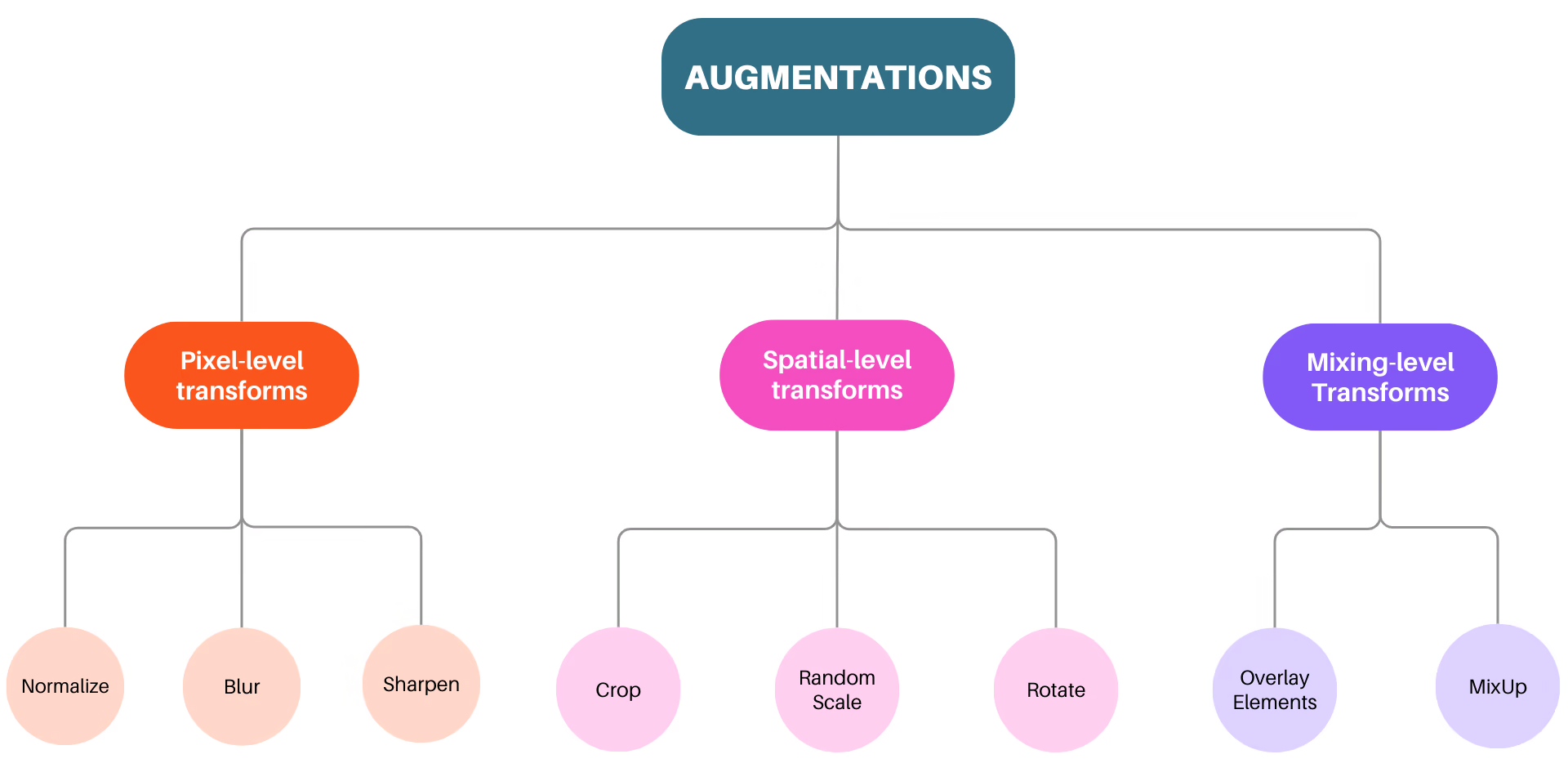
세 가지 증강 수준: Albumentations는 픽셀 수준 변환, 공간 수준 변환, 혼합 수준 변환의 세 가지 증강 수준을 지원합니다. 픽셀 수준 변환은 마스크, 바운딩 박스, 키포인트를 변경하지 않고 입력 이미지에만 영향을 줍니다. 공간 수준 변환은 이미지와 마스크, 바운딩 박스 등의 요소를 모두 변경합니다. 혼합 수준 변환은 여러 이미지를 하나로 결합합니다.
- 벤치마크 결과: Albumentations가 공개한 벤치마크 결과에 따르면, 특히 대규모 데이터셋에서 다른 증강 라이브러리보다 속도가 빠릅니다.
Vision AI 프로젝트에 Albumentations를 사용해야 하는 이유#
이미지 증강 측면에서 Albumentations는 컴퓨터 비전 작업을 위한 신뢰할 수 있는 도구로 두각을 나타냅니다. Vision AI 프로젝트에 Albumentations를 고려해야 하는 주요 이유는 다음과 같습니다:
-
사용하기 쉬운 API: Albumentations는 이미지, 마스크, 바운딩 박스 및 키포인트에 다양한 증강을 적용할 수 있는 단순하고 직관적인 단일 API를 제공합니다. 다양한 데이터셋에 쉽게 맞도록 설계되어 데이터 준비를 더 간편하고 효율적으로 만듭니다.
-
철저한 버그 테스트: 증강 파이프라인의 버그는 입력 데이터를 눈에 띄지 않게 손상시킬 수 있으며, 이런 문제는 대개 발견되지 않은 채 모델 성능을 저하시킵니다. Albumentations는 철저한 테스트 스위트로 이러한 문제를 해결해 개발 초기 단계에서 버그를 찾아낼 수 있도록 합니다.
-
확장성: Albumentations에서는 새로운 증강을 쉽게 추가하고 단일 인터페이스를 통해 기본 제공 변환과 함께 사용할 수 있습니다.
YOLO26 학습을 위해 Albumentations로 데이터를 증강하는 방법#
Albumentations는 Ultralytics 학습 모드에 직접 통합되며 Albumentations 패키지가 설치되어 있으면 자동으로 적용됩니다.
설치#
YOLO26에서 Albumentations를 사용하려면 먼저 필요한 패키지가 설치되어 있는지 확인하세요. Albumentations가 설치되어 있지 않으면 학습 중 증강이 적용되지 않습니다. 설치하면 학습 이미지에 변환이 실시간으로 적용됩니다.
# Install the required packages
pip install albumentations ultralytics
설치 절차에 대한 자세한 지침과 모범 사례는 Ultralytics 설치 가이드를 참조하세요. YOLO26에 필요한 패키지를 설치하는 중 문제가 발생하면 해결 방법과 팁을 확인할 수 있는 일반적인 문제 가이드를 참조하세요.
이 페이지의 사용자 지정 변환 예제를 사용하려면 Albumentations 1.4.22 이상과 Python 3.9 이상이 필요합니다.
사용법#
필요한 패키지를 설치하면 YOLO26에서 Albumentations를 사용할 준비가 됩니다. Albumentations가 설치된 상태에서 YOLO26을 학습하면 기본 Albumentations 변환 세트가 자동으로 적용됩니다.
from ultralytics import YOLO

# 사전 학습된 모델 불러오기
model = YOLO("yolo26n.pt")

# 기본 증강을 사용해 모델 학습
results = model.train(data="coco8.yaml", epochs=100, imgsz=640)
다음 섹션에서는 학습 중 적용되는 기본 Albumentations 변환을 설명합니다.
블러#
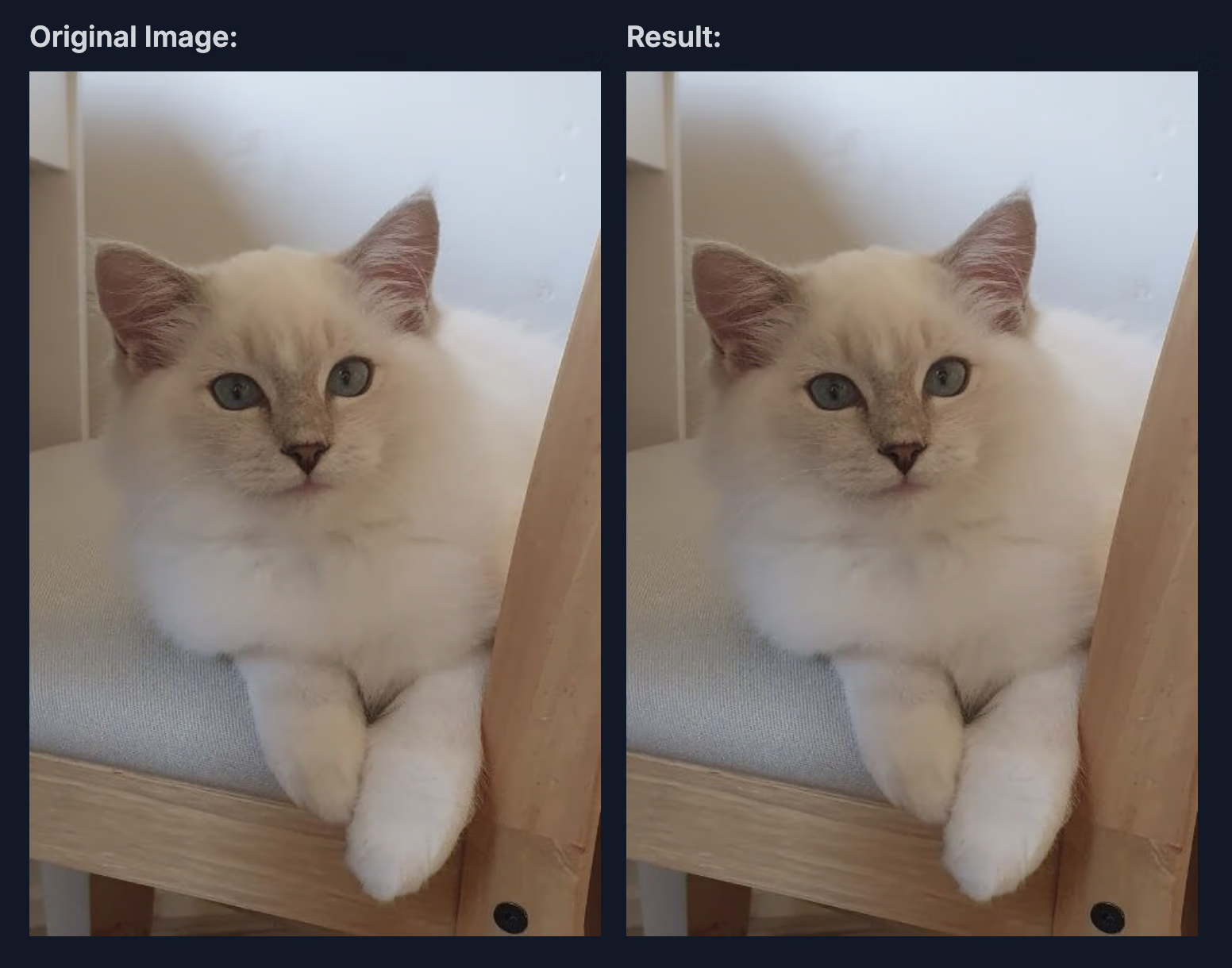
Albumentations의 Blur 변환은 작은 정사각형 영역, 즉 커널 내 픽셀 값을 평균 내어 이미지에 간단한 블러 효과를 적용합니다. 이 변환은 OpenCV의 cv2.blur 함수를 사용해 이미지의 노이즈를 줄이지만, 이미지 세부 정보도 약간 감소시킵니다.
이 통합에서 사용하는 매개변수와 값은 다음과 같습니다:
-
blur_limit: 블러 효과의 크기 범위를 제어합니다. 기본 범위는 (3, 7)이며, 블러 커널 크기가 3~7픽셀 사이에서 달라질 수 있습니다. 블러의 중심을 유지하기 위해 홀수만 허용됩니다.
-
p: 블러를 적용할 확률입니다. 통합에서는 p=0.01이므로 각 이미지에 블러가 적용될 확률은 1%입니다. 확률이 낮아 이미지에 블러를 가끔 적용하고, 지나치게 흐려지지 않으면서 약간의 변화를 주어 모델의 일반화 성능을 높입니다.
미디언 블러#
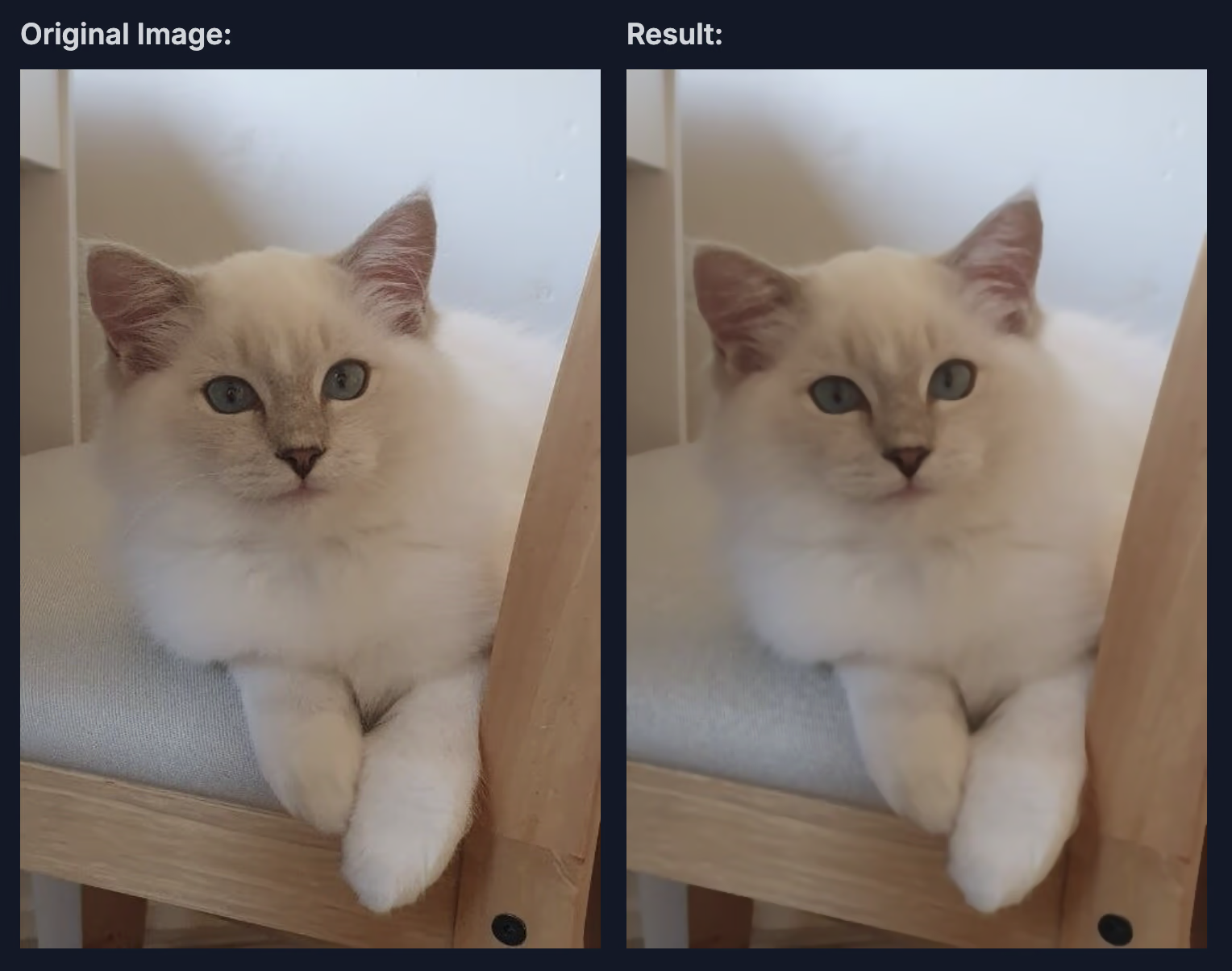
Albumentations의 MedianBlur 변환은 이미지에 미디언 블러 효과를 적용하며, 에지를 보존하면서 노이즈를 줄이는 데 특히 유용합니다. 일반적인 블러 방식과 달리 MedianBlur는 미디언 필터를 사용해 에지 주변의 선명도를 유지하면서 솔트 앤 페퍼 노이즈를 효과적으로 제거합니다.
이 통합에서 사용하는 매개변수와 값은 다음과 같습니다:
-
blur_limit: 블러 커널의 최대 크기를 제어하는 매개변수입니다. 이 통합의 기본 범위는 (3, 7)이며, 적절한 정렬을 위해 홀수 값만 허용하고 블러 커널 크기는 3~7픽셀 사이에서 무작위로 선택됩니다.
-
p: 미디언 블러를 적용할 확률을 설정합니다. 여기서 p=0.01이므로 각 이미지에 변환이 적용될 확률은 1%입니다. 이 낮은 확률은 미디언 블러를 드물게 사용하도록 하며, 노이즈가 줄고 에지가 보존된 이미지를 가끔 보여 줌으로써 모델의 일반화 성능 향상에 도움이 됩니다.
아래 이미지는 이미지에 이 증강을 적용한 예를 보여 줍니다.
그레이스케일#
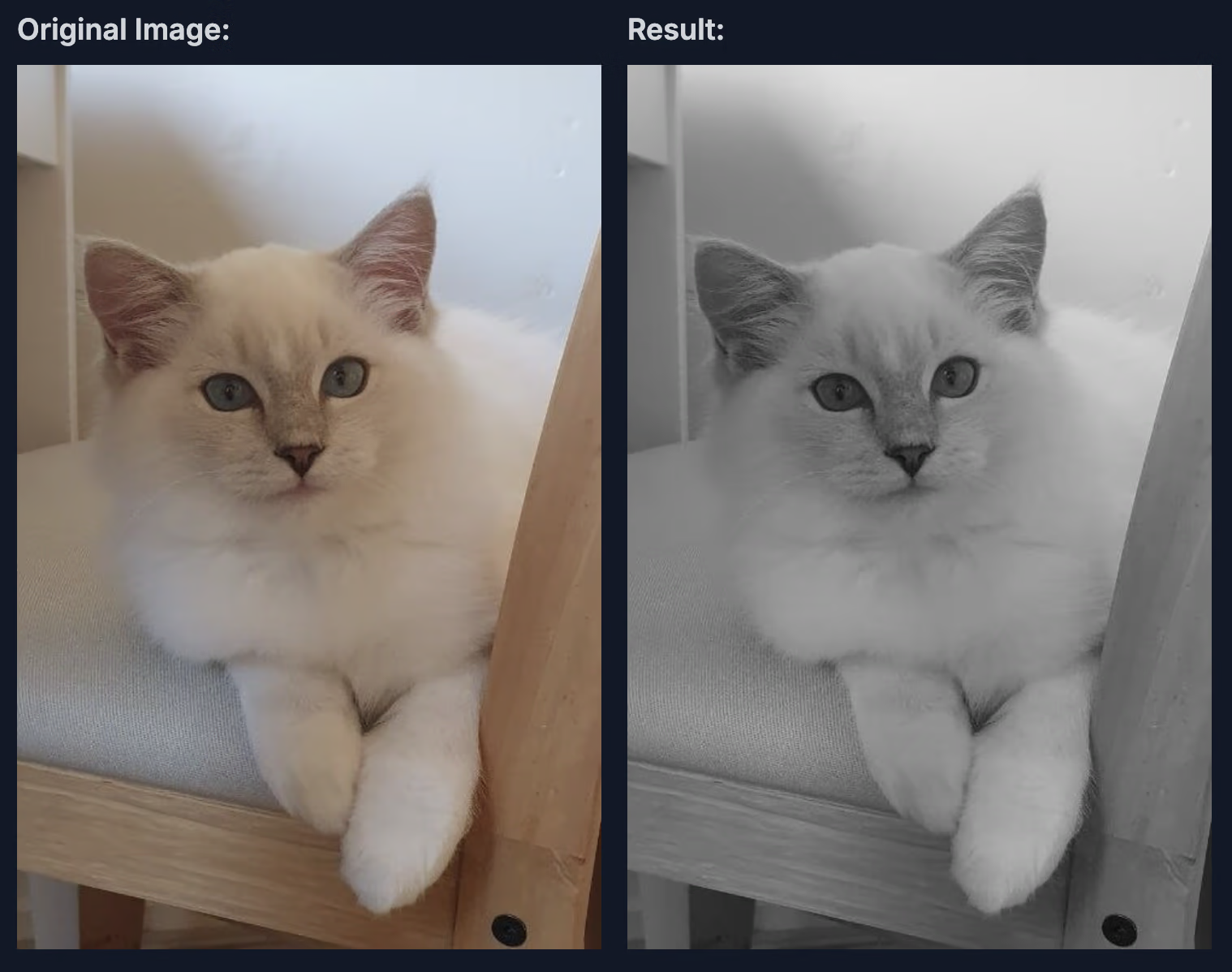
Albumentations의 ToGray 변환은 이미지를 그레이스케일로 변환해 단일 채널 형식으로 축소하고, 필요에 따라 이 채널을 복제해 지정된 출력 채널 수에 맞춥니다. 단순한 평균 계산부터 대비와 밝기를 사실적으로 인식하도록 하는 고급 기법까지 다양한 방법으로 그레이스케일 밝기를 조정할 수 있습니다.
이 통합에서 사용하는 매개변수와 값은 다음과 같습니다:
-
num_output_channels: 출력 이미지의 채널 수를 설정합니다. 값이 1보다 크면 단일 그레이스케일 채널을 복제해 다중 채널 그레이스케일 이미지를 만듭니다. 기본값은 3이며, 동일한 채널 세 개로 구성된 그레이스케일 이미지가 생성됩니다.
-
method: 그레이스케일 변환 방법을 지정합니다. 기본 방법인 "weighted_average"는 사람의 시각적 인식과 밀접하게 일치하는 공식 (0.299R + 0.587G + 0.114B)을 적용해 자연스러운 그레이스케일 효과를 제공합니다. "from_lab", "desaturation", "average", "max" 및 "pca"와 같은 다른 옵션은 속도, 밝기 강조 또는 세부 정보 보존 등 다양한 요구에 따라 그레이스케일 이미지를 만드는 대안을 제공합니다.
-
p: 그레이스케일 변환 적용 빈도를 제어합니다. p=0.01이면 각 이미지를 그레이스케일로 변환할 확률이 1%이므로 컬러 이미지와 그레이스케일 이미지를 섞어 모델의 일반화 성능을 높일 수 있습니다.
아래 이미지는 그레이스케일 변환을 적용한 예를 보여 줍니다.
대비 제한 적응형 히스토그램 평활화(CLAHE)#
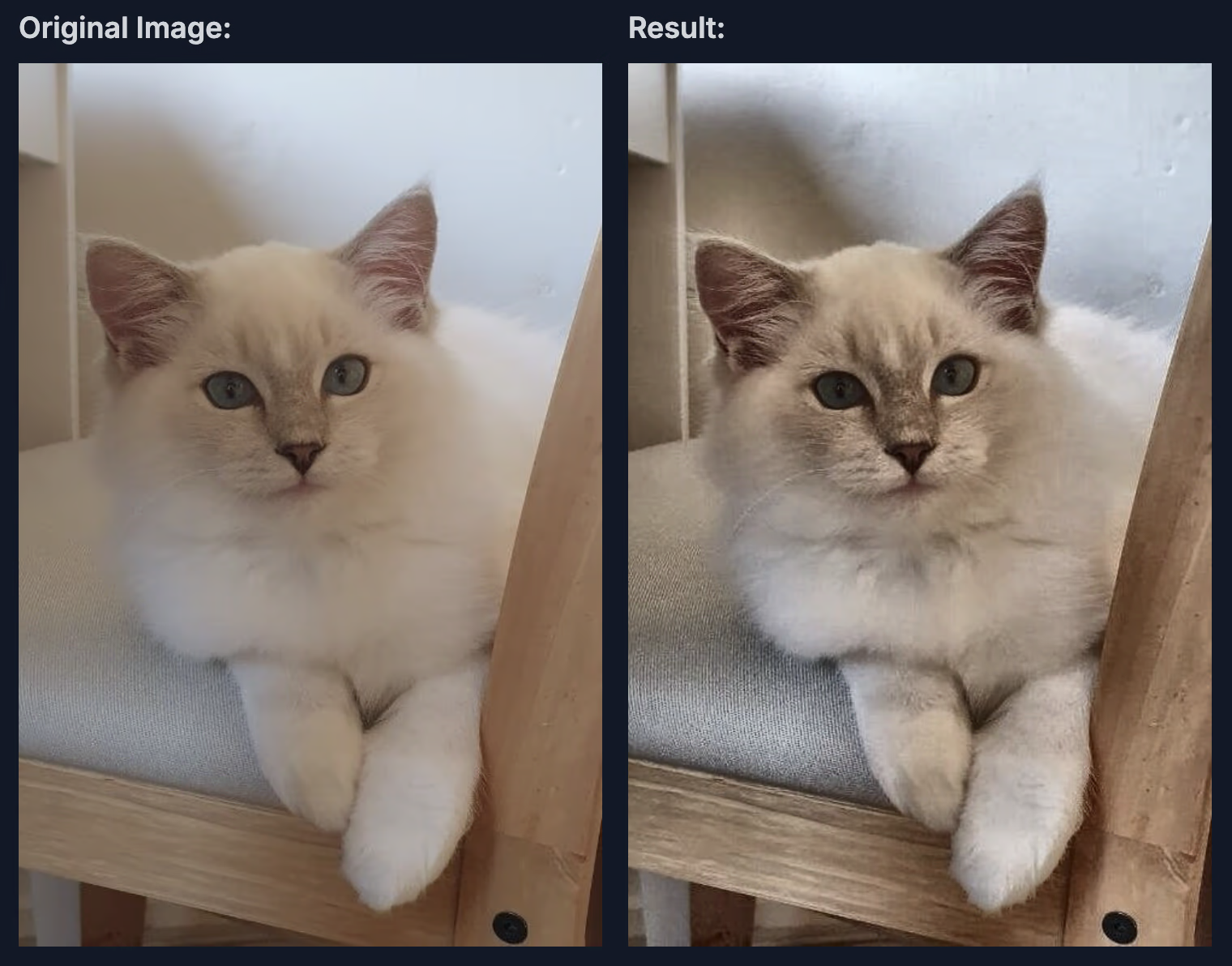
Albumentations의 CLAHE 변환은 대비 제한 적응형 히스토그램 평활화(CLAHE)를 적용합니다. 이 기법은 전체 이미지가 아니라 국부 영역(타일)의 히스토그램을 평활화해 이미지 대비를 높입니다. CLAHE는 균형 잡힌 개선 효과를 제공하므로, 특히 처음부터 대비가 낮은 영역에서 일반 히스토그램 평활화로 인해 발생할 수 있는 과도한 대비 증폭을 방지합니다.
이 통합에서 사용하는 매개변수와 값은 다음과 같습니다:
-
clip_limit: 대비 향상 범위를 제어합니다. 기본 범위는 (1, 4)이며, 각 타일에서 허용되는 최대 대비를 결정합니다. 값이 높을수록 대비가 커지지만 노이즈가 발생할 수도 있습니다.
-
tile_grid_size: 일반적으로 (행, 열)로 지정하는 타일 격자의 크기를 정의합니다. 기본값은 (8, 8)이며, 이미지가 8x8 격자로 나뉜다는 의미입니다. 타일이 작으면 더 국소적으로 조정되고, 타일이 크면 전체 균등화에 가까운 효과가 나타납니다.
-
p: CLAHE 적용 확률입니다. 여기서 p=0.01은 1%의 확률로만 개선 효과를 적용하므로 학습 이미지에 가끔 변화를 주기 위해 대비 조정을 드물게 수행합니다.
아래 이미지는 CLAHE 변환을 적용한 예를 보여 줍니다.
사용자 지정 Albumentations 변환 사용#
기본 Albumentations 통합 기능은 유용한 증강 세트를 제공하지만, 특정 사용 사례에 맞게 변환을 사용자 지정할 수도 있습니다. Ultralytics YOLO26에서는 Python API의 augmentations 매개변수를 통해 맞춤형 Albumentations 변환을 전달할 수 있습니다. 이 섹션의 예제를 사용하려면 Albumentations 1.4.22 이상이 필요합니다.
사용자 지정 변환 정의 방법#
직접 Albumentations 변환 목록을 정의하여 학습 함수에 전달할 수 있습니다. 이렇게 하면 기본 Albumentations 변환이 대체되지만, 다른 모든 YOLO 증강(예: hsv_h, degrees, mosaic 등)은 계속 활성화됩니다.
다음은 고급 변환을 사용하는 예제입니다.
import albumentations as A

from ultralytics import YOLO

# 모델 로드
model = YOLO("yolo26n.pt")

# 다양한 증강 기법으로 사용자 지정 변환 정의
custom_transforms = [
    # 블러 변형
    A.OneOf(
        [
            A.MotionBlur(blur_limit=7, p=1.0),
            A.MedianBlur(blur_limit=7, p=1.0),
            A.GaussianBlur(blur_limit=7, p=1.0),
        ],
        p=0.3,
    ),
    # 노이즈 변형
    A.OneOf(
        [
            A.GaussNoise(std_range=(0.0124, 0.0277), p=1.0),
            A.ISONoise(color_shift=(0.01, 0.05), intensity=(0.1, 0.5), p=1.0),
        ],
        p=0.2,
    ),
    # 색상 및 대비 조정
    A.CLAHE(clip_limit=4.0, tile_grid_size=(8, 8), p=0.5),
    A.RandomBrightnessContrast(brightness_limit=0.3, contrast_limit=0.3, p=0.5),
    A.HueSaturationValue(hue_shift_limit=20, sat_shift_limit=30, val_shift_limit=20, p=0.5),
    # 가림 현상 시뮬레이션
    A.CoarseDropout(num_holes_range=(1, 8), hole_height_range=(8, 32), hole_width_range=(8, 32), fill=0, p=0.2),
]

# 사용자 지정 변환으로 학습
results = model.train(
    data="coco8.yaml",
    epochs=100,
    imgsz=640,
    augmentations=custom_transforms,
)
중요 고려 사항#
사용자 지정 Albumentations 변환을 사용할 때는 다음 사항에 유의하세요.
- 구성: Python API를 통해 사용자 지정 변환 객체를 생성하세요. 직렬화된 변환은 CLI 또는 YAML 구성 파일을 통해 전달할 수도 있으며, 학습을 재개할 때도 사용할 수 있습니다.
- 기본 변환 대체: 사용자 지정 변환은 기본 Albumentations 변환을 완전히 대체합니다. 다른 YOLO 증강은 계속 활성화됩니다.
- 레이블 처리:
A.OneOf또는A.Compose에 중첩된 변환을 포함한 공간 변환은 이미지와 함께 바운딩 박스, 폴리곤, 키포인트, 깊이 또는 시맨틱 마스크를 이동합니다.A.RandomGridShuffle는 폴리곤 또는 키포인트의 위상 구조를 보존할 수 없으므로 세그멘테이션, 포즈, OBB 샘플에서 오류가 발생합니다. - 성능: 일부 변환은 계산 비용이 많이 듭니다. 학습 속도를 모니터링하고 그에 따라 조정하세요.
- 작업 호환성: 사용자 지정 Albumentations 변환은 객체 탐지, 세그멘테이션, 시맨틱 세그멘테이션, 깊이, 포즈, OBB 학습에서 작동하지만, 다른 증강 파이프라인을 사용하는 분류에서는 작동하지 않습니다.
사용자 지정 변환의 활용 사례#
애플리케이션마다 서로 다른 증강 전략이 효과적입니다.
- 의료 영상: 탄성 변형, 그리드 왜곡, 특수 노이즈 패턴을 사용하세요.
- 항공/위성 영상: 다양한 고도, 기상 조건, 조명 각도를 시뮬레이션하는 변환을 적용하세요.
- 저조도 환경: 까다로운 조명 조건에서도 강건한 모델을 학습할 수 있도록 노이즈 추가와 밝기 조정을 중점적으로 적용하세요.
- 산업 검사: 품질 관리 애플리케이션을 위해 텍스처 변형과 결함 시뮬레이션을 추가하세요.
사용 가능한 변환과 매개변수의 전체 목록은 Albumentations 문서를 참조하세요.
YOLO26에서 사용자 지정 Albumentations 변환을 사용하는 방법과 모범 사례에 대한 자세한 예제는 YOLO 데이터 증강 가이드를 참조하세요.
Albumentations에 대해 더 알아보기#
Albumentations에 대해 더 자세히 알아보고 싶다면, 심층적인 안내와 예제를 제공하는 다음 자료를 확인하세요.
-
Albumentations 문서: 공식 문서에서 지원되는 다양한 변환과 고급 사용 기법을 확인할 수 있습니다.
-
Ultralytics Albumentations API 참조: 이 통합 기능을 구현하는 클래스에 대한 자세한 내용은 여기를 참조하세요.
-
Albumentations GitHub 저장소: 저장소에는 증강 사용자 지정을 시작하는 데 도움이 되는 예제, 벤치마크, 토론이 포함되어 있습니다.
핵심 요약#
이 가이드에서는 이미지 증강을 위한 Python 라이브러리인 Albumentations의 주요 측면을 살펴보았습니다. 다양한 변환과 최적화된 성능을 설명하고, 다음 YOLO26 프로젝트에서 사용하는 방법을 안내했습니다.
자주 묻는 질문#
Albumentations는 YOLO26에 통합되며 패키지가 설치되어 있으면 학습 중 자동으로 적용됩니다. 시작하는 방법은 다음과 같습니다.
# 필수 패키지 설치
# !pip install albumentations ultralytics
from ultralytics import YOLO

# 자동 증강을 사용하여 모델 로드 및 학습
model = YOLO("yolo26n.pt")
model.train(data="coco8.yaml", epochs=100)
기본 통합 기능은 블러, 미디언 블러, 그레이스케일 변환, CLAHE를 적용하며, 각 변환의 확률은 1%로 낮게 설정되어 있어 학습에 큰 영향을 주지 않으면서 간헐적인 변화를 추가합니다.
Albumentations는 다음과 같은 여러 이유로 두드러집니다.
- 성능: OpenCV와 NumPy를 기반으로 구축되었으며 SIMD 최적화를 통해 빠르게 처리합니다.
- 유연성: 픽셀 수준, 공간 수준, 혼합 수준 증강 전반에 걸쳐 70가지 이상의 변환을 지원합니다.
- 호환성: PyTorch 및 TensorFlow와 같은 널리 사용되는 프레임워크와 호환됩니다.
- 신뢰성: 광범위한 테스트 스위트를 통해 감지되지 않는 데이터 손상을 방지합니다.
- 사용 편의성: 모든 유형의 증강을 위한 단일 통합 API를 제공합니다.
Albumentations는 다음을 포함한 다양한 컴퓨터 비전 작업의 성능을 향상합니다.
- 객체 탐지: 조명, 스케일, 방향의 변화에 대한 모델의 강건성을 높입니다.
- 인스턴스 세그멘테이션: 다양한 변환을 통해 마스크 예측 정확도를 높입니다.
- 포즈 추정: 모델이 다양한 시점과 조명 조건에 적응하도록 지원합니다.
- 방향성 바운딩 박스 탐지: 항공 영상과 회전된 객체 이미지에 색상 및 노이즈 변화를 추가합니다.
다양한 증강 옵션을 제공하는 이 라이브러리는 강건한 모델 성능이 필요한 비전 작업에 유용합니다. Ultralytics YOLO26에서 분류 학습은 자체 torchvision 기반 증강 파이프라인을 사용하며 Albumentations 변환을 적용하지 않습니다.


댓글19
질문을 하거나 결과를 공유하거나 다른 사람을 도와주세요.
anushka-kore
Is there a way that we can define more custom albumentations transforms to be applied during model train? If yes, will they also change the bounding box coords accordingly if they are spatial transforms?
manuelescobar5036
The albumentations transforms are defined in the ultralytics/data/augment.py file. There you can find the following function that returns the transforms to be applied to the images, which includes the Albumentations transform.
Then, in the same file you can find the Albumentations class which defines the pipeline. In this pipeline you can add the new transforms that you want.
Bouding boxes are changed accordingly to their spatial transforms. This is done when you pass bbox_params to the Albumentations pipeline.
 Glenn JocherUltralytics(수정됨)
@anushka-kore Yes. Pass your own Albumentations transforms to training with the
augmentationsargument (Python only):import albumentations as A from ultralytics import YOLO model = YOLO("yolo26n.pt") model.train(data="coco8.yaml", augmentations=[A.Blur(p=0.01), A.CLAHE(p=0.01)])Spatial transforms (rotation, flips, perspective, etc.) are applied together with the bounding boxes, which are updated automatically through Albumentations' bbox handling in YOLO format. Non-spatial transforms like color adjustments only change the image. See the Albumentations integration guide for details.
Thanks a lot for the inputs @deox1994 and @glenn-jocher! I have made it work👍🏻
Hey @glenn-jocher and @deox1994, I later realised that simply defining my list of custom transform in the augment.py file is not working. This is the part I changed in the augment.py file (original ones are commented out)-
        T = [
            #A.Blur(p=0.01),
            #A.MedianBlur(p=0.01),
            #A.ToGray(p=0.01),
            #A.CLAHE(p=0.01),
            A.RandomBrightnessContrast(p=0.2),
            #A.RandomGamma(p=0.0),
            #A.ImageCompression(quality_range=(75, 100), p=0.0),
            A.HorizontalFlip(p=0.5),
            A.VerticalFlip(p=0.5),
            A.Rotate(limit=30, p=0.5),
            A.GaussianBlur(p=0.2),
            A.GaussNoise(p=0.2),
        ]
For your reference, this is the error I get, you could view the list of albumentation transforms I applied here as well- ..... Transferred 1009/1015 items from pretrained weights Freezing layer 'model.23.dfl.conv.weight' AMP: running Automatic Mixed Precision (AMP) checks... AMP: checks passed ✅ train: Scanning /home/xxx/dataset_MIP_clean/train/labels.cache... 831 images, 73 backgrounds, 0 corrupt: 100%|██████████| 831/831 [00:00<?, ?it/s] albumentations: RandomBrightnessContrast(p=0.2, brightness_by_max=True, brightness_limit=(-0.2, 0.2), contrast_limit=(-0.2, 0.2), ensure_safe_range=False), HorizontalFlip(p=0.5), VerticalFlip(p=0.5), Rotate(p=0.5, border_mode=0, crop_border=False, fill=0.0, fill_mask=0.0, interpolation=1, limit=(-30.0, 30.0), mask_interpolation=0, rotate_method='largest_box'), GaussianBlur(p=0.2, blur_limit=(0, 0), sigma_limit=(0.5, 3.0)), GaussNoise(p=0.2, mean_range=(0.0, 0.0), noise_scale_factor=1.0, per_channel=True, std_range=(0.2, 0.44)) val: Scanning /home/xxx/dataset_MIP_clean/val/labels.cache... 210 images, 13 backgrounds, 0 corrupt: 100%|██████████| 210/210 [00:00<?, ?it/s] Plotting labels to /home/xxx/yolov11_predictions/test4/labels.jpg... optimizer: 'optimizer=auto' found, ignoring 'lr0=0.01' and 'momentum=0.937' and determining best 'optimizer', 'lr0' and 'momentum' automatically... optimizer: AdamW(lr=0.000769, momentum=0.9) with parameter groups 167 weight(decay=0.0), 174 weight(decay=0.0005), 173 bias(decay=0.0) Image sizes 640 train, 640 val Using 8 dataloader workers Logging results to /home/xxx/yolov11_predictions/test4 Starting training for 200 epochs...
  Epoch    GPU_mem   box_loss   cls_loss   dfl_loss  Instances       Size
  1/200      15.4G      5.502      51.38      2.745         17        640:  10%|▉         | 5/52 [00:02<00:22,  2.07it/s]
Traceback (most recent call last): File "/home/xxx/yolo_train.py", line 149, in train_yolo(output_dir) File "/home/xxx/yolo_train.py", line 116, in train_yolo results = model.train( ^^^^^^^^^^^^ File "/home/xxx/env/lib/python3.12/site-packages/ultralytics/engine/model.py", line 791, in train self.trainer.train() File "/home/xxx/env/lib/python3.12/site-packages/ultralytics/engine/trainer.py", line 211, in train self._do_train(world_size) File "/home/xxx/env/lib/python3.12/site-packages/ultralytics/engine/trainer.py", line 366, in _do_train for i, batch in pbar: ^^^^ File "/home/xxx/env/lib/python3.12/site-packages/tqdm/std.py", line 1178, in iter for obj in iterable: ^^^^^^^^ File "/home/xxx/env/lib/python3.12/site-packages/ultralytics/data/build.py", line 59, in iter yield next(self.iterator) ^^^^^^^^^^^^^^^^^^^ File "/home/xxx/env/lib/python3.12/site-packages/torch/utils/data/dataloader.py", line 708, in next data = self._next_data() ^^^^^^^^^^^^^^^^^ File "/home/xxx/env/lib/python3.12/site-packages/torch/utils/data/dataloader.py", line 1455, in _next_data return self._process_data(data) ^^^^^^^^^^^^^^^^^^^^^^^^ File "/home/xxx/env/lib/python3.12/site-packages/torch/utils/data/dataloader.py", line 1505, in _process_data data.reraise() File "/home/xxx/env/lib/python3.12/site-packages/torch/_utils.py", line 733, in reraise raise exception RuntimeError: Caught RuntimeError in DataLoader worker process 5. Original Traceback (most recent call last): File "/home/xxx/env/lib/python3.12/site-packages/torch/utils/data/_utils/worker.py", line 349, in _worker_loop data = fetcher.fetch(index) # type: ignore[possibly-undefined] ^^^^^^^^^^^^^^^^^^^^ File "/home/xxx/env/lib/python3.12/site-packages/torch/utils/data/_utils/fetch.py", line 55, in fetch return self.collate_fn(data) ^^^^^^^^^^^^^^^^^^^^^ File "/home/xxx/env/lib/python3.12/site-packages/ultralytics/data/dataset.py", line 298, in collate_fn value = torch.cat(value, 0) ^^^^^^^^^^^^^^^^^^^ RuntimeError: Tensors must have same number of dimensions: got 1 and 2
All my transforms are correctly defined, and the spatial transforms (horizontalflip, verticalflip and rotate) exist in the spatial_transforms list. Could you please point where this is going wrong?
supriamir
Hi Glen,
I would like to optimize the hyperparameters using model.tune(). My goal is to identify the most important augmentations from Albumentations.
If I am not mistaken, the default hyperparameter optimization only includes a limited set of augmentation parameters, as described in the following link: https://docs.ultralytics.com/integrations/ray-tune/#tune-method-parameters
Could you advise how I can include and optimize additional Albumentations transforms beyond the default settings?
- Glenn JocherUltralytics
Yes, but not directly through the default
model.tune()search set: custom Albumentations are a Python-onlyaugmentationslist passed tomodel.train(), while the built-in tuner mutates the numericspace, so the usual workflow is to keep one fixedaugmentations=pipeline per tuning run and compare the best result across several candidate pipelines; if you want to search the pipeline itself, use a small custom Ray Tune wrapper aroundmodel.train()instead, and keep the standard YOLO augmentations fixed so you isolate the Albumentations effect—see the hyperparameter tuning guide and the Albumentations integration guide.
UltralyticsAssistantUltralytics
👋 Hello, thank you for your interest in Ultralytics 🚀! We recommend visiting the Docs for guidance—there you’ll find many Python and CLI usage examples, and answers to many common questions.
If this is a 🐛 Bug Report, please provide a minimum reproducible example to help us investigate.
If you have a custom training ❓ Question, please share as much relevant information as possible, including dataset image examples and training logs. Also, make sure to review our Tips for Best Training Results.
You’re welcome to join the Ultralytics community where it fits you best:
- For real-time chat, join us on Discord 🎧
- For in-depth discussions, visit Discourse
- For community sharing, check out our Subreddit
Upgrade
Upgrade to the latest
ultralyticspackage and all requirements in a Python>=3.8 environment with PyTorch>=1.8 to ensure you’re on the latest version:pip install -U ultralyticsEnvironments
YOLO can be run in any of the following up-to-date verified environments (with all dependencies like CUDA/CUDNN, Python, and PyTorch preinstalled):
- Notebooks with free GPU:


- Google Cloud Deep Learning VM. See GCP Quickstart Guide
- Amazon Deep Learning AMI. See AWS Quickstart Guide
- Docker Image. See Docker Quickstart Guide
Status

If this badge is green, all Ultralytics CI tests are currently passing. These tests confirm correct operation of all YOLO Modes and Tasks on macOS, Windows, and Ubuntu every 24 hours and on every commit.
This is an automated response 🤖. An Ultralytics engineer will assist you here soon!
- Glenn JocherUltralytics
欢迎来到 Ultralytics 中文文档的 Albumentations 集成讨论区!如果您对使用 Albumentations 来增强 YOLO11 训练数据有任何问题或想法,请在这里提出。
Albumentations 与 YOLO11 的集成非常简便,只需安装
albumentations包,就会在训练过程中自动应用多种图像增强技术,如模糊、中值模糊、灰度转换和 CLAHE,帮助您的模型更好地适应各种真实场景。您是否在特定项目中使用过 Albumentations?或者您对如何最佳配置这些增强技术有疑问?请随时在这里分享您的经验或提出问题,Ultralytics 团队将很乐意提供帮助!
👋 Hello, thank you for your interest in Ultralytics 🚀! We recommend visiting the Docs for guidance on integrations like Albumentations with YOLO11. You can also review many Python and CLI examples, and frequently asked questions may already be addressed there.
If this is a 🐛 Bug Report, please include a minimum reproducible example to help us investigate further.
If you have a custom training ❓ Question, please provide detailed info such as dataset image samples, training logs, and confirm you are following our Tips for Best Training Results.
Join the Ultralytics community wherever you prefer—real-time chat on Discord 🎧, in-depth discussions on Discourse, or knowledge-sharing on our Subreddit.
Upgrade
Upgrade to the latest
ultralyticspackage and all requirements in a Python>=3.8 environment with PyTorch>=1.8 to ensure your issue is not already fixed in the latest version:pip install -U ultralyticsEnvironments
YOLO may be run in any of the following verified and up-to-date environments (with all dependencies including CUDA/CUDNN, Python and PyTorch preinstalled):
- Notebooks with free GPU:
- Google Cloud Deep Learning VM. See GCP Quickstart Guide
- Amazon Deep Learning AMI. See AWS Quickstart Guide
- Docker Image. See Docker Quickstart Guide
Status
If this badge is green, all Ultralytics CI tests are currently passing. These tests verify correct operation of all YOLO Modes and Tasks on macOS, Windows, and Ubuntu every 24 hours and on every commit.
This is an automated response. An Ultralytics engineer will review and assist you soon!
- Glenn JocherUltralytics
Bonjour! N'hésitez pas à poser vos questions sur l'intégration d'Albumentations avec YOLO11 dans cette discussion. Cette intégration vous permet d'améliorer automatiquement votre jeu de données pendant l'entraînement avec diverses transformations comme le flou, le flou médian, la conversion en niveaux de gris et CLAHE.
L'avantage principal est sa simplicité d'utilisation - il suffit d'installer les packages requis et les augmentations sont appliquées automatiquement pendant l'entraînement:
pip install albumentations ultralyticsSi vous rencontrez des difficultés avec cette intégration ou si vous avez des questions sur l'augmentation de données pour améliorer les performances de vos modèles YOLO11, n'hésitez pas à les partager ici!
- Notebooks with free GPU:
Dear Ultralytics team,
I’m working on a project focused on detecting the behavior of workers in underground mines. The classes and the number of labels per class in the training set are as follows:
- Sitting → 2500
- Standing → 9000
- Operation → 700
- Lean Against → 4000
- Tumble → 400
Since the dataset is imbalanced, I would like to apply data augmentation to avoid overfitting and improve accuracy. While researching YOLO's data augmentation capabilities, a few questions came up:
- As far as I understand, YOLO currently supports two methods for performing data augmentation:
- Modifying individual hyperparameters such as hsv_h, hsv_s, hsv_v, degrees, translate, etc., in the ultralytics/cfg/default.yaml file (does not require the Albumentations Python Library).
- Using the Albumentations Python Library (previously installed).
Is this correct? If so, what are the differences between the two methods, and which one is currently recommended?
-
Considering both options from question 1, does YOLO apply data augmentation only to images from the classes with less labels, or to images from all classes? I ask because if I have an imbalanced dataset and YOLO applies data augmentation to images from all classes, the imbalance would remain, wouldn’t it?
-
If I choose to use an older YOLO model, such as yolov8n.yaml, and I have Albumentations installed, will Albumentations-based data augmentation be applied during training?
-
What other suggestions would you recommend for dealing with imbalanced classes?
safwene-bahroun
Hello @glenn-jocher , Do you can , please , answer to these questions , because the same questions and problem.
THANKS
- Glenn JocherUltralytics
@deox1994 Thanks for your detailed questions about data augmentation in YOLO for handling your imbalanced mining worker dataset. Let me address each point:
- Yes, you're correct about the two augmentation approaches:
- Built-in YOLO augmentations (hsv_h, translate, scale, etc.) which are always available
- Albumentations integration which activates automatically when the library is installed
The key difference is that built-in augmentations focus primarily on geometric and color transformations, while Albumentations adds more specialized transformations like blur, grayscale, and CLAHE with carefully tuned probabilities (typically 0.01 as shown in the reference code). Both work together complementarily rather than being exclusive options.
-
Both augmentation methods apply to all images regardless of class. To address your imbalance specifically, consider:
- Using a weighted loss function
- Implementing class-aware sampling during training
- Creating custom data pipeline that applies additional augmentations to underrepresented classes
-
Yes, if Albumentations is installed, it will be automatically applied when training YOLOv8 models too. The integration is part of the Ultralytics framework, not specific to YOLO11.
-
For handling imbalanced classes beyond augmentation:
- Apply weighted loss based on inverse class frequency
- Use focal loss which naturally handles class imbalance better
- Consider different evaluation metrics (precision/recall per class rather than just mAP)
- Experiment with undersampling majority classes or oversampling minority classes
You can find implementation details for these approaches in the data augment reference documentation.
- Yes, you're correct about the two augmentation approaches:
Good morning ,@glenn-jocher, do you can help me ?
{ "total_images": 39152, "total_detections": 70910, "instances_per_class": { "Dress": 52999, "Skirt": 1259, "Handbag": 2495, "High heels": 3124, "Swimwear": 10079, "Miniskirt": 954 } } i will train this with yolo11n.pt and with albumentation the code : from ultralytics import YOLO import torch
def main(): # Load a pretrained YOLO model model = YOLO("yolo11n.pt") # Set device device = "cuda" if torch.cuda.is_available() else "cpu" print(f"Using device: {device}")
if device == "cuda":
    print(f"GPU name: {torch.cuda.get_device_name(0)}")

# Debug: Print dataset configuration
print("Training with dataset: OpenImagesV7-women.yaml")

# Train the model with enhanced hyperparameters
results = model.train(
data="OpenImagesV7-woman.yaml",
epochs=150,
imgsz=640,
device=device,
batch=16,
optimizer ="auto"
)
Dataset configuration
path: ../datasets/open-images-v7 train: c:\Users\GIGABYTE\datasets\open-images-v7\train val: C:/Users/GIGABYTE/datasets/open-images-v7/val
nc: 6 names: 0: Dress 1: High heels 2: Miniskirt 3: Skirt 4: Swimwear 5: Handbag
Hyperparameters for extreme imbalance
loss: cls_weight: [0.3, 0.5, 7.0, 5.0, 0.4, 0.6] # Calculated weights below box: 0.05 obj: 1.0 label_smoothing: 0.1
Strategic augmentation
augment:
For rare classes (Miniskirt, Skirt)
copy_paste: 0.7 # High frequency for rare classes paste_classes: [2, 3] # Only Miniskirt(class2)/Skirt(class3) paste_scale: [0.3, 0.7] # Realistic resizing of pasted objects
General augmentations (applied to all)
mosaic: 1.0 # Helps context learning mixup: 0.05 # Reduced to avoid label confusion fliplr: 0.5 hsv_h: 0.015 # Mild color variation degrees: 5.0 # Small rotation for fashion items
Training parameters
batch: 16 # Match GPU capacity accumulate: 4 # Simulates batch=64 epochs: 150 # Longer training for rare classes patience: 50 # Early stopping if no improveme
but i trained untill now :
Epoch GPU_mem box_loss cls_loss dfl_loss Instances Size 104/150 2.92G 1.026 0.9478 1.206 55 640: 100%|██████████| 2447/2447 [07:51<00:00, Class Images Instances Box(P R mAP50 mAP50-95): 100%|██████████| 32/32 [00:06 all 1016 1987 0.581 0.525 0.536 0.423Can you help me please to reach all metrics above 0.8
THANKS
hillsonghimire
Even when I turned off augment=False, albumentation-related operations were still performed in yolo11. How to completely turn it off/disable?
- Glenn JocherUltralytics
@hillsonghimire to completely disable Albumentations augmentations in YOLO11, uninstall the Albumentations package since its presence automatically enables the integration. Run
pip uninstall albumentationsand verify it's removed from your environment. This will prevent any Albumentations transformations from being applied regardless of other settings. For more details, see the Albumentations integration guide.
DP1701
Thanks for this explanation. But if I understand correctly, not all functions of Albuminations are directly supported, or am I misunderstanding?
The explanation says: The integration includes optimized augmentations like blur, median blur, grayscale conversion, and CLAHE with carefully tuned probabilities to enhance model performance.
So only blur, median blur, grayscale conversion and CLAHE are applied and the others cannot be individually selected and adjusted?
- Glenn JocherUltralytics(수정됨)
The integration with Albumentations in YOLO11 automatically applies specific augmentations like blur, median blur, grayscale conversion, and CLAHE. While these are the default transformations used to enhance model performance, you can pass your own Albumentations transforms to
model.train()with theaugmentationsargument (Python only).
