YOLO26 모델용 MNN 내보내기 및 배포#
MNN#
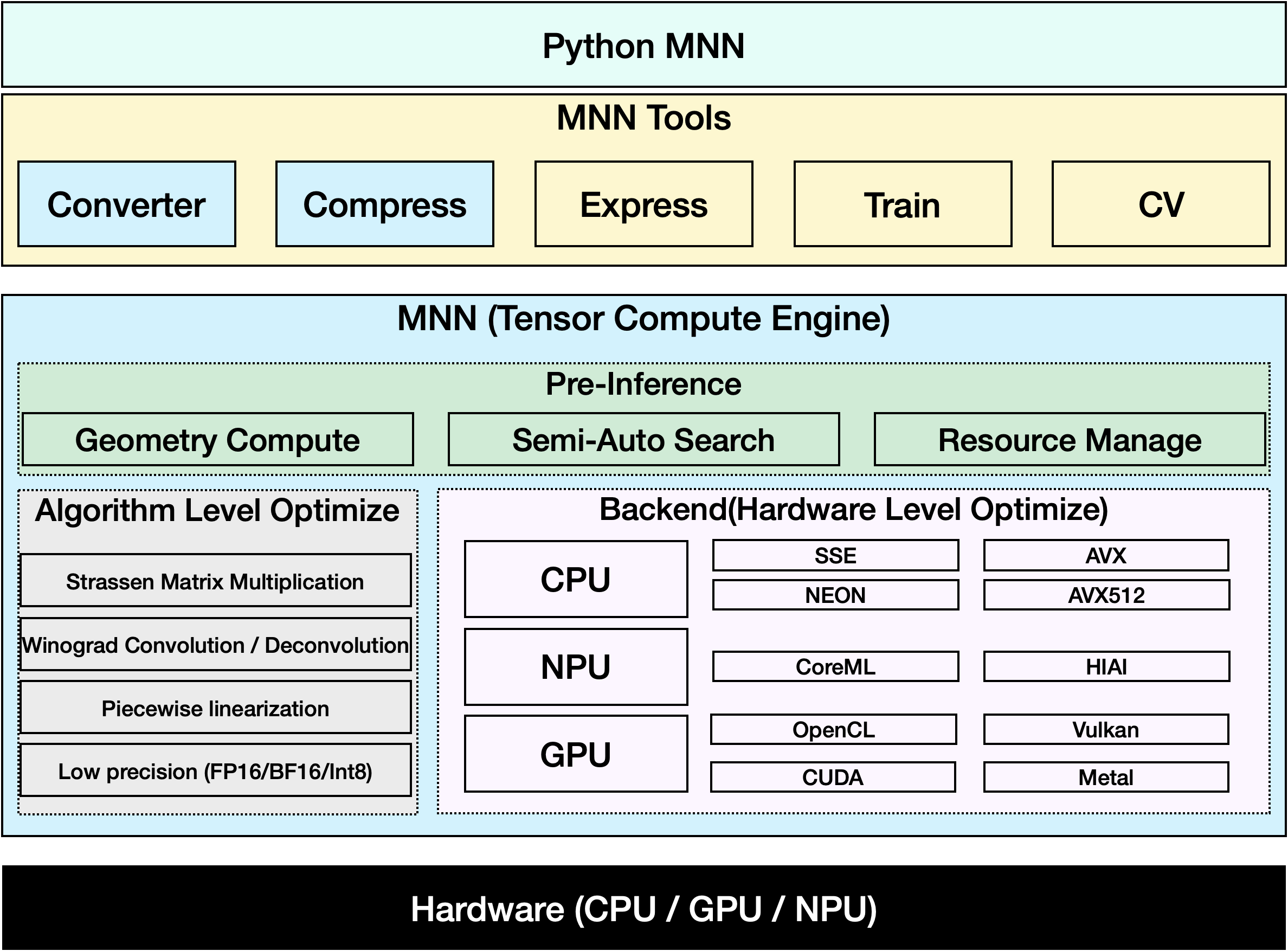
MNN은 효율성이 높고 경량인 딥러닝 프레임워크입니다. 딥러닝 모델의 추론과 학습을 지원하며, 기기 내 추론 및 학습에서 업계 최고 수준의 성능을 제공합니다. 현재 MNN은 Taobao, Tmall, Youku, DingTalk, Xianyu 등을 포함한 Alibaba Inc의 30개 이상의 앱에 통합되어 있으며, 라이브 방송, 짧은 동영상 캡처, 검색 추천, 이미지 기반 제품 검색, 인터랙티브 마케팅, 지분 분배, 보안 위험 제어 등 70개 이상의 사용 사례를 지원합니다. 또한 MNN은 IoT와 같은 임베디드 기기에서도 사용됩니다.
시청: Ultralytics YOLO26을 MNN 형식으로 내보내는 방법 | 모바일 디바이스에서 추론 속도 향상 📱
지원 작업#
MNN 내보내기는 Ultralytics의 7가지 작업을 모두 지원합니다. 시맨틱 세그멘테이션과 깊이 추정은 해당 헤드가 포함된 유일한 모델 제품군인 YOLO26에서만 사용할 수 있습니다.
MNN으로 내보내기: YOLO26 모델 변환#
Ultralytics YOLO 모델을 MNN 형식으로 변환하면 모델 호환성과 배포 유연성을 높일 수 있습니다. 이 변환을 통해 모바일 및 임베디드 환경에 맞게 모델을 최적화하여 리소스가 제한된 기기에서도 효율적으로 실행할 수 있습니다.
설치#
필수 패키지를 설치하려면 다음을 실행하세요:
# Install the required package for YOLO26 and MNN
pip install ultralytics
pip install MNN사용법#
모든 Ultralytics YOLO26 모델은 별도의 설정 없이 내보내기를 지원하도록 설계되어 있어 원하는 배포 워크플로에 쉽게 통합할 수 있습니다. 애플리케이션에 가장 적합한 설정을 선택하려면 지원되는 내보내기 형식 및 구성 옵션 전체 목록을 확인하세요.
MNN 형식은 내보내기, 예측, 검증 모드를 지원합니다. 모델을 내보낸 다음 내보낸 모델을 로드하여 추론을 실행하거나 정확도를 검증합니다.
from ultralytics import YOLO

# YOLO26 모델 로드
model = YOLO("yolo26n.pt")

# 모델을 MNN 형식으로 내보내기
model.export(format="mnn") # 'yolo26n.mnn' 생성from ultralytics import YOLO
# 내보낸 MNN 모델 로드
model = YOLO("yolo26n.mnn")
# 추론 실행
results = model("https://ultralytics.com/images/bus.jpg")from ultralytics import YOLO
# 내보낸 MNN 모델 로드
model = YOLO("yolo26n.mnn")
# COCO8 데이터셋에서 정확도 검증
metrics = model.val(data="coco8.yaml")내보내기 인수#
| 인수 | 유형 | 기본값 | 설명 |
|---|---|---|---|
format | str | 'mnn' | 내보낸 모델의 대상 형식으로, 다양한 배포 환경과의 호환성을 정의합니다. |
imgsz | int 또는 tuple | 640 | 모델 입력에 사용할 이미지 크기입니다. 정사각형 이미지에는 정수를 사용하고, 특정 크기에는 튜플 (height, width)을 사용할 수 있습니다. |
quantize | int 또는 str | None | 양자화 정밀도: 16(FP16) 또는 8(INT8)은 내보낸 가중치 크기를 줄입니다. 32/미설정 상태에서는 FP32 가중치를 내보내지만, Ultralytics의 MNNBackend은 여전히 FP32가 아닌 low 정밀도로 실행됩니다. 더 이상 사용되지 않는 half/int8 플래그를 대체합니다. |
simplify | bool | True | onnxslim을 사용하여 중간 ONNX 그래프를 간소화합니다. |
opset | int | None | 중간 ONNX 그래프의 ONNX opset 버전을 지정합니다. 설정하지 않으면 지원되는 최신 버전을 사용합니다. |
batch | int | 1 | 내보내기 모델의 배치 추론 크기 또는 predict 모드에서 내보낸 모델이 동시에 처리할 최대 이미지 수를 지정합니다. |
dynamic | bool | False | 동적 입력 이미지 크기를 활성화합니다. nms=True과 함께 사용할 수 없습니다. |
nms | bool, 선택 사항 | None | 원시 출력(None, 기본값), 내장 NMS(True) 또는 NMS가 없는 헤드(False)를 선택합니다. 내장 NMS는 dynamic=False을 사용하여 detect 및 pose 작업을 지원합니다. |
device | str | None | 내보내기에 사용할 장치를 지정합니다. GPU(device=0), CPU(device=cpu), Apple 실리콘용 MPS(device=mps)를 사용할 수 있습니다. |
내보내기 프로세스에 관한 자세한 내용은 내보내기에 관한 Ultralytics 문서 페이지를 참조하세요.
MNN 전용 추론#
YOLO26 추론 및 전처리에 MNN만 사용하는 함수가 구현되어 있으며, 어떤 시나리오에서든 쉽게 배포할 수 있도록 Python 및 C++ 버전이 제공됩니다.
import argparse

import MNN
import MNN.cv as cv2
import MNN.numpy as np

def inference(model, img, precision, backend, thread):
    config = {}
    config["precision"] = precision
    config["backend"] = backend
    config["numThread"] = thread
    rt = MNN.nn.create_runtime_manager((config,))
    # net = MNN.nn.load_module_from_file(model, ['images'], ['output0'], runtime_manager=rt)
    net = MNN.nn.load_module_from_file(model, [], [], runtime_manager=rt)
    original_image = cv2.imread(img)
    ih, iw, _ = original_image.shape
    length = max((ih, iw))
    scale = length / 640
    image = np.pad(original_image, [[0, length - ih], [0, length - iw], [0, 0]], "constant")
    image = cv2.resize(
        image, (640, 640), 0.0, 0.0, cv2.INTER_LINEAR, -1, [0.0, 0.0, 0.0], [1.0 / 255.0, 1.0 / 255.0, 1.0 / 255.0]
    )
    image = image[..., ::-1]  # BGR을 RGB로 변환
    input_var = image[None]
    input_var = MNN.expr.convert(input_var, MNN.expr.NC4HW4)
    output_var = net.forward(input_var)
    output_var = MNN.expr.convert(output_var, MNN.expr.NCHW)
    output_var = output_var.squeeze()
    # output_var shape: [84, 8400]; 84는 [cx, cy, w, h, prob * 80]을 의미합니다.
    cx = output_var[0]
    cy = output_var[1]
    w = output_var[2]
    h = output_var[3]
    probs = output_var[4:]
    # [cx, cy, w, h] -> [x0, y0, x1, y1]
    x0 = cx - w * 0.5
    y0 = cy - h * 0.5
    x1 = cx + w * 0.5
    y1 = cy + h * 0.5
    boxes = np.stack([x0, y0, x1, y1], axis=1)
    # 최대 prob 및 idx 가져오기
    scores = np.max(probs, 0)
    class_ids = np.argmax(probs, 0)
    result_ids = MNN.expr.nms(boxes, scores, 100, 0.45, 0.25)
    print(result_ids.shape)
    # nms 결과 box, score, ids
    result_boxes = boxes[result_ids]
    result_scores = scores[result_ids]
    result_class_ids = class_ids[result_ids]
    for i in range(len(result_boxes)):
        x0, y0, x1, y1 = result_boxes[i].read_as_tuple()
        y0 = int(y0 * scale)
        y1 = int(y1 * scale)
        x0 = int(x0 * scale)
        x1 = int(x1 * scale)
        # 패딩이 적용된 경우를 처리하기 위해 원본 이미지 크기로 제한합니다.
        x1 = min(iw, x1)
        y1 = min(ih, y1)
        print(result_class_ids[i])
        cv2.rectangle(original_image, (x0, y0), (x1, y1), (0, 0, 255), 2)
    cv2.imwrite("res.jpg", original_image)

if __name__ == "__main__":
    parser = argparse.ArgumentParser()
    parser.add_argument("--model", type=str, required=True, help="the yolo26 model path")
    parser.add_argument("--img", type=str, required=True, help="the input image path")
    parser.add_argument("--precision", type=str, default="normal", help="inference precision: normal, low, high, lowBF")
    parser.add_argument(
        "--backend",
        type=str,
        default="CPU",
        help="inference backend: CPU, OPENCL, OPENGL, NN, VULKAN, METAL, TRT, CUDA, HIAI",
    )
    parser.add_argument("--thread", type=int, default=4, help="inference using thread: int")
    args = parser.parse_args()
inference(args.model, args.img, args.precision, args.backend, args.thread)요약#
이 가이드에서는 Ultralytics YOLO26 모델을 MNN으로 내보내고 MNN을 사용해 추론하는 방법을 소개합니다. MNN 형식은 엣지 AI 애플리케이션에서 뛰어난 성능을 제공하므로, 리소스가 제한된 기기에 컴퓨터 비전 모델을 배포하는 데 적합합니다.
자세한 사용법은 MNN 문서를 참조하세요.
자주 묻는 질문#
Ultralytics YOLO26 모델을 MNN 형식으로 내보내려면 다음 단계를 따르세요:
내보내기from ultralytics import YOLO # YOLO26 모델 로드 model = YOLO("yolo26n.pt") # MNN 형식으로 내보내기 model.export(format="mnn") # fp32 가중치를 사용하여 'yolo26n.mnn' 생성 model.export(format="mnn", quantize=16) # fp16 가중치를 사용하여 'yolo26n.mnn' 생성 model.export(format="mnn", quantize=8) # int8 가중치를 사용하여 'yolo26n.mnn' 생성자세한 내보내기 옵션은 문서의 내보내기 페이지를 확인하세요.
내보낸 YOLO26 MNN 모델로 예측하려면 YOLO 클래스의
predict함수를 사용합니다.예측from ultralytics import YOLO # YOLO26 MNN 모델 로드 model = YOLO("yolo26n.mnn") # 추론 실행 results = model("https://ultralytics.com/images/bus.jpg") for result in results: result.show() # 화면에 표시 result.save(filename="result.jpg") # 디스크에 저장MNN은 다양한 플랫폼을 지원하며 활용 범위가 넓습니다:
- 모바일: Android, iOS, Harmony.
- 임베디드 시스템 및 IoT 기기: Raspberry Pi 및 NVIDIA Jetson과 같은 기기입니다.
- 데스크톱 및 서버: Linux, Windows, macOS.
YOLO26 모델을 모바일 기기에 배포하려면 다음을 수행합니다:
- Android용 빌드: MNN Android 가이드를 따르세요.
- iOS용 빌드: MNN iOS 가이드를 따르세요.
- Harmony용 빌드: MNN Harmony 가이드를 따르세요.