Ultralytics模态快速入门指南
本指南全面介绍了如何在Modal 上运行Ultralytics ,内容涵盖无服务器GPU 模型训练。
什么是模态?
Modal是一个专为人工智能和机器学习工作负载设计的无服务器云计算平台。它能够自动处理资源配置、弹性扩展和程序执行——您只需在本地编写Python ,Modal 便会在云端运行该代码并提供GPU 。这使得它成为运行 YOLO26 等深度学习模型的理想选择,且无需管理基础设施。
您将学到的内容
- 设置 Modal 并进行身份验证
- 在 Modal 上运行 YOLO26 推理
- 利用 GPU 加速推理
- 在 Modal 上训练 YOLO26 模型
准备工作
- Modal 账户(请访问modal.com 免费注册)
- 本地计算机上已安装Python .9 或更高版本
安装
安装 ModalPython 并进行身份验证:
pip install modal
modal token new
身份验证
字段 modal token new 该命令将打开一个浏览器窗口,用于验证您的 Modal 账户。验证完成后,您即可在终端中运行 Modal 命令。
运行 YOLO26 推理
Python 一个名为 modal_yolo.py 使用以下代码:
"""
Modal + Ultralytics YOLO26 Quickstart
Run: modal run modal_yolo.py.
"""

import modal

app = modal.App("ultralytics-yolo")

image = modal.Image.debian_slim(python_version="3.11").apt_install("libgl1", "libglib2.0-0").pip_install("ultralytics")


@app.function(image=image)
def predict(image_url: str):
    """Run YOLO26 inference on an image URL."""
    from ultralytics import YOLO

    model = YOLO("yolo26n.pt")
    results = model(image_url)

    for r in results:
        print(f"Detected {len(r.boxes)} objects:")
        for box in r.boxes:
            print(f"  - {model.names[int(box.cls)]}: {float(box.conf):.2f}")


@app.local_entrypoint()
def main():
    """Test inference with sample image."""
    predict.remote("https://ultralytics.com/images/bus.jpg")
运行推理:
modal run modal_yolo.py
预期输出:
✓ Initialized. View run at https://modal.com/apps/your-username/main/ap-xxxxxxxx
✓ Created objects.
├── 🔨 Created mount modal_yolo.py
└── 🔨 Created function predict.
Downloading https://github.com/ultralytics/assets/releases/download/v8.4.0/yolo26n.pt to 'yolo26n.pt'...
Downloading https://ultralytics.com/images/bus.jpg to 'bus.jpg'...
image 1/1 /root/bus.jpg: 640x480 4 persons, 1 bus, 377.8ms
Speed: 5.8ms preprocess, 377.8ms inference, 0.3ms postprocess per image at shape (1, 3, 640, 480)

Detected 5 objects:
  - bus: 0.92
  - person: 0.91
  - person: 0.91
  - person: 0.87
  - person: 0.53
✓ App completed.
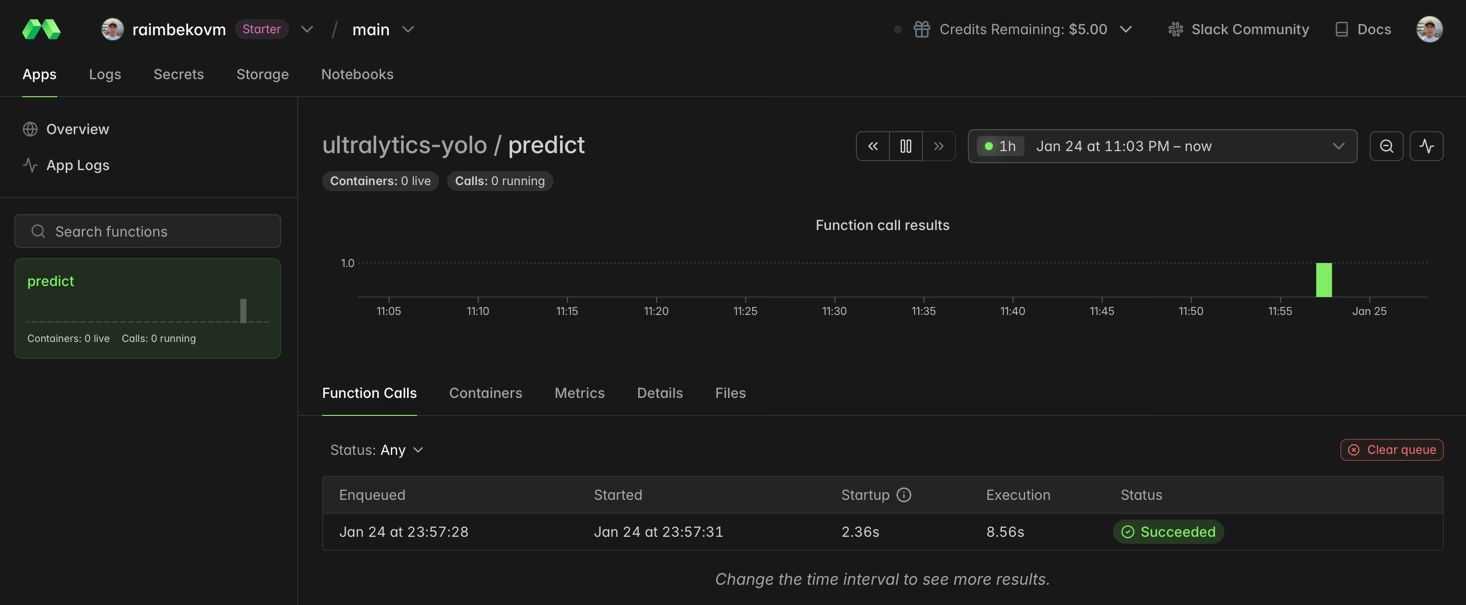
您可以在 Modal 仪表盘中监控函数的执行情况:
利用GPU 加速推理
通过指定 gpu 参数训练 YOLO11 时,可以控制缓存:
@app.function(image=image, gpu="T4")  # Options: "T4", "A10G", "A100", "H100"
def predict_gpu(image_url: str):
    """Run YOLO26 inference on GPU."""
    from ultralytics import YOLO

    model = YOLO("yolo26n.pt")
    results = model(image_url)
    print(results[0].boxes)
| GPU | 内存 | 最适合 |
|---|---|---|
| T4 | 16 GB | 推理、小型模型训练 |
| A10G | 24 GB | 中等难度的培训岗位 |
| A100 | 40 GB | 大规模培训 |
| H100 | 80 GB | 最高性能 |
在Modal上训练YOLO26
训练时,请使用GPU Modal 卷 Python 持久化存储。创建一个名为 train_yolo.py:
import modal

app = modal.App("ultralytics-training")

volume = modal.Volume.from_name("yolo-training-vol", create_if_missing=True)

image = modal.Image.debian_slim(python_version="3.11").apt_install("libgl1", "libglib2.0-0").pip_install("ultralytics")


@app.function(image=image, gpu="T4", timeout=3600, volumes={"/data": volume})
def train():
    """Train YOLO26 model on Modal."""
    from ultralytics import YOLO

    model = YOLO("yolo26n.pt")
    model.train(data="coco8.yaml", epochs=3, imgsz=640, project="/data/runs")


@app.local_entrypoint()
def main():
    train.remote()
跑步训练:
modal run train_yolo.py
成交量持续性
模态卷能在函数执行之间保留数据。训练好的权重将保存到 /data/runs/detect/train/weights/.
恭喜!您已成功在 Modal 上配置了Ultralytics 。如需进一步学习:
- 查阅Ultralytics 文档,了解高级功能
- 了解如何使用您自己的数据集训练自定义模型
- 请参阅Modal 文档以了解高级平台功能
常见问题
如何GPU 我的 YOLO26 工作负载选择合适的GPU ?
对于推理任务,通常使用NVIDIA (16 GB)就足够了,且性价比高。若用于训练或处理 YOLO26x 等更大规模的模型,建议考虑 A10G 或 A100 GPU。
在 Modal 上运行 YOLO26 需要多少费用?
Modal 采用按秒计费的定价模式。大致费率如下:CPU 0.05 美元/小时,T4 约 0.59 美元/小时,A10G 约 1.10 美元/小时,A100 约 2.10 美元/小时。请查看Modal 定价页面以获取最新费率。
我可以使用自己训练的YOLO 吗?
是的!从模态体积中加载自定义模型:
model = YOLO("/data/my_custom_model.pt")
有关训练自定义模型的更多信息,请参阅训练指南。
