Medical Pills Dataset#


The Ultralytics Medical Pills dataset is a proof-of-concept (POC) object detection dataset of 115 labeled images across a single class, pill — 92 for training and 23 for validation. It is built to demonstrate computer vision models for pharmaceutical applications such as quality control, packaging automation, and sorting.
Watch: How to train an Ultralytics YOLO Model on the Medical Pills Detection Dataset in Google Colab
Dataset Structure#
The Medical Pills dataset contains 115 images annotated with a single class, pill, split into two subsets defined by the medical-pills.yaml configuration:
| Split | Images | Description |
|---|---|---|
| Train | 92 | Labeled images for model training |
| Validation | 23 | Held-out images for evaluation and benchmarking |
Explore Medical Pills on Ultralytics Platform to browse the images with their annotation overlays, view the class distribution and bounding-box heatmaps in the Charts tab, and clone it to train your own model in the cloud.
Applications#
Using computer vision for medical pills detection enables automation in the pharmaceutical industry, supporting tasks like:
- Pharmaceutical Sorting: Automating the sorting of pills based on size, shape, or color to enhance production efficiency.
- AI Research and Development: Serving as a benchmark for developing and testing computer vision algorithms in pharmaceutical use cases.
- Digital Inventory Systems: Powering smart inventory solutions by integrating automated pill recognition for real-time stock monitoring and replenishment planning.
- Quality Control: Ensuring consistency in pill production by identifying defects, irregularities, or contamination.
- Counterfeit Detection: Helping identify potentially counterfeit medications by analyzing visual characteristics against known standards.
Dataset YAML#
The medical-pills.yaml file defines the dataset configuration — the dataset paths, class names, and other metadata. It is maintained in the Ultralytics repository at https://github.com/ultralytics/ultralytics/blob/main/ultralytics/cfg/datasets/medical-pills.yaml.
# Ultralytics 🚀 AGPL-3.0 License - https://ultralytics.com/license

# Medical-pills dataset by Ultralytics
# Documentation: https://docs.ultralytics.com/datasets/detect/medical-pills
# Example usage: yolo train data=medical-pills.yaml
# parent
# ├── ultralytics
# └── datasets
#     └── medical-pills ← downloads here (8.19 MB)

# Train/val/test sets as 1) dir: path/to/imgs, 2) file: path/to/imgs.txt, or 3) list: [path/to/imgs1, path/to/imgs2, ..]
path: medical-pills # dataset root dir
train: images/train # train images (relative to 'path') 92 images
val: images/val # val images (relative to 'path') 23 images

# Classes
names:
  0: pill

# Download script/URL (optional)
download: https://github.com/ultralytics/assets/releases/download/v0.0.0/medical-pills.zipUsage#
To train a YOLO26n model on the Medical Pills dataset for 100 epochs with an image size of 640, use the following examples. For detailed arguments, refer to the model's Training page.
from ultralytics import YOLO

# Load a model
model = YOLO("yolo26n.pt")  # load a pretrained model (recommended for training)

# Train the model
results = model.train(data="medical-pills.yaml", epochs=100, imgsz=640)from ultralytics import YOLO
# Load a model
model = YOLO("path/to/best.pt") # load a fine-tuned model
# Inference using the model
results = model.predict("https://ultralytics.com/assets/medical-pills-sample.jpg")Sample Images and Annotations#
The Medical Pills dataset features labeled images showcasing the diversity of pills. Below is an example of a mosaiced training batch from the dataset:
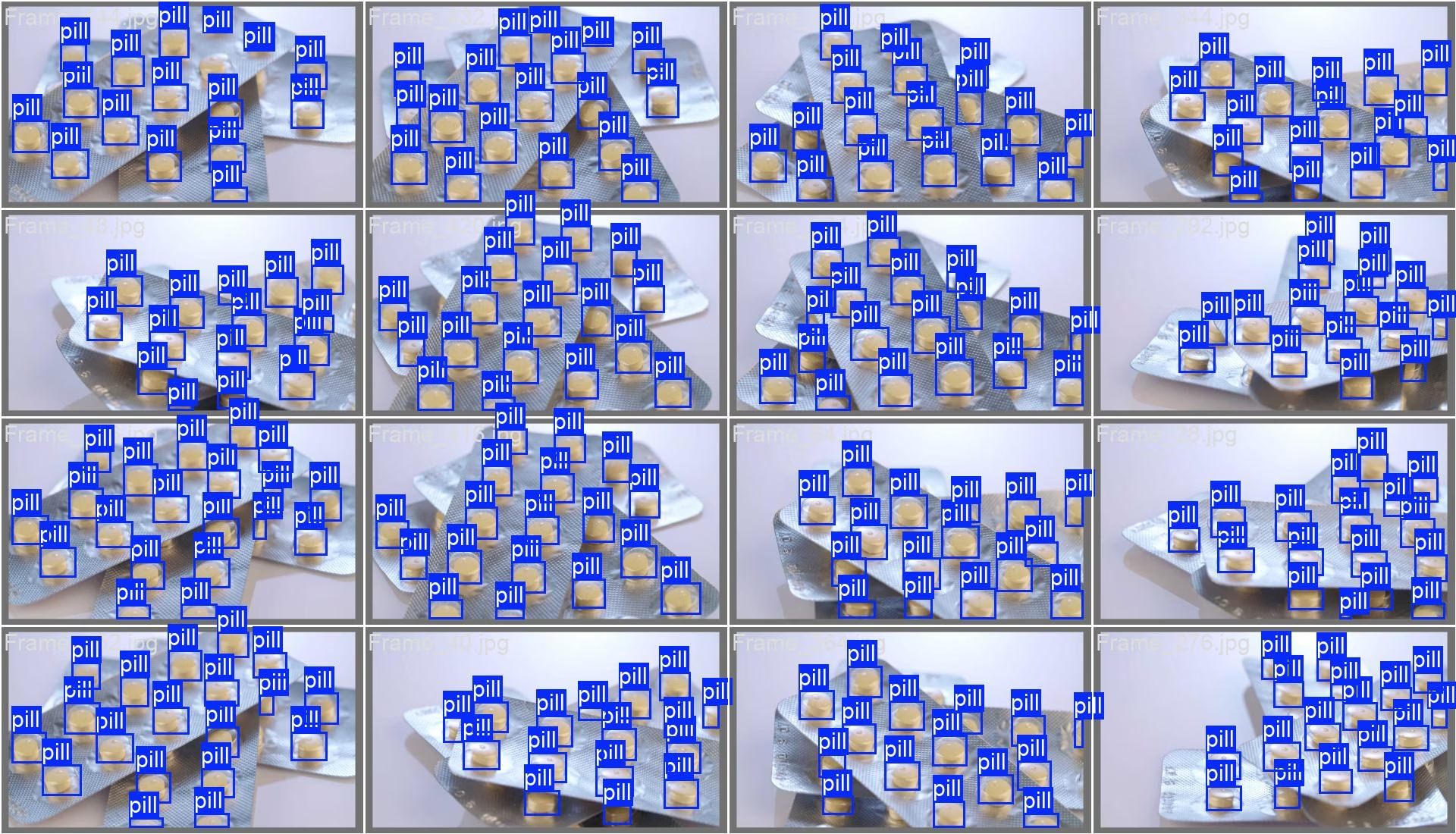
- Mosaiced Image: Displayed is a training batch comprising mosaiced dataset images. Mosaicing enhances training diversity by consolidating multiple images into one, improving model generalization.
Integration with Other Datasets#
For more comprehensive pharmaceutical analysis, consider combining the Medical Pills dataset with other related datasets like package-seg for packaging identification or medical imaging datasets like brain-tumor to develop end-to-end healthcare AI solutions.
Citations and Acknowledgments#
The dataset is available under the AGPL-3.0 License.
If you use the Medical Pills dataset in your research or development work, please cite it using the mentioned details:
@dataset{Jocher_Ultralytics_Datasets_2024,
    author = {Jocher, Glenn and Rizwan, Muhammad},
    license = {AGPL-3.0},
    month = {Dec},
    title = {Ultralytics Datasets: Medical-pills Detection Dataset},
    url = {https://docs.ultralytics.com/datasets/detect/medical-pills},
    version = {1.0.0},
    year = {2024}
}FAQ#
The Medical Pills dataset contains 115 images total — 92 for training and 23 for validation — with no separate test split. Each image is annotated with a single class,
pill. It ships as an 8.19 MB automatic download defined in themedical-pills.yamlconfiguration.You can train a YOLO26 model for 100 epochs with an image size of 640px using the Python or CLI methods provided. Refer to the Training Example section for detailed instructions and check the YOLO26 documentation for more information on model capabilities.
The dataset enables automation in pill detection, contributing to counterfeit prevention, quality assurance, and pharmaceutical process optimization. It also serves as a valuable resource for developing AI solutions that can improve medication safety and supply chain efficiency.
Inference can be done using Python or CLI methods with a fine-tuned YOLO26 model. Refer to the Inference Example section for code snippets and the Predict mode documentation for additional options.
The YAML file is available at medical-pills.yaml, containing dataset paths, classes, and additional configuration details essential for training models on this dataset.