Thread-Safe Inference with YOLO Models
To run Ultralytics YOLO inference safely across Python threads, instantiate a separate YOLO model inside each thread instead of sharing one instance across them. Sharing a single model causes race conditions that corrupt its internal state and produce unpredictable results, because Python's threading module runs the threads concurrently against the same object. This guide explains why sharing fails, shows the safe per-thread pattern, and covers the ThreadingLocked decorator for cases where you must share an instance.
Jump to why sharing a model fails, the thread-safe pattern, or the ThreadingLocked decorator.
Watch: How to Perform Thread Safe Inference with Ultralytics YOLO Models in Python | Multi-Threading 🚀
Understanding Python Threading#
Python threads let your program run multiple operations concurrently. However, Python's Global Interpreter Lock (GIL) means that only one thread can execute Python bytecode at a time.
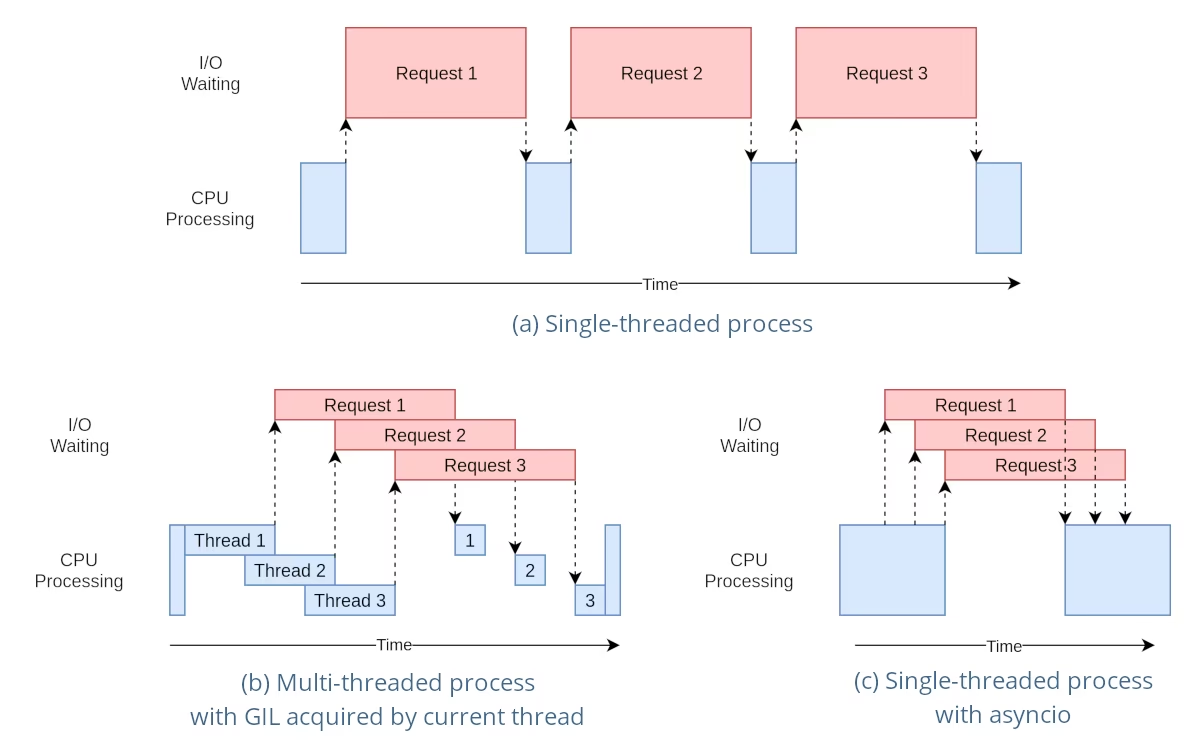
While this sounds like a limitation, threads can still provide concurrency, especially for I/O-bound operations or when using operations that release the GIL, like those performed by YOLO's underlying C libraries.
The Danger of Shared Model Instances#
Instantiating a YOLO model outside your threads and sharing this instance across multiple threads can lead to race conditions, where the internal state of the model is inconsistently modified due to concurrent accesses. This is particularly problematic when the model or its components hold state that is not designed to be thread-safe.
Non-Thread-Safe Example: Single Model Instance#
When using threads in Python, it's important to recognize patterns that can lead to concurrency issues. Here is what you should avoid: sharing a single YOLO26 model instance across multiple threads.
# Unsafe: Sharing a single model instance across threads
from threading import Thread

from ultralytics import YOLO

# Instantiate the model outside the thread
shared_model = YOLO("yolo26n.pt")

def predict(image_path):
    """Predicts objects in an image using a preloaded YOLO model, take path string to image as argument."""
    results = shared_model.predict(image_path)
    # Process results

# Starting threads that share the same model instance
Thread(target=predict, args=("image1.jpg",)).start()
Thread(target=predict, args=("image2.jpg",)).start()
In the example above, both threads share shared_model. Each predict call keeps its own arguments such as conf, iou and imgsz, but calls that use the same predictor run one at a time behind its lock, so the threads gain little parallelism. State that lives on the instance, such as tracker state, YOLOE set_classes vocabularies, or SAM, FastSAM and YOLOE prompts, is still shared by every thread, so give each thread its own instance for those.
Safe Example: A Dedicated Instance per Thread#
Multiple separate model instances are fine as long as each thread owns its instance and never shares it with another thread. It does not matter that the instances below are created before the threads start — the only unsafe pattern is sharing one instance across threads:
# Safe: each thread uses its own dedicated model instance
from threading import Thread

from ultralytics import YOLO

# Instantiate one model per thread
model_1 = YOLO("yolo26n.pt")
model_2 = YOLO("yolo26n.pt")

def predict(model, image_path):
    """Runs prediction on an image using a specified YOLO model, returning the results."""
    results = model.predict(image_path)
    # Process results

# Each thread uses a separate, dedicated model instance
Thread(target=predict, args=(model_1, "image1.jpg")).start()
Thread(target=predict, args=(model_2, "image2.jpg")).start()
Because each thread works with its own dedicated instance, there is no shared model state for the threads to corrupt. Instantiating the model inside each thread, as shown next, is simply the easiest way to guarantee that an instance is never accidentally shared.
Thread-Safe Inference#
To perform thread-safe inference, you should instantiate a separate YOLO model within each thread. This ensures that each thread has its own isolated model instance, eliminating the risk of race conditions.
Thread-Safe Example#
Here's how to instantiate a YOLO model inside each thread for safe parallel inference:
# Safe: Instantiating a single model inside each thread
from threading import Thread

from ultralytics import YOLO

def thread_safe_predict(image_path):
    """Predict on an image using a new YOLO model instance in a thread-safe manner; takes image path as input."""
    local_model = YOLO("yolo26n.pt")
    results = local_model.predict(image_path)
    # Process results

# Starting threads that each have their own model instance
Thread(target=thread_safe_predict, args=("image1.jpg",)).start()
Thread(target=thread_safe_predict, args=("image2.jpg",)).start()
In this example, each thread creates its own YOLO instance. This prevents any thread from interfering with the model state of another, thus ensuring that each thread performs inference safely and without unexpected interactions with the other threads.
Using the ThreadingLocked Decorator#
Ultralytics provides a ThreadingLocked decorator that can be used to ensure thread-safe execution of functions. This decorator uses a lock to ensure that only one thread at a time can execute the decorated function.
from ultralytics import YOLO
from ultralytics.utils import ThreadingLocked

# Create a model instance
model = YOLO("yolo26n.pt")

# Decorate the prediction function to make it thread-safe
@ThreadingLocked()
def thread_safe_predict(image_path):
    """Thread-safe prediction using a shared model instance."""
    results = model.predict(image_path)
    return results

# Now you can safely call this function from multiple threads
The ThreadingLocked decorator is particularly useful when you need to share a model instance across threads but want to ensure that only one thread can access it at a time.
Sharing one locked model instance saves memory compared to loading a model in every thread, but it reduces concurrency because threads serialize on the lock and wait their turn. Prefer the per-thread pattern when you have memory to spare and want maximum parallelism, and reach for ThreadingLocked when model memory is the bottleneck.
Conclusion#
When using YOLO models with Python's threading, give each thread its own dedicated model instance and never share one instance across threads. Instantiating the model inside the thread that uses it is the simplest way to guarantee this, avoiding race conditions and keeping your inference tasks reliable.
For more advanced scenarios and to further optimize your multi-threaded inference performance, consider using process-based parallelism with multiprocessing or leveraging a task queue with dedicated worker processes.
FAQ#
To prevent race conditions when using Ultralytics YOLO models in a multi-threaded Python environment, instantiate a separate YOLO model within each thread. This ensures that each thread has its own isolated model instance, avoiding concurrent modification of the model state.
Example:
from threading import Thread from ultralytics import YOLO def thread_safe_predict(image_path): """Predict on an image in a thread-safe manner.""" local_model = YOLO("yolo26n.pt") results = local_model.predict(image_path) # Process results Thread(target=thread_safe_predict, args=("image1.jpg",)).start() Thread(target=thread_safe_predict, args=("image2.jpg",)).start()To run multi-threaded YOLO model inference safely in Python, follow these best practices:
- Instantiate YOLO models within each thread rather than sharing a single model instance across threads.
- Use Python's
multiprocessingmodule for parallel processing to avoid issues related to the Global Interpreter Lock (GIL). - Remember that YOLO's underlying C libraries (PyTorch, OpenCV) automatically release the GIL during heavy computation, so threads can still run inference concurrently.
- Consider using the
ThreadingLockeddecorator for shared model instances when memory is a concern.
Example for thread-safe model instantiation:
from threading import Thread

from ultralytics import YOLO

def thread_safe_predict(image_path):
    """Runs inference in a thread-safe manner with a new YOLO model instance."""
    local_model = YOLO("yolo26n.pt")
    results = local_model.predict(image_path)
    # Process results

# Initiate multiple threads
Thread(target=thread_safe_predict, args=("image1.jpg",)).start()
Thread(target=thread_safe_predict, args=("image2.jpg",)).start()
For additional context, refer to the section on Thread-Safe Inference.
Each thread should have its own YOLO model instance to prevent race conditions. When a single model instance is shared among multiple threads, concurrent accesses can lead to unpredictable behavior and modifications of the model's internal state. By using separate instances, you ensure thread isolation, making your multi-threaded tasks reliable and safe.
For detailed guidance, check the Non-Thread-Safe Example: Single Model Instance and Thread-Safe Example sections.
Python's Global Interpreter Lock (GIL) allows only one thread to execute Python bytecode at a time, which can limit the performance of CPU-bound multi-threading tasks. However, for I/O-bound operations or processes that use libraries releasing the GIL, like YOLO's underlying C libraries, you can still achieve concurrency. For enhanced performance, consider using process-based parallelism with Python's
multiprocessingmodule.For more about threading in Python, see the Understanding Python Threading section.
Yes, using Python's
multiprocessingmodule is safer and often more efficient for running YOLO model inference in parallel. Process-based parallelism creates separate memory spaces, avoiding the Global Interpreter Lock (GIL) and reducing the risk of concurrency issues. Each process will operate independently with its own YOLO model instance.


Comments12
Ask a question, share your results, or help someone else.
amani784
I used a YOLOv8 model optimized with TensorRT on an AWS machine with a Tesla T4 GPU to detect people in multiple videos. The model is loaded once per process using an initializer function. To improve performance, I parallelized the video processing using 4 processes from the multiprocessing module, where each process handles one video and performs inference using model.predict() on frames sampled at regular intervals. However, this approach led to a decrease in overall performance, with slower processing time per frame and reduced FPS. Is this normal, and if not, what is the solution?
warptengood
I have a few questions:
- Does the rules about thread-safety apply in the same way to TensorRT/ONNX inference of YOLO?
- Should I have the shared model for all threads when using TensorRT YOLO? (In case the answer for the 1st question is 'No'.)
- Is it true that it is better to have
streamparameter to be set toFalsewhen performing inference on TensorRT (inpredict()) - How
torch.cuda.Stream()affects the performance of multi-threading/multi-processing when used onpredict()/track()functions? - Should I have any sort of warm up for TensorRT inference before utilizing a model in any thread/process? (Like making inference on dummy input)
P.S: I want to thank all the Ultralytics team for their kindness and open-mindedness when it comes to help and support their community. You guys are always eager to help. And I don't care if it is some AI agent that's replying or a real person, I am very grateful for you for what you guys doing :D
 Glenn JocherUltralytics
@KenesYerassyl Thank you for your great questions about thread safety with TensorRT/ONNX models. Let me address each one:
-
Yes, the thread-safety principles apply similarly to TensorRT/ONNX models, but with important distinctions. TensorRT engines have their own memory management which can introduce additional concurrency concerns.
-
For TensorRT models, it's generally safer to use separate engine instances per thread or use a thread locking mechanism like our
ThreadingLockeddecorator. TensorRT engines maintain internal state during inference that can cause issues with concurrent access. -
Setting
stream=Falsefor TensorRT inference is often beneficial as it ensures complete processing of each input before handling another, which can help avoid resource conflicts in multi-threaded environments. -
Using
torch.cuda.Stream()with multi-threading can improve performance by allowing parallel execution of CUDA operations across different streams. However, you need to carefully manage synchronization points to prevent race conditions. Each thread should ideally use a separate CUDA stream. -
Yes, warming up TensorRT models is highly recommended. The first inference typically takes longer due to CUDA context initialization and memory allocations. Running inference on a dummy input before deploying in production or multi-threaded environments ensures consistent performance.
Thank you for your kind words about our team! We're committed to supporting the community with helpful resources and guidance.
-
Thank you very much for such a comprehensive reply!
mrbulb
Hello, is there any example code that uses Python's multiprocessing for YOLO model inference?
 Paula DerrengerUltralytics
@mrbulb for using Python's multiprocessing with YOLO model inference, you should instantiate a separate YOLO model within each process to avoid race conditions. This ensures each process has its own isolated model instance. For detailed guidance, please refer to our Thread-Safe Inference with YOLO Models page. If you need a specific code example, feel free to ask!
farrostaufiqur
how to use results differently for each thread?
- Paula DerrengerUltralytics
To use results differently for each thread, ensure each thread instantiates its own YOLO model instance. This prevents race conditions and ensures thread safety. For more details, please refer to our Thread-Safe Inference with YOLO Models guide.
ghost
Hello. Thanks for the info. I have a question, If I run in two terminals the same python script, but to two different videos, both processes still suffer from GIL ?
- Glenn JocherUltralytics
@cawilchesp running the same Python script in two separate terminals for different videos won't suffer from GIL issues, as each process has its own Python interpreter and memory space. This effectively bypasses the GIL, allowing true parallel execution. For more details, you can check out our guide on thread-safe inference: https://docs.ultralytics.com/guides/yolo-thread-safe-inference/.
abysshal
So what is the best practice for single-threaded processing with asyncio? For example, gunicron+gevent+flask is used to deal with highly concurrent requests, and only one Yolo model instance will be created in each worker process. Here we do not handle threads manually, we only provide the predict function for callback from gevent. Then will the predict function of the same model instance be called again on the next request when it is not completed due to an I/O wait operation on the current request? How we handle this safely? Does it matter if cpu of gpu is used for inference?
- Glenn JocherUltralytics(edited)
@abysshal when using an asynchronous server like Gunicorn with Gevent and Flask, you're dealing with a cooperative multitasking environment. In such an environment, the context switches occur at well-defined points, typically I/O operations or explicit yield points. This means that your predict function will not be preempted in the middle of execution by another request unless it hits an I/O wait or a yield.
Here's how you can handle this safely:
-
Single Model Instance: Since you're creating only one YOLO model instance per worker process, you need to ensure that the predict function is designed to be re-entrant. This means that if the function is called again while a previous call is waiting for I/O, it should not cause any conflicts or unexpected behavior.
-
Asyncio Compatibility: If you're using asyncio, you should ensure that the predict function and any other code that might run concurrently are compatible with asyncio's event loop. This means using
awaitfor I/O-bound operations and ensuring that any libraries you use within the predict function are also compatible with asyncio. -
Thread Safety: Even though you're not manually handling threads, the underlying implementation of some libraries (like PyTorch) may use threads for certain operations. A single Ultralytics
YOLOmodel instance is not thread-safe, so do not share one instance across threads. Use one instance per thread or worker, or wrap the shared call with theThreadingLockeddecorator (see the thread-safe inference guide). -
Resource Locking: If there are shared resources that need to be accessed or modified during the predict function, you should use appropriate locking mechanisms to prevent race conditions. However, in an async environment, you should use async-compatible locks like
asyncio.Lock. -
CPU vs. GPU Inference: The choice between CPU and GPU can affect performance but should not affect the thread safety or the async behavior of your application. However, if you're using a GPU, you need to ensure that the library you're using for YOLO supports concurrent model inference on the GPU without conflicts.
-
Testing: Test your application under load to ensure that it behaves correctly with concurrent requests. You can use tools like
locustorab(Apache Bench) to simulate high concurrency and check for any race conditions or deadlocks.
In summary, when using Gunicorn with Gevent and Flask, you should ensure that your predict function is re-entrant and compatible with asyncio, use async-compatible locks if necessary, and test your application under load. The choice of CPU or GPU should not affect the thread safety of your application, but you should ensure that your YOLO model library supports concurrent inference on your chosen hardware.
1 -