Loading YOLOv5 from PyTorch Hub#
📚 This guide explains how to load YOLOv5 🚀 from PyTorch Hub at https://pytorch.org/hub/ultralytics_yolov5.
Before You Start#
Install requirements.txt in a Python>=3.8.0 environment, including PyTorch>=1.8. Models and datasets download automatically from the latest YOLOv5 release.
pip install -r https://raw.githubusercontent.com/ultralytics/yolov5/master/requirements.txtCloning ultralytics/yolov5 is not required — PyTorch Hub fetches the code automatically.
Load YOLOv5 with PyTorch Hub#
Simple Example#
This example loads a pretrained YOLOv5s model from PyTorch Hub as model and passes an image for inference. 'yolov5s' is a small, fast YOLOv5 model. For details on all available models please see the README.
import torch

# Model
model = torch.hub.load("ultralytics/yolov5", "yolov5s")

# Image
im = "https://ultralytics.com/images/zidane.jpg"

# Inference
results = model(im)

results.pandas().xyxy[0]
#      xmin    ymin    xmax   ymax  confidence  class    name
# 0  749.50   43.50  1148.0  704.5    0.874023      0  person
# 1  433.50  433.50   517.5  714.5    0.687988     27     tie
# 2  114.75  195.75  1095.0  708.0    0.624512      0  person
# 3  986.00  304.00  1028.0  420.0    0.286865     27     tie
Detailed Example#
This example shows batched inference with PIL and OpenCV image sources. results can be printed to console, saved to runs/hub, shown on screen on supported environments, and returned as tensors or pandas dataframes.
import cv2
import torch
from PIL import Image

# Model
model = torch.hub.load("ultralytics/yolov5", "yolov5s")

# Images
for f in "zidane.jpg", "bus.jpg":
    torch.hub.download_url_to_file(f"https://ultralytics.com/images/{f}", f)  # download 2 images
im1 = Image.open("zidane.jpg")  # PIL image
im2 = cv2.imread("bus.jpg")[..., ::-1]  # OpenCV image (BGR to RGB)

# Inference
results = model([im1, im2], size=640)  # batch of images

# Results
results.print()
results.save()  # or .show()

results.xyxy[0]  # im1 predictions (tensor)
results.pandas().xyxy[0]  # im1 predictions (pandas)
#      xmin    ymin    xmax   ymax  confidence  class    name
# 0  749.50   43.50  1148.0  704.5    0.874023      0  person
# 1  433.50  433.50   517.5  714.5    0.687988     27     tie
# 2  114.75  195.75  1095.0  708.0    0.624512      0  person
# 3  986.00  304.00  1028.0  420.0    0.286865     27     tie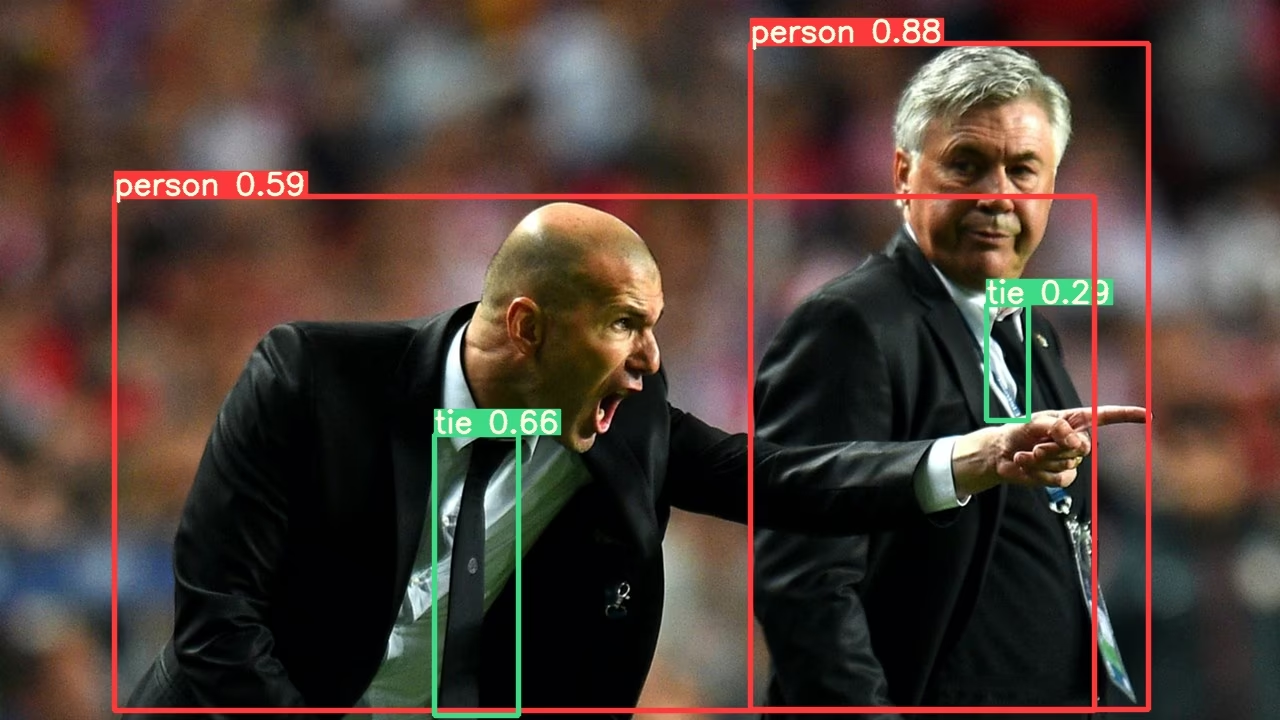
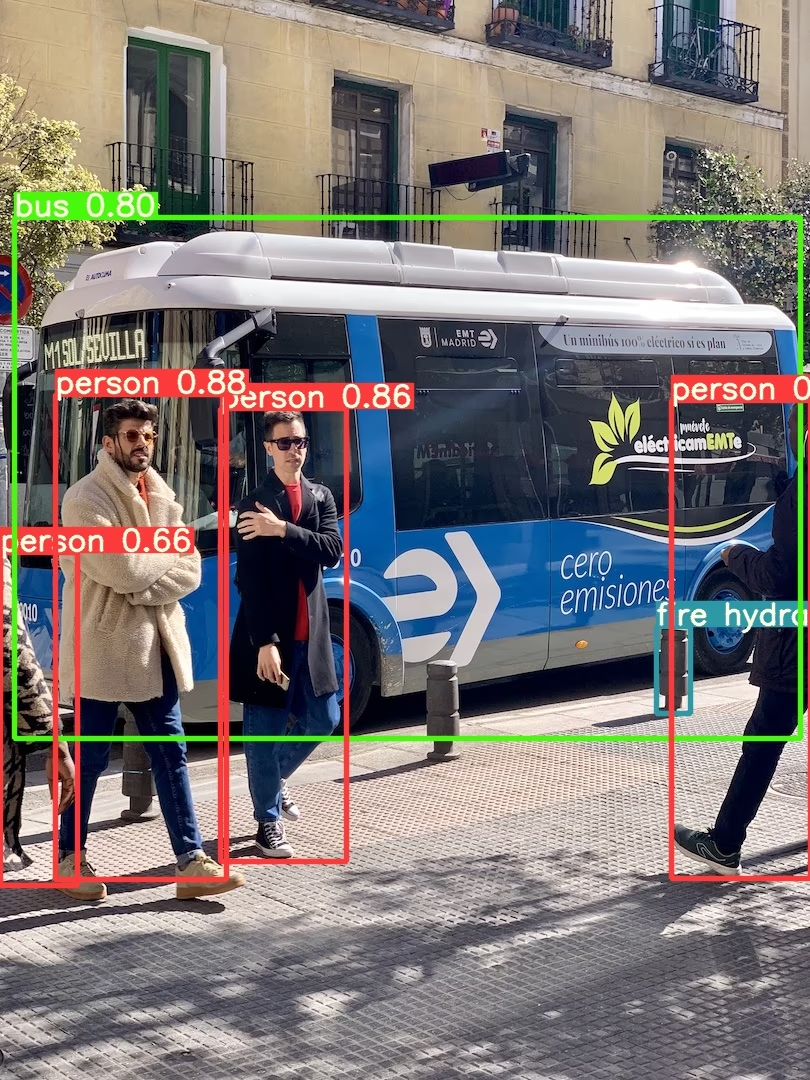
For all inference options see YOLOv5 AutoShape() forward method.
Inference Settings#
YOLOv5 models contain various inference attributes such as confidence threshold, IoU threshold, etc. which can be set by:
model.conf = 0.25  # NMS confidence threshold
model.iou = 0.45  # NMS IoU threshold
model.agnostic = False  # NMS class-agnostic
model.multi_label = False  # NMS multiple labels per box
model.classes = None  # (optional list) filter by class, i.e. = [0, 15, 16] for COCO persons, cats and dogs
model.max_det = 1000  # maximum number of detections per image
model.amp = False  # Automatic Mixed Precision (AMP) inference

results = model(im, size=320) # custom inference sizeDevice#
Models can be transferred to any device after creation:
model.cpu()  # CPU
model.cuda()  # GPU
model.to(device)  # i.e. device=torch.device(0)
Models can also be created directly on any device:
model = torch.hub.load("ultralytics/yolov5", "yolov5s", device="cpu") # load on CPUInput images are automatically transferred to the correct model device before inference.
Silence Outputs#
Models can be loaded silently with _verbose=False:
model = torch.hub.load("ultralytics/yolov5", "yolov5s", _verbose=False) # load silentlyInput Channels#
To load a pretrained YOLOv5s model with 4 input channels rather than the default 3:
model = torch.hub.load("ultralytics/yolov5", "yolov5s", channels=4)In this case the model will be composed of pretrained weights except for the very first input layer, which is no longer the same shape as the pretrained input layer. The input layer will remain initialized by random weights.
Number of Classes#
To load a pretrained YOLOv5s model with 10 output classes rather than the default 80:
model = torch.hub.load("ultralytics/yolov5", "yolov5s", classes=10)In this case the model will be composed of pretrained weights except for the output layers, which are no longer the same shape as the pretrained output layers. The output layers will remain initialized by random weights.
Force Reload#
If you run into problems with the above steps, setting force_reload=True may help by discarding the existing cache and forcing a fresh download of the latest YOLOv5 version from PyTorch Hub. Cached copies live in ~/.cache/torch/hub; deleting that folder achieves the same effect.
model = torch.hub.load("ultralytics/yolov5", "yolov5s", force_reload=True) # force reloadScreenshot Inference#
To run inference on your desktop screen:
import torch
from PIL import ImageGrab

# Model
model = torch.hub.load("ultralytics/yolov5", "yolov5s")

# Image
im = ImageGrab.grab()  # take a screenshot

# Inference
results = model(im)
Multi-GPU Inference#
YOLOv5 models can be loaded to multiple GPUs in parallel with threaded inference:
import threading

import torch

def run(model, im):
    """Performs inference on an image using a given model and saves the output; model must support `.save()` method."""
    results = model(im)
    results.save()

# Models
model0 = torch.hub.load("ultralytics/yolov5", "yolov5s", device=0)
model1 = torch.hub.load("ultralytics/yolov5", "yolov5s", device=1)

# Inference
threading.Thread(target=run, args=[model0, "https://ultralytics.com/images/zidane.jpg"], daemon=True).start()
threading.Thread(target=run, args=[model1, "https://ultralytics.com/images/bus.jpg"], daemon=True).start()Training#
To load a YOLOv5 model for training rather than inference, set autoshape=False. To load a model with randomly initialized weights (to train from scratch) use pretrained=False. You must provide your own training script in this case. Alternatively see our YOLOv5 Train Custom Data Tutorial for model training.
import torch

model = torch.hub.load("ultralytics/yolov5", "yolov5s", autoshape=False)  # load pretrained
model = torch.hub.load("ultralytics/yolov5", "yolov5s", autoshape=False, pretrained=False)  # load scratch
Base64 Results#
For use with API services. See Flask REST API example for details.
import base64
from io import BytesIO

from PIL import Image

results = model(im)  # inference

results.ims  # array of original images (as np array) passed to model for inference
results.render()  # updates results.ims with boxes and labels
for im in results.ims:
    buffered = BytesIO()
    im_base64 = Image.fromarray(im)
    im_base64.save(buffered, format="JPEG")
    print(base64.b64encode(buffered.getvalue()).decode("utf-8"))  # base64 encoded image with results
Cropped Results#
Results can be returned and saved as detection crops:
results = model(im)  # inference
crops = results.crop(save=True)  # cropped detections dictionary
Pandas Results#
Results can be returned as Pandas DataFrames:
results = model(im)  # inference
results.pandas().xyxy[0]  # Pandas DataFrame
Pandas Output (click to expand)
print(results.pandas().xyxy[0])
#      xmin    ymin    xmax   ymax  confidence  class    name
# 0  749.50   43.50  1148.0  704.5    0.874023      0  person
# 1  433.50  433.50   517.5  714.5    0.687988     27     tie
# 2  114.75  195.75  1095.0  708.0    0.624512      0  person
# 3  986.00  304.00  1028.0  420.0    0.286865     27     tie
Sorted Results#
Results can be sorted by column, i.e. to sort license plate digit detection left-to-right (x-axis):
results = model(im)  # inference
results.pandas().xyxy[0].sort_values("xmin")  # sorted left-right
JSON Results#
Results can be returned in JSON format once converted to .pandas() dataframes using the .to_json() method. The JSON format can be modified using the orient argument. See pandas .to_json() documentation for details.
results = model(im)  # inference
results.pandas().xyxy[0].to_json(orient="records")  # JSON img1 predictions
JSON Output (click to expand)
[
    {
        "xmin": 749.5,
        "ymin": 43.5,
        "xmax": 1148.0,
        "ymax": 704.5,
        "confidence": 0.8740234375,
        "class": 0,
        "name": "person"
    },
    {
        "xmin": 433.5,
        "ymin": 433.5,
        "xmax": 517.5,
        "ymax": 714.5,
        "confidence": 0.6879882812,
        "class": 27,
        "name": "tie"
    },
    {
        "xmin": 115.25,
        "ymin": 195.75,
        "xmax": 1096.0,
        "ymax": 708.0,
        "confidence": 0.6254882812,
        "class": 0,
        "name": "person"
    },
    {
        "xmin": 986.0,
        "ymin": 304.0,
        "xmax": 1028.0,
        "ymax": 420.0,
        "confidence": 0.2873535156,
        "class": 27,
        "name": "tie"
    }
]
Custom Models#
This example loads a custom 20-class VOC-trained YOLOv5s model 'best.pt' with PyTorch Hub.
import torch

model = torch.hub.load("ultralytics/yolov5", "custom", path="path/to/best.pt")  # local model
model = torch.hub.load("path/to/yolov5", "custom", path="path/to/best.pt", source="local")  # local repo
TensorRT, ONNX and OpenVINO Models#
PyTorch Hub supports inference on most YOLOv5 export formats, including custom-trained models. See TFLite, ONNX, CoreML, TensorRT Export tutorial for details on exporting models.
- TensorRT can be 2-5× faster than PyTorch on GPU benchmarks.
- ONNX and OpenVINO can be 2-3× faster than PyTorch on CPU benchmarks.
import torch

model = torch.hub.load("ultralytics/yolov5", "custom", path="yolov5s.pt")  # PyTorch
model = torch.hub.load("ultralytics/yolov5", "custom", path="yolov5s.torchscript")  # TorchScript
model = torch.hub.load("ultralytics/yolov5", "custom", path="yolov5s.onnx")  # ONNX
model = torch.hub.load("ultralytics/yolov5", "custom", path="yolov5s_openvino_model/")  # OpenVINO
model = torch.hub.load("ultralytics/yolov5", "custom", path="yolov5s.engine")  # TensorRT
model = torch.hub.load("ultralytics/yolov5", "custom", path="yolov5s.mlpackage")  # CoreML (macOS-only)
model = torch.hub.load("ultralytics/yolov5", "custom", path="yolov5s.tflite")  # TFLite
model = torch.hub.load("ultralytics/yolov5", "custom", path="yolov5s_paddle_model/")  # PaddlePaddle
Supported Environments#
Ultralytics provides a range of ready-to-use environments, each pre-installed with essential dependencies such as CUDA, CUDNN, Python, and PyTorch, to kickstart your projects.
- Free GPU Notebooks:



- Google Cloud: GCP Quickstart Guide
- Amazon: AWS Quickstart Guide
- Azure: AzureML Quickstart Guide
- Docker: Docker Quickstart Guide

Project Status#

This badge indicates that all YOLOv5 GitHub Actions Continuous Integration (CI) tests are successfully passing. These CI tests rigorously check the functionality and performance of YOLOv5 across various key aspects: training, validation, inference, export, and benchmarks. They ensure consistent and reliable operation on macOS, Windows, and Ubuntu, with tests conducted every 24 hours and upon each new commit.
FAQ#
No.
torch.hub.load("ultralytics/yolov5", ...)downloads the code into~/.cache/torch/huband the weights on first use. Only the packages inrequirements.txtneed to be installed.Use the
customentry point with the checkpoint path:torch.hub.load("ultralytics/yolov5", "custom", path="runs/train/exp/weights/best.pt"). Addsource="local"and a local repository path to load without network access.Yes. Pass the exported file to the same
customloader and YOLOv5 selects the matching backend from the suffix, for exampleyolov5s.onnx,yolov5s.engine, oryolov5s_openvino_model/.Pass
force_reload=Trueto discard the cached repository and fetch the latest code, or delete~/.cache/torch/hubmanually. This also picks up new releases of YOLOv5.results.xyxy[0]returns a tensor of[x1, y1, x2, y2, confidence, class]rows,results.pandas().xyxy[0]returns a DataFrame with class names, and.to_json(orient="records")on that DataFrame produces JSON.