슬라이스 추론에 SAHI와 YOLO26 사용하기#

이 가이드에서는 YOLO26과 SAHI(Slicing Aided Hyper Inference)를 사용하는 방법을 설명합니다. SAHI의 정의, 대규모 애플리케이션에서 슬라이스 추론이 중요한 이유, 향상된 객체 탐지 성능을 위해 이러한 기능을 YOLO26과 통합하는 방법을 자세히 살펴봅니다.
SAHI 소개#
SAHI(Slicing Aided Hyper Inference)는 대규모 및 고해상도 이미지에서 객체 탐지 알고리즘을 최적화하도록 설계된 혁신적인 라이브러리입니다. 핵심 기능은 이미지를 관리하기 쉬운 슬라이스로 분할하고, 각 슬라이스에서 객체 탐지를 실행한 다음, 결과를 다시 결합하는 것입니다. SAHI는 YOLO 시리즈를 포함한 다양한 객체 탐지 모델과 호환되므로 컴퓨팅 리소스를 효율적으로 사용하면서 유연성을 제공합니다.
시청: SAHI와 Ultralytics YOLO26을 사용해 작은 객체를 감지하는 방법 | 슬라이싱 기반 하이퍼 추론 🚀
SAHI의 주요 기능#
- 원활한 통합: SAHI는 YOLO 모델과 간편하게 통합되므로 코드를 크게 수정하지 않고도 슬라이스 분할과 탐지를 시작할 수 있습니다.
- 리소스 효율성: SAHI는 큰 이미지를 더 작은 부분으로 분할하여 메모리 사용량을 최적화하므로 리소스가 제한된 하드웨어에서도 고품질 탐지를 수행할 수 있습니다.
- 높은 정확도: SAHI는 스티칭 과정에서 겹치는 탐지 박스를 병합하는 스마트 알고리즘을 활용하여 탐지 정확도를 유지합니다.
슬라이스 추론이란 무엇인가요?#
슬라이스 추론은 크거나 고해상도인 이미지를 작은 세그먼트(슬라이스)로 나누고, 해당 슬라이스에서 객체 탐지를 수행한 다음, 슬라이스를 다시 결합하여 원본 이미지에서 객체 위치를 재구성하는 방식입니다. 이 기술은 컴퓨팅 리소스가 제한적이거나 메모리 문제를 일으킬 수 있는 초고해상도 이미지를 다루는 시나리오에서 매우 유용합니다.
슬라이스 추론의 이점#
-
컴퓨팅 부담 감소: 작은 이미지 슬라이스는 처리 속도가 빠르고 메모리 사용량이 적어 성능이 낮은 하드웨어에서도 더 원활하게 작동합니다.
-
탐지 품질 유지: 각 슬라이스를 독립적으로 처리하므로, 관심 객체를 포착할 만큼 슬라이스가 충분히 큰 경우 객체 탐지 품질이 저하되지 않습니다.
-
확장성 향상: 이 기술을 사용하면 다양한 크기와 해상도의 이미지에 걸쳐 객체 탐지를 더 쉽게 확장할 수 있으므로 위성 이미지부터 의료 진단까지 폭넓은 애플리케이션에 적합합니다.
| SAHI를 사용하지 않은 YOLO26 | SAHI를 사용한 YOLO26 |
|---|---|
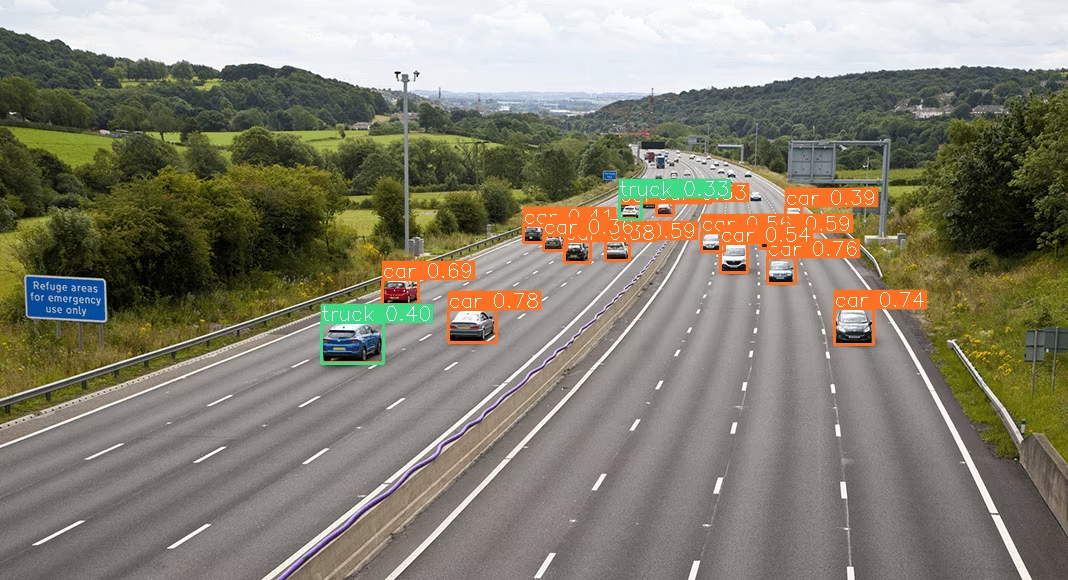 | 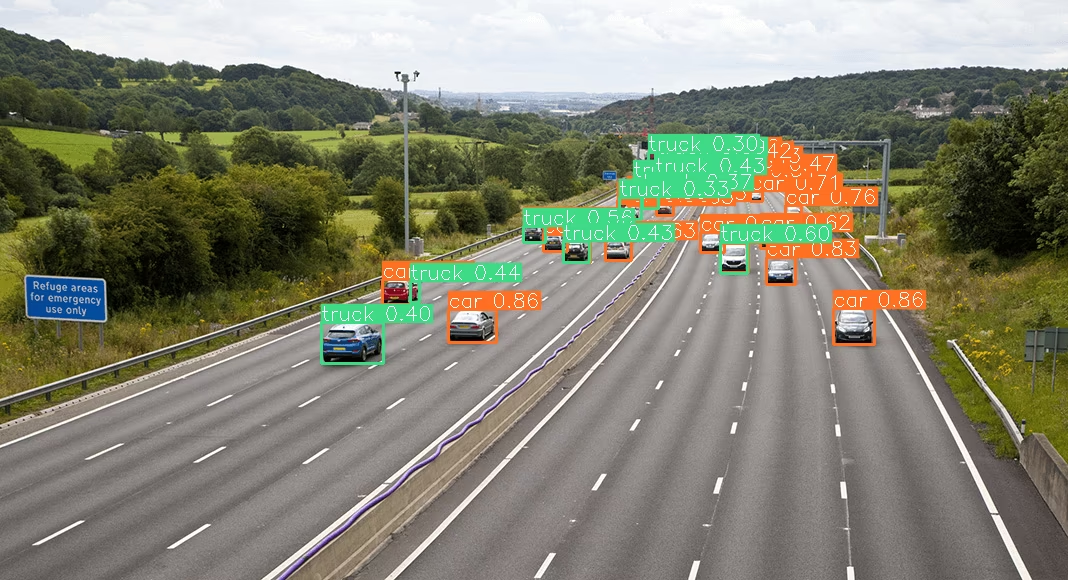 |
설치 및 준비#
설치#
시작하려면 최신 버전의 SAHI와 Ultralytics를 설치합니다.
pip install -U ultralytics sahi모듈 가져오기 및 리소스 다운로드#
테스트 이미지를 다운로드하는 방법은 다음과 같습니다.
from sahi.utils.file import download_from_url

# 테스트 이미지 다운로드
download_from_url(
    "https://raw.githubusercontent.com/obss/sahi/main/demo/demo_data/small-vehicles1.jpeg",
    "demo_data/small-vehicles1.jpeg",
)
download_from_url(
    "https://raw.githubusercontent.com/obss/sahi/main/demo/demo_data/terrain2.png",
    "demo_data/terrain2.png",
)
YOLO26을 사용한 표준 추론#
모델 인스턴스 생성#
다음과 같이 객체 탐지용 YOLO26 모델의 인스턴스를 생성할 수 있습니다.
from sahi import AutoDetectionModel

detection_model = AutoDetectionModel.from_pretrained(
    model_type="ultralytics",
    model_path="yolo26n.pt",
    confidence_threshold=0.3,
    device="cpu",  # 또는 'cuda:0'
)
표준 예측 수행#
이미지 경로를 사용하여 표준 추론을 수행합니다.
from sahi.predict import get_prediction

result = get_prediction("demo_data/small-vehicles1.jpeg", detection_model)

result.export_visuals(export_dir="demo_data/", hide_conf=True)
결과 시각화#
예측된 바운딩 박스와 마스크를 내보내고 시각화합니다.
from PIL import Image

# 예측 이미지 열기
processed_image = Image.open("demo_data/prediction_visual.png")

# 예측 이미지 표시
processed_image.show()
YOLO26을 사용한 슬라이스 추론#
슬라이스 크기와 겹침 비율을 지정하여 슬라이스 추론을 수행합니다.
from PIL import Image
from sahi.predict import get_sliced_prediction

result = get_sliced_prediction(
    "demo_data/small-vehicles1.jpeg",
    detection_model,
    slice_height=256,
    slice_width=256,
    overlap_height_ratio=0.2,
    overlap_width_ratio=0.2,
)

# 결과 내보내기
result.export_visuals(export_dir="demo_data/", hide_conf=True)

# 예측 이미지 열기
processed_image = Image.open("demo_data/prediction_visual.png")

# 예측 이미지 표시
processed_image.show()
예측 결과 처리#
SAHI는 PredictionResult 객체를 제공하며, 이를 다양한 주석 형식으로 변환할 수 있습니다.
# 객체 예측 목록에 액세스
object_prediction_list = result.object_prediction_list

# COCO 주석 및 COCO 예측 형식으로 변환
result.to_coco_annotations()[:3]
result.to_coco_predictions(image_id=1)[:3]배치 예측#
이미지 디렉터리에서 배치 예측을 수행하려면 다음을 실행합니다.
from sahi.predict import predict

predict(
    model_type="ultralytics",
    model_path="yolo26n.pt",
    model_device="cpu",  # 또는 'cuda:0'
    model_confidence_threshold=0.4,
    source="path/to/dir",
    slice_height=256,
    slice_width=256,
    overlap_height_ratio=0.2,
    overlap_width_ratio=0.2,
)
이제 표준 추론과 슬라이스 추론 모두에서 SAHI와 YOLO26을 사용할 준비가 되었습니다.
인용 및 감사의 글#
연구 또는 개발 작업에서 SAHI를 사용하는 경우 원본 SAHI 논문을 인용하고 저자를 밝혀 주세요.
@article{akyon2022sahi,
  title={Slicing Aided Hyper Inference and Fine-tuning for Small Object Detection},
  author={Akyon, Fatih Cagatay and Altinuc, Sinan Onur and Temizel, Alptekin},
  journal={2022 IEEE International Conference on Image Processing (ICIP)},
  doi={10.1109/ICIP46576.2022.9897990},
  pages={966-970},
  year={2022}
}
이 귀중한 리소스를 만들고 유지 관리해 주신 SAHI 연구 그룹에 컴퓨터 비전 커뮤니티를 대신해 감사드립니다. SAHI와 제작자에 대한 자세한 내용은 SAHI GitHub 저장소를 방문하세요.
자주 묻는 질문#
슬라이스 추론을 위해 Ultralytics YOLO26과 SAHI(Slicing Aided Hyper Inference)를 통합하면 고해상도 이미지를 관리하기 쉬운 슬라이스로 분할하여 객체 탐지 작업을 최적화할 수 있습니다. 이 방법은 메모리 사용량을 개선하고 높은 탐지 정확도를 유지합니다. 시작하려면 ultralytics 및 sahi 라이브러리를 설치합니다.
pip install -U ultralytics sahi그런 다음 테스트 이미지를 다운로드합니다.
from sahi.utils.file import download_from_url

# 테스트 이미지 다운로드
download_from_url(
    "https://raw.githubusercontent.com/obss/sahi/main/demo/demo_data/small-vehicles1.jpeg",
    "demo_data/small-vehicles1.jpeg",
)
download_from_url(
    "https://raw.githubusercontent.com/obss/sahi/main/demo/demo_data/terrain2.png",
    "demo_data/terrain2.png",
)
자세한 안내는 슬라이스 추론 가이드를 참조하세요.
큰 이미지에서 객체를 탐지할 때 Ultralytics YOLO26과 함께 SAHI를 사용하면 다음과 같은 이점이 있습니다.
- 컴퓨팅 부담 감소: 작은 슬라이스는 처리 속도가 빠르고 메모리 사용량이 적어 리소스가 제한된 하드웨어에서도 고품질 탐지를 수행할 수 있습니다.
- 탐지 정확도 유지: SAHI는 겹치는 박스를 병합하는 지능형 알고리즘을 사용하여 탐지 품질을 유지합니다.
- 확장성 향상: SAHI는 다양한 이미지 크기와 해상도에 걸쳐 객체 탐지 작업을 확장하므로 위성 이미지 분석 및 의료 진단과 같은 여러 애플리케이션에 적합합니다.
문서에서 슬라이스 추론의 이점에 대해 자세히 알아보세요.
예. YOLO26과 SAHI를 사용할 때 예측 결과를 시각화할 수 있습니다. 결과를 내보내고 시각화하는 방법은 다음과 같습니다.
from PIL import Image

result.export_visuals(export_dir="demo_data/", hide_conf=True)

processed_image = Image.open("demo_data/prediction_visual.png")

processed_image.show()
이 명령은 시각화된 예측 결과를 지정된 디렉터리에 저장합니다. 그런 다음 이미지를 불러와 노트북이나 애플리케이션에서 확인할 수 있습니다. 자세한 안내는 표준 추론 섹션을 참조하세요.
SAHI(Slicing Aided Hyper Inference)는 객체 탐지에서 Ultralytics YOLO26을 보완하는 다음과 같은 여러 기능을 제공합니다.
- 원활한 통합: SAHI는 YOLO 모델과 쉽게 통합되므로 코드를 최소한으로 조정하면 됩니다.
- 리소스 효율성: SAHI는 큰 이미지를 작은 슬라이스로 분할하여 메모리 사용량과 처리 속도를 최적화합니다.
- 높은 정확도: SAHI는 결합 과정에서 겹치는 탐지 박스를 효과적으로 병합하여 높은 탐지 정확도를 유지합니다.
SAHI의 주요 기능에 대해 자세히 알아보세요.
YOLO26과 SAHI를 사용한 대규모 추론 프로젝트를 처리하려면 다음 모범 사례를 따르세요:
- 필수 라이브러리 설치: ultralytics와 sahi의 최신 버전이 설치되어 있는지 확인하세요.
- 슬라이스 추론 구성: 프로젝트에 적합한 슬라이스 크기와 중첩 비율을 결정하세요.
- 배치 예측 실행: SAHI의 기능을 사용해 이미지 디렉터리에 배치 예측을 수행하면 효율성을 높일 수 있습니다.
배치 예측 예시:
from sahi.predict import predict

predict(
    model_type="ultralytics",
    model_path="path/to/yolo26n.pt",
    model_device="cpu",  # 또는 'cuda:0'
    model_confidence_threshold=0.4,
    source="path/to/dir",
    slice_height=256,
    slice_width=256,
    overlap_height_ratio=0.2,
    overlap_width_ratio=0.2,
)
자세한 단계는 배치 예측 섹션을 참조하세요.