YOLO 模型的线程安全推理
要在 Python 线程中安全地运行 Ultralytics YOLO推理,请在每个线程中分别实例化一个 YOLO 模型,而不要让多个线程共享同一个实例。共享单个模型会引发竞态条件,破坏模型的内部状态并导致结果不可预测,因为 Python 的 threading 模块会让多个线程同时操作同一个对象。本指南将解释共享模型为何会失败,展示安全的线程独立模式,并介绍在必须共享实例时使用的 ThreadingLocked 装饰器。
跳转至共享模型为何会失败、线程安全模式或ThreadingLocked 装饰器。
观看: 如何在 Python 中使用 Ultralytics YOLO 模型执行线程安全推理 | 多线程 🚀
了解 Python 线程#
Python 线程可让程序并发运行多个操作。不过,Python 的全局解释器锁(GIL)意味着同一时间只能有一个线程执行 Python 字节码。
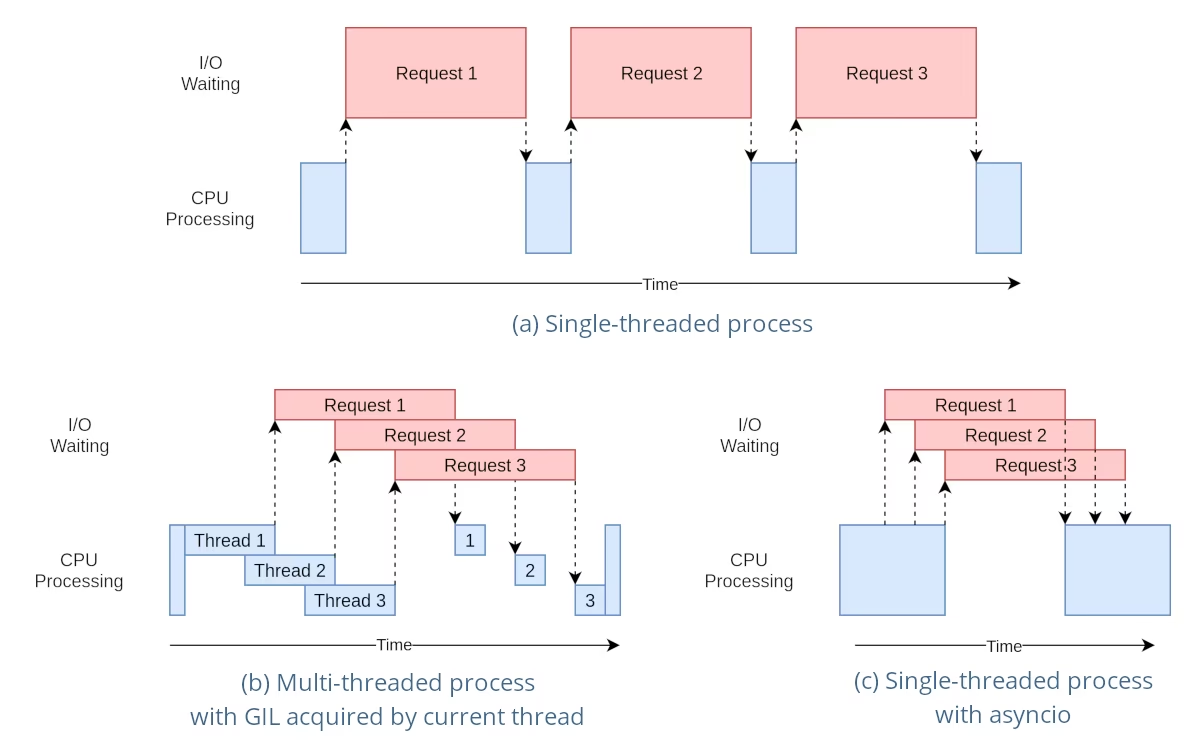
这听起来像是一种限制,但线程仍然可以提供并发能力,尤其适用于 I/O 密集型操作,或使用会释放 GIL 的操作时,例如 YOLO 底层 C 库执行的操作。
共享模型实例的风险#
在多个线程之外实例化 YOLO 模型并让这些线程共享该实例,可能会导致竞态条件:并发访问会不一致地修改模型内部状态。如果模型或其组件持有未设计为线程安全的状态,这个问题尤其严重。
非线程安全示例:单个模型实例#
在 Python 中使用线程时,了解哪些模式可能导致并发问题非常重要。以下是你应该避免的做法:让多个线程共享同一个 YOLO26 模型实例。
# 不安全:多个线程共享同一个模型实例
from threading import Thread

from ultralytics import YOLO

# 在线程外实例化模型
shared_model = YOLO("yolo26n.pt")

def predict(image_path):
    """Predicts objects in an image using a preloaded YOLO model, take path string to image as argument."""
    results = shared_model.predict(image_path)
    # 处理结果

# 启动共享同一模型实例的线程
Thread(target=predict, args=("image1.jpg",)).start()
Thread(target=predict, args=("image2.jpg",)).start()
在上面的示例中,两个线程共享 shared_model。每次 predict 调用都有自己的参数,例如 conf、iou 和 imgsz;但使用同一个 predictor 的调用会在其锁的保护下依次运行,因此线程几乎无法获得并行性。实例上的状态(例如跟踪器状态、YOLOE set_classes 词汇表,或 SAM、FastSAM 和 YOLOE 提示)仍由每个线程共享,因此请为每个线程单独创建一个实例。
安全示例:每个线程使用独立实例#
只要每个线程都拥有自己的模型实例并且绝不与其他线程共享,使用多个独立的模型实例就没有问题。下面的实例在线程启动前创建也无妨——唯一不安全的模式是在多个线程之间共享同一个实例:
# 安全:每个线程使用自己的专用模型实例
from threading import Thread

from ultralytics import YOLO

# 每个线程实例化一个模型
model_1 = YOLO("yolo26n.pt")
model_2 = YOLO("yolo26n.pt")

def predict(model, image_path):
    """Runs prediction on an image using a specified YOLO model, returning the results."""
    results = model.predict(image_path)
    # 处理结果

# 每个线程使用独立的专用模型实例
Thread(target=predict, args=(model_1, "image1.jpg")).start()
Thread(target=predict, args=(model_2, "image2.jpg")).start()
由于每个线程都使用自己的专用实例,因此不存在可被线程破坏的共享模型状态。如下所示,在每个线程内部实例化模型只是确保实例不会被意外共享的最简单方法。
线程安全推理#
要执行线程安全的推理,你应在每个线程内分别实例化一个 YOLO 模型。这样可以确保每个线程拥有独立的模型实例,从而消除竞态条件风险。
线程安全示例#
以下是在每个线程内部实例化 YOLO 模型以安全并行推理的方法:
# 安全:在每个线程内实例化一个模型
from threading import Thread

from ultralytics import YOLO

def thread_safe_predict(image_path):
    """Predict on an image using a new YOLO model instance in a thread-safe manner; takes image path as input."""
    local_model = YOLO("yolo26n.pt")
    results = local_model.predict(image_path)
    # 处理结果

# 启动各自拥有模型实例的线程
Thread(target=thread_safe_predict, args=("image1.jpg",)).start()
Thread(target=thread_safe_predict, args=("image2.jpg",)).start()
在此示例中,每个线程都会创建自己的 YOLO 实例。这样可防止任何线程干扰其他线程的模型状态,确保每个线程都能安全地执行推理,且不会与其他线程产生意外交互。
使用 ThreadingLocked 装饰器#
Ultralytics 提供了 ThreadingLocked 装饰器,可用于确保函数以线程安全的方式执行。该装饰器使用锁来保证同一时间只有一个线程能够执行被装饰的函数。
from ultralytics import YOLO
from ultralytics.utils import ThreadingLocked

# 创建模型实例
model = YOLO("yolo26n.pt")

# 为预测函数添加装饰器,使其具备线程安全性
@ThreadingLocked()
def thread_safe_predict(image_path):
    """Thread-safe prediction using a shared model instance."""
    results = model.predict(image_path)
    return results

# 现在,你可以从多个线程安全地调用此函数当你需要让多个线程共享一个模型实例,同时又要确保同一时间只有一个线程能够访问它时,ThreadingLocked 装饰器尤其有用。
与在每个线程中加载模型相比,共享一个加锁的模型实例可以节省内存,但会降低并发能力,因为线程会在锁上排队依次等待。内存充足且希望获得最大并行度时,优先采用每线程独立实例的模式;如果模型内存成为瓶颈,则可以使用 ThreadingLocked。
结论#
在 Python 的 threading 中使用 YOLO 模型时,为每个线程创建自己的专用模型实例,绝不要让多个线程共享同一个实例。在使用模型的线程内部实例化模型是确保这一点最简单的方法,可以避免竞态条件并确保推理任务可靠运行。
对于更高级的场景,如需进一步优化多线程推理性能,可以考虑使用基于进程的并行处理方式,例如 multiprocessing,或者借助任务队列和专用工作进程。
常见问题#
要避免在多线程 Python 环境中使用 Ultralytics YOLO 模型时发生竞态条件,请在每个线程中单独实例化一个 YOLO 模型。这样,每个线程都有独立的模型实例,避免并发修改模型状态。
示例:
from threading import Thread from ultralytics import YOLO def thread_safe_predict(image_path): """Predict on an image in a thread-safe manner.""" local_model = YOLO("yolo26n.pt") results = local_model.predict(image_path) # 处理结果 Thread(target=thread_safe_predict, args=("image1.jpg",)).start() Thread(target=thread_safe_predict, args=("image2.jpg",)).start()要在 Python 中安全地运行多线程 YOLO 模型推理,请遵循以下最佳实践:
- 在每个线程中分别实例化 YOLO 模型,不要让多个线程共享同一个模型实例。
- 使用 Python 的
multiprocessing模块进行并行处理,以避免与全局解释器锁(GIL)相关的问题。 - 请记住,YOLO 底层的 C 库(PyTorch、OpenCV)会在繁重计算期间自动释放 GIL,因此线程仍可并发运行推理。
- 如果内存有限,可以考虑在共享模型实例时使用
ThreadingLocked装饰器。
线程安全的模型实例化示例:
from threading import Thread from ultralytics import YOLO def thread_safe_predict(image_path): """Runs inference in a thread-safe manner with a new YOLO model instance.""" local_model = YOLO("yolo26n.pt") results = local_model.predict(image_path) # 处理结果 # 启动多个线程 Thread(target=thread_safe_predict, args=("image1.jpg",)).start() Thread(target=thread_safe_predict, args=("image2.jpg",)).start()如需更多背景信息,请参阅线程安全推理一节。
每个线程都应该拥有自己的 YOLO 模型实例,以避免竞态条件。当多个线程共享同一个模型实例时,并发访问可能导致行为不可预测,并修改模型的内部状态。使用独立实例可确保线程彼此隔离,让多线程任务可靠且安全。
如需详细指导,请查看非线程安全示例:单个模型实例和线程安全示例两节。
Python 的全局解释器锁(GIL)规定同一时间只能有一个线程执行 Python 字节码,这可能会限制 CPU 密集型多线程任务的性能。不过,对于 I/O 密集型操作,或使用会释放 GIL 的库的进程(例如 YOLO 底层的 C 库),仍然可以实现并发。要获得更高性能,可以考虑使用 Python 的
multiprocessing模块进行基于进程的并行处理。如需了解更多有关 Python 线程的信息,请参阅了解 Python 线程一节。
是的,使用 Python 的
multiprocessing模块并行运行 YOLO 模型推理更安全,而且通常效率更高。基于进程的并行处理会创建相互独立的内存空间,从而避开全局解释器锁(GIL)并降低并发问题的风险。每个进程都会独立运行,并拥有自己的 YOLO 模型实例。


评论12
提出问题、分享结果,或帮助其他人。
amani784
I used a YOLOv8 model optimized with TensorRT on an AWS machine with a Tesla T4 GPU to detect people in multiple videos. The model is loaded once per process using an initializer function. To improve performance, I parallelized the video processing using 4 processes from the multiprocessing module, where each process handles one video and performs inference using model.predict() on frames sampled at regular intervals. However, this approach led to a decrease in overall performance, with slower processing time per frame and reduced FPS. Is this normal, and if not, what is the solution?
warptengood
I have a few questions:
- Does the rules about thread-safety apply in the same way to TensorRT/ONNX inference of YOLO?
- Should I have the shared model for all threads when using TensorRT YOLO? (In case the answer for the 1st question is 'No'.)
- Is it true that it is better to have
streamparameter to be set toFalsewhen performing inference on TensorRT (inpredict()) - How
torch.cuda.Stream()affects the performance of multi-threading/multi-processing when used onpredict()/track()functions? - Should I have any sort of warm up for TensorRT inference before utilizing a model in any thread/process? (Like making inference on dummy input)
P.S: I want to thank all the Ultralytics team for their kindness and open-mindedness when it comes to help and support their community. You guys are always eager to help. And I don't care if it is some AI agent that's replying or a real person, I am very grateful for you for what you guys doing :D
 Glenn JocherUltralytics
@KenesYerassyl Thank you for your great questions about thread safety with TensorRT/ONNX models. Let me address each one:
-
Yes, the thread-safety principles apply similarly to TensorRT/ONNX models, but with important distinctions. TensorRT engines have their own memory management which can introduce additional concurrency concerns.
-
For TensorRT models, it's generally safer to use separate engine instances per thread or use a thread locking mechanism like our
ThreadingLockeddecorator. TensorRT engines maintain internal state during inference that can cause issues with concurrent access. -
Setting
stream=Falsefor TensorRT inference is often beneficial as it ensures complete processing of each input before handling another, which can help avoid resource conflicts in multi-threaded environments. -
Using
torch.cuda.Stream()with multi-threading can improve performance by allowing parallel execution of CUDA operations across different streams. However, you need to carefully manage synchronization points to prevent race conditions. Each thread should ideally use a separate CUDA stream. -
Yes, warming up TensorRT models is highly recommended. The first inference typically takes longer due to CUDA context initialization and memory allocations. Running inference on a dummy input before deploying in production or multi-threaded environments ensures consistent performance.
Thank you for your kind words about our team! We're committed to supporting the community with helpful resources and guidance.
-
Thank you very much for such a comprehensive reply!
mrbulb
Hello, is there any example code that uses Python's multiprocessing for YOLO model inference?
 Paula DerrengerUltralytics
@mrbulb for using Python's multiprocessing with YOLO model inference, you should instantiate a separate YOLO model within each process to avoid race conditions. This ensures each process has its own isolated model instance. For detailed guidance, please refer to our Thread-Safe Inference with YOLO Models page. If you need a specific code example, feel free to ask!
farrostaufiqur
how to use results differently for each thread?
- Paula DerrengerUltralytics
To use results differently for each thread, ensure each thread instantiates its own YOLO model instance. This prevents race conditions and ensures thread safety. For more details, please refer to our Thread-Safe Inference with YOLO Models guide.
ghost
Hello. Thanks for the info. I have a question, If I run in two terminals the same python script, but to two different videos, both processes still suffer from GIL ?
- Glenn JocherUltralytics
@cawilchesp running the same Python script in two separate terminals for different videos won't suffer from GIL issues, as each process has its own Python interpreter and memory space. This effectively bypasses the GIL, allowing true parallel execution. For more details, you can check out our guide on thread-safe inference: https://docs.ultralytics.com/guides/yolo-thread-safe-inference/.
abysshal
So what is the best practice for single-threaded processing with asyncio? For example, gunicron+gevent+flask is used to deal with highly concurrent requests, and only one Yolo model instance will be created in each worker process. Here we do not handle threads manually, we only provide the predict function for callback from gevent. Then will the predict function of the same model instance be called again on the next request when it is not completed due to an I/O wait operation on the current request? How we handle this safely? Does it matter if cpu of gpu is used for inference?
- Glenn JocherUltralytics(已编辑)
@abysshal when using an asynchronous server like Gunicorn with Gevent and Flask, you're dealing with a cooperative multitasking environment. In such an environment, the context switches occur at well-defined points, typically I/O operations or explicit yield points. This means that your predict function will not be preempted in the middle of execution by another request unless it hits an I/O wait or a yield.
Here's how you can handle this safely:
-
Single Model Instance: Since you're creating only one YOLO model instance per worker process, you need to ensure that the predict function is designed to be re-entrant. This means that if the function is called again while a previous call is waiting for I/O, it should not cause any conflicts or unexpected behavior.
-
Asyncio Compatibility: If you're using asyncio, you should ensure that the predict function and any other code that might run concurrently are compatible with asyncio's event loop. This means using
awaitfor I/O-bound operations and ensuring that any libraries you use within the predict function are also compatible with asyncio. -
Thread Safety: Even though you're not manually handling threads, the underlying implementation of some libraries (like PyTorch) may use threads for certain operations. A single Ultralytics
YOLOmodel instance is not thread-safe, so do not share one instance across threads. Use one instance per thread or worker, or wrap the shared call with theThreadingLockeddecorator (see the thread-safe inference guide). -
Resource Locking: If there are shared resources that need to be accessed or modified during the predict function, you should use appropriate locking mechanisms to prevent race conditions. However, in an async environment, you should use async-compatible locks like
asyncio.Lock. -
CPU vs. GPU Inference: The choice between CPU and GPU can affect performance but should not affect the thread safety or the async behavior of your application. However, if you're using a GPU, you need to ensure that the library you're using for YOLO supports concurrent model inference on the GPU without conflicts.
-
Testing: Test your application under load to ensure that it behaves correctly with concurrent requests. You can use tools like
locustorab(Apache Bench) to simulate high concurrency and check for any race conditions or deadlocks.
In summary, when using Gunicorn with Gevent and Flask, you should ensure that your predict function is re-entrant and compatible with asyncio, use async-compatible locks if necessary, and test your application under load. The choice of CPU or GPU should not affect the thread safety of your application, but you should ensure that your YOLO model library supports concurrent inference on your chosen hardware.
1 -