YOLO26 모델을 위한 TensorRT 내보내기
TensorRT는 고속 딥러닝 추론을 위한 NVIDIA의 SDK입니다. format="engine"을 사용해 Ultralytics YOLO26 모델을 내보내면 빌드에 사용한 NVIDIA GPU에 최적화된 .engine 파일이 생성되며, 정밀도는 FP32, FP16 또는 INT8입니다.
TensorRT는 엔진을 빌드한 GPU에 맞춰 엔진을 최적화합니다. 배포 GPU 또는 동일한 모델의 GPU에서 동일한 TensorRT 버전을 사용해 엔진을 빌드하세요. .engine 파일은 이식 가능한 모델 형식이 아닙니다. 엣지 배포의 경우 Ultralytics Platform에서 Jetson 대상 8종을 선택할 수 있으며, 각 대상의 실제 빌드 및 검증 상태가 문서화되어 있습니다. 또는 대상 장치에서 직접 내보낼 수도 있습니다.
한눈에 보기#
| 속성 | 세부 정보 |
|---|---|
format 인수 | engine(별칭: tensorrt, trt) |
| 출력 | yolo26n.engine은 JSON 메타데이터 헤더(클래스 이름, 작업, 이미지 크기)로 시작하는 단일 파일입니다. 중간 파일인 yolo26n.onnx는 이 파일과 같은 디렉터리에 유지됩니다. |
| 실행 환경 | 데이터센터, 워크스테이션 및 Jetson을 포함한 NVIDIA GPU. Jetson DLA 코어도 포함됩니다(TensorRT 11에서는 제외). |
| 런타임 | TensorRT 7.0 이상(10.2.0은 지원되지 않음) |
| 정밀도 | FP32, FP16, INT8 |
| 내보내기 호스트 | NVIDIA GPU와 CUDA가 탑재된 머신. 배포 GPU 또는 동일한 모델의 GPU에서 빌드하세요. |
Ultralytics Platform에서는 NVIDIA Jetson 대상을 포함하여 선택한 GPU 유형에서 TensorRT 엔진을 빌드할 수 있으므로 로컬 내보내기 환경이 필요하지 않습니다.
빠른 시작#
NVIDIA GPU와 CUDA가 탑재된 머신에 Ultralytics 패키지를 설치하세요. Linux에서는 TensorRT Python 패키지가 없는 경우 첫 내보내기 시 CUDA 버전에 맞는 패키지를 설치합니다. NVIDIA Jetson에서는 JetPack에 포함된 TensorRT 버전을 사용하세요. Windows에서는 내보내기 전에 TensorRT를 직접 설치하세요.
pip install ultralytics다른 설치 방법은 설치 가이드를 참조하세요. 그런 다음 모델을 내보내고 내보낸 엔진을 로드하여 추론을 실행하거나 정확도를 검증하세요. 추론 및 검증에는 NVIDIA GPU가 필요합니다. NVIDIA T4에서 YOLO26n 엔진을 빌드하는 데 1~3분이 걸립니다.
from ultralytics import YOLO

# YOLO26 모델 로드
model = YOLO("yolo26n.pt")

# 모델을 TensorRT 형식으로 내보내기
model.export(format="engine")  # 'yolo26n.engine' 생성

# 대신 FP16 엔진을 내보낼 수도 있습니다.
model.export(format="engine", quantize=16) # 'yolo26n.engine' 생성from ultralytics import YOLO
# 내보낸 TensorRT 모델 로드
model = YOLO("yolo26n.engine")
# 추론 실행
results = model("https://ultralytics.com/images/bus.jpg")from ultralytics import YOLO
# 내보낸 TensorRT 모델 로드
model = YOLO("yolo26n.engine")
# COCO8 데이터셋에서 정확도 검증
metrics = model.val(data="coco8.yaml")지원 작업#
TensorRT 내보내기는 YOLOv8, YOLO11, YOLO26 모델에서 Ultralytics의 7가지 작업을 모두 지원합니다. 지원 작업은 검출, 인스턴스 분할, 시맨틱 분할, 깊이 추정, 분류, 자세 추정, OBB입니다. 시맨틱 분할과 깊이 추정은 해당 헤드를 제공하는 유일한 모델 계열인 YOLO26에서만 사용할 수 있습니다.
내보내기 인수#
| 인수 | 유형 | 기본값 | 설명 |
|---|---|---|---|
format | str | 'engine' | 내보낸 모델의 대상 형식으로, 다양한 배포 환경과의 호환성을 정의합니다. |
imgsz | int 또는 tuple | 640 | 모델 입력에 사용할 이미지 크기입니다. 정사각형 이미지에는 정수를 사용하고, 특정 크기에는 튜플 (height, width)을 사용할 수 있습니다. |
quantize | int 또는 str | None | 양자화 정밀도: 16(FP16) 또는 8(INT8/PTQ, 보정용 data/fraction 필요)입니다. 32/미설정은 FP32입니다. quantize=8로 학습한 체크포인트는 보정 없이 체크포인트에 포함된 범위에서 INT8을 내보내며, quantize을 설정하지 않은 경우에도 동일하게 적용됩니다. quantize=16 또는 quantize=32을 지정하면 오류가 발생합니다. 더 이상 사용되지 않는 half/int8 플래그를 대체합니다. |
dynamic | bool | False | 배치 크기 1부터 batch까지, 이미지 크기 32픽셀부터 imgsz의 두 배까지 허용하는 엔진을 빌드합니다. 구형 GPU의 동적 INT8 엔진은 최소 크기가 더 큽니다. False의 경우 엔진은 내보내기 시의 batch 및 imgsz만 허용합니다. |
simplify | bool | True | onnxslim을 사용해 모델 그래프를 단순화하여 성능과 호환성을 높일 수 있습니다. |
opset | int | None | 중간 ONNX 그래프의 ONNX opset 버전을 지정합니다. 설정하지 않으면 opset 18을 사용하며(PyTorch < 2.4에서는 더 낮은 버전), 설치된 onnx 버전으로 제한됩니다. |
workspace | float 또는 None | None | 엔진 빌드 중 TensorRT가 사용하는 메모리의 최대 용량(GiB)입니다. TensorRT가 메모리를 자동으로 할당하도록 하려면 None으로 두세요. |
nms | bool, 선택 사항 | None | 원시 출력(None, 기본값), 포함된 NMS(True) 또는 NMS가 없는 헤드(False)를 선택합니다. nms=True을 사용하면 conf(기본값 0.25), iou, max_det, agnostic_nms이 내보내기 시 고정됩니다. nms=True는 시맨틱 및 깊이 모델에서는 무시되고 분류 모델에서는 오류를 발생시킵니다. |
batch | int | 1 | 엔진의 배치 크기 또는 dynamic=True을 사용하는 경우 최대 배치 크기입니다. INT8 보정에 사용되는 배치 크기이기도 합니다. |
data | str | None | INT8 보정에 사용하는 데이터셋 YAML 파일 경로입니다. 분류 작업에서는 데이터셋 디렉터리 또는 기본 제공 데이터셋 이름을 사용합니다. split를 설정하지 않으면 보정에 val 분할을 사용합니다. quantize=8과 함께 생략하면 Ultralytics는 작업에 맞는 작은 기본 데이터셋을 사용합니다. 예를 들어 검출에는 coco8.yaml를 사용합니다. quantize=8로 학습한 체크포인트에는 데이터셋이 필요하지 않습니다. |
fraction | float, int 또는 list | 1.0 | 비율, 이미지 수 또는 [train, val, test] 비율/개수로 지정하는 보정 하위 집합입니다. 항목이 두 개인 목록에서는 test이 전체로 설정되고, 0는 건너뜁니다. |
device | str | None | 내보내기 장치를 지정합니다. GPU(device=0, 미설정 시 사용) 또는 NVIDIA Jetson의 DLA(device=dla:0 또는 device=dla:1, quantize=16 또는 quantize=8와 함께 사용)입니다. |
NVIDIA Jetson에서 Ultralytics는 사용 중인 JetPack 릴리스의 TensorRT 런타임으로 내보냅니다. JetPack 7에서 내보내려면 TensorRT 10.15 이상 11 미만이 필요합니다. TensorRT 11에서는 device=dla:0과 device=dla:1이 오류를 발생시킵니다. NVIDIA는 TensorRT 10.7을 DLA 지원이 포함된 마지막 10.x 릴리스로 안내하며, TensorRT 11.4.1에는 JetPack 7.2.2 지원이 추가되었습니다. Ultralytics는 아직 이를 사용하지 않습니다.
모든 형식에 공통으로 적용되는 인수는 내보내기 모드 문서를 참조하세요.
INT8 양자화를 적용해 TensorRT로 내보내기#
quantize=8은 학습 후 양자화(PTQ)를 사용해 INT8 엔진을 빌드합니다. 내보내기 과정에서 보정 이미지를 모델에 입력해 각 텐서의 값 범위를 측정합니다. 양자화 인식 학습을 통해 quantize=8로 미세 조정된 체크포인트에는 INT8 범위가 이미 포함되어 있으므로, 해당 체크포인트의 내보내기에서는 보정을 건너뜁니다.
quantize 및 data 인수는 모든 TensorRT 버전에서 동일하지만, quantize=8로 학습하지 않은 체크포인트의 내보내기는 내부적으로 다르게 작동합니다.
| TensorRT 7~10 | TensorRT 11 | |
|---|---|---|
| INT8 방식 | IInt8Calibrator 인터페이스를 사용하는 암시적 양자화 | 명시적 양자화: NVIDIA ModelOpt가 ONNX 그래프에 Q/DQ 노드를 삽입합니다. |
| 보정 알고리즘 | GPU에서는 MINMAX_CALIBRATION, DLA에서는 ENTROPY_CALIBRATION_2 | CPU에서 실행되는 ModelOpt max |
| 사용된 보정 이미지 | 분할의 모든 전체 배치 | 셔플된 순서로 약 512개 이미지 또는 더 작은 분할의 모든 전체 배치 |
quantize=8과 함께 사용하는 dynamic=True | 테스트 범위에 포함되지 않음. dynamic=True 없이 내보내기 | 지원됨 |
FP16 (quantize=16) | TensorRT 빌더 플래그 | ModelOpt의 혼합 정밀도 변환 자동 적용 |
처음 사용할 때 ModelOpt가 설치됩니다. Ultralytics는 보정 캐시를 재사용하지 않으므로 내보낼 때마다 다시 보정합니다. 두 방식에 대한 자세한 내용은 TensorRT 문서의 양자화된 유형 사용을 참조하세요.
quantize=8으로 학습하지 않은 체크포인트의 경우 data을 사용해 보정 이미지를 전달하세요. 예를 들어 data="my_dataset.yaml"를 지정합니다. split를 설정하지 않으면 해당 데이터셋의 val 분할을 보정에 사용하며, fraction로 이미지 수를 제한할 수 있습니다. NVIDIA는 배포 데이터를 대표하는 이미지를 최소 500개 사용할 것을 권장하며, 300개 미만이면 내보내기 로그에 경고가 표시됩니다. data을 지정하지 않으면 내보내기 로그에 경고가 표시되고 작업에 맞는 작은 예제 데이터셋이 사용됩니다. 예를 들어 검출에는 coco8.yaml을 사용합니다. 검증 분할에는 이미지가 4개 있습니다. 이는 내보내기를 테스트하기에는 충분하지만 배포 모델을 보정하기에는 부족합니다.
from ultralytics import YOLO

model = YOLO("yolo26n.pt")

# COCO 검증 이미지의 10%(이미지 500개)로 보정합니다. coco.yaml을 자체 데이터셋으로 바꾸세요.
model.export(format="engine", quantize=8, data="coco.yaml", fraction=0.1)

# 내보낸 INT8 엔진을 로드하고 추론을 실행합니다.
model = YOLO("yolo26n.engine")
result = model.predict("https://ultralytics.com/images/bus.jpg")
벤치마크 GPU에서 INT8 엔진은 FP32 엔진보다 1.04~2.3배 빠르게 실행되었지만, 10개 모델 중 3개 모델에서만 FP16 엔진보다 빨랐습니다. INT8에서는 YOLO26n~YOLO26l의 mAP가 1.7~2.9 하락했으며, YOLO26x와 YOLO26n-pose에서는 훨씬 더 크게 하락했습니다. YOLO26n INT8 엔진은 FP32 엔진보다 컸지만(11MB 대비 30MB), 대형 모델은 더 작아졌습니다(YOLO26l은 103MB 대비 53MB). INT8은 신뢰도 값도 바꿀 수 있으므로 INT8 엔진 자체의 F1 곡선에서 신뢰도 임계값을 선택하세요. 모든 모델의 벤치마크를 참조하세요.
출력 형식#
엔진은 images이라는 이름의 입력 하나를 받고, 한 가지 예외를 제외하면 기반이 된 ONNX 내보내기와 동일한 출력을 반환합니다. TensorRT 10 이전 버전에서 시맨틱 모델은 uint8 클래스 맵 대신 (batch, classes, height, width) 형태의 부동 소수점 클래스 점수를 반환합니다. 각 작업 및 nms 설정에 따른 출력 형태는 ONNX 출력 형식을 참조하세요.
Ultralytics 외부에서 엔진 로드하기#
Ultralytics .engine 파일은 일반 TensorRT 엔진이 아닙니다. 4바이트 리틀 엔디언 길이 값 뒤에 해당 길이만큼의 JSON 메타데이터가 오고, 그 뒤에 직렬화된 엔진이 이어집니다. TensorRT의 deserialize_cuda_engine은 전체 파일을 전달하면 None를 반환합니다. 헤더를 건너뛰고 TensorRT API로 엔진을 로드하세요.
import json

import tensorrt as trt

with open("yolo26n.engine", "rb") as f:
    n = int.from_bytes(f.read(4), byteorder="little")  # 메타데이터 헤더의 길이
    metadata = json.loads(f.read(n))  # 클래스 이름, 작업, imgsz, 배치, 내보내기 인수
    engine = trt.Runtime(trt.Logger(trt.Logger.WARNING)).deserialize_cuda_engine(f.read())
다른 도구에서 일반 TensorRT 엔진 파일을 요구하는 경우 헤더 뒤의 바이트를 새 파일에 기록하거나, 내보내기 도구가 엔진 옆에 남기는 yolo26n.onnx 파일을 사용해 해당 도구에서 엔진을 빌드하세요. TensorRT 11에서 FP16 및 보정된 INT8 내보내기는 yolo26n.fp16.onnx과 yolo26n.int8.onnx도 남깁니다. 다른 도구에서 INT8 엔진을 빌드하려면 .int8.onnx 파일을 사용하세요. quantize=8로 학습한 체크포인트의 경우 yolo26n.onnx에 Q/DQ 노드가 이미 포함되어 있으며 .int8.onnx 파일은 기록되지 않습니다. TensorRT 11에서 해당 내보내기는 다른 레이어가 FP16으로 된 동일한 Q/DQ 그래프인 yolo26n.fp16.onnx을 남깁니다.
배포#
YOLO("yolo26n.engine")은 TensorRT Python 런타임으로 엔진을 로드합니다. device="cpu"을 전달하더라도 엔진은 기본적으로 GPU 0에서 실행됩니다. 동일한 모델의 다른 GPU에서 실행하려면 device=1를 전달하세요. device=dla:0 또는 device=dla:1로 내보낸 엔진은 해당 DLA 코어에서 실행됩니다.
dynamic=True 없이 내보낸 엔진은 입력 형태가 고정됩니다. predict 및 val은 내보내기 시의 imgsz을 사용하며, 다른 imgsz 인수는 무시합니다. Ultralytics는 더 큰 배치를 내보내기 크기의 배치로 나누고 더 작은 배치는 패딩하므로 이미지 수에 관계없이 처리할 수 있습니다. dynamic=True으로 내보낸 엔진은 지정된 범위 내의 모든 배치 크기와 이미지 크기를 허용하며 범위를 벗어난 형태에는 ValueError: input size ... is outside the TensorRT optimization profile를 발생시킵니다. nms=True를 사용하면 범위를 초과하는 배치는 내보내기 크기의 배치로 나뉩니다.
배포 가이드#
-
NVIDIA Triton Inference Server: Triton의 TensorRT 가속기를 사용해 ONNX 내보내기를 제공합니다. 이 가속기는 서버 GPU에서 엔진을 빌드합니다.
-
NVIDIA Jetson 빠른 시작: Jetson 장치에 Ultralytics를 설정하고 DLA를 포함한 TensorRT 엔진을 JetPack으로 내보냅니다.
-
NVIDIA DGX Spark 빠른 시작: NVIDIA DGX Spark에 Ultralytics와 TensorRT를 설정합니다.
-
NVIDIA Jetson에서 DeepStream 사용: 내보낸 모델을 NVIDIA DeepStream 비디오 파이프라인에서 실행합니다.
-
GitHub의 NVIDIA TensorRT: TensorRT용 소스 코드, 샘플 및 도구입니다.
제한 사항 및 문제 해결#
- 엔진은 이식할 수 없습니다: 엔진은 하나의 GPU 모델과 하나의 TensorRT 버전에 맞춰 빌드됩니다. GPU, TensorRT 버전 또는 JetPack 릴리스를 변경하면 엔진을 다시 빌드하세요. 엔진을 로드할 수 없는 경우 Ultralytics는
TensorRT model exported with a different version than expected을 로그에 기록합니다. - GPU 필요:
device을 설정하지 않으면 내보내기에device=0이 사용되며,device=cpu에 대해서는export running on CPU but must be on GPU와 함께 실패합니다. - 다른 도구에서 엔진이 로드되지 않음:
.engine파일은 메타데이터 헤더로 시작하므로 TensorRT API에서 직접 읽을 수 없습니다. Ultralytics 외부에서 엔진 로드하기를 참조하세요. - TensorRT 버전: Ultralytics에는 TensorRT 7.0.0 이상이 필요합니다. TensorRT 10.2.0은 지원되지 않으며 자동 설치에서도 제외됩니다. JetPack 7 및 NVIDIA DGX 시스템에서 내보내려면 TensorRT 10.15 이상이 필요합니다(Jetson에서는 11 미만). 설치된 버전이 이 범위를 벗어나면 해당 버전을 설치하려고 시도합니다.
- 구형 TensorRT에서 NMS가 없는 헤드 사용: TensorRT 8.5.0 이전 버전에서는 YOLO26의 NMS가 없는 헤드를 빌드할 수 없습니다. 내보내기 도구는 경고를 로그에 기록하고 NMS가 필요한 원시 예측값을 기록합니다.
nms=False으로 내보내려면 TensorRT 8.5.0 이상으로 업그레이드하세요. - JetPack 6에서 INT8 사용: JetPack 6의 TensorRT 10.3.0에서는
nms=True을 사용한 INT8 내보내기가 실패하고,nms=False을 사용한 INT8 내보내기는 원시 예측값으로 대체됩니다. 해결 방법은 Jetson 가이드를 참조하세요. - TensorRT 10.16에서 INT8 사용: NVIDIA RTX PRO 6000 Blackwell 및 RTX 6000D GPU에서 TensorRT 10.16.1을 사용한 INT8 내보내기는
Could not find any implementation for node과 함께 실패했습니다. RTX PRO 6000 Blackwell에서는 TensorRT 10.13, 10.14, 10.15 및 11.4로 INT8 엔진을 빌드할 수 있었습니다. - DLA:
device=dla:0및device=dla:1은 NVIDIA Jetson에서만,quantize=16또는quantize=8을 사용하는 경우에만 작동합니다. TensorRT 11에서는 내보내기 과정에서 오류가 발생합니다. DLA에서 지원하지 않는 레이어는 GPU에서 실행됩니다. - 동적 형태:
dynamic=True에는 최대 배치 크기가 필요하므로batch도 설정하세요. 예를 들어batch=8를 지정할 수 있습니다. 이를 설정하지 않으면 내보내기 로그에 경고가 표시되고 최대 배치 크기는 1이 됩니다. 엔진은 배치 크기 1부터batch까지, 이미지 크기 32픽셀부터 내보내기 시의imgsz의 두 배까지 허용합니다. 예를 들어imgsz=320 batch=4로 내보낸 엔진은 640픽셀에서는 실행되지만, 704픽셀 또는 배치 크기 6에서는input size ... is outside the TensorRT optimization profile과 함께 거부합니다. TensorRT 11에서만dynamic=True과quantize=8을 함께 사용하세요. T4와 같이 컴퓨팅 기능 7.5 이하인 GPU에서는 이러한 동적 INT8 엔진의 최소 크기가 64픽셀입니다(P6 모델은 128픽셀). - 고정 입력 크기:
dynamic=True없이 내보낸 엔진은 항상 내보내기 시의imgsz에서 실행됩니다. predict 또는 val에 다른imgsz를 전달해도 적용되지 않으므로 입력 크기를 변경하려면 다시 내보내세요. data없이 INT8 내보내기: 체크포인트가quantize=8로 학습된 경우가 아니라면, 내보내기는 작업에 맞는 작은 기본 데이터셋으로 보정합니다. 검출 작업의 기본 데이터셋에는 검증 이미지가 4개이며 경고가 로그에 기록됩니다. 대표 이미지를 포함한data를 전달하세요. 이미지가 300개 미만이면 내보내기 과정에서 경고가 표시됩니다.- 첫 추론이 느림: 새 엔진을 사용하거나 동적 엔진에서 새
imgsz을 사용하는 경우, 처음 몇 차례의 호출은 이후 호출보다 오래 걸립니다.
그 밖의 오류는 일반적인 문제 가이드를 참조하세요.
벤치마크#
YOLO26 모델 페이지에는 시맨틱 분할을 제외한 모든 작업에 대해 NVIDIA T4 GPU에서 측정한 각 모델의 TensorRT 10 속도가 나와 있습니다.
FP32, FP16 및 INT8 비교#
아래 표는 모든 YOLO26 검출 모델과 다른 5가지 작업의 YOLO26n 모델에 대해 PyTorch와 FP32, FP16 및 INT8 TensorRT 11.4 엔진을 비교합니다. 모든 값은 NVIDIA RTX PRO 6000 Blackwell Server Edition GPU 한 대에서 측정했습니다.
이미지당 밀리초이며, 낮을수록 좋습니다. 각 모델에서 가장 빠른 형식은 굵게 표시했습니다. 정확도가 불안정했던 YOLO26x INT8 엔진은 제외했습니다.
| 모델 | imgsz | PyTorch | TensorRT FP32 | TensorRT FP16 | TensorRT INT8 |
|---|---|---|---|---|---|
| YOLO26n | 640 | 2.85 | 0.67 | 0.48 | 0.53 |
| YOLO26s | 640 | 2.98 | 1.15 | 0.61 | 0.66 |
| YOLO26m | 640 | 3.29 | 2.22 | 1.03 | 1.08 |
| YOLO26l | 640 | 4.70 | 3.03 | 1.49 | 1.43 |
| YOLO26x | 640 | 5.93 | 4.31 | 2.09 | 1.84 |
| YOLO26n-seg | 640 | 3.18 | 0.93 | 0.65 | 0.72 |
| YOLO26n-sem | 1024 | 1.74 | 0.74 | 0.45 | 0.71 |
| YOLO26n-cls | 224 | 1.75 | 0.29 | 0.24 | 0.20 |
| YOLO26n-pose | 640 | 3.39 | 0.76 | 0.51 | 0.59 |
| YOLO26n-obb | 1024 | 4.55 | 1.03 | 0.64 | 0.88 |
- FP16은 모든 모델에서 FP32 정확도를 0.1포인트 이내로 유지했습니다. 탐지 모델에서는 FP32 엔진보다 1.4~2.2배, PyTorch보다 2.8~5.9배 빠르게 실행되었습니다.
- INT8은 탐지 모델에서 FP16 지연 시간의 12% 이내로 실행되었으며, YOLO26n, YOLO26s, YOLO26m, YOLO26l에서 mAP가 1.7~2.9 낮아졌습니다. 이 GPU에서는 YOLO26l, YOLO26x, YOLO26n-cls에서만 FP16보다 빨랐습니다.
- YOLO26x INT8 정확도는 세 번의 빌드에서 25.3~38.5 mAP로 낮아졌으며, FP32에서는 57.5였습니다. YOLO26n-pose INT8은 포즈 mAP가 56.7에서 33.4로 낮아졌습니다. 배포하기 전에 자체 데이터에서 모든 INT8 엔진을 검증하십시오.
- TensorRT 10.16에서 YOLO26n과 YOLO26s의 FP32 및 FP16 엔진은 TensorRT 11.4와 동일한 정확도를 보였습니다. FP16 엔진은 약 7% 더 빨랐고, FP32 엔진은 TensorRT 11.4에서보다 4~9% 느렸습니다.
NVIDIA Jetson 및 DGX Spark에 대한 내용은 Jetson 벤치마크와 DGX Spark 가이드를 참조하십시오.
2026년 11월 13일 ultralytics 8.4.211, TensorRT 11.4.0, PyTorch 2.15.0, CUDA 13.2를 사용하여 batch=1에서 측정했습니다. 지연 시간은 val에서 보고하는 추론 단계의 시간이며, 전처리 또는 후처리는 포함하지 않습니다.
TensorRT 소개#
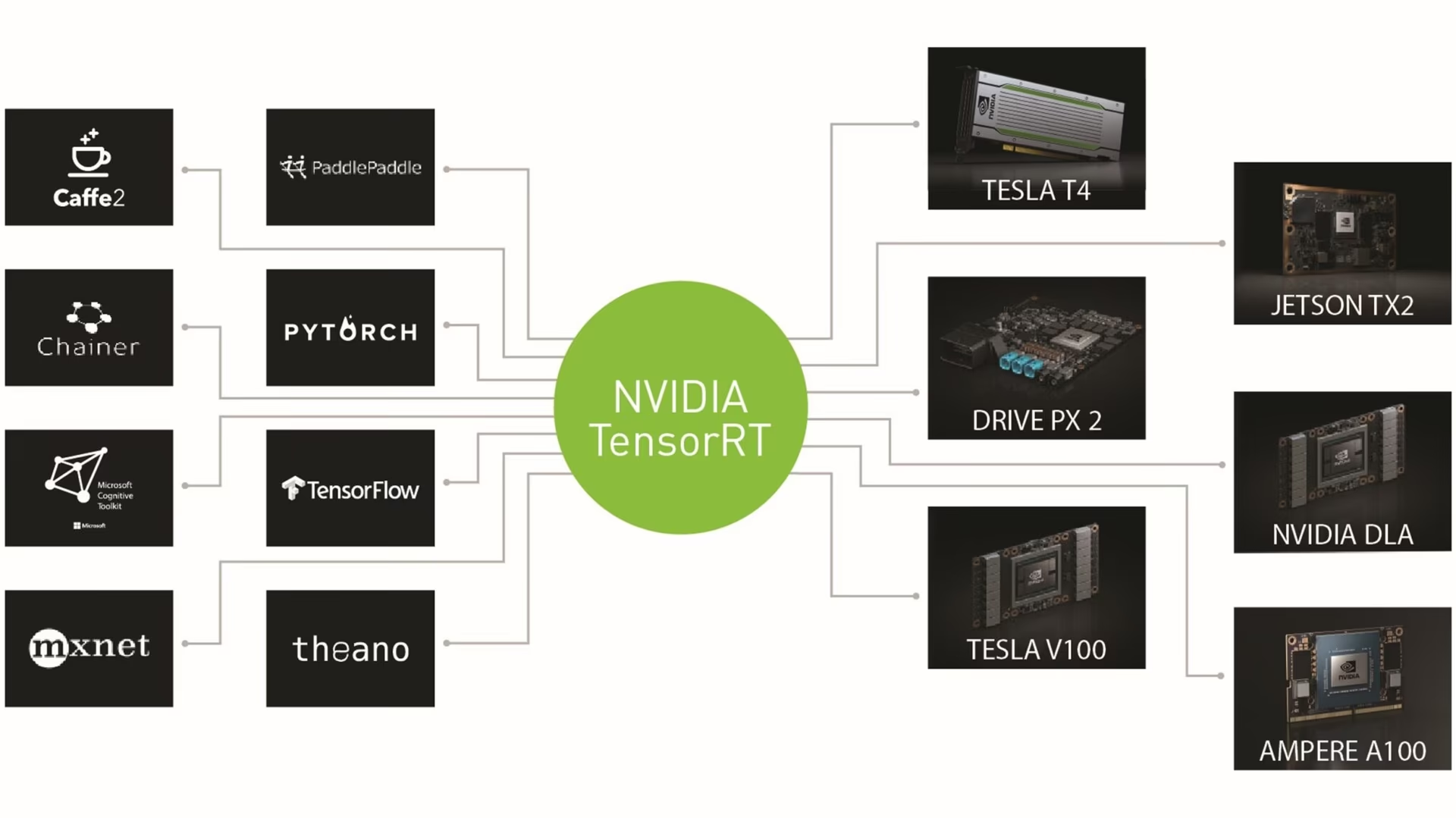
TensorRT는 레이어를 융합하고, 빌드 GPU에서 각 레이어에 가장 빠른 커널을 선택하며, 선택적으로 정밀도를 FP16 또는 INT8로 낮춰 엔진을 빌드합니다. 전체 참고 자료는 TensorRT 문서를 참조하십시오.
자주 묻는 질문#
동일한 TensorRT 버전을 사용하는 동일 모델의 GPU에서만 가능합니다. 엔진은 하나의 GPU 모델과 하나의 TensorRT 버전에 맞춰 빌드됩니다. 서로 다른 하드웨어에서 하나의 파일을 공유하려면 ONNX로 내보낸 다음 각 장치에서 엔진을 빌드하십시오. NVIDIA Jetson의 경우 Ultralytics Platform에서 8가지 Jetson 타깃용 엔진을 빌드할 수 있습니다.
FP16(
quantize=16)부터 시작하십시오. 보정 데이터가 필요하지 않으며 FP32 정확도를 유지합니다. TensorRT 11.4를 사용하는 NVIDIA RTX PRO 6000 Blackwell의 벤치마크에서 FP16은 동일한 48.5 mAP검증 50-95를 유지하면서 YOLO26s의 이미지당 지연 시간을 1.15ms에서 0.61ms로 줄였습니다. INT8(quantize=8)은 0.66ms와 46.3 mAP검증 50-95를 기록했으므로 해당 GPU에서는 FP16보다 빠르지 않았으며, 체크포인트를quantize=8로 학습한 경우가 아니라면 대표성 있는 보정 데이터가 필요합니다. INT8은 다른 하드웨어에서 효과적일 수 있습니다. Jetson 벤치마크에는 임베디드 장치의 FP16 및 INT8 결과가 나와 있습니다. INT8을 선택하기 전에 배포 장치에서 두 정밀도를 모두 측정하십시오.dynamic=True으로 내보내고, 실행하려는 최대 배치 크기로batch을 설정합니다. 그러면 엔진은 1부터batch까지의 배치 크기와 32픽셀부터 내보내기 시 지정한imgsz의 두 배까지의 이미지 크기를 허용하며, 구형 GPU의 동적 INT8 엔진에서는 최소 크기가 더 높습니다.dynamic=True를 지정하지 않으면 엔진의 입력 형상은 하나로 고정되며, Ultralytics는 각 배치를 해당 형상에 맞게 분할하거나 패딩합니다.동적 엔진from ultralytics import YOLO model = YOLO("yolo26n.pt") model.export(format="engine", dynamic=True, batch=8, quantize=16) model = YOLO("yolo26n.engine") results = model(["https://ultralytics.com/images/bus.jpg"] * 4, batch=4) # 이미지 4개로 구성된 배치JetPack 릴리스에 포함된 TensorRT 버전을 사용하여 Jetson 자체에서 내보내기를 실행하십시오. DLA 코어를 사용하려면
quantize=16또는quantize=8와 함께device=dla:0을 추가하십시오. 설정 및 벤치마크는 NVIDIA Jetson 가이드를 참조하십시오.Jetson에서 내보내기from ultralytics import YOLO model = YOLO("yolo26n.pt") model.export(format="engine", quantize=16) # Jetson GPU에서 실행하는 FP16 엔진 # 또는 DLA 코어 0용 FP16 엔진을 빌드합니다 model.export(format="engine", quantize=16, device="dla:0")Triton Inference Server 가이드는 모델을 ONNX로 내보내고
config.pbtxt에서 Triton의 TensorRT 가속기를 활성화합니다. 그러면 Triton은 최초 로드 시 서버 GPU에서 TensorRT 엔진을 빌드하고 캐시하므로 엔진은 항상 서버의 GPU 및 TensorRT 버전과 일치합니다. 이 가이드에서는 모델 저장소 레이아웃, 서버 컨테이너, Ultralytics를 사용한 클라이언트 추론을 다룹니다.


댓글116
질문을 하거나 결과를 공유하거나 다른 사람을 도와주세요.
AgbajeAyomipo
Hi Ultralytics team, I’ve trained a YOLOv11 model on (1024x1024) images from a camera feed and now I’m trying to run real-time inference on live streams using a Jetson Orin Nano. I want to maintain full resolution for inference because of accuracy requirements, but currently I'm getting only 1-2 FPS. When I reduce the input size, the FPS improves significantly, but it's not acceptable due to missed detections at lower resolutions. I attempted to export the model to TensorRT using:
model.export(format="engine", imgsz=(2592, 1944), half=True) but it fails silently. If I use a dynamic=true without specifying the imgsz parameter, the export succeeds and uses (1024, 1024). My questions:
Is TensorRT export for such high-resolution input supported/recommended with YOLOv11? If not, is there any known limitation or workaround? Are there ways to improve performance with high-res inference on Jetson Orin Nano? What hardware would you recommend for real-time inference on 1-3 camera streams with 5MP inputs, assuming we need at least ~15-20 FPS per stream? Device: AAEON BOXER-8621AI Module: NVIDIA® Jetson Orin Nano™ (4GB LPDDR5, Super Mode Enabled) Memory: 4 GB LPDDR5 I/O: USB 3.2 Gen 2, M.2 Expansion Operating System: JetPack 5.1.4 (L4T 35.6.0, Ubuntu 20.04) Use Case: Real-time multi-stream 5MP video inference
1martinmclee
Have you gotten any workaround? Perhaps with the YOLO26?
Hi Ultralytics team, I’ve trained a YOLOv11 model on full-size 5MP (2592x1944) images from a camera feed and now I’m trying to run real-time inference on live streams using a Jetson Orin Nano. I want to maintain full resolution for inference because of accuracy requirements, but currently I'm getting only 1-2 FPS. When I reduce the input size, the FPS improves significantly, but it's not acceptable due to missed detections at lower resolutions. I attempted to export the model to TensorRT using:
model.export(format="engine", imgsz=(2592, 1944), half=True)but it fails silently. If I use a dynamic=true, the export succeeds and uses (1024, 1024). My questions:- Is TensorRT export for such high-resolution input supported/recommended with YOLOv11? If not, is there any known limitation or workaround?
- Are there ways to improve performance with high-res inference on Jetson Orin Nano?
- What hardware would you recommend for real-time inference on 1-3 camera streams with 5MP inputs, assuming we need at least ~15-20 FPS per stream? Device: AAEON BOXER-8621AI Module: NVIDIA® Jetson Orin Nano™ (4GB LPDDR5, Super Mode Enabled) Memory: 4 GB LPDDR5 I/O: USB 3.2 Gen 2, M.2 Expansion Operating System: JetPack 5.1.4 (L4T 35.6.0, Ubuntu 20.04) Use Case: Real-time multi-stream 5MP video inference
1020423lzl
m的模型大小比n大的多,速度也慢了很多,输入图像尺寸越大,越吃显存,速度也越慢
李子乐控制工程 @.***
---Original--- From: @.> Date: Sat, May 9, 2026 10:30 AM To: @.>; Cc: @.@.>; Subject: Re: [ultralytics/ultralytics] zh/integrations/tensorrt/ (Discussion #9868)
现在有一个奇怪的现象,我导出的tensorrt模型的推理速度几乎和原来的.pt几乎没有差别甚至更慢,并且导出的tensorrt模型的推理结果和.pt模型的差别很大。 我的设备是i914900k+64G RAM+RTX A6000 我的环境是cuda12.4.131+tensorrt10.10.0.31+torch2.5.1+ultralytics8.3.252 导出命令: yolo export model=yolo11m.pt imgsz=1280 format='engine 推理代码为: model.predict(stream_path, imgsz=1280, classes=[14], conf=0.2, iou=0.5, stream=True, task='detect')
另外我试了下yolo11n.pt的640输入尺寸导出,推理速度就有明显提升,当然推理结果差别仍然较大。 请问这是什么道理,有什么解决办法?
— Reply to this email directly, view it on GitHub, or unsubscribe. Triage notifications on the go with GitHub Mobile for iOS or Android. You are receiving this because you commented.Message ID: @.***>
 User
能不能读完再说话,肯定是m和m比,n和n比,同样尺寸输入和同样尺寸输入的比啊。 该显卡的RT core算力是普通fp32算力的近两倍。
 Glenn JocherUltralytics
是的,性能应当在同一模型、同一
imgsz、同一batch、同一后处理参数下比较;m比n更大、1280比640更吃显存且更慢是正常现象。对 RTX A6000 来说,FP32的 TensorRT 往往不会比.pt明显更快,建议先按 TensorRT 导出文档 用half=True重新导出,并在相同输入上预热后再统计平均耗时;如果engine与.pt结果仍明显不一致,请贴出!yolo checks、完整控制台日志文本和一个最小可复现示例,我们好继续排查环境或后处理差异。
- User
现在有一个奇怪的现象,我导出的tensorrt模型的推理速度几乎和原来的.pt几乎没有差别甚至更慢,并且导出的tensorrt模型的推理结果和.pt模型的差别很大。 我的设备是i914900k+64G RAM+RTX A6000 我的环境是cuda12.4.131+tensorrt10.10.0.31+torch2.5.1+ultralytics8.3.252 导出命令:
yolo export model=yolo11m.pt imgsz=1280 format='engine推理代码为:model.predict(stream_path, imgsz=1280, classes=[14], conf=0.2, iou=0.5, stream=True, task='detect')另外我试了下yolo11n.pt的640输入尺寸导出,推理速度就有明显提升,当然推理结果差别仍然较大。 请问这是什么道理,有什么解决办法?
etson@yahboom:~/ultralytics/ultralytics$ yolo predict model=best.engine source=0 save=False show WARNING ⚠️ Unable to automatically guess model task, assuming 'task=detect'. Explicitly define task for your model, i.e. 'task=detect', 'segment', 'classify','pose' or 'obb'. Ultralytics 8.3.172 🚀 Python-3.10.12 torch-2.5.0a0+872d972e41.nv24.08 CUDA:0 (Orin, 7620MiB) Loading best.engine for TensorRT inference... [12/18/2025-17:11:05] [TRT] [I] Loaded engine size: 75 MiB [12/18/2025-17:11:05] [TRT] [I] [MS] Running engine with multi stream info [12/18/2025-17:11:05] [TRT] [I] [MS] Number of aux streams is 7 [12/18/2025-17:11:05] [TRT] [I] [MS] Number of total worker streams is 8 [12/18/2025-17:11:05] [TRT] [I] [MS] The main stream provided by execute/enqueue calls is the first worker stream [12/18/2025-17:11:05] [TRT] [I] [MemUsageChange] TensorRT-managed allocation in IExecutionContext creation: CPU +1, GPU +88, now: CPU 1, GPU 158 (MiB)
[ WARN:0@2.771] global cap_gstreamer.cpp:1777 open OpenCV | GStreamer warning: Cannot query video position: status=0, value=-1, duration=-1 1/1: 0... Success ✅ (inf frames of shape 1920x1080 at 5.00 FPS)
Traceback (most recent call last): File "/home/jetson/.local/bin/yolo", line 7, in sys.exit(entrypoint()) File "/home/jetson/Downloads/ultralytics-main/ultralytics/cfg/init.py", line 983, in entrypoint getattr(model, mode)(**overrides) # default args from model File "/home/jetson/Downloads/ultralytics-main/ultralytics/engine/model.py", line 555, in predict return self.predictor.predict_cli(source=source) if is_cli else self.predictor(source=source, stream=stream) File "/home/jetson/Downloads/ultralytics-main/ultralytics/engine/predictor.py", line 247, in predict_cli for _ in gen: # sourcery skip: remove-empty-nested-block, noqa File "/usr/local/lib/python3.10/dist-packages/torch/utils/_contextlib.py", line 36, in generator_context response = gen.send(None) File "/home/jetson/Downloads/ultralytics-main/ultralytics/engine/predictor.py", line 351, in stream_inference s[i] += self.write_results(i, Path(paths[i]), im, s) File "/home/jetson/Downloads/ultralytics-main/ultralytics/engine/predictor.py", line 434, in write_results string += f"{result.verbose()}{result.speed['inference']:.1f}ms" File "/home/jetson/Downloads/ultralytics-main/ultralytics/engine/results.py", line 694, in verbose return "".join(f"{n} {self.names[i]}{'s' * (n > 1)}, " for i, n in enumerate(counts) if n > 0) File "/home/jetson/Downloads/ultralytics-main/ultralytics/engine/results.py", line 694, in return "".join(f"{n} {self.names[i]}{'s' * (n > 1)}, " for i, n in enumerate(counts) if n > 0) KeyError: 171 terminate called without an active exception Aborted (core dumped) jetson@yahboom:~/ultralytics/ultralytics$ How to solve it
- Glenn JocherUltralytics
KeyError: 171表示模型输出了类别171,但当前names里没有这个索引(通常是自定义数据集的标签类别编号不在0..nc-1范围内、data.yaml里的names数量与nc不匹配,或导出/推理用的模型与数据配置不一致导致的元数据错配);请先把所有标注.txt的 class id 修正为连续的0..nc-1,同步修正data.yaml的nc/names,修正后删除数据集labels/下的*.cache,再用同一套环境从best.pt重新导出.engine(参考 TensorRT 导出文档),并在推理时显式加上task=detect。另外请把下面命令的完整输出(文本)贴在这个 discussion 里,以及你当时的导出命令,方便我们确认是否有多环境/路径冲突:yolo checks Thank you for your reply. The issue has been resolved. I was using the RT-DETR model, but I mistakenly used "from ultralytics import YOLO" when exporting
- Glenn JocherUltralytics
Glad you found it — RT-DETR models should be loaded/exported with
RTDETR(...)(mixing them withYOLO(...)can produce mismatched metadata likenames), see the RT-DETR model docs for details:from ultralytics import RTDETR model = RTDETR("best.pt") model.export(format="engine") # creates best.engine
fly2skyToEnjoy
May I ask : The following command exports the file, whether the box and mask are both nmsed at the same time ???
from ultralytics import YOLO
Load the YOLO11 model
model = YOLO("yolo11n.pt")
Export the model to TensorRT format
model.export(format="engine") # creates 'yolo11n.engine'
Load the exported TensorRT model
tensorrt_model = YOLO("yolo11n.engine")
Run inference
results = tensorrt_model("https://ultralytics.com/images/bus.jpg")
AK993
这个方法适用于rt-detr吗
dilanpatel195
I am trying to prediction model for the YOLOv11n-seg, I have exported the .py to .engine to back it run faster but keep getting a KEY error message:
KeyError Traceback (most recent call last) Cell In[4], line 109 106 # Inside the main loop after grabbing a frame 107 if inference_active and not inpainting_active: 108 # Perform YOLO inference --> 109 results = model(rgb_frame)[0] 110 masked_image = rgb_frame.copy() # Make a copy for masking 112 # Process YOLO masks (original functionality remains unchanged)
File c:\ProgramData\miniconda3\Lib\site-packages\ultralytics\engine\model.py:176, in Model.call(self, source, stream, **kwargs) 147 def call( 148 self, 149 source: Union[str, Path, int, Image.Image, list, tuple, np.ndarray, torch.Tensor] = None, 150 stream: bool = False, 151 **kwargs, 152 ) -> list: 153 """ 154 Alias for the predict method, enabling the model instance to be callable for predictions. 155 (...) 174 ... print(f"Detected {len(r)} objects in image") 175 """ --> 176 return self.predict(source, stream, **kwargs)
File c:\ProgramData\miniconda3\Lib\site-packages\ultralytics\engine\model.py:554, in Model.predict(self, source, stream, predictor, **kwargs) 552 if prompts and hasattr(self.predictor, "set_prompts"): # for SAM-type models 553 self.predictor.set_prompts(prompts) --> 554 return self.predictor.predict_cli(source=source) if is_cli else self.predictor(source=source, stream=stream)
File c:\ProgramData\miniconda3\Lib\site-packages\ultralytics\engine\predictor.py:168, in BasePredictor.call(self, source, model, stream, *args, **kwargs) 166 return self.stream_inference(source, model, *args, **kwargs) 167 else: --> 168 return list(self.stream_inference(source, model, *args, **kwargs))
File c:\ProgramData\miniconda3\Lib\site-packages\torch\utils_contextlib.py:36, in _wrap_generator..generator_context(*args, **kwargs) 33 try: 34 # Issuing None to a generator fires it up 35 with ctx_factory(): ---> 36 response = gen.send(None) 38 while True: 39 try: 40 # Forward the response to our caller and get its next request
File c:\ProgramData\miniconda3\Lib\site-packages\ultralytics\engine\predictor.py:274, in BasePredictor.stream_inference(self, source, model, *args, **kwargs) 268 self.results[i].speed = { 269 "preprocess": profilers[0].dt * 1e3 / n, 270 "inference": profilers[1].dt * 1e3 / n, 271 "postprocess": profilers[2].dt * 1e3 / n, 272 } 273 if self.args.verbose or self.args.save or self.args.save_txt or self.args.show: --> 274 s[i] += self.write_results(i, Path(paths[i]), im, s) 276 # Print batch results 277 if self.args.verbose:
File c:\ProgramData\miniconda3\Lib\site-packages\ultralytics\engine\predictor.py:334, in BasePredictor.write_results(self, i, p, im, s) 332 result = self.results[i] 333 result.save_dir = self.save_dir.str() # used in other locations --> 334 string += f"{result.verbose()}{result.speed['inference']:.1f}ms" 336 # Add predictions to image 337 if self.args.save or self.args.show:
File c:\ProgramData\miniconda3\Lib\site-packages\ultralytics\engine\results.py:663, in Results.verbose(self) 661 for c in boxes.cls.unique(): 662 n = (boxes.cls == c).sum() # detections per class --> 663 log_string += f"{n} {self.names[int(c)]}{'s' * (n > 1)}, " 664 return log_string
KeyError: 2
Any help would be greatly appreciated!
Ranjith3436
Now, My TensorRT Sengment model used for track. if any detections not there the processing FPS is 75-80 in jetson. But once the person or people detected suddenly reused to 15-20. processing time going to 40ms. only when the object detected. What's the issue in model.track(), could i run all the tracking thing on GPU.
- Glenn JocherUltralytics(수정됨)
@Ranjith3436 the performance drop when objects are detected is expected behavior, as tracking introduces additional computational overhead. When objects are detected, the model.track() method performs several CPU-bound operations including feature extraction, association, and trajectory management.
To improve performance:
- Try using a smaller model variant (like YOLO26n-seg instead of larger variants)
- Consider reducing the image resolution for tracking
- Optimize tracking parameters by setting
persist=Trueand adjustingconfthresholds higher to track fewer objects - Use
half=True(FP16) orint8=Truewhen exporting your model to TensorRT for maximum GPU acceleration
For the tracking components specifically, the BoT-SORT or ByteTrack algorithms used by Ultralytics do have some CPU-bound operations, but you can minimize their impact with the above optimizations. For more details on tracking optimization, check our tracking documentation.
1
I convert Classification model that i retrained. But it throw the error "amax(): Expected reduction dim 1 to have non-zero size."
- Glenn JocherUltralytics
@Ranjith3436 this error typically occurs when TensorRT encounters an empty dimension during model conversion. For classification models, this could happen if:
- Your model architecture was modified or if you're using a custom architecture
- There might be an issue with batch normalization layers during export
- The class count in your retrained model might be causing dimension mismatches
Try these solutions:
- Ensure your model's forward pass works correctly before export
- Try exporting with
simplify=Falseto preserve the original graph structure - Check if your classification model has the correct output dimension for your number of classes
If the issue persists, share more details about your model architecture and export command for better assistance. For more guidance, refer to our TensorRT integration documentation.
The model trained use yolov8l-cls.pt and the error come from jetson device.
(model): ClassificationModel( (model): Sequential( (0): Conv( (conv): Conv2d(3, 64, kernel_size=(3, 3), stride=(2, 2), padding=(1, 1), bias=False) (bn): BatchNorm2d(64, eps=1e-05, momentum=0.1, affine=True, track_running_stats=True) (act): SiLU(inplace=True) ) (1): Conv( (conv): Conv2d(64, 128, kernel_size=(3, 3), stride=(2, 2), padding=(1, 1), bias=False) (bn): BatchNorm2d(128, eps=1e-05, momentum=0.1, affine=True, track_running_stats=True) (act): SiLU(inplace=True) ) (2): C2f( (cv1): Conv( (conv): Conv2d(128, 128, kernel_size=(1, 1), stride=(1, 1), bias=False) (bn): BatchNorm2d(128, eps=1e-05, momentum=0.1, affine=True, track_running_stats=True) (act): SiLU(inplace=True) ) (cv2): Conv( (conv): Conv2d(320, 128, kernel_size=(1, 1), stride=(1, 1), bias=False) (bn): BatchNorm2d(128, eps=1e-05, momentum=0.1, affine=True, track_running_stats=True) (act): SiLU(inplace=True) ) (m): ModuleList( (0-2): 3 x Bottleneck( (cv1): Conv( (conv): Conv2d(64, 64, kernel_size=(3, 3), stride=(1, 1), padding=(1, 1), bias=False) (bn): BatchNorm2d(64, eps=1e-05, momentum=0.1, affine=True, track_running_stats=True) (act): SiLU(inplace=True) ) (cv2): Conv( (conv): Conv2d(64, 64, kernel_size=(3, 3), stride=(1, 1), padding=(1, 1), bias=False) (bn): BatchNorm2d(64, eps=1e-05, momentum=0.1, affine=True, track_running_stats=True) (act): SiLU(inplace=True) ) ) ) ) (3): Conv( (conv): Conv2d(128, 256, kernel_size=(3, 3), stride=(2, 2), padding=(1, 1), bias=False) (bn): BatchNorm2d(256, eps=1e-05, momentum=0.1, affine=True, track_running_stats=True) (act): SiLU(inplace=True) ) (4): C2f( (cv1): Conv( (conv): Conv2d(256, 256, kernel_size=(1, 1), stride=(1, 1), bias=False) (bn): BatchNorm2d(256, eps=1e-05, momentum=0.1, affine=True, track_running_stats=True) (act): SiLU(inplace=True) ) (cv2): Conv( (conv): Conv2d(1024, 256, kernel_size=(1, 1), stride=(1, 1), bias=False) (bn): BatchNorm2d(256, eps=1e-05, momentum=0.1, affine=True, track_running_stats=True) (act): SiLU(inplace=True) ) (m): ModuleList( (0-5): 6 x Bottleneck( (cv1): Conv( (conv): Conv2d(128, 128, kernel_size=(3, 3), stride=(1, 1), padding=(1, 1), bias=False) (bn): BatchNorm2d(128, eps=1e-05, momentum=0.1, affine=True, track_running_stats=True) (act): SiLU(inplace=True) ) (cv2): Conv( (conv): Conv2d(128, 128, kernel_size=(3, 3), stride=(1, 1), padding=(1, 1), bias=False) (bn): BatchNorm2d(128, eps=1e-05, momentum=0.1, affine=True, track_running_stats=True) (act): SiLU(inplace=True) ) ) ) ) (5): Conv( (conv): Conv2d(256, 512, kernel_size=(3, 3), stride=(2, 2), padding=(1, 1), bias=False) (bn): BatchNorm2d(512, eps=1e-05, momentum=0.1, affine=True, track_running_stats=True) (act): SiLU(inplace=True) ) (6): C2f( (cv1): Conv( (conv): Conv2d(512, 512, kernel_size=(1, 1), stride=(1, 1), bias=False) (bn): BatchNorm2d(512, eps=1e-05, momentum=0.1, affine=True, track_running_stats=True) (act): SiLU(inplace=True) ) (cv2): Conv( (conv): Conv2d(2048, 512, kernel_size=(1, 1), stride=(1, 1), bias=False) (bn): BatchNorm2d(512, eps=1e-05, momentum=0.1, affine=True, track_running_stats=True) (act): SiLU(inplace=True) ) (m): ModuleList( (0-5): 6 x Bottleneck( (cv1): Conv( (conv): Conv2d(256, 256, kernel_size=(3, 3), stride=(1, 1), padding=(1, 1), bias=False) (bn): BatchNorm2d(256, eps=1e-05, momentum=0.1, affine=True, track_running_stats=True) (act): SiLU(inplace=True) ) (cv2): Conv( (conv): Conv2d(256, 256, kernel_size=(3, 3), stride=(1, 1), padding=(1, 1), bias=False) (bn): BatchNorm2d(256, eps=1e-05, momentum=0.1, affine=True, track_running_stats=True) (act): SiLU(inplace=True) ) ) ) ) (7): Conv( (conv): Conv2d(512, 1024, kernel_size=(3, 3), stride=(2, 2), padding=(1, 1), bias=False) (bn): BatchNorm2d(1024, eps=1e-05, momentum=0.1, affine=True, track_running_stats=True) (act): SiLU(inplace=True) ) (8): C2f( (cv1): Conv( (conv): Conv2d(1024, 1024, kernel_size=(1, 1), stride=(1, 1), bias=False) (bn): BatchNorm2d(1024, eps=1e-05, momentum=0.1, affine=True, track_running_stats=True) (act): SiLU(inplace=True) ) (cv2): Conv( (conv): Conv2d(2560, 1024, kernel_size=(1, 1), stride=(1, 1), bias=False) (bn): BatchNorm2d(1024, eps=1e-05, momentum=0.1, affine=True, track_running_stats=True) (act): SiLU(inplace=True) ) (m): ModuleList( (0-2): 3 x Bottleneck( (cv1): Conv( (conv): Conv2d(512, 512, kernel_size=(3, 3), stride=(1, 1), padding=(1, 1), bias=False) (bn): BatchNorm2d(512, eps=1e-05, momentum=0.1, affine=True, track_running_stats=True) (act): SiLU(inplace=True) ) (cv2): Conv( (conv): Conv2d(512, 512, kernel_size=(3, 3), stride=(1, 1), padding=(1, 1), bias=False) (bn): BatchNorm2d(512, eps=1e-05, momentum=0.1, affine=True, track_running_stats=True) (act): SiLU(inplace=True) ) ) ) ) (9): Classify( (conv): Conv( (conv): Conv2d(1024, 1280, kernel_size=(1, 1), stride=(1, 1), bias=False) (bn): BatchNorm2d(1280, eps=1e-05, momentum=0.1, affine=True, track_running_stats=True) (act): SiLU(inplace=True) ) (pool): AdaptiveAvgPool2d(output_size=1) (drop): Dropout(p=0.0, inplace=True) (linear): Linear(in_features=1280, out_features=2, bias=True) ) ) ) )
model architecture
This error sorted out