SKU-110K 데이터셋
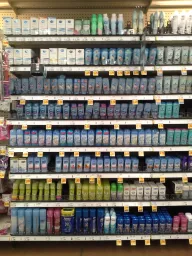

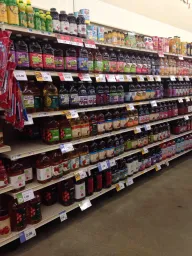

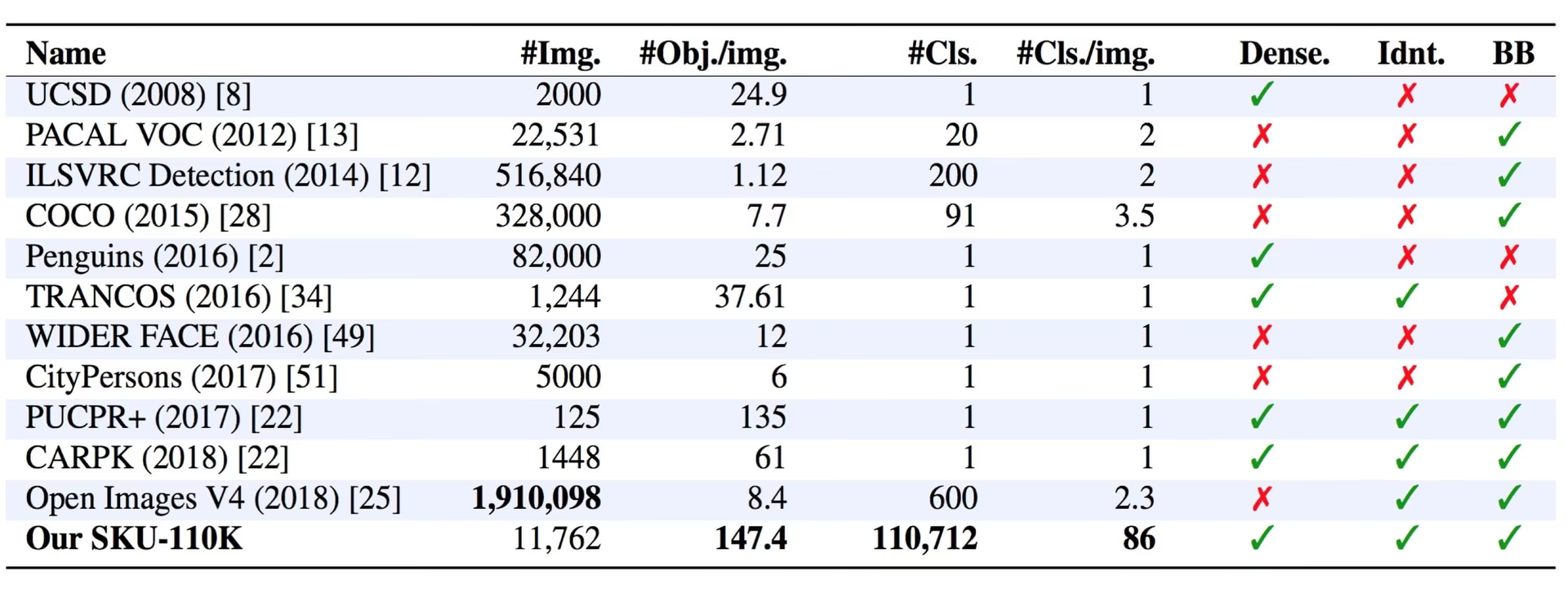
SKU-110K 데이터셋은 소매점 진열대의 밀집 이미지 11,743개로 구성된 단일 클래스 객체 감지 데이터셋이며, 학습 이미지 8,219개, 검증 이미지 588개, 테스트 이미지 2,936개로 분할되어 있습니다. 모든 제품에는 단일 클래스 object에 속하는 바운딩 박스 하나가 주석으로 지정되어 있습니다. 여기서 이름은 장면에 등장하는 110,000개 이상의 고유 재고 보관 단위(SKU)를 가리키며, 감지 클래스가 110,000개라는 뜻은 아닙니다. CVPR 2019 논문 밀집 장면에서의 정밀 감지를 위해 Eran Goldman 외 연구진이 제작한 이 데이터셋에는 주석이 달린 제품이 170만 개 이상 포함되어 있으며, 이미지당 평균 약 147개에 달합니다. 따라서 혼잡한 소매 환경의 컴퓨터 비전 모델을 위한 까다로운 벤치마크입니다.
시청: 소매점 선반의 모든 제품을 감지하도록 Ultralytics YOLO26을 학습하는 방법 | SKU-110K 🛒
주요 기능#
- 단일 클래스 감지: 모든 제품에는 단일 클래스
object(names: {0: object}) 아래 바운딩 박스 하나가 지정됩니다. 주석에는 SKU별 카테고리 레이블이 없습니다. - 극도로 높은 객체 밀도: 전 세계 매장 진열대 이미지에는 평균 약 147개의 제품이 빽빽하게 들어 있으며, 서로 비슷하거나 똑같아 보이는 객체가 가까이 배치되는 경우가 많습니다.
- 대규모 데이터: 이미지 11,743개에 걸쳐 110,000개 이상의 고유 SKU와 170만 개 이상의 주석이 달린 바운딩 박스가 포함되어 최첨단 객체 감지기의 성능을 시험합니다.
데이터셋 구조#
SKU-110K 데이터셋은 세 가지 하위 집합으로 나뉘며, 모두 object 단일 클래스를 공유합니다:
| 분할 | 이미지 | 설명 |
|---|---|---|
| 학습 | 8,219 | 모델 학습에 사용되는 이미지와 주석 |
| 검증 | 588 | 학습 중 평가를 위해 분리해 둔 이미지 |
| 테스트 | 2,936 | 학습된 모델의 최종 평가에 사용되는 이미지 |
응용 분야#
SKU-110K 데이터셋은 객체 감지 작업, 특히 소매점 진열대처럼 객체가 밀집된 장면에서 딥러닝 모델을 학습하고 평가하는 데 널리 사용됩니다. 주요 활용 분야는 다음과 같습니다:
자체 진열대 이미지에 주석을 달고, 소매 감지 데이터셋을 학습 및 관리하려면 Ultralytics Platform에서 전체 워크플로를 실행하세요.
데이터셋 YAML#
SKU-110K.yaml 파일은 데이터셋 경로, 클래스 이름, 기타 메타데이터를 포함한 데이터셋 구성을 정의합니다. 이 파일은 https://github.com/ultralytics/ultralytics/blob/main/ultralytics/cfg/datasets/SKU-110K.yaml의 Ultralytics 저장소에서 관리됩니다.
# Ultralytics 🚀 AGPL-3.0 License - https://ultralytics.com/license

# SKU-110K retail items dataset https://github.com/eg4000/SKU110K_CVPR19 by Trax Retail
# Documentation: https://docs.ultralytics.com/datasets/detect/sku-110k
# Example usage: yolo train data=SKU-110K.yaml
# parent
# ├── ultralytics
# └── datasets
#     └── SKU-110K ← downloads here (13.6 GB)

# Train/val/test sets as 1) dir: path/to/imgs, 2) file: path/to/imgs.txt, or 3) list: [path/to/imgs1, path/to/imgs2, ..]
path: SKU-110K # dataset root dir
train: train.txt # train images (relative to 'path') 8219 images
val: val.txt # val images (relative to 'path') 588 images
test: test.txt # test images (optional) 2936 images

# Classes
names:
  0: object

# Download script/URL (optional) ---------------------------------------------------------------------------------------
download: |
  import shutil
  from pathlib import Path

  import numpy as np
  import polars as pl

  from ultralytics.utils import TQDM
  from ultralytics.utils.downloads import download
  from ultralytics.utils.ops import xyxy2xywh

  # Download
  dir = Path(yaml["path"])  # dataset root dir
  parent = Path(dir.parent)  # download dir
  urls = ["http://trax-geometry.s3.amazonaws.com/cvpr_challenge/SKU110K_fixed.tar.gz"]
  download(urls, dir=parent)

  # Rename directories
  if dir.exists():
      shutil.rmtree(dir)
  (parent / "SKU110K_fixed").rename(dir)  # rename dir
  (dir / "labels").mkdir(parents=True, exist_ok=True)  # create labels dir

  # Convert labels
  names = "image", "x1", "y1", "x2", "y2", "class", "image_width", "image_height"  # column names
  for d in "annotations_train.csv", "annotations_val.csv", "annotations_test.csv":
      x = pl.read_csv(dir / "annotations" / d, has_header=False, new_columns=names, infer_schema_length=None).to_numpy()  # annotations
      images, unique_images = x[:, 0], np.unique(x[:, 0])
      with open((dir / d).with_suffix(".txt").__str__().replace("annotations_", ""), "w", encoding="utf-8") as f:
          f.writelines(f"./images/{s}\n" for s in unique_images)
      for im in TQDM(unique_images, desc=f"Converting {dir / d}"):
          cls = 0  # single-class dataset
          with open((dir / "labels" / im).with_suffix(".txt"), "a", encoding="utf-8") as f:
              for r in x[images == im]:
                  w, h = r[6], r[7]  # image width, height
                  xywh = xyxy2xywh(np.array([[r[1] / w, r[2] / h, r[3] / w, r[4] / h]]))[0]  # instance
f.write(f"{cls} {xywh[0]:.5f} {xywh[1]:.5f} {xywh[2]:.5f} {xywh[3]:.5f}\n") # write label사용법#
SKU-110K는 처음 학습할 때 자동으로 다운로드되며, 이미지 11,743개를 저장하려면 디스크 여유 공간이 약 13.6 GB 필요합니다. 다운로드 스크립트는 원본 주석도 가져와 YOLO 형식으로 변환하며, 이 작업에는 몇 분 정도 걸릴 수 있습니다.
다음 코드 조각을 사용하면 이미지 크기 640으로 SKU-110K 데이터셋에서 100 에포크 동안 YOLO26n 모델을 학습할 수 있습니다.
from ultralytics import YOLO

# 모델 로드
model = YOLO("yolo26n.pt")  # 사전 학습된 모델을 불러옵니다(학습에 권장).

# 모델 학습
results = model.train(data="SKU-110K.yaml", epochs=100, imgsz=640)
샘플 데이터 및 어노테이션#
SKU-110K 이미지는 실제 매장 진열대에 빽빽하게 놓인 제품을 포착하며, 서로 거의 동일한 제품 수십 개가 나란히 배치되어 있습니다. 주석이 포함된 이미지 예시는 다음과 같습니다:
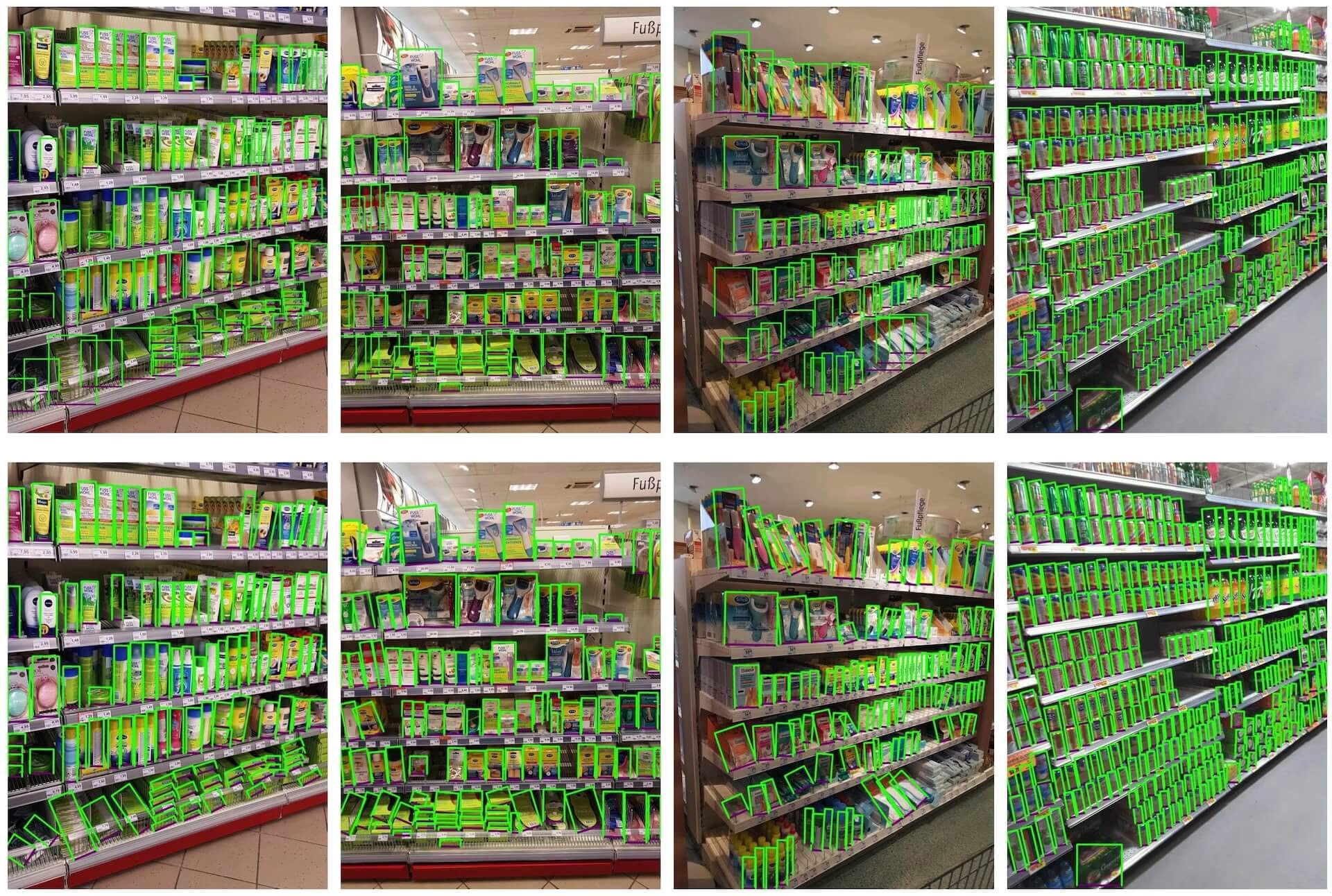
- 밀집된 소매점 진열대 이미지: 소매점 진열대 환경에 객체가 밀집된 사례를 보여 주는 이미지입니다. 객체에는 단일
object클래스의 바운딩 박스가 주석으로 지정되어 있습니다.
제품이 밀집해 배치되어 있어 SKU-110K는 소매 분야에 특화된 견고한 컴퓨터 비전 솔루션을 개발하는 데 특히 유용합니다. 이미지당 객체 수가 많아 감지기가 일반적인 벤치마크보다 훨씬 까다로운 조건에서 평가되기 때문입니다.
인용 및 감사의 글#
연구 또는 개발 작업에서 SKU-110K 데이터셋을 사용하는 경우 다음 논문을 인용해 주세요:
@inproceedings{goldman2019dense,
  author    = {Eran Goldman and Roei Herzig and Aviv Eisenschtat and Jacob Goldberger and Tal Hassner},
  title     = {Precise Detection in Densely Packed Scenes},
  booktitle = {Proc. Conf. Comput. Vision Pattern Recognition (CVPR)},
  year      = {2019}
}
컴퓨터 비전 연구 커뮤니티를 위한 귀중한 자료인 SKU-110K 데이터셋을 제작하고 관리한 Eran Goldman 외 연구진에게 감사의 뜻을 전합니다. SKU-110K 데이터셋과 제작자에 대한 자세한 내용은 SKU-110K 데이터셋 GitHub 저장소를 방문하세요.
자주 묻는 질문#
SKU-110K 데이터셋은 Eran Goldman 외 연구진이 CVPR 2019 논문을 위해 제작한 소매 선반 이미지 11,743개로 구성된 단일 클래스 객체 감지 데이터셋입니다. 각 상품에는
object바운딩 박스 하나가 지정되어 있으며, 이미지는 110,000개 이상의 고유 재고 관리 단위(SKU)를 포괄합니다. 따라서 혼잡한 장면의 객체 감지 및 소매 컴퓨터 비전 시스템 구축을 위한 강력한 벤치마크입니다.아니요. SKU-110K는 단일 클래스 데이터셋입니다. 모든 제품에는
object(names: {0: object}) 클래스에 속하는 바운딩 박스 하나가 주석으로 지정됩니다. 이름의 "110K"는 이미지에 등장하는 고유 재고 보관 단위(SKU)의 수를 가리키며, 감지 클래스의 수를 뜻하지 않습니다.SKU-110K 데이터셋에는 이미지 11,743개(학습용 8,219개, 검증용 588개, 테스트용 2,936개)와 단일 감지 클래스
object가 포함되어 있습니다. 자세한 내용은 데이터셋 구조 섹션과SKU-110K.yaml구성을 참조하세요.SKU-110K의 용량은 약 13.6 GB이며,
data="SKU-110K.yaml"으로 처음 학습할 때 자동으로 다운로드되므로 수동으로 다운로드할 필요가 없습니다. 용량이 더 작은 데이터셋은 객체 감지 데이터셋 개요를 참조하세요.SKU-110K 데이터셋에서 YOLO26 모델을 학습하는 방법은 간단합니다. 이미지 크기 640으로 YOLO26n 모델을 100 에폭 동안 학습하는 예시는 다음과 같습니다:
학습 예제from ultralytics import YOLO # 모델 로드 model = YOLO("yolo26n.pt") # 사전 학습된 모델을 불러옵니다(학습에 권장). # 모델 학습 results = model.train(data="SKU-110K.yaml", epochs=100, imgsz=640)


댓글6
질문을 하거나 결과를 공유하거나 다른 사람을 도와주세요.
syafiqmuda
Hi, newbie here, I try to use this dataset to compare and see the accuracy for this dataset with my own, but during training almost all the file were show
Corrupt JPEG data: 786 extraneous bytes before marker 0xd9and sometimesCorrupt JPEG data: premature end of data segment. can I know why? my code look like this:training.py
from ultralytics import YOLO, checks, hub checks() def main(): hub.login('something') model = YOLO('https://hub.ultralytics.com/models/ukr3hHHq88WJASNn3aUz') results = model.train(device=[0,1,2,3]) if __name__ == '__main__': main() Glenn JocherUltralytics
Those messages are PIL JPEG warnings from a handful of non-standard images in SKU-110K; Ultralytics usually auto-recovers/filters these during dataloading via
ultralytics.data.utils.verify_image()(see theverify_image()reference), so if training continues it’s safe to ignore—if it actually crashes, re-download/re-extract the dataset (or re-encode the specific bad JPGs), then delete any*.cacheunder yourlabels/folder and rerun; if you share the text output ofyolo checksplus the full traceback (not a screenshot) we can pinpoint whether it’s data corruption or an environment issue.
ApodiAlsurihi
Hi, thank you for this amazing and detailed explanation! Your work is incredibly helpful and inspiring. I would deeply appreciate it if you could share the trained model after the training process. It would make a significant difference in advancing my project and learning. Thank you so much for your generosity and support!
- Glenn JocherUltralytics
@ApodiAlsurihi thank you for your kind words! Unfortunately, we cannot share trained models directly. However, you can train your own model using the SKU-110K dataset by following the instructions provided in the documentation.
serna01
Are this warnings OK, when training? the batch=0.1 I used it to avoid a memory error. yolo detect train data=SKU-110K.yaml model=yolov8n.pt epochs=50 imgsz=640 batch=0.1
AutoBatch: Using batch-size 2 for CUDA:0 0.49G/3.81G (13%) ✅ train: Scanning /home/asm/cv_cornia/parking_mgmt/datasets/SKU-110K/labels... 8216 train: WARNING ⚠️ /home/asm/cv_cornia/parking_mgmt/datasets/SKU-110K/images/train_1797.jpg: 3 duplicate labels removed train: WARNING ⚠️ /home/asm/cv_cornia/parking_mgmt/datasets/SKU-110K/images/train_4222.jpg: ignoring corrupt image/label: image file is truncated (23 bytes not processed) train: WARNING ⚠️ /home/asm/cv_cornia/parking_mgmt/datasets/SKU-110K/images/train_882.jpg: ignoring corrupt image/label: image file is truncated (3 bytes not processed) train: WARNING ⚠️ /home/asm/cv_cornia/parking_mgmt/datasets/SKU-110K/images/train_924.jpg: ignoring corrupt image/label: image file is truncated (10 bytes not processed)
al: Scanning /home/asm/cv_cornia/parking_mgmt/datasets/SKU-110K/labels... 588 ima val: New cache created: /home/asm/cv_cornia/parking_mgmt/datasets/SKU-110K/labels.cache Corrupt JPEG data: 305 extraneous bytes before marker 0xd9 Corrupt JPEG data: 786 extraneous bytes before marker 0xd9 Plotting labels to runs/detect/train5/labels.jpg... optimizer: 'optimizer=auto' found, ignoring 'lr0=0.01' and 'momentum=0.937' and determining best 'optimizer', 'lr0' and 'momentum' automatically... optimizer: AdamW(lr=0.002, momentum=0.9) with parameter groups 57 weight(decay=0.0), 64 weight(decay=0.0005), 63 bias(decay=0.0) TensorBoard: model graph visualization added ✅ Image sizes 640 train, 640 val Using 8 dataloader workers Logging results to runs/detect/train5 Starting training for 50 epochs...
  Epoch    GPU_mem   box_loss   cls_loss   dfl_loss  Instances       Size
   1/50      1.14G      2.504      3.041       1.53        378        640:   5Corrupt JPEG data: premature end of data segment
   1/50      1.15G      2.382      2.658      1.454        331        640:   7Corrupt JPEG data: 562 extraneous bytes before marker 0xd9
   1/50      1.42G      2.273      2.314      1.382        314        640:  11Corrupt JPEG data: bad Huffman code
   1/50      1.42G      2.266      2.295      1.378        578        64       1/50      1.42G      2.266      2.293      1.377        678        64       1/50      1.42G      2.266      2.293      1.377        678        64       1/50      1.42G      2.265      2.292      1.377        723        64       1/50      1.42G      2.265      2.292      1.377        723        64       1/50      1.42G      2.266       2.29      1.377        695        64       1/50      1.42G      2.266          1/50      1.42G      2.255      2.2       1/50      1.42G      2.254      2.247       1.3       1/50      1       1/50              1/50                          1/50      1.42G      2.232      2.187      1.358        608        640:  13Corrupt JPEG data: bad Huffman code
   1/50      1.42G      2.216      2.138      1.347        437        640:  14Corrupt JPEG data: premature end of data segment
   1/50      1.42G      2.164      1.993      1.318        478        640:  17Corrupt JPEG data: 41 extraneous bytes before marker 0xd9
   1/50      1.42G      2.157      1.967      1.312        308        640:  17Corrupt JPEG data: premature end of data segment
   1/50      1.42G      2.011       1.61      1.239        173        640:  30Corrupt JPEG data: premature end of data segment
   1/50      1.42G      1.987      1.556      1.227        461        640:  33Corrupt JPEG data: 96 extraneous bytes before marker 0xd9
   1/50      1.42G      1.978      1.537      1.223        214        640:  34Corrupt JPEG data: bad Huffman code
   1/50      1.42G      1.959      1.497      1.215        250        640:  37Corrupt JPEG data: bad Huffman code
   1/50      1.42G      1.915      1.403      1.197        500        640:  46Corrupt JPEG data: premature end of data segment
   1/50      1.42G      1.888      1.345      1.185        616        640:  52Corrupt JPEG data: premature end of data segment
Thanks.
- Glenn JocherUltralytics
@serna01 the warnings you see are generally okay and indicate that the training process is handling issues like duplicate labels and corrupt images. Using
batch=0.1to avoid memory errors is fine, but consider adjusting your batch size to better utilize your GPU memory. If the warnings persist or cause issues, ensure you're using the latest version of the package. For more details on the SKU-110k dataset, visit SKU-110k Dataset Documentation.