OBB가 포함된 DOTA 데이터셋
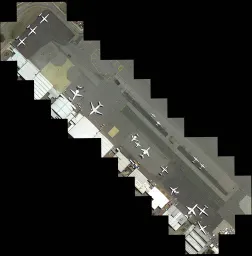
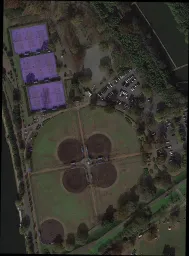
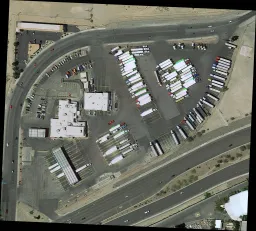
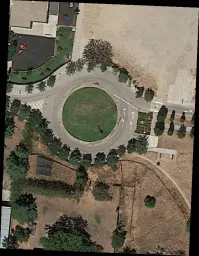
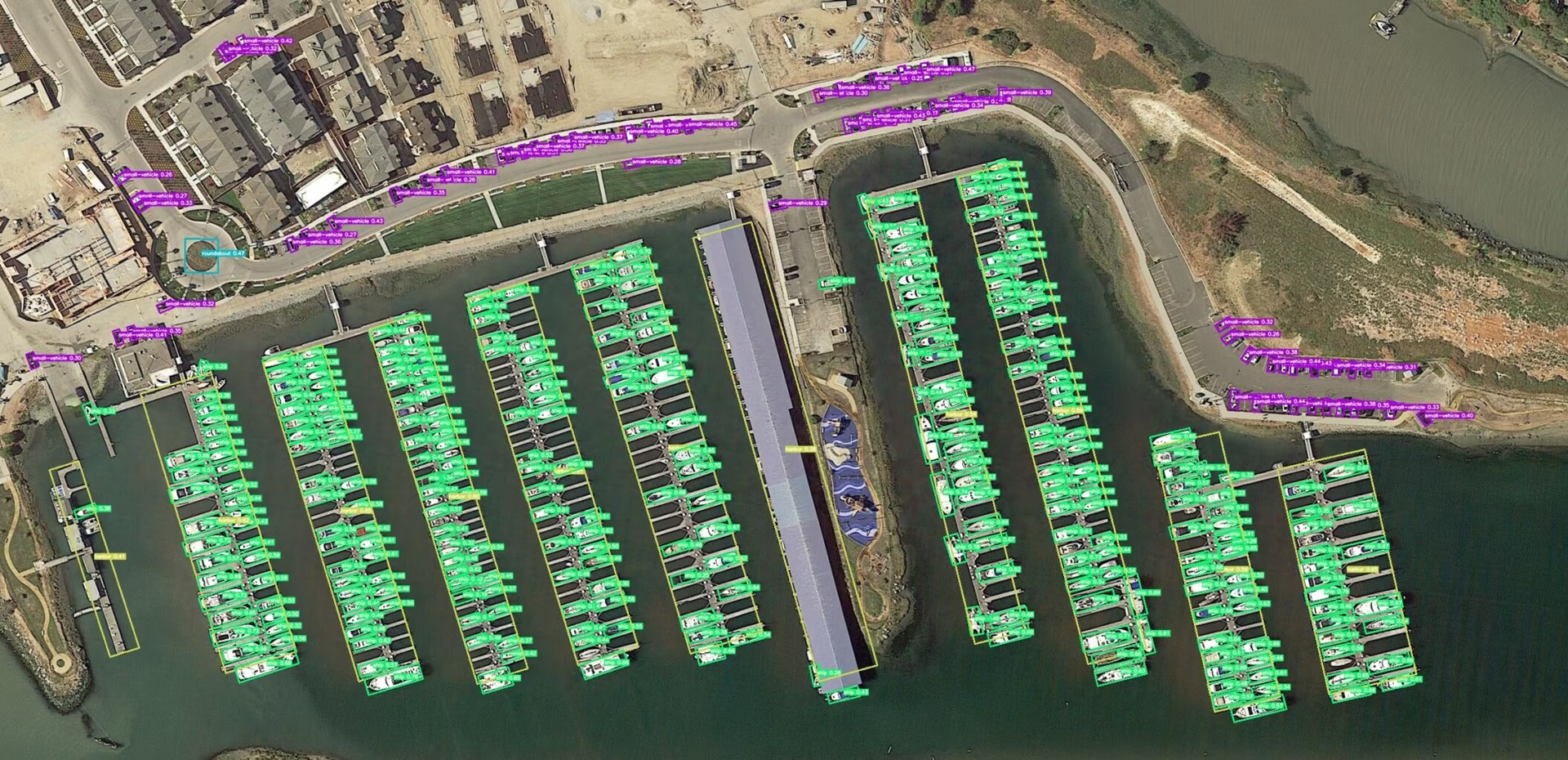
DOTA 데이터셋은 항공 이미지의 객체 감지를 위한 대규모 벤치마크입니다. 세 가지 버전(v1.0, v1.5, v2.0)으로 공개되었으며, 다양한 항공 센서와 플랫폼으로 촬영한 이미지에 18개 카테고리, 최대 170만 개의 방향성 바운딩 박스(OBB) 어노테이션이 포함되어 있습니다.
Ultralytics Platform에서 공식 호스팅되는 DOTA v1.5 및 DOTA v1.0 데이터셋을 살펴보세요. 방향성 어노테이션을 미리 보고 통계를 확인한 다음, 데이터셋을 복제해 학습에 사용할 수 있습니다.
주요 기능#
시청: Google Colab에서 방향 경계 상자를 위해 DOTA 데이터셋으로 Ultralytics YOLO를 학습하는 방법
- 다양한 센서와 플랫폼에서 수집했으며, 이미지 크기는 800 × 800픽셀부터 20,000 × 20,000픽셀까지 다양합니다.
- 18개 카테고리에 걸쳐 방향성 바운딩 박스가 170만 개 이상 포함되어 있습니다.
- 이미지마다 객체 크기 범위가 넓어 다중 스케일 객체 감지를 지원합니다.
- 전문가가 임의의 사각형(8 d.o.f.)을 사용해 인스턴스에 어노테이션을 지정하므로 다양한 크기와 방향, 형태의 객체를 표현할 수 있습니다.
데이터셋 버전#
DOTA-v1.0#
- 일반적인 카테고리 15개가 포함됩니다.
- 이미지 2,806개와 인스턴스 188,282개로 구성됩니다.
- 분할 비율: 학습 1/2(이미지 1,411개), 검증 1/6(이미지 458개), 테스트 1/3(이미지 937개)입니다.
DOTA-v1.5#
- DOTA-v1.0과 동일한 이미지가 포함됩니다.
- 매우 작은 인스턴스(10픽셀 미만)에도 어노테이션이 지정됩니다.
- 새 카테고리인 "컨테이너 크레인"이 추가되었습니다.
- 총 인스턴스 수는 403,318개입니다.
- 항공 이미지 객체 감지에 관한 DOAI Challenge 2019를 위해 공개되었습니다.
DOTA-v2.0#
- Google Earth, GF-2 위성 및 기타 항공 이미지에서 수집했습니다.
- 일반적인 카테고리 18개가 포함됩니다.
- 11,268개의 이미지와 1,793,658개의 인스턴스로 구성됩니다.
- 새 카테고리인 "공항"과 "헬리패드"가 추가되었습니다.
- 이미지 분할:
- 학습: 이미지 1,830개, 인스턴스 268,627개.
- 검증: 이미지 593개, 인스턴스 81,048개.
- Test-dev: 이미지 2,792개, 인스턴스 353,346개.
- Test-challenge: 이미지 6,053개, 인스턴스 1,090,637개.
데이터셋 구조#
DOTA는 OBB 객체 감지 과제에 맞춰 구조화된 레이아웃을 제공합니다.
- 이미지: 다양한 지형과 구조물을 포착한 고해상도 항공 이미지의 방대한 모음입니다.
- 방향성 바운딩 박스: 객체의 방향에 관계없이 객체를 둘러싸는 회전 사각형 형태의 어노테이션으로, 비행기, 선박, 건물과 같은 객체를 포착하는 데 적합합니다.
응용 분야#
DOTA는 항공 이미지 분석용 모델을 학습하고 평가하기 위한 벤치마크입니다. 방향 경계 상자 어노테이션은 회전되어 있고 밀집된 항공 표적을 대상으로 하는 객체 탐지 모델의 까다로운 테스트를 가능하게 합니다. 이 데이터셋은 원격 탐사, 감시 및 환경 모니터링 분야에서 널리 사용됩니다.
데이터셋 YAML#
데이터셋 YAML 파일은 이미지 및 라벨 경로, 클래스 이름, 기타 주요 메타데이터를 지정합니다. Ultralytics는 가장 널리 사용되는 두 릴리스에 대해 공식 YAML 파일을 제공합니다.
다운로드한 릴리스에 해당하는 YAML을 사용하거나, DOTA-v2 또는 다른 파생 버전을 사용하는 경우 사용자 정의 YAML을 작성하세요. 두 릴리스 모두 처음 학습을 시작할 때 Ultralytics GitHub 자산에서 자동으로 다운로드됩니다(2GB).
# Ultralytics 🚀 AGPL-3.0 License - https://ultralytics.com/license

# DOTA 1.0 dataset https://captain-whu.github.io/DOTA/index.html for object detection in aerial images by Wuhan University
# Documentation: https://docs.ultralytics.com/datasets/obb/dota-v2
# Example usage: yolo train model=yolov8n-obb.pt data=DOTAv1.yaml
# parent
# ├── ultralytics
# └── datasets
#     └── DOTAv1 ← downloads here (2 GB)

# Train/val/test sets as 1) dir: path/to/imgs, 2) file: path/to/imgs.txt, or 3) list: [path/to/imgs1, path/to/imgs2, ..]
path: DOTAv1 # dataset root dir
train: images/train # train images (relative to 'path') 1411 images
val: images/val # val images (relative to 'path') 458 images
test: images/test # test images (optional) 937 images

# Classes for DOTA 1.0
names:
  0: plane
  1: ship
  2: storage tank
  3: baseball diamond
  4: tennis court
  5: basketball court
  6: ground track field
  7: harbor
  8: bridge
  9: large vehicle
  10: small vehicle
  11: helicopter
  12: roundabout
  13: soccer ball field
  14: swimming pool

# Download script/URL (optional)
download: https://github.com/ultralytics/assets/releases/download/v0.0.0/DOTAv1.zip
DOTA 이미지 분할#
원본 이미지는 한 변의 길이가 10,000픽셀을 넘는 경우가 많으므로, YOLO에 데이터를 입력하기 전에 타일링하는 것이 좋습니다. 아래 도우미 코드를 사용하면 어노테이션을 동기화된 상태로 유지하면서 원본 이미지를 여러 배율에서 중첩되는 1024 × 1024 크롭으로 분할할 수 있습니다.
from ultralytics.data.split_dota import split_test, split_trainval

# 라벨을 포함하여 학습 및 검증 세트를 분할합니다.
split_trainval(
    data_root="path/to/DOTAv1.0/",
    save_dir="path/to/DOTAv1.0-split/",
    rates=[0.5, 1.0, 1.5],  # multiscale
    gap=500,
)
# 라벨 없이 테스트 세트를 분할합니다.
split_test(
    data_root="path/to/DOTAv1.0/",
    save_dir="path/to/DOTAv1.0-split/",
    rates=[0.5, 1.0, 1.5],  # multiscale
    gap=500,
)출력 디렉터리를 표준 YOLO 레이아웃(images/train, labels/train 등)에 맞게 구성하여 데이터셋 YAML에서 직접 참조할 수 있도록 하세요.
사용법#
DOTA v1 데이터셋에서 YOLO26n-obb 모델을 학습하려면 다음 코드 스니펫을 사용하세요. 사용 가능한 인수의 전체 목록은 항상 모델 문서를 참조하세요. 먼저 더 작은 하위 집합으로 실험해 보려면 빠른 테스트를 위해 8개의 이미지만 포함하고 Ultralytics Platform에서 둘러볼 수 있는 DOTA8 데이터셋을 사용해 보세요.
DOTAv1 데이터셋의 모든 이미지와 관련 주석은 학술적 용도로만 사용할 수 있으며, 상업적 사용은 금지됩니다. Ultralytics는 이러한 제한이 사전 학습 또는 미세 조정된 모델 가중치가 아니라 원본 데이터셋에 적용되는 것으로 해석합니다. 사용 목적에 맞는 DOTA 약관을 확인하세요.
from ultralytics import YOLO

# 사전 학습된 YOLO26n-OBB 모델 로드
model = YOLO("yolo26n-obb.pt")

# DOTAv1 데이터셋으로 모델 학습
results = model.train(data="DOTAv1.yaml", epochs=100, imgsz=1024)
샘플 데이터 및 어노테이션#
아래 샘플은 일반적인 DOTA 장면과 어노테이션을 보여 줍니다:
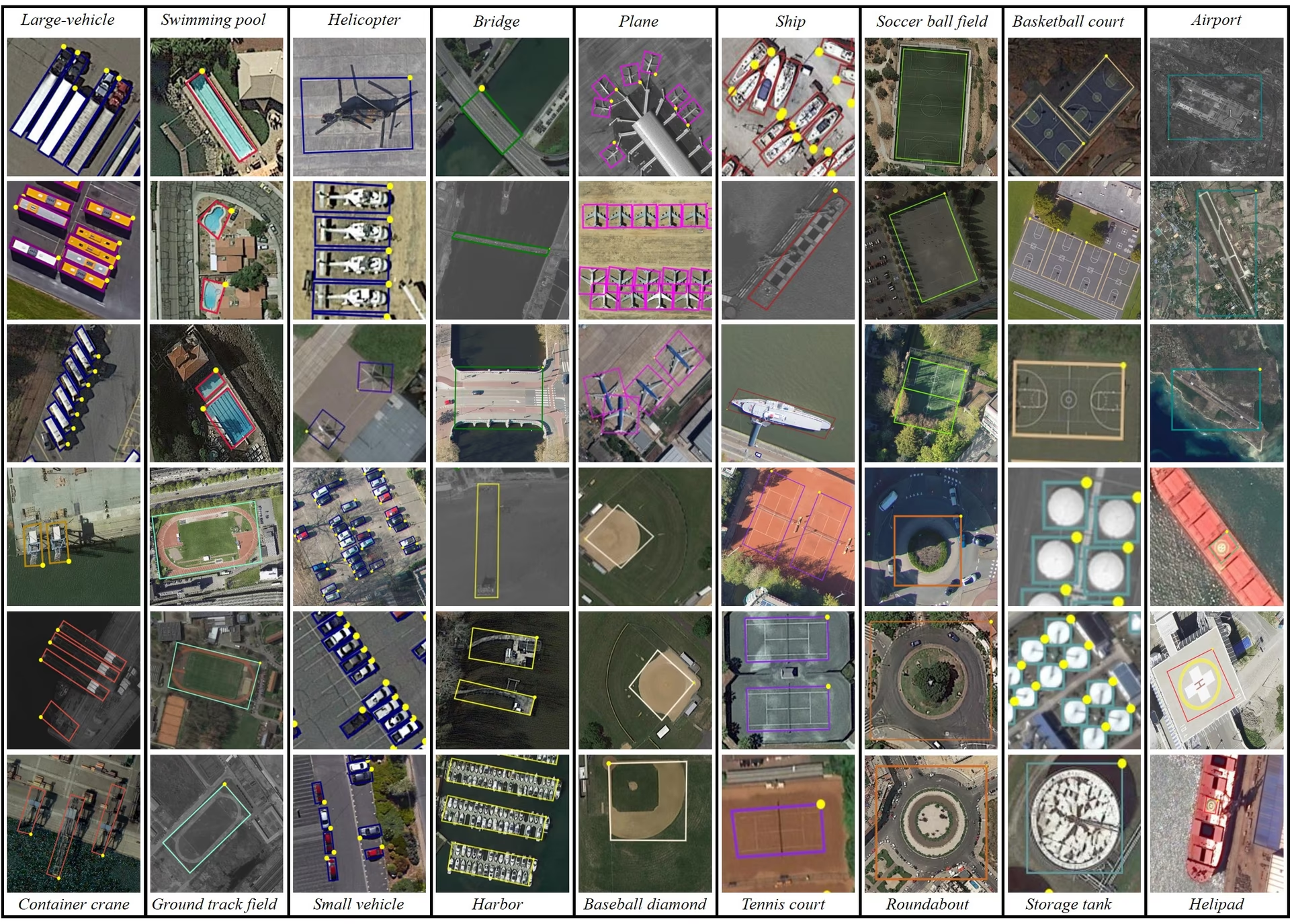
- DOTA 예시: 이 스냅샷은 항공 장면의 복잡성과 객체의 자연스러운 방향을 포착하는 방향성 바운딩 박스 어노테이션의 중요성을 보여줍니다.
이러한 장면은 항공 이미지에 특화된 탐지 과제를 보여 줍니다. DOTA-v2.0은 포괄적인 어노테이션과 다양한 객체 범주를 갖추고 있어 원격 탐사 및 항공 감시 프로젝트에서 널리 사용됩니다.
인용 및 감사의 글#
작업에 DOTA를 사용하는 경우 관련 연구 논문을 인용해 주세요.
@article{9560031,
  author={Ding, Jian and Xue, Nan and Xia, Gui-Song and Bai, Xiang and Yang, Wen and Yang, Michael and Belongie, Serge and Luo, Jiebo and Datcu, Mihai and Pelillo, Marcello and Zhang, Liangpei},
  journal={IEEE Transactions on Pattern Analysis and Machine Intelligence},
  title={Object Detection in Aerial Images: A Large-Scale Benchmark and Challenges},
  year={2022},
  volume={44},
  number={11},
  pages={7778-7796},
  doi={10.1109/TPAMI.2021.3117983}
}
DOTA 데이터셋을 선별해 주신 팀에 감사드립니다. 데이터셋에 대한 자세한 내용은 공식 DOTA 웹사이트를 방문하세요.
자주 묻는 질문#
DOTA 데이터셋은 항공 이미지의 객체 감지에 초점을 둔 특수 데이터셋입니다. 방향성 바운딩 박스(OBB)를 제공하며, 다양한 항공 장면의 어노테이션된 이미지를 포함합니다. 170만 개의 어노테이션과 18개 카테고리에 걸쳐 객체 방향, 크기, 형태가 다양하므로, DOTA는 감시, 환경 모니터링, 재난 관리 등에 사용되는 항공 이미지 분석용 모델을 개발하고 평가하는 데 적합합니다.
DOTA는 어노테이션에 방향 경계 상자(OBB)를 사용하며, OBB는 방향에 관계없이 객체를 둘러싸는 회전 사각형으로 표현됩니다. 이 방법은 크기가 작거나 각도가 다양한 객체도 정확하게 포착합니다. 800 × 800픽셀부터 20,000 × 20,000픽셀까지 다양한 크기의 이미지를 포함하는 데이터셋은 작은 객체와 큰 객체를 모두 효과적으로 탐지할 수 있게 합니다. 이 방식은 객체가 다양한 각도와 크기로 나타나는 항공 이미지에서 특히 유용합니다.
DOTA 데이터셋으로 모델을 학습하려면 Ultralytics YOLO를 사용하는 다음 예제를 참고하세요.
학습 예제from ultralytics import YOLO # 사전 학습된 YOLO26n-OBB 모델 로드 model = YOLO("yolo26n-obb.pt") # DOTAv1 데이터셋으로 모델 학습 results = model.train(data="DOTAv1.yaml", epochs=100, imgsz=1024)DOTA 이미지 분할 및 전처리에 관한 자세한 내용은 DOTA 이미지 분할 섹션을 참조하세요.
- DOTA-v1.0: 이미지 2,806개와 인스턴스 188,282개에 걸쳐 15개의 일반 카테고리를 포함합니다. 데이터셋은 학습, 검증, 테스트 세트로 나뉩니다.
- DOTA-v1.5: DOTA-v1.0을 기반으로 10픽셀 미만의 매우 작은 인스턴스에 어노테이션을 추가하고, 새로운 카테고리인 "컨테이너 크레인"을 추가하여 총 인스턴스 수가 403,318개입니다.
- DOTA-v2.0: Google Earth와 GF-2 Satellite의 어노테이션을 추가하여 이미지 11,268개와 인스턴스 1,793,658개를 포함하도록 확장되었습니다. "공항" 및 "헬리패드"와 같은 새로운 카테고리가 추가되었습니다.
자세한 비교 및 추가 정보는 데이터셋 버전 섹션을 참조하세요.
DOTA 이미지는 매우 클 수 있으므로 관리하기 쉬운 학습을 위해 더 작은 해상도의 이미지로 분할합니다. 다음은 이미지를 분할하는 Python 코드 예제입니다.
예제from ultralytics.data.split_dota import split_test, split_trainval # 라벨을 포함하여 학습 및 검증 세트를 분할합니다. split_trainval( data_root="path/to/DOTAv1.0/", save_dir="path/to/DOTAv1.0-split/", rates=[0.5, 1.0, 1.5], # multiscale gap=500, ) # 라벨 없이 테스트 세트를 분할합니다. split_test( data_root="path/to/DOTAv1.0/", save_dir="path/to/DOTAv1.0-split/", rates=[0.5, 1.0, 1.5], # multiscale gap=500, )이 프로세스는 학습 효율과 모델 성능을 향상합니다. 자세한 지침은 DOTA 이미지 분할 섹션을 참조하세요.


댓글17
질문을 하거나 결과를 공유하거나 다른 사람을 도와주세요.
XWP-PPP
May I ask how you converted the inference results from YOLOV8 OBB into inference results that can be uploaded to DOTA's Task 1 server? I saved the final inference results of the model in the form of xyxyxy and uploaded them via email. However, the mAP results provided on YOLO's official website differ significantly. I would like to know the reason for this. Can you provide me with a conversion code to convert the test image set into a result that can be uploaded to DOTA's Task 1 server? Thank you very much for your help!
1 Paula DerrengerUltralytics(수정됨)
@XWP-PPP hi there!
DOTA's Task 1 server expects a zip of one text file per class (
Task1_plane.txt,Task1_storage-tank.txt, ...), where each line isimgname score x1 y1 x2 y2 x3 y3 x4 y4, with the image name given without extension. OBB results are stored inresult.obb, notresult.boxes. Here is a snippet that builds those files:import shutil from collections import defaultdict from pathlib import Path from ultralytics import YOLO # Load your trained YOLO26-OBB model model = YOLO("path/to/your/yolo26n-obb.pt") # Collect one DOTA Task1 line per detection: imgname score x1 y1 x2 y2 x3 y3 x4 y4 (pixels) category_results = defaultdict(list) for r in model.predict(source="path/to/test/images", stream=True): img_name = Path(r.path).stem for cls, conf, pts in zip(r.obb.cls.int().tolist(), r.obb.conf.tolist(), r.obb.xyxyxyxy.flatten(1).tolist()): coords = " ".join(f"{p:.1f}" for p in pts) category_results[f"Task1_{model.names[cls].replace(' ', '-')}.txt"].append(f"{img_name} {conf:.6f} {coords}\n") # Save one file per category and zip the submission folder output_dir = Path("submission") output_dir.mkdir(exist_ok=True) for category_file, lines in category_results.items(): (output_dir / category_file).write_text("".join(lines)) shutil.make_archive("submission", "zip", output_dir)Upload
submission.zipto the DOTA Task 1 server. If your mAP differs from your local validation, check that image names match the test set and that the coordinates are in pixels of the original (unsplit) images. For more details, see the DOTA Dataset Documentation. Happy coding! 😊
Taufiq-Ahmed-pranto
Hi, I want to use the DOTA dataset only for YOLOv11 Nano. I don't want to use the model with oriented bounding boxes (OBB). What is the procedure?
 Jie Liu
I have download dotav1 form
https://github.com/ultralytics/assets/releases/download/v0.0.0/DOTAv1.zipand use script split dataset.from ultralytics.data.split_dota import split_test, split_trainval # split train and val set, with labels. split_trainval( data_root="/dataset/coco/DOTAv1", save_dir="/dataset/coco/DOTAv1.0-split/", rates=[0.5, 1.0, 1.5], # multiscale gap=500, ) # split test set, without labels. split_test( data_root="/dataset/coco/DOTAv1/", save_dir="/dataset/coco/DOTAv1.0-split/", rates=[0.5, 1.0, 1.5], # multiscale gap=500, )how to reproduce yolov11 obb result, please show me the command like
yolo train model=ultralytics-8.3.13/ultralytics/cfg/models/11/yolo11n-obb.yaml data=DOTAv1/DOTAv1.yaml epochs=500 batch=32*4 imgsz=640 device=4,5,6,7 cache=disk amp=True Glenn JocherUltralytics(수정됨)
@keeper-jie for training YOLO26-OBB on DOTAv1 after splitting, use this command with your 4 GPUs:
yolo obb train data=DOTAv1.yaml model=yolo26n-obb.pt epochs=500 imgsz=1024 batch=128 device=4,5,6,7Key parameters from our DOTA documentation:
imgsz=1024(matches dataset's multiscale split)- Use official model name
yolo26n-obb.ptrather than YAML path - Batch size 128 (32*4 GPUs) via
batch=128
Ensure your dataset YAML paths point to the split images directory.
huynhkhoa44
I have labeled data in YOLOv8 object detection format, our label data format is already rotated rectangles to the correct angle of the object, however since it is in YOLOv8 object detection format, the "angle" parameter is missing. I no longer keep the label folder on CVAT so I cannot export to a different label format. Is there a way to add the angle value from the 4 pre-existing <x_center> <y_center> values?
- Glenn JocherUltralytics
To add the angle value from your existing YOLOv8 labels, you'll need to calculate it based on the coordinates. Unfortunately, without the original CVAT labels, this requires manual computation or using a tool that supports angle annotations. For guidance on datasets with oriented bounding boxes, you can refer to the DOTA dataset documentation at https://docs.ultralytics.com/datasets/obb/dota-v2/.
jack-ready
Recently, I've been using YOLOv8 to train the DOTAv1 dataset and encountered some issues. I was wondering if I could seek advice. 1.To train the DOTA dataset, we split the original DOTA images with high-resolution into images with 1024x1024. I noticed that the provided segmentation code provides three sizes, rates=[0.5, 1.0, 1.5]. In order to obtain 1024×1024 images, it seems that we should choose rates=1, but I noticed that some images in the segmentation results of the validation set are smaller than 1024×1024, such as 1024×1023, 824*1024, etc. What is the reason for this?Will it affect the experiment? 2.Another issue arises during the training process. I noticed that the training process conducts validation after each epoch. I attempted to disable validation by setting val=False, but it seems to have no effect. What could be the reason for this? The training code snippet is as follows: results = model.train(data="DOTAv1.yaml", epochs=100, imgsz=640, batch=10, workers=0, val=False). Additionally, during validation, it seems that the images are not being resized to 640. Printing the results in the code yields torch.Size([10, 3, 672, 672]), whereas during the training process, images are correctly resized to 640. Could someone help me understand this?
- Glenn JocherUltralytics(수정됨)
@jack-ready hi there!
Thank you for reaching out with your questions regarding training the DOTA dataset with YOLOv8. Let's address each of your concerns:
-
Image Splitting and Sizes: When splitting high-resolution DOTA images into 1024x1024 segments using
rates=[0.5, 1.0, 1.5], you might notice some resulting images are slightly smaller than 1024x1024 (e.g., 1024x1023 or 824x1024). This occurs due to the way the splitting algorithm handles the edges of the original images. If the original image dimensions are not perfectly divisible by 1024, the last segment in each row or column might be smaller. This should not significantly affect your experiment as long as the majority of your data maintains the expected size. However, you can ensure consistency by padding these smaller images to 1024x1024 if necessary. -
Disabling Validation: The
val=Falseargument should indeed disable validation during training. If it doesn't seem to work, please ensure you are using the latest version of the Ultralytics package. You can update it using:pip install --upgrade ultralyticsIf the issue persists, providing a minimum reproducible example would be very helpful for us to diagnose the problem. You can find guidance on creating one here: Minimum Reproducible Example.
-
Image Resizing During Validation: The discrepancy in image sizes during validation (e.g.,
torch.Size([10, 3, 672, 672])instead of 640) might be due to the model's internal resizing logic. Ensure that theimgszparameter is correctly set for both training and validation. Validation uses the sameimgszas training, so set it explicitly in your training script:results = model.train(data="DOTAv1.yaml", epochs=100, imgsz=640, batch=10, workers=0, val=True)
I hope this helps! If you have any further questions or need additional assistance, feel free to ask. Happy training! 🚀
-
Thank you very much for your help. I have another question regarding the YOLOV8 training on the DOTA v1.0 dataset. I would like to know how to set the training parameters, such as learning rate, optimizer, and loss function. When I try to reproduce the results, my mAP50 is about 74%, but it does not reach 78%. I would greatly appreciate any assistance you can provide.Below is my training code. from ultralytics import YOLO model = YOLO("yolov8n-obb.yaml") model.load("yolov8n-obb.pt") model = YOLO("yolov8n-obb.yaml").load("yolov8n.pt") results = model.train(data="DOTAv1.yaml", epochs=100, imgsz=640, batch=48, workers=0,project="runs/DOTAV1.0",val=True,resume=True)
- Glenn JocherUltralytics(수정됨)
Hi there! Glad to help with your training setup. To fine-tune your training parameters for better mAP50 results, you can adjust the learning rate, optimizer, and loss function. For instance, you might try a lower learning rate or switch to a different optimizer like Adam. Here's a quick example:
from ultralytics import YOLO

model = YOLO("yolo26n-obb.yaml").load("yolo26n-obb.pt")
results = model.train(
    data="DOTAv1.yaml",
    epochs=100,
    imgsz=640,
    batch=48,
    workers=0,
    project="runs/DOTAV1.0",
    val=True,
    lr0=0.001,  # Adjust learning rate
    optimizer='Adam'  # Change optimizer
)
Ensure you're using the latest version of the Ultralytics package to avoid any bugs. If you still face issues, feel free to share more details. Happy training! 🚀
Tintin26100
How can I find the number of instances per class in DOTA v1.5 ? I've been searching for this information for a moment and I can't find any answers
- Paula DerrengerUltralytics
@Tintin26100 hello!
The number of instances per class in DOTA v1.5 isn't directly listed in the dataset's summary. However, you can obtain this information by analyzing the annotation files provided with the dataset. Each object instance in these files is labeled with a class, and you can count the number of times each class appears.
If you need further guidance on how to process these annotation files or any other assistance with the DOTA dataset, feel free to ask!
Happy coding! 😊
Hi, thanks for your quick answer, I will gladly accept your help because I don't really know what to do to extract those informations, where do you find the annotation files ? Is it on the github ? If it is what's it's path ? Thanks for the time you spend helping
- Paula DerrengerUltralytics
@Tintin26100 hello!
The annotation files for the DOTA dataset are typically included within the dataset download itself. These files contain the details for each instance, including class labels and oriented bounding box coordinates.
For the DOTA v1.5 dataset, you can find these files in the dataset directory after you download it from the official DOTA dataset page or the provided download link in the dataset's YAML configuration file. The path to the annotations will usually be structured under the
labelsorannotationsdirectory within the main dataset folder.If you've already downloaded the dataset, you should look for
.txtor.jsonfiles corresponding to each image in the dataset, which contain the annotations. If you need further assistance navigating these files or extracting specific data, feel free to ask!Thank you for reaching out, and happy analyzing! 😊
hencai
how to test DOTA datatests online using YOLOv8-obb? somebody help me ?
- Glenn JocherUltralytics(수정됨)
Hey there! 😊 Testing the DOTA dataset online using YOLO26-obb is quite straightforward. If you've already prepared your dataset according to the Ultralytics guidelines and split the images, here's a simple example to get you started with training:
# Train a YOLO26n-OBB model on the DOTA v1 dataset
yolo obb train data=DOTAv1.yaml model=yolo26n-obb.pt epochs=100 imgsz=640
This command uses DOTA v1 and the corresponding
.yamlfile (DOTAv1.yaml) describing your dataset paths and classes. Adjustepochsandimgszbased on your needs.Just make sure to check out the DOTA dataset page on Ultralytics docs for more info on dataset preparation and additional configurations! Happy detecting! 🚀