객체 탐지 데이터셋 개요
견고하고 정확한 객체 탐지 모델을 학습하려면 포괄적인 데이터셋이 필요합니다. 이 가이드에서는 Ultralytics YOLO 모델과 호환되는 다양한 데이터셋 형식을 소개하고, 각 형식의 구조와 사용 방법, 형식 간 변환 방법을 설명합니다.
지원되는 데이터셋 형식#
Ultralytics YOLO 형식#
Ultralytics YOLO 형식은 데이터셋 루트 디렉터리, 학습/검증/테스트 이미지 디렉터리 또는 이미지 경로가 포함된 *.txt 파일의 상대 경로, 그리고 클래스 이름 사전을 정의할 수 있는 데이터셋 구성 형식입니다. 예시는 다음과 같습니다.
# Ultralytics 🚀 AGPL-3.0 License - https://ultralytics.com/license

# COCO8 dataset (first 8 images from COCO train2017) by Ultralytics
# Documentation: https://docs.ultralytics.com/datasets/detect/coco8
# Example usage: yolo train data=coco8.yaml
# parent
# ├── ultralytics
# └── datasets
#     └── coco8 ← downloads here (1 MB)

# Train/val/test sets as 1) dir: path/to/imgs, 2) file: path/to/imgs.txt, or 3) list: [path/to/imgs1, path/to/imgs2, ..]
path: coco8 # dataset root dir
train: images/train # train images (relative to 'path') 4 images
val: images/val # val images (relative to 'path') 4 images
test: # test images (optional)

# Classes
names:
  0: person
  1: bicycle
  2: car
  3: motorcycle
  4: airplane
  5: bus
  6: train
  7: truck
  8: boat
  9: traffic light
  10: fire hydrant
  11: stop sign
  12: parking meter
  13: bench
  14: bird
  15: cat
  16: dog
  17: horse
  18: sheep
  19: cow
  20: elephant
  21: bear
  22: zebra
  23: giraffe
  24: backpack
  25: umbrella
  26: handbag
  27: tie
  28: suitcase
  29: frisbee
  30: skis
  31: snowboard
  32: sports ball
  33: kite
  34: baseball bat
  35: baseball glove
  36: skateboard
  37: surfboard
  38: tennis racket
  39: bottle
  40: wine glass
  41: cup
  42: fork
  43: knife
  44: spoon
  45: bowl
  46: banana
  47: apple
  48: sandwich
  49: orange
  50: broccoli
  51: carrot
  52: hot dog
  53: pizza
  54: donut
  55: cake
  56: chair
  57: couch
  58: potted plant
  59: bed
  60: dining table
  61: toilet
  62: tv
  63: laptop
  64: mouse
  65: remote
  66: keyboard
  67: cell phone
  68: microwave
  69: oven
  70: toaster
  71: sink
  72: refrigerator
  73: book
  74: clock
  75: vase
  76: scissors
  77: teddy bear
  78: hair drier
  79: toothbrush

# Download script/URL (optional)
download: https://github.com/ultralytics/assets/releases/download/v0.0.0/coco8.ziptrain, val, test는 각각 디렉터리, 이미지 파일, 디렉터리 또는 이미지 파일 목록, 또는 줄마다 이미지 경로 하나가 지정된 UTF-8 *.txt 파일을 입력으로 받습니다(경로가 ./로 시작하면 *.txt 파일을 기준으로 확인합니다). *.txt 파일은 디렉터리의 일부만 선택해 학습하거나, 라벨이 없는 이미지를 건너뛰거나, 여러 소스의 이미지를 하나의 split으로 결합할 때 유용합니다.
path: datasets/coco8 # dataset root
train: train.txt # a directory, an image, a list e.g. [images/a, images/b], or a *.txt file
val: val.txt
names:
  0: person
(선택 사항) colors은 각 클래스에 클래스 ID를 인덱스로 사용하는 따옴표로 묶인 "#rrggbb" 문자열을 표시 색상으로 지정합니다(예: colors: ["#042aff", "#ff0000"]). 학습 및 내보내기된 모델은 예측 결과에 이 색상을 유지하며, 색상이 지정되지 않은 클래스에는 기본 팔레트가 사용됩니다. NDJSON 데이터셋 레코드에도 동일한 colors 필드를 포함할 수 있습니다.
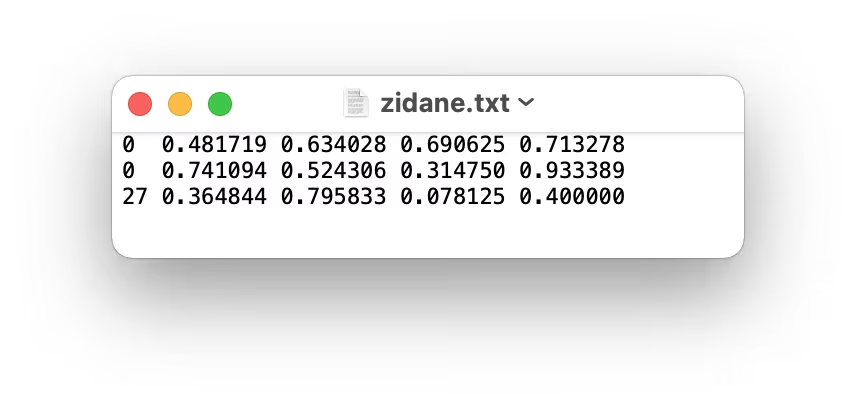
이 형식의 레이블은 이미지당 *.txt 파일 하나씩 생성하여 YOLO 형식으로 내보내야 합니다. 이미지에 객체가 없는 경우 *.txt 파일은 필요하지 않습니다. *.txt 파일은 class x_center y_center width height 형식으로 객체당 한 행씩 구성해야 합니다. 바운딩 박스 좌표는 정규화된 xywh 형식(0~1)이어야 합니다. 박스 좌표가 픽셀 단위라면 x_center와 width은 이미지 너비로 나누고, y_center과 height은 이미지 높이로 나누어야 합니다. 좌표는 Ultralytics가 모든 이미지를 읽는 방식과 동일하게 EXIF 방향을 적용하여 뷰어에 표시되는 이미지 기준입니다. 클래스 번호는 0부터 시작하는 인덱스여야 합니다.
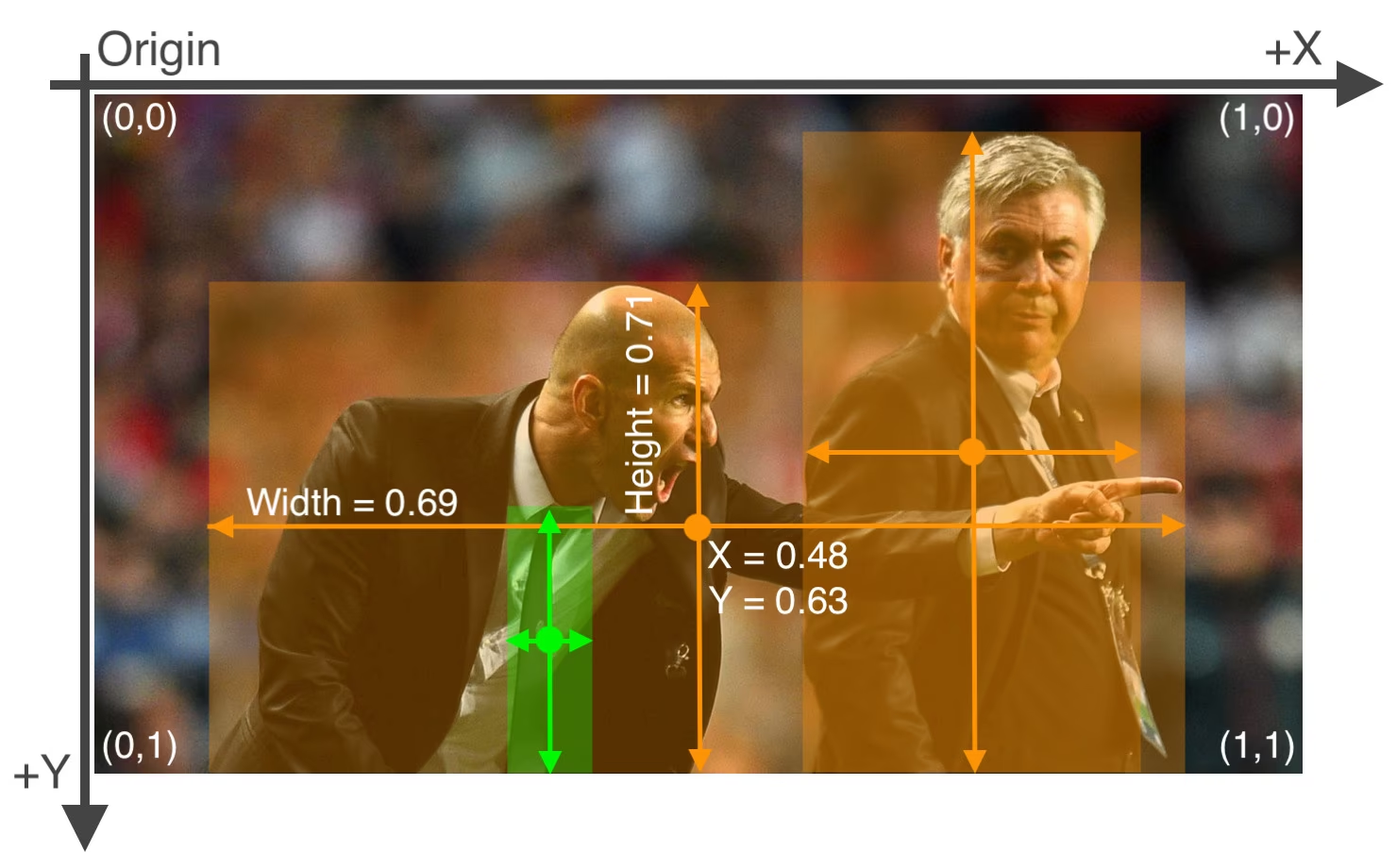
위 이미지에 해당하는 레이블 파일에는 사람 2명(클래스 0)과 넥타이 하나(클래스 27)가 포함되어 있습니다.
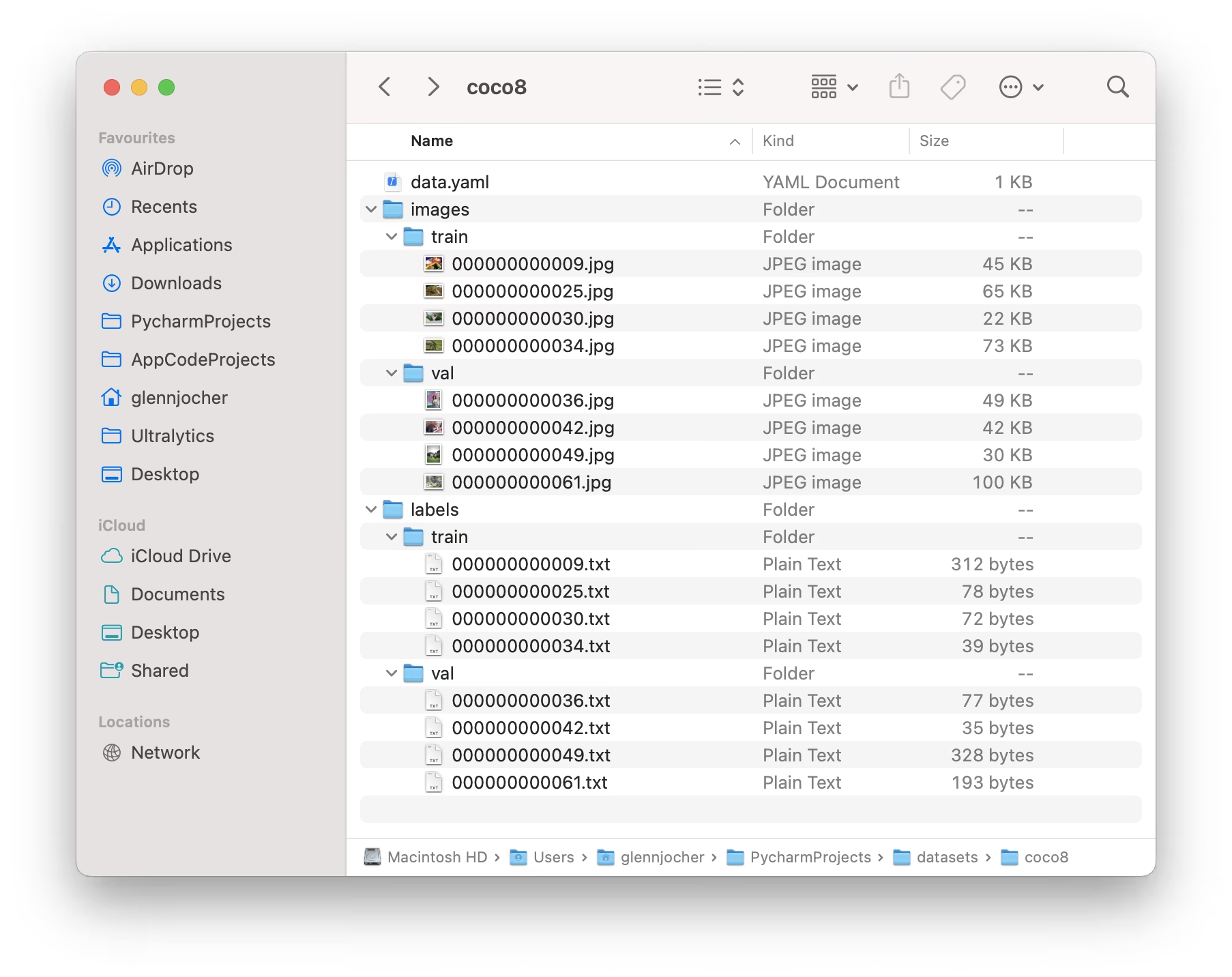
Ultralytics YOLO 형식을 사용할 때는 아래 COCO8 데이터셋 예시와 같이 학습 및 검증 이미지와 레이블을 구성하세요.
사용 예제#
YOLO 형식의 데이터셋을 사용해 모델을 학습하는 방법은 다음과 같습니다.
from ultralytics import YOLO

# 모델 로드
model = YOLO("yolo26n.pt")  # 사전 학습된 모델을 불러옵니다(학습에 권장).

# 모델 학습
results = model.train(data="coco8.yaml", epochs=100, imgsz=640)
Ultralytics NDJSON 형식#
NDJSON(Newline Delimited JSON) 형식은 Ultralytics YOLO 모델의 데이터셋을 정의하는 또 다른 방법입니다. 이 형식은 데이터셋 메타데이터와 어노테이션을 단일 파일에 저장하며, 각 줄에는 별도의 JSON 객체가 포함됩니다.
NDJSON 데이터셋 파일에는 다음이 포함됩니다.
- 데이터셋 레코드(첫 번째 줄): 작업 유형, 클래스 이름 및 일반 정보를 포함한 데이터셋 메타데이터입니다.
- 이미지 레코드(이후 줄): 크기, 어노테이션 및 파일 경로를 포함한 개별 이미지 데이터입니다.
{
    "type": "dataset",
    "task": "detect",
    "name": "Example",
    "description": "COCO NDJSON example dataset",
    "url": "https://platform.ultralytics.com/user/datasets/example",
    "class_names": { "0": "person", "1": "bicycle", "2": "car" },
    "bytes": 426342,
    "version": 0,
    "created_at": "2024-01-01T00:00:00Z",
    "updated_at": "2025-01-01T00:00:00Z"
}
사용자 지정 이미지 메타데이터#
각 이미지 레코드에는 촬영 조건, 장비 식별자 또는 검토 상태와 같은 애플리케이션별 맥락을 담은 metadata JSON 객체를 포함할 수 있습니다. 중첩 값도 지원됩니다. Ultralytics Platform으로 가져오면 메타데이터가 해당 이미지와 함께 저장되며, 전체 화면 정보 패널에서 확인하거나 편집할 수 있습니다.
{
    "type": "image",
    "file": "airbus-wing.jpg",
    "url": "https://example.com/airbus-wing.jpg",
    "split": "train",
    "metadata": {
        "aircraft": { "family": "A350", "section": "wing" },
        "inspectionStatus": "reviewed"
    }
}
Platform은 최상위 메타데이터 키를 128자로, 이미지별 직렬화된 메타데이터 객체를 500,000자로, NDJSON 가져오기 1회에서 결합된 유효 메타데이터를 500,000자로 제한합니다.
사용 예제#
YOLO26에서 NDJSON 데이터셋을 사용하려면 .ndjson 파일 경로를 지정하면 됩니다.
from ultralytics import YOLO

# 모델 로드
model = YOLO("yolo26n.pt")

# NDJSON 데이터셋을 사용하여 학습
results = model.train(data="path/to/dataset.ndjson", epochs=100, imgsz=640)
NDJSON 형식의 장점#
- 단일 파일: 모든 데이터셋 정보를 하나의 파일에 저장합니다.
- 스트리밍: 모든 데이터를 메모리에 로드하지 않고 대용량 데이터셋을 한 줄씩 처리할 수 있습니다.
- 클라우드 통합: 클라우드 기반 학습을 위한 원격 이미지 URL을 지원합니다.
- 확장성: 사용자 지정 메타데이터 필드를 쉽게 추가할 수 있습니다.
- 버전 관리: 단일 파일 형식은 git 및 버전 관리 시스템과 잘 호환됩니다.
지원되는 데이터셋#
지원되는 데이터셋 목록과 각 데이터셋에 대한 간략한 설명은 다음과 같습니다. 대부분의 데이터셋은 Ultralytics Platform에서도 호스팅되므로, 이미지와 어노테이션을 둘러보고 데이터셋 통계를 확인하며 클라우드 학습을 위해 데이터셋을 복제할 수 있습니다.
- African-wildlife: 버팔로, 코끼리, 코뿔소, 얼룩말 등 아프리카 야생동물 이미지가 포함된 데이터셋입니다.
- Argoverse: 8개 도로 객체 클래스를 포함하는 도시 자율 주행 이미지 54,446장으로 구성된 Argoverse-HD 2D 탐지 데이터셋입니다.
- 뇌종양: 뇌 MRI 이미지에서 뇌종양을 탐지하기 위한 데이터셋으로, 종양 바운딩 박스가 단일 클래스로 라벨링되어 있습니다.
- COCO: 컨텍스트 내 일반 객체(COCO)는 80개 객체 범주를 포함하는 대규모 객체 탐지, 분할 및 캡셔닝 데이터셋입니다.
- COCO8: COCO train2017의 처음 8개 이미지(학습용 4개, 검증용 4개)로 구성된 소규모 하위 집합으로, 빠른 테스트에 적합합니다.
- COCO8-Grayscale: RGB를 그레이스케일로 변환해 만든 COCO8의 그레이스케일 버전으로, 단일 채널 모델 평가에 유용합니다.
- COCO8-Multispectral: RGB 파장을 보간해 만든 COCO8의 10채널 다중 스펙트럼 버전으로, 스펙트럼 인식 모델 평가에 유용합니다.
- COCO12-Formats: 이미지 로딩 파이프라인 검증을 위해 12개의 지원 이미지 형식(AVIF, BMP, DNG, HEIC, JP2, JPEG, JPG, MPO, PNG, TIF, TIFF, WebP)을 다루는 이미지 12장의 테스트 데이터셋입니다.
- COCO16: COCO train2017의 처음 16개 이미지(학습 8개 + 검증 8개)로 이루어진 하위 집합으로, 빠른 테스트에 적합합니다.
- COCO32: COCO train2017의 처음 32개 이미지(학습 16개 + 검증 16개)로 이루어진 하위 집합으로, 빠른 테스트에 적합합니다.
- COCO64: COCO train2017의 처음 64개 이미지(학습 32개 + 검증 32개)로 이루어진 하위 집합으로, 빠른 테스트에 적합합니다.
- COCO128: COCO train2017의 처음 128개 이미지로 구성된 소규모 하위 집합으로, 테스트에 적합합니다.
- Construction-PPE: 건설 현장 작업자의 이미지에 헬멧, 조끼, 장갑, 부츠, 보안경 등의 안전 장비 레이블을 지정한 데이터셋입니다. 실제 현장의 규정 준수 모니터링을 위해 no_helmet, no_goggle과 같은 장비 미착용 어노테이션도 포함합니다.
- Global Wheat 2020: Global Wheat Challenge 2020을 위해 밀 이삭 이미지를 포함한 데이터셋입니다.
- HomeObjects-3K: 침대, 의자, TV 등을 포함하는 실내 가정용품 데이터셋으로, 스마트 홈 자동화, 로보틱스, 증강 현실 및 실내 레이아웃 분석 애플리케이션에 적합합니다.
- KITTI: 스테레오, LiDAR 및 GPS/IMU 데이터가 포함된 실제 주행 장면 데이터셋입니다. 도시, 교외 및 고속도로 환경에서 자동차, 보행자, 자전거 이용자를 식별하는 2D 객체 탐지 작업에 사용됩니다.
- LVIS: 1,203개 객체 범주를 포함하는 대규모 객체 탐지 및 인스턴스 분할 데이터셋입니다.
- Medical-pills: 의약품 품질 보증, 알약 분류, 규제 준수 등의 애플리케이션을 위해 주석이 표시된 의약품 알약 이미지 데이터셋입니다.
- Objects365: 365개 객체 카테고리와 170만 개 이상의 학습 이미지를 포함하는 고품질 대규모 객체 탐지 데이터셋입니다.
- OpenImagesV7: Google이 제공하는 포괄적인 데이터셋으로, 학습 이미지 170만 개와 검증 이미지 4만 2천 개를 포함합니다.
- Roboflow 100: 7개 이미지 도메인에 걸친 100개 데이터셋으로 구성되어 다양한 환경을 포괄적으로 평가할 수 있는 객체 탐지 벤치마크입니다.
- Signature: 서명이 어노테이션된 다양한 문서 이미지 데이터셋으로, 문서 검증 및 사기 탐지 연구를 지원합니다.
- SKU-110K: 1만 1천 개가 넘는 이미지와 170만 개의 바운딩 박스를 포함하는 소매 환경의 고밀도 객체 탐지 데이터셋입니다.
- TT100K: 탐지 및 분류를 위한 칭화-텐센트 100K(TT100K) 교통 표지판 데이터셋으로, 221개 표지판 카테고리에 걸친 거리 영상 16,817장으로 구성됩니다.
- Ultralytics 벤치마크: 의료, 항공, 산업, 소매 및 기타 분야의 선별된 탐지 데이터셋 37개를 아우르는 자체 벤치마크 제품군으로, 실제 환경에서 모델의 일반화 성능을 측정하기 위한 고정 프로토콜을 제공합니다.
- VisDrone: 드론 촬영 이미지로 구성된 객체 탐지 및 다중 객체 추적 데이터셋으로, 1만 개가 넘는 이미지와 비디오 시퀀스를 포함합니다.
- VOC: 20개 객체 클래스와 11K개 이상의 이미지로 구성된 파스칼 시각 객체 클래스 (VOC) 객체 탐지 및 세그멘테이션 데이터셋입니다.
- xView: 60개 객체 범주와 100만 개가 넘는 어노테이션 객체를 포함하는 항공 이미지 객체 탐지 데이터셋입니다.
사용자 데이터셋 추가#
사용자 데이터셋이 있고 Ultralytics YOLO 형식을 사용해 탐지 모델을 학습하려면, 위의 "Ultralytics YOLO format"에 명시된 형식을 따르는지 확인하세요. 어노테이션을 필요한 형식으로 변환하고 YAML 구성 파일에 경로, 클래스 수, 클래스 이름을 지정하세요.
레이블 형식 포팅 또는 변환#
COCO 데이터셋 형식을 YOLO 형식으로 변환#
다음 코드 조각을 사용하여 널리 사용되는 COCO 데이터셋 형식의 레이블을 YOLO 형식으로 변환할 수 있습니다:
from ultralytics.data.converter import convert_coco

convert_coco(labels_dir="path/to/coco/annotations/")
이 변환 도구를 사용하면 COCO 데이터셋 또는 COCO 형식의 데이터셋을 Ultralytics YOLO 형식으로 변환할 수 있습니다. 이 과정에서 JSON 기반 COCO 어노테이션을 더 간결한 텍스트 기반 YOLO 형식으로 변환하여 Ultralytics YOLO 모델과 호환되도록 합니다. 클래스 ID 매핑, 디렉터리 레이아웃, 세그멘테이션 또는 포즈 어노테이션을 포함한 전체 워크플로는 COCO 어노테이션을 YOLO로 변환을 참조하세요.
사용하려는 데이터셋이 모델과 호환되고 필요한 형식 규칙을 따르는지 다시 확인하세요. 객체 탐지 모델을 성공적으로 학습하려면 데이터셋의 형식을 올바르게 지정해야 합니다.
다음 단계#
데이터셋 형식을 지정했다면 모델 학습을 시작하세요. 어떤 사전 학습 모델로 시작할지 잘 모르시겠나요? YOLO26 모델 제품군에서 여러 옵션을 비교해 보세요.
자주 묻는 질문#
Ultralytics YOLO 형식은 학습 프로젝트에서 데이터셋을 정의하기 위한 구조화된 구성입니다. 학습, 검증, 테스트 이미지와 해당 레이블의 경로를 설정합니다. 예를 들면 다음과 같습니다.
# Ultralytics 🚀 AGPL-3.0 License - https://ultralytics.com/license

# COCO8 dataset (first 8 images from COCO train2017) by Ultralytics
# Documentation: https://docs.ultralytics.com/datasets/detect/coco8
# Example usage: yolo train data=coco8.yaml
# parent
# ├── ultralytics
# └── datasets
#     └── coco8 ← downloads here (1 MB)

# Train/val/test sets as 1) dir: path/to/imgs, 2) file: path/to/imgs.txt, or 3) list: [path/to/imgs1, path/to/imgs2, ..]
path: coco8 # dataset root dir
train: images/train # train images (relative to 'path') 4 images
val: images/val # val images (relative to 'path') 4 images
test: # test images (optional)

# Classes
names:
  0: person
  1: bicycle
  2: car
  3: motorcycle
  4: airplane
  5: bus
  6: train
  7: truck
  8: boat
  9: traffic light
  10: fire hydrant
  11: stop sign
  12: parking meter
  13: bench
  14: bird
  15: cat
  16: dog
  17: horse
  18: sheep
  19: cow
  20: elephant
  21: bear
  22: zebra
  23: giraffe
  24: backpack
  25: umbrella
  26: handbag
  27: tie
  28: suitcase
  29: frisbee
  30: skis
  31: snowboard
  32: sports ball
  33: kite
  34: baseball bat
  35: baseball glove
  36: skateboard
  37: surfboard
  38: tennis racket
  39: bottle
  40: wine glass
  41: cup
  42: fork
  43: knife
  44: spoon
  45: bowl
  46: banana
  47: apple
  48: sandwich
  49: orange
  50: broccoli
  51: carrot
  52: hot dog
  53: pizza
  54: donut
  55: cake
  56: chair
  57: couch
  58: potted plant
  59: bed
  60: dining table
  61: toilet
  62: tv
  63: laptop
  64: mouse
  65: remote
  66: keyboard
  67: cell phone
  68: microwave
  69: oven
  70: toaster
  71: sink
  72: refrigerator
  73: book
  74: clock
  75: vase
  76: scissors
  77: teddy bear
  78: hair drier
  79: toothbrush

# Download script/URL (optional)
download: https://github.com/ultralytics/assets/releases/download/v0.0.0/coco8.zip
레이블은 이미지마다 하나씩
*.txt파일에 저장되며, 정규화된 좌표를 사용하는class x_center y_center width height형식으로 지정됩니다. 자세한 안내는 COCO8 데이터셋 예제를 참조하세요.Ultralytics 변환 도구를 사용하면 COCO 데이터셋을 YOLO 형식으로 변환할 수 있습니다. 간단한 방법은 다음과 같습니다.
from ultralytics.data.converter import convert_coco

convert_coco(labels_dir="path/to/coco/annotations/")
이 코드는 COCO 어노테이션을 YOLO 형식으로 변환하여 Ultralytics YOLO 모델 학습에 사용할 수 있도록 합니다.
Ultralytics YOLO는 다음을 비롯한 다양한 데이터셋을 지원합니다.
각 데이터셋 페이지에는 효율적인 YOLO26 학습에 맞춘 구조 및 사용법에 관한 자세한 정보가 제공됩니다. 지원 데이터셋 섹션에서 전체 목록을 살펴보세요.
YOLO26 모델 학습을 시작하려면 데이터셋 형식이 올바른지 확인하고 YAML 파일에 경로를 정의하세요. 다음 스크립트로 학습을 시작할 수 있습니다.
예제from ultralytics import YOLO model = YOLO("yolo26n.pt") # 사전 학습된 모델 불러오기 results = model.train(data="path/to/your_dataset.yaml", epochs=100, imgsz=640)Ultralytics는 다양한 애플리케이션에서 YOLO를 활용하는 여러 예제와 실용적인 가이드를 제공합니다. 객체 탐지, 분할 등과 관련된 사례 연구, 상세 튜토리얼, 커뮤니티 이야기는 Ultralytics 블로그를 방문하세요. 구체적인 예제는 문서의 예측 모드 페이지를 확인하세요.


댓글54
질문을 하거나 결과를 공유하거나 다른 사람을 도와주세요.
zcoolster11
Python Head Bop
 Paula DerrengerUltralytics
@zcoolster11, could you clarify what you mean by “Python Head Bop” and what you’d like to do with Ultralytics YOLO? Feel free to drop your dataset or Python questions here in the discussion so the Ultralytics team can help.
 Murat Raimbekov
hey @orz-serein, short answer: no, you don't need empty label files for background images - just leave the
.txtout.i verified this empirically on the current main branch. setup: 5 images, 2 with real labels, 1 with an empty
.txtfile, 2 without any.txtfile at all. building aYOLODatasetover them gives:Scanning /tmp/bgtest_full/labels... 3 images, 3 backgrounds, 0 corrupt: 100% 5/5all 5 images are kept. the 3 without labels (the empty-
.txtone and the two with no.txtat all) all end up with the same(0, 5)labels array - they are treated identically as background images.so both options work:
- no
.txtfile: counted as "missing" (nm=1), no labels -> background - empty
.txtfile: counted as "empty" (ne=1), no labels -> background
both end up in the same
backgrounds = nm + nebucket inultralytics/data/dataset.py.this is also stated in the detection dataset docs:
If there are no objects in an image, no
*.txtfile is required.how many background images: the yolov5 training tips recommend 0-10% of the dataset as background images to reduce false positives (coco has about 1% background).
hope this helps!
- no
 serein
Hello, I would like to ask a question. During the stage of preparing the training dataset, if some images do not have the target to be detected, do I need to add corresponding empty label files in the label folder?
Fatima-khanjar
Hello, I hope this message finds you well.
I have a question regarding fine-tuning a pre-trained YOLO model (e.g., trained on the COCO dataset) on my custom dataset. My dataset includes both new classes (not present in COCO) and the same existing classes (e.g., toothbrush, car), but with different layouts. Specifically, I would like to add my new classes starting from index 80, while still leveraging the pre-trained weights for the common classes, which are the same but with different layouts.
Is it possible to use the pre-trained weights for the common classes and only train the model on the new classes, while ensuring that the pre-trained knowledge for the common classes is preserved? If so, could you please guide me on how to proceed?
Thank you for your time and assistance. best regards,
bimal-gajera
Hello, I'm working on multiple dataset formats for object detection. For the YOLO dataset format, is there any way I can rename the labels directory and put it in yaml file? Something like this:
path: path_to_root_directory
train: train\images
val: val\images
test: test\images

labels_dir: yolo

nc: 1
names: ['object']
yolo directory has yolo annotations (*.txt files), and it's inside respective train, val and test directory.
 Glenn JocherUltralytics(수정됨)
@bimal-gajera currently, the
labels_dirkey is not supported in the YAML file. Ultralytics finds label files by replacing the last/images/directory in each image path with/labels/, so each split needs siblingimages/andlabels/directories (for exampletrain/imagesandtrain/labels). For more details, refer to the Object Detection Datasets Overview.1
nitya-pandey-astro
Hello Team, I am using YOLO for detecting trails of slow-moving astronomical objects in my images. While the model detects the trails, the bounding boxes predicted around the objects are not tight enough. The boxes tend to be too loose or not well-shaped to fit the elongated, irregular trails, resulting in inaccurate object localization. I suspect, YOLO's standard rectangular bounding box not being well-suited for the elongated, curving shapes of the trails. Could you provide guidance on how to improve bounding box accuracy for this specific use case?
- Glenn JocherUltralytics(수정됨)
@astronitya thank you for your question! For detecting elongated or irregular trails, consider using Oriented Bounding Boxes (OBB), which may better fit your objects' shapes compared to standard rectangular boxes. You can format your dataset in the YOLO OBB format and train a YOLO26 OBB model. Please refer to the Oriented Bounding Box (OBB) Datasets Overview for details on dataset formatting and training. Let me know if you need further clarification!
@glenn-jocher Thankyou very much for the prompt response. I am going to work on your suggestions.
Yuxuan1998
Hi team, I am a little bit confused with the dataset folder structure. For most dataset I used, it strunctured in the way that each of
train/andval/folders containsimages/andlabels/folders. However, the COCO8 dataset example shows the opposite way, each ofimages/andlabels/folder containstest/andval/folders. Does the folder structure matter here? Thanks in advance- Glenn JocherUltralytics(수정됨)
@Yuxuan1998 both layouts work, as long as each image has a sibling
labelsdirectory: Ultralytics finds the label for an image by replacing the last/images/in its path with/labels/(sotrain/images/img.jpgusestrain/labels/img.txt, andimages/train/img.jpguseslabels/train/img.txt). Set the paths in your dataset's YAML file to the image directories. For details, refer to the Object Detection Datasets Overview. Let us know if you need further clarification!1
milanaveed
Hello, can you please fix the broken images on this page? Can't see the label file example.
wgdcxy
Hello, my label and image files are stored according to the requirements, but they are still not recognized, and the following is an error message Thank you in advance
WARNING ⚠️ imgsz=[2448] must be multiple of max stride 32, updating to [2464] train: Scanning D:\Textile_testing\ultralytics-seg\cs\labels\ttb... 0 images, 30 backgrounds, 0 corrupt: 100%|██████████| 30/30 [00:00<00:00, 1138.41it/s] train: WARNING ⚠️ No labels found in D:\Textile_testing\ultralytics-seg\cs\labels\ttb.cache. See https://docs.ultralytics.com/datasets/detect for dataset formatting guidance. train: WARNING ⚠️ Cache directory D:\Textile_testing\ultralytics-seg\cs\labels is not writeable, cache not saved. WARNING ⚠️ No labels found in D:\Textile_testing\ultralytics-seg\cs\labels\ttb.cache, training may not work correctly. See https://docs.ultralytics.com/datasets/detect for dataset formatting guidance. val: Scanning D:\Textile_testing\ultralytics-seg\cs\labels\ttj... 0 images, 30 backgrounds, 0 corrupt: 100%|██████████| 30/30 [00:00<00:00, 1617.94it/s] val: WARNING ⚠️ No labels found in D:\Textile_testing\ultralytics-seg\cs\labels\ttj.cache. See https://docs.ultralytics.com/datasets/detect for dataset formatting guidance. val: WARNING ⚠️ Cache directory D:\Textile_testing\ultralytics-seg\cs\labels is not writeable, cache not saved. WARNING ⚠️ No labels found in D:\Textile_testing\ultralytics-seg\cs\labels\ttj.cache, training may not work correctly. See https://docs.ultralytics.com/datasets/detect for dataset formatting guidance. Plotting labels to runs\segment\train3\labels.jpg...
- Glenn JocherUltralytics
It seems like your dataset labels are not being recognized. Please ensure your label files are in the correct YOLO format and that the directory is writable. For detailed guidance, visit the dataset formatting section at https://docs.ultralytics.com/datasets/detect/.
Hi, but my file path is very accurate, and I checked it N times, so is there any otherreason? Thank you
- Glenn JocherUltralytics
@wgdcxy please ensure your label files are in the correct YOLO format, with one
.txtfile per image containing normalized coordinates. Also, verify that the directory permissions allow writing. For more details, refer to the dataset formatting guide linked earlier. Hello, I'm a student whose English is not particularly good, so some places may not be clear, and secondly, this is not an error but a warning.I don't know why it's the background that reads, not the images. The warnings are as follows: val: Scanning D:\Textile_testing\ultralytics-seg\cs\labels\ttj... 0 images, 30 backgrounds, 0 corrupt: 100%| 30/30 [00:00<00:00, 495.76it/s] val: WARNING ⚠️ No labels found in D:\Textile_testing\ultralytics-seg\cs\labels\ttj.cache. See https://docs.ultralytics.com/datasets/detect for dataset formatting guidance. val: WARNING ⚠️ Cache directory D:\Textile_testing\ultralytics-seg\cs\labels is not writeable, cache not saved. WARNING ⚠️ No labels found in D:\Textile_testing\ultralytics-seg\cs\labels\ttj.cache, training may not work correctly. See https://docs.ultralytics.com/datasets/detect for dataset formatting guidance. Plotting labels to runs\segment\train4\labels.jpg...
Then this warning tells me that the cache file is missing, and I don't know why I can't generate a cache file for the file I created, so I'm here to ask you guys. Below is my own yaml file: # Train/val/test sets as 1) dir: path/to/imgs, 2) file: path/to/imgs.txt, or 3) list: [path/to/imgs1, path/to/imgs2, ..] path: ../cs # dataset root dir train: images/ttb # train images (relative to 'path') 128 images val: images/ttj # val images (relative to 'path') 128 images test: # test images (optional) # Classes names : 0 : wf
Below is my label file: 0 0.6799428104575164 0.5005859375 0.6844771241830065 0.500537109375 0.6845996732026144 0.497265625 0.6802696078431373 0.497119140625 0 0.6803104575163399 0.4935546875 0.6848039215686275 0.493505859375 0.6847630718954248 0.497119140625 0.6802696078431373 0.49697265625 0 0.6802696078431373 0.49013671875 0.6849673202614379 0.490185546875 0.6849264705882353 0.49345703125 0.6803513071895425 0.493359375 0 0.6805555555555556 0.48662109375 0.6850898692810458 0.486767578125 0.6850490196078431 0.490234375 0.6803513071895425 0.490234375 0 0.6808415032679739 0.483447265625 0.6852941176470588 0.48349609375 0.6852124183006536 0.486767578125 0.6806781045751634 0.486669921875 0 0.6806372549019607 0.47998046875 0.6854166666666666 0.47998046875 0.6853349673202613 0.48349609375 0.6808415032679738 0.48359375
Finally, this yolo can be run, but I don't know why the result is 0. Here's how it works: Transferred 381/417 items from pretrained weights 195/200 8.73G 0 0 nan 0 0 2464: 100%|██████████| 8/8 [01:37<00:00, 12.13s/it] Class Images Instances Box(P R mAP50 mAP50-95) Mask(P R mAP50 mAP50-95): 100%|[00:31<00:00, 7.91s/it] all 30 0 0 0 0 0 0 0 0 0 Finally, thank you for explaining it to me
By the way, the size of my picture is 2448x2048, so the imgsz entered is 2448, and your code changed the size of my picture to 2464, is it related to this. imgsz=[2448] must be multiple of max stride 32, updating to [2464]
I apologize, I found a small mistake of mine. I wrote the file name as "labels" instead of "lables" which I intended to write.Please forgive my carelessness.After all, who doesn't make mistakes. I'll come back to you next time I have a problem. Thank you for your help.
Transferred 417/417 items from pretrained weights Freezing layer 'model.22.dfl.conv.weight' AMP: running Automatic Mixed Precision (AMP) checks with YOLOv8n... AMP: checks passed ✅ WARNING ⚠️ imgsz=[2448] must be multiple of max stride 32, updating to [2464] train: Scanning D:\Textile_testing\ultralytics-seg\cs\labels\ttb.cache... 30 images, 0 backgrounds, 0 corrupt: 100%|██████████| 30/30 [00:00<?, ?it/s] Hello, here I am again, with a new problem, how to solve this problem about image size?Ask for answers, thank you
- Glenn JocherUltralytics
@wgdcxy to address the image size issue, ensure your
imgszis a multiple of 32, as required by the model's architecture. This adjustment helps maintain compatibility with the model's stride. If you have further questions, feel free to ask! WARNING ⚠️ NMS time limit 0.900s exceeded. Hello, my teacher who has never met, what should I do with this warning?
- Glenn JocherUltralytics(수정됨)
@wgdcxy the "NMS time limit exceeded" warning is not controlled by an
nmsargument. It appears when too many candidate boxes need to be processed within the time limit, which is common early in training when validation uses a low confidence threshold. It usually stops as the model trains, and you can reduce it by raisingconfor loweringmax_detduring validation. If you have further questions, feel free to ask! Hello, I'm here again. The issue this time is still the same warning. I adjusted the max_time_img to 0.1 in ops. py, but I don't feel it's right. So I came to ask for your help because it still shows this warning. I hope you can tell me where to make the adjustment. Thank you again. WARNING ⚠️ NMS time limit 0.900s exceeded
How can these values be improved? We can only continue training or increase the training dataset. Epoch GPU_mem box_loss seg_loss cls_loss dfl_loss Instances Size 11/500 11G nan 6.21 nan nan 132 2464: 100%|██████████| 8/8 [01:56<00:00, 14.59s/it] Class Images Instances Box(P R mAP50 mAP50-95) Mask(P R mAP50 mAP50-95): 100%|██████████| 4/4 [00:54<00:00, 13.56s/it] all 30 664 0 0 0 0 0 0 0 0
- Glenn JocherUltralytics
To improve your model's performance, consider increasing the dataset size, enhancing data quality, or adjusting hyperparameters. If issues persist, reviewing the dataset for label accuracy and distribution might help.
WARNING ⚠️ imgsz=[2448] must be multiple of max stride 32, updating to [2464] train: Scanning D:\Textile_testing\ultralytics-seg\cs\labels\ttb... 0 images, 30 backgrounds, 0 corrupt: 100%|██████████| 30/30 [00:00<00:00, 1138.41it/s] train: WARNING ⚠️ No labels found in D:\Textile_testing\ultralytics-seg\cs\labels\ttb.cache. See https://docs.ultralytics.com/datasets/detect for dataset formatting guidance. train: WARNING ⚠️ Cache directory D:\Textile_testing\ultralytics-seg\cs\labels is not writeable, cache not saved. WARNING ⚠️ No labels found in D:\Textile_testing\ultralytics-seg\cs\labels\ttb.cache, training may not work correctly. See https://docs.ultralytics.com/datasets/detect for dataset formatting guidance. val: Scanning D:\Textile_testing\ultralytics-seg\cs\labels\ttj... 0 images, 30 backgrounds, 0 corrupt: 100%|██████████| 30/30 [00:00<00:00, 1617.94it/s] val: WARNING ⚠️ No labels found in D:\Textile_testing\ultralytics-seg\cs\labels\ttj.cache. See https://docs.ultralytics.com/datasets/detect for dataset formatting guidance. val: WARNING ⚠️ Cache directory D:\Textile_testing\ultralytics-seg\cs\labels is not writeable, cache not saved. WARNING ⚠️ No labels found in D:\Textile_testing\ultralytics-seg\cs\labels\ttj.cache, training may not work correctly. See https://docs.ultralytics.com/datasets/detect for dataset formatting guidance. Plotting labels to runs\segment\train3\labels.jpg...
这个问题该如何解决?
- Glenn JocherUltralytics
It looks like your dataset labels are missing or not formatted correctly. Please ensure your labels are in the YOLO format and check the directory permissions. For detailed guidance, visit the dataset formatting section at https://docs.ultralytics.com/datasets/detect/.