Link to this sectionYOLOv5에서 레이어 동결을 이용한 전이 학습#
📚 This guide explains how to freeze YOLOv5 🚀 layers when implementing transfer learning. Transfer learning is a powerful machine learning (ML) technique that allows you to quickly retrain a model on new data without retraining the entire network from scratch. By freezing the weights of initial layers and only updating the parameters of later layers, you can significantly reduce computational resource requirements and training time. However, this approach might slightly impact the final model accuracy.
Link to this section시작하기 전에#
먼저 YOLOv5 저장소를 복제하고 requirements.txt에 나열된 필수 종속성을 설치하십시오. Python>=3.8.0 환경과 PyTorch>=1.8이 설치되어 있는지 확인하십시오. 사전 학습된 모델과 필요한 데이터셋은 최신 YOLOv5 릴리스에서 자동으로 다운로드됩니다.
git clone https://github.com/ultralytics/yolov5 # clone repository
cd yolov5
pip install -r requirements.txt # install dependencies
Link to this section레이어 동결 작동 방식#
신경망의 레이어를 동결하면 학습 과정 중에 해당 파라미터(가중치 및 편향)가 업데이트되지 않도록 방지할 수 있습니다. PyTorch에서는 레이어 텐서의 requires_grad 속성을 False로 설정하여 이를 수행합니다. 결과적으로 역전파 과정에서 해당 레이어에 대한 기울기가 계산되지 않아 계산량과 메모리를 절약할 수 있습니다.
YOLOv5의 학습 스크립트에서 레이어 동결을 구현하는 방법은 다음과 같습니다:
# Freeze specified layers
freeze = [f"model.{x}." for x in range(freeze)]  # Define layers to freeze based on module index
for k, v in model.named_parameters():
    v.requires_grad = True  # Ensure all parameters are initially trainable
    if any(x in k for x in freeze):
        print(f"Freezing layer: {k}")
        v.requires_grad = False  # Disable gradient calculation for frozen layers
Link to this section모델 아키텍처 탐색#
YOLOv5 모델 구조를 이해하는 것은 어떤 레이어를 동결할지 결정하는 데 중요합니다. 다음 Python 스니펫을 사용하여 모든 모듈의 이름과 해당 파라미터를 확인할 수 있습니다:
# Assuming 'model' is your loaded YOLOv5 model instance
for name, param in model.named_parameters():
    print(name)

"""
Example Output:
model.0.conv.conv.weight
model.0.conv.bn.weight
model.0.conv.bn.bias
model.1.conv.weight
model.1.bn.weight
model.1.bn.bias
model.2.cv1.conv.weight
model.2.cv1.bn.weight
...
"""
The YOLOv5 architecture typically consists of a backbone (layers 0-9 in standard configurations like YOLOv5s/m/l/x) responsible for feature extraction, and a head (the remaining layers) which performs object detection.
# Example YOLOv5 v6.0 backbone structure
backbone:
    # [from, number, module, args]
    - [-1, 1, Conv, [64, 6, 2, 2]]  # Layer 0: Initial convolution (P1/2 stride)
    - [-1, 1, Conv, [128, 3, 2]] # Layer 1: Downsampling convolution (P2/4 stride)
    - [-1, 3, C3, [128]]          # Layer 2: C3 module
    - [-1, 1, Conv, [256, 3, 2]] # Layer 3: Downsampling convolution (P3/8 stride)
    - [-1, 6, C3, [256]]          # Layer 4: C3 module
    - [-1, 1, Conv, [512, 3, 2]] # Layer 5: Downsampling convolution (P4/16 stride)
    - [-1, 9, C3, [512]]          # Layer 6: C3 module
    - [-1, 1, Conv, [1024, 3, 2]]# Layer 7: Downsampling convolution (P5/32 stride)
    - [-1, 3, C3, [1024]]         # Layer 8: C3 module
    - [-1, 1, SPPF, [1024, 5]]    # Layer 9: Spatial Pyramid Pooling Fast

# Example YOLOv5 v6.0 head structure
head:
    - [-1, 1, Conv, [512, 1, 1]] # Layer 10
    - [-1, 1, nn.Upsample, [None, 2, "nearest"]] # Layer 11
    - [[-1, 6], 1, Concat, [1]] # Layer 12: Concatenate with backbone P4 (from layer 6)
    - [-1, 3, C3, [512, False]] # Layer 13: C3 module
    # ... subsequent head layers for feature fusion and detection
Link to this section동결 옵션#
학습 명령어에서 --freeze 인수를 사용하여 동결할 레이어를 제어할 수 있습니다. 이 인수는 동결되지 않은 첫 번째 모듈의 인덱스를 지정하며, 이 인덱스 이전의 모든 모듈은 가중치가 동결됩니다. 특정 블록에 해당하는 인덱스를 확인해야 하는 경우 model.model(nn.Sequential)을 사용하여 모듈 순서를 확인하십시오.
Link to this section백본만 동결#
백본 전체(0번부터 9번 레이어까지)를 동결하는 경우입니다. 이는 COCO와 같은 대규모 데이터셋에서 학습된 일반적인 특징 추출 능력을 유지하면서 새로운 객체 클래스에 모델을 적용할 때 흔히 사용됩니다:
python train.py --weights yolov5m.pt --data your_dataset.yaml --freeze 10이 전략은 타겟 데이터셋이 원래 학습 데이터(예: COCO)와 유사한 저수준 시각적 특징(엣지, 질감)을 공유하지만 객체 카테고리는 다를 때 효과적입니다.
Link to this section최종 탐지 레이어를 제외하고 모두 동결#
네트워크 거의 전체를 동결하고 최종 출력 컨벌루션 레이어(Detect 모듈의 일부, 일반적으로 마지막 모듈인 YOLOv5s의 24번 모듈 등)만 학습 가능하게 두는 방법입니다:
python train.py --weights yolov5m.pt --data your_dataset.yaml --freeze 24이 접근 방식은 학습된 특징 대부분을 유지하면서 모델의 출력 클래스 수만 조정해야 할 때 유용합니다. 파인 튜닝을 위해 가장 적은 컴퓨팅 리소스가 소모됩니다.
Link to this section성능 비교#
To illustrate the effects of freezing layers, we trained YOLOv5m on the Pascal VOC dataset for 50 epochs, starting from the official COCO pretrained weights (yolov5m.pt). We compared three scenarios: training all layers (--freeze 0), freezing the backbone (--freeze 10), and freezing all but the final detection layers (--freeze 24).
# Example command for training with backbone frozen
python train.py --batch 48 --weights yolov5m.pt --data voc.yaml --epochs 50 --cache --img 512 --hyp data/hyps/hyp.VOC.yaml --freeze 10
Link to this section정확도 결과#
결과를 보면 레이어 동결이 학습 속도를 크게 높일 수 있지만 최종 mAP(평균 정밀도)가 약간 감소할 수 있음을 보여줍니다. 모든 레이어를 학습하는 것이 일반적으로 가장 좋은 정확도를 나타내며, 더 많은 레이어를 동결할수록 학습 속도는 빨라지지만 잠재적으로 성능이 저하될 수 있습니다.
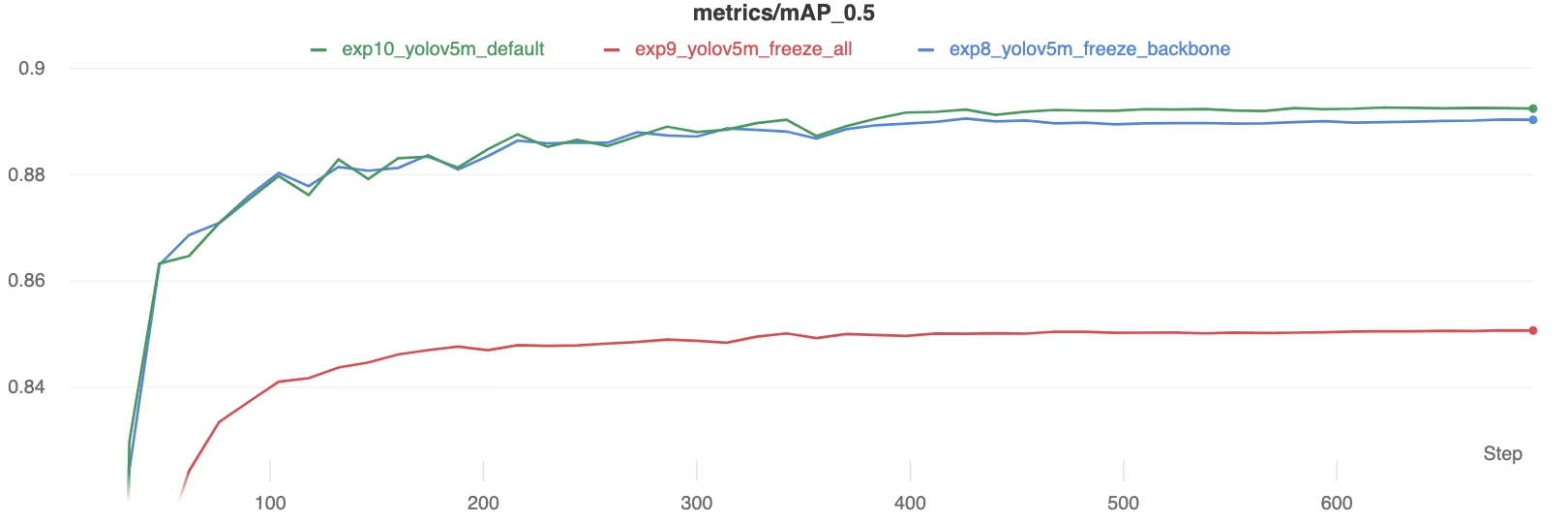 학습 중 mAP50 비교
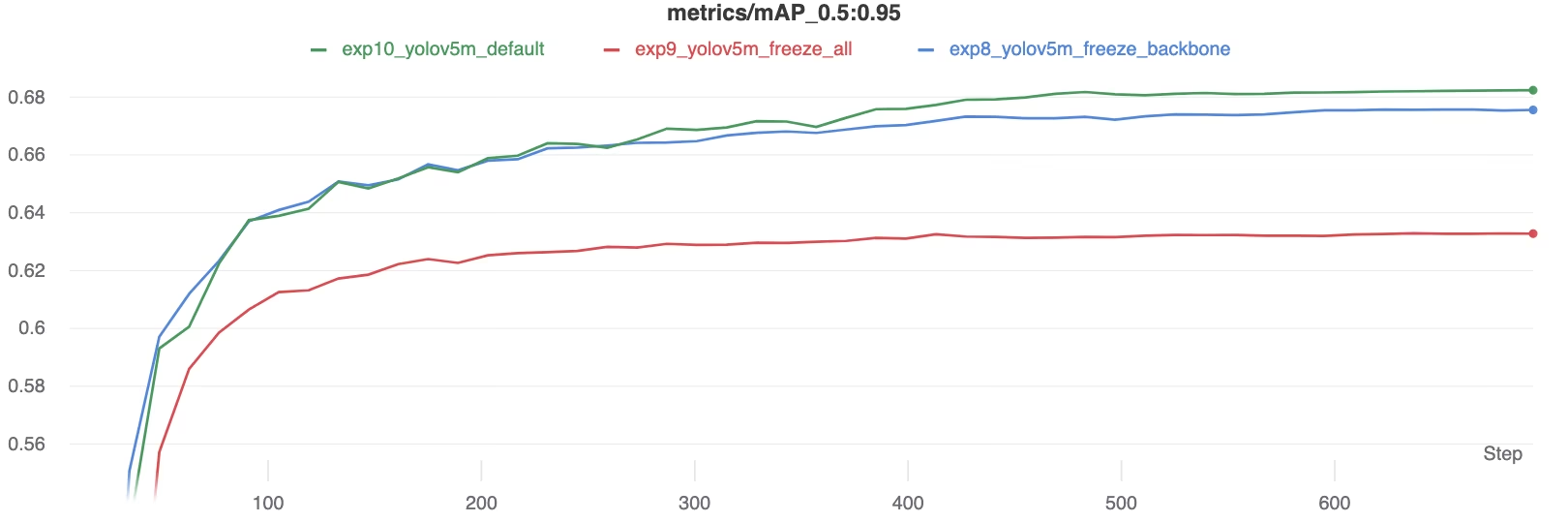 학습 중 mAP50-95 비교
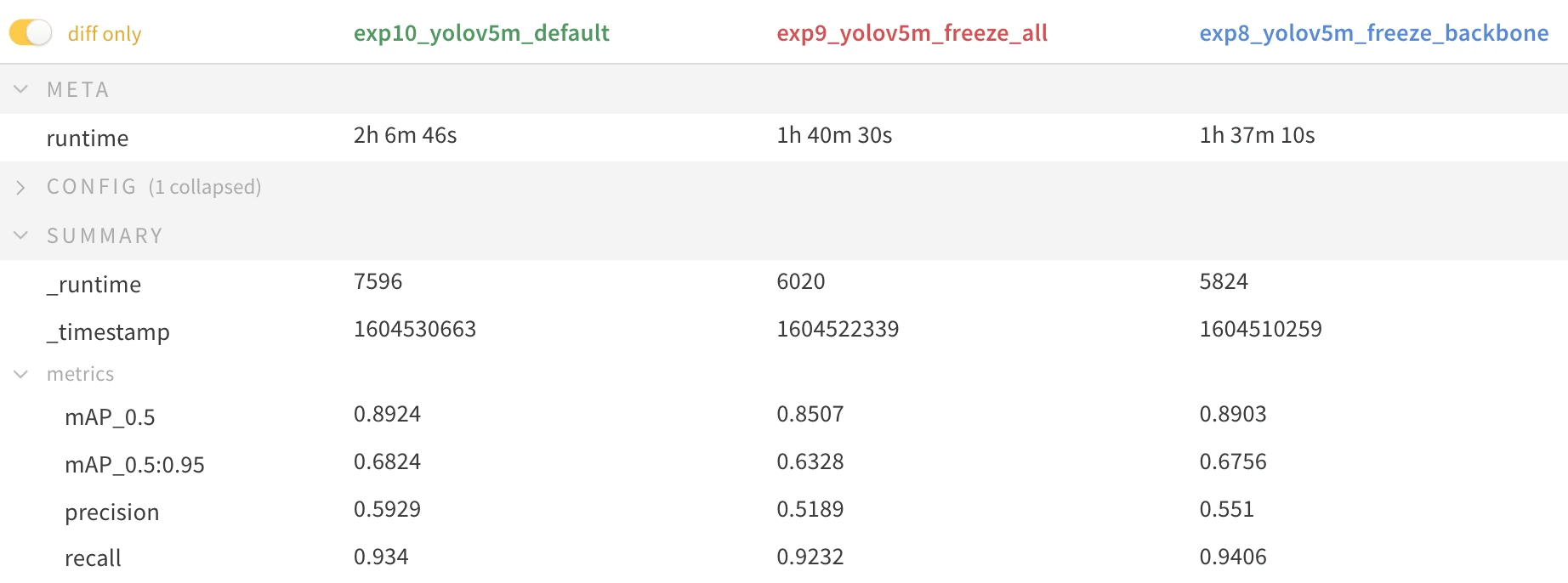 *Summary table of performance metrics*
Link to this section리소스 활용#
더 많은 레이어를 동결하면 GPU 메모리 요구 사항과 전체 활용도가 상당히 줄어듭니다. 이로 인해 레이어 동결을 이용한 전이 학습은 하드웨어 리소스가 제한적인 경우 매력적인 옵션이 되며, 그렇지 않은 경우보다 더 큰 모델을 학습하거나 더 큰 이미지 크기를 사용할 수 있게 해줍니다.
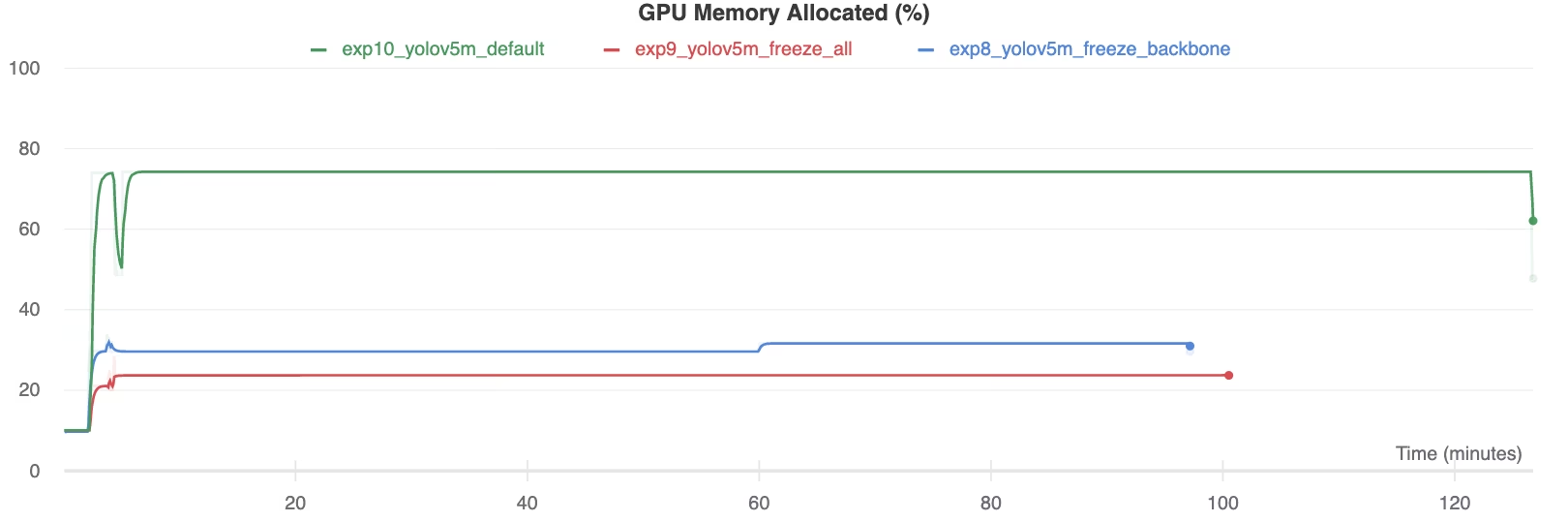 할당된 GPU 메모리(%)
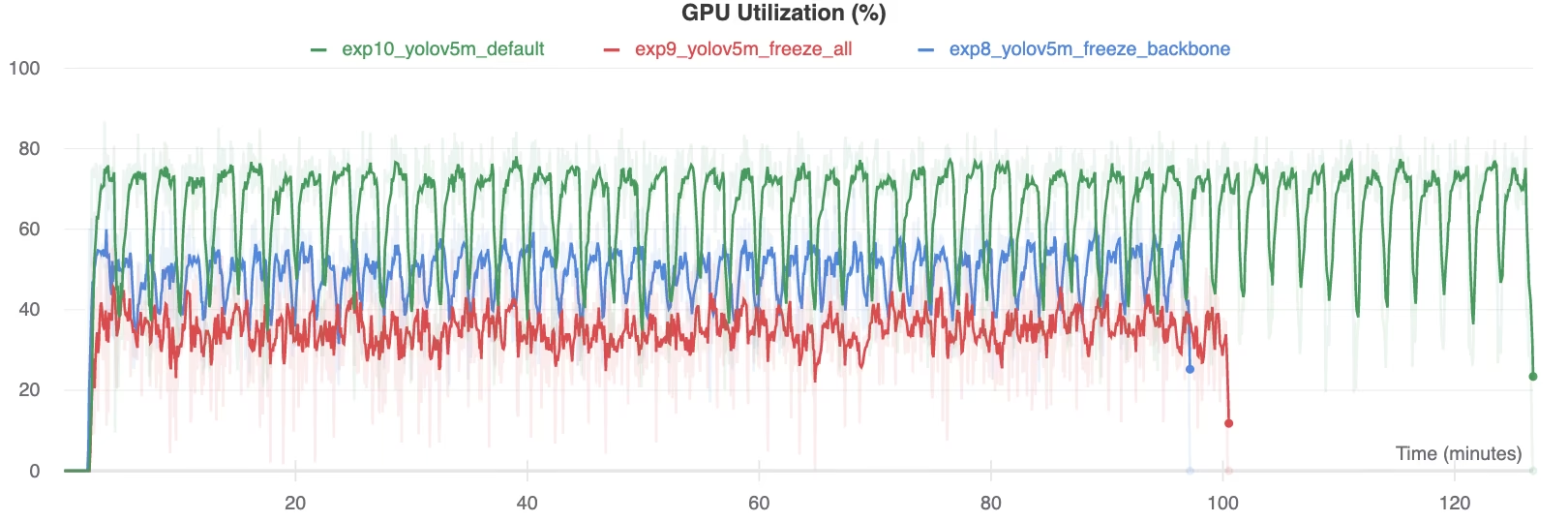 GPU 활용률(%)
Link to this section레이어 동결을 사용하는 경우#
전이 학습 중 레이어 동결은 특히 다음과 같은 상황에서 유리합니다:
- 제한된 컴퓨팅 리소스: GPU 메모리나 처리 능력에 제약이 있는 경우.
- 소규모 데이터셋: 타겟 데이터셋이 원래 사전 학습 데이터셋보다 현저히 작을 때, 동결은 과적합을 방지하는 데 도움이 됩니다.
- 신속한 프로토타이핑: 초기 평가를 위해 기존 모델을 새로운 작업이나 도메인에 빠르게 적응시켜야 하는 경우.
- 유사한 특징 도메인: 새로운 데이터셋의 저수준 특징이 모델이 사전 학습된 데이터셋과 매우 유사한 경우.
전이 학습의 세부 사항에 대해 자세히 알아보려면 용어 사전을 확인하시고, 성능 최적화를 위해 하이퍼파라미터 튜닝과 같은 기술을 고려해 보십시오.
Link to this section지원되는 환경#
Ultralytics는 CUDA, CuDNN, Python, PyTorch와 같은 필수 종속성이 사전 설치된 다양한 즉시 사용 가능한 환경을 제공합니다.
- 무료 GPU 노트북:



- Google Cloud: GCP 퀵스타트 가이드
- Amazon: AWS 퀵스타트 가이드
- Azure: AzureML 퀵스타트 가이드
- Docker: Docker 퀵스타트 가이드

Link to this section프로젝트 상태#

이 배지는 모든 YOLOv5 GitHub Actions 지속적 통합(CI) 테스트가 성공적으로 통과되었음을 확인합니다. 이러한 CI 테스트는 학습, 검증, 추론, 내보내기, 벤치마크 등 주요 작업 전반에서 YOLOv5의 기능과 성능을 엄격하게 평가합니다. 테스트는 24시간마다 그리고 새로운 코드 커밋이 있을 때마다 자동으로 실행되며 macOS, Windows, Ubuntu에서 일관되고 안정적인 작동을 보장합니다.