Ultralytics YOLO11#
Overview#
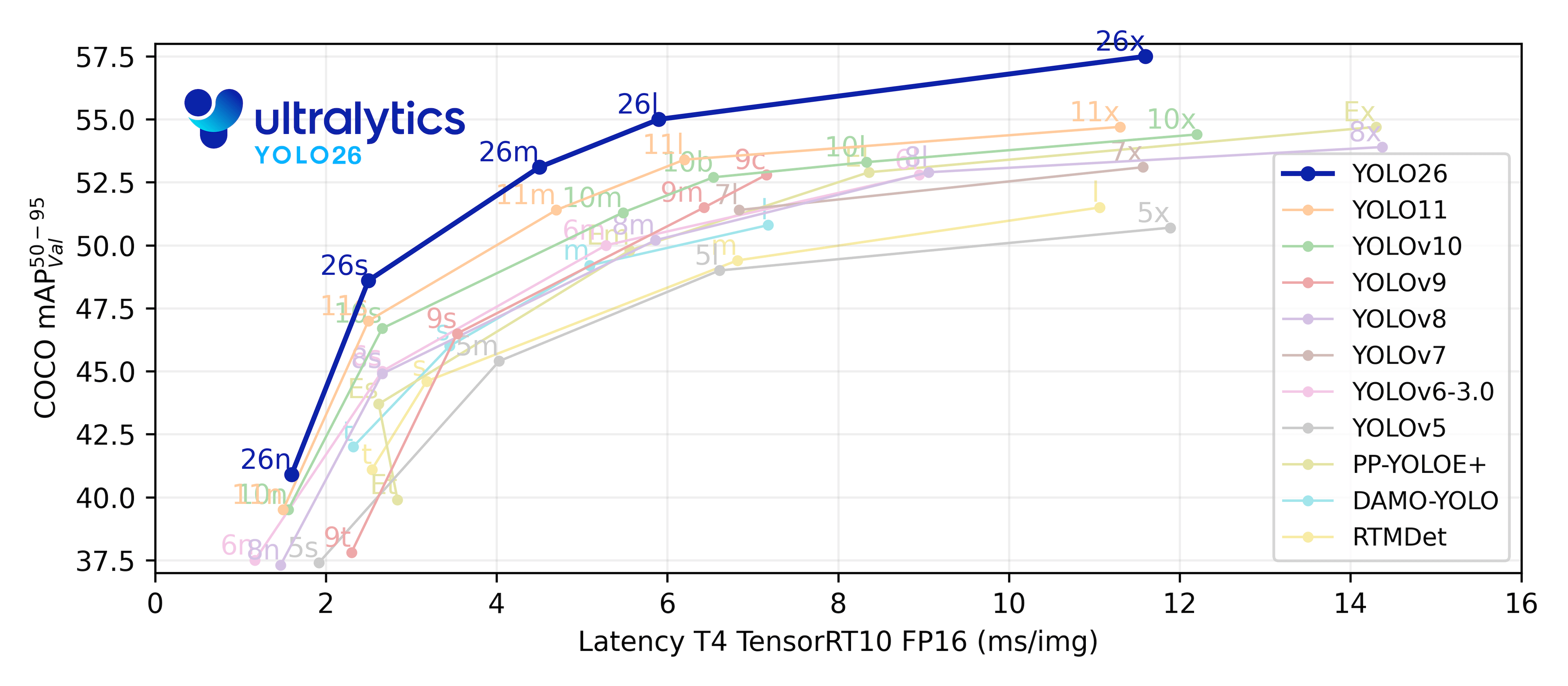
YOLO11 was released by Ultralytics on September 27, 2024, improving accuracy, speed, and efficiency over previous versions. Building on earlier YOLO releases, YOLO11 introduces improvements in architecture and training methods, making it a versatile choice for a wide range of computer vision tasks. YOLO26, the latest Ultralytics model, adds end-to-end NMS-free inference and optimized edge deployment.
Watch: How to Use Ultralytics YOLO11 for Object Detection and Tracking | How to Benchmark | YOLO11 RELEASED
Explore and run YOLO11 models directly on Ultralytics Platform.
Key Features#
- Enhanced Feature Extraction: YOLO11 employs an improved backbone and neck architecture, which enhances feature extraction capabilities for more precise object detection and complex task performance.
- Optimized for Efficiency and Speed: YOLO11 introduces refined architectural designs and optimized training pipelines, delivering faster processing speeds while balancing accuracy and performance.
- Greater Accuracy with Fewer Parameters: With advancements in model design, YOLO11m achieves a higher mean Average Precision (mAP) on the COCO dataset while using 22% fewer parameters than YOLOv8m, making it computationally efficient without compromising accuracy.
- Adaptability Across Environments: YOLO11 can be deployed across various environments, including edge devices, cloud platforms, and systems supporting NVIDIA GPUs.
- Broad Range of Supported Tasks: YOLO11 supports object detection, instance segmentation, image classification, pose estimation, and oriented object detection (OBB).
Supported Tasks and Modes#
YOLO11 builds on the model range established by earlier Ultralytics YOLO releases, with support for the following computer vision tasks:
| Model | Filenames | Task | Training | Validation | Inference | Export |
|---|---|---|---|---|---|---|
| YOLO11 | yolo11n.pt yolo11s.pt yolo11m.pt yolo11l.pt yolo11x.pt | Detection | ✅ | ✅ | ✅ | ✅ |
| YOLO11-seg | yolo11n-seg.pt yolo11s-seg.pt yolo11m-seg.pt yolo11l-seg.pt yolo11x-seg.pt | Instance Segmentation | ✅ | ✅ | ✅ | ✅ |
| YOLO11-cls | yolo11n-cls.pt yolo11s-cls.pt yolo11m-cls.pt yolo11l-cls.pt yolo11x-cls.pt | Classification | ✅ | ✅ | ✅ | ✅ |
| YOLO11-pose | yolo11n-pose.pt yolo11s-pose.pt yolo11m-pose.pt yolo11l-pose.pt yolo11x-pose.pt | Pose/Keypoints | ✅ | ✅ | ✅ | ✅ |
| YOLO11-obb | yolo11n-obb.pt yolo11s-obb.pt yolo11m-obb.pt yolo11l-obb.pt yolo11x-obb.pt | Oriented Detection | ✅ | ✅ | ✅ | ✅ |
This table provides an overview of the YOLO11 model variants, their tasks, and their compatibility with the Training, Validation, Inference, and Export modes.
Performance Metrics#
See Detection Docs for usage examples with these models trained on COCO, which include 80 pretrained classes.
Usage Examples#
This section provides simple YOLO11 training and inference examples.
The example below trains a YOLO11 Detect model for object detection on the COCO8 example dataset.
PyTorch pretrained *.pt models as well as configuration *.yaml files can be passed to the YOLO() class to create a model instance in Python:
from ultralytics import YOLO

# Load a COCO-pretrained YOLO11n model
model = YOLO("yolo11n.pt")

# Train the model on the COCO8 example dataset for 100 epochs
results = model.train(data="coco8.yaml", epochs=100, imgsz=640)

# Run inference with the YOLO11n model on the 'bus.jpg' image
results = model("path/to/bus.jpg")
Citations and Acknowledgments#
Ultralytics has not published a formal research paper for YOLO11 due to the rapidly evolving nature of the models. We focus on advancing the technology and making it easier to use, rather than producing static documentation. For the most up-to-date information on YOLO architecture, features, and usage, please refer to our GitHub repository and documentation.
If you use YOLO11 or any other software from this repository in your work, please cite it using the following format:
@software{yolo11_ultralytics,
  author = {Glenn Jocher and Jing Qiu},
  title = {Ultralytics YOLO11},
  version = {11.0.0},
  year = {2024},
  url = {https://github.com/ultralytics/ultralytics},
  orcid = {0000-0001-5950-6979, 0000-0003-3783-7069},
  license = {AGPL-3.0}
}
Please note that the DOI is pending and will be added to the citation once it is available. YOLO11 models are provided under AGPL-3.0 and Enterprise licenses.
FAQ#
Ultralytics YOLO11 introduces several advancements over YOLOv8. Key improvements include:
- Enhanced Feature Extraction: YOLO11 employs an improved backbone and neck architecture, enhancing feature extraction capabilities for more precise object detection.
- Optimized Efficiency and Speed: Refined architectural designs and optimized training pipelines deliver faster processing speeds while maintaining a balance between accuracy and performance.
- Greater Accuracy with Fewer Parameters: YOLO11m achieves higher mean Average Precision (mAP) on the COCO dataset with 22% fewer parameters than YOLOv8m, making it computationally efficient without compromising accuracy.
- Adaptability Across Environments: YOLO11 can be deployed across various environments, including edge devices, cloud platforms, and systems supporting NVIDIA GPUs.
- Broad Range of Supported Tasks: YOLO11 supports diverse computer vision tasks such as object detection, instance segmentation, image classification, pose estimation, and oriented object detection (OBB).
Training a YOLO11 model for object detection can be done using Python or CLI commands. Below are examples for both methods:
Examplefrom ultralytics import YOLO # Load a COCO-pretrained YOLO11n model model = YOLO("yolo11n.pt") # Train the model on the COCO8 example dataset for 100 epochs results = model.train(data="coco8.yaml", epochs=100, imgsz=640)For more detailed instructions, refer to the Train documentation.
YOLO11 models are versatile and support a wide range of computer vision tasks, including:
- Object Detection: Identifying and locating objects within an image.
- Instance Segmentation: Detecting objects and delineating their boundaries.
- Image Classification: Categorizing images into predefined classes.
- Pose Estimation: Detecting and tracking keypoints on human bodies.
- Oriented Object Detection (OBB): Detecting objects with rotation for higher precision.
For more information on each task, see the Detection, Instance Segmentation, Classification, Pose Estimation, and Oriented Detection documentation.
YOLO11 achieves greater accuracy with fewer parameters through advancements in model design and optimization techniques. The improved architecture allows for efficient feature extraction and processing, resulting in higher mean Average Precision (mAP) on datasets like COCO while using 22% fewer parameters than YOLOv8m. This makes YOLO11 computationally efficient without compromising on accuracy, making it suitable for deployment on resource-constrained devices.
Yes. YOLO11's efficient architecture makes it suitable for deployment on edge devices, cloud platforms, and systems supporting NVIDIA GPUs, so it can be used in diverse applications, from real-time detection on mobile devices to complex segmentation tasks in cloud environments.
Comments275
Ask a question, share your results, or help someone else.
LemonGraZ
Is there a possibility to get a P6 variant of Yolo11? There are still use cases where this would really help!
1 Glenn JocherUltralytics
@LemonGraZ thank you for your interest in a P6 variant of YOLO11. Currently, we don't have plans to release a P6 model, but we appreciate your feedback and will consider it for future updates. For now, please explore the existing YOLO11 models for your use cases.
It is very simple, the solution is here: https://github.com/ultralytics/ultralytics/issues/16844
or in this PR: https://github.com/ultralytics/ultralytics/pull/16558
xingchen020622
How to solve it in the latest yolov11 environment TypeError: load_inference_source() got an unexpected keyword argument 'img_size'
1- Glenn JocherUltralytics
@xingchen020622 the error you're encountering suggests a mismatch in function arguments. Please ensure you're using the latest version of the YOLO11 codebase, as the function signature might have changed. You can check the documentation for updates: YOLO11 Documentation.
ghzlnasiri
Hi! I have a question about reporting evaluation metrics for a research paper. When comparing my YOLOv11 results with other papers, should mAP@50 and mAP@50–95 be reported using the default evaluation confidence threshold ( 0.001), regardless of the confidence threshold used during inference? For example, if I choose a confidence threshold of 0.35 because it gives the best Precision and Recall, should I report Precision and Recall at 0.35, but report mAP@50 and mAP@50–95 from the standard evaluation at 0.001? Or should all metrics, including mAP@50 and mAP@50–95, be reported using the same confidence threshold? What is the recommended practice for standard article and fair comparison with other published papers?
- Glenn JocherUltralytics
Recommended: report
mAP@50andmAP@50-95from standardmodel.val()/yolo valsettings, leavingconfat the default low validation threshold (0.001) so AP is computed from the full PR curve; don’t use your deployment/inference threshold for headline mAP, as that truncates the curve and makes comparisons less fair. If0.35is your chosen operating point, reportPrecision,Recall, and/orF1separately as “atconf=0.35”, and include dataset split, image size, IoU/NMS settings, and checkpoint details. See the performance metrics guide and Val mode docs. Thanks for the clarification! I have one more question. Many published papers report mAP@50, mAP@50–95, Precision, and Recall, but they often do not explicitly mention the confidence threshold used for each metric. Is it generally safe to assume that the reported mAP@50 and mAP@50–95 were computed using the standard validation procedure (default confidence threshold, 0.001), while Precision and Recall were reported at the authors' chosen operating confidence threshold? In other words, is this the standard convention in YOLO-based research papers, even if the paper does not explicitly state it?
- Glenn JocherUltralytics
I would not assume that from a paper unless the authors state it or provide code/configs. The standard convention for AP/mAP in object detection is to compute it from the precision-recall curve across confidence thresholds, typically via the framework’s validation/evaluation pipeline; however, reported
PrecisionandRecallcan be either the framework’s validation operating point or a chosen deployment threshold, and papers are often ambiguous. For fair reporting, state your protocol explicitly:mAP@50andmAP@50-95from standardmodel.val()settings, andPrecision/Recall at conf=0.35if those are from your selected operating point. See the Ultralytics performance metrics guide for the AP/PR-curve relationship. Thanks again. I have one final question related to my thesis. For my comparison with previous studies, is it methodologically correct to report mAP@50 and mAP@50–95 using the standard validation protocol (default "model.val()" settings, conf=0.001), while reporting Precision and Recall at my selected operating threshold (conf=0.35), and then compare these metrics with the values reported in other papers? I understand that many papers do not clearly specify how Precision/Recall were computed, so I cannot know whether they used the default validation threshold or a custom operating threshold. Given this limitation, is my reporting protocol still considered the correct and accepted way to present and compare results in a thesis or research paper?
- Glenn JocherUltralytics
Yes — that is a methodologically sound way to report your own results: use standard
model.val()settings for headlinemAP@50andmAP@50-95, and reportPrecision/Recallseparately at your selected operating threshold, e.g.conf=0.35. For comparisons with prior papers, mAP comparisons are generally the fairest when the dataset/split/protocol match, but treat Precision/Recall comparisons as approximate unless those papers state their confidence threshold. In your thesis, explicitly document this limitation rather than trying to infer missing thresholds from other studies.
hey. I want to add cbam to yolov11l, how do i know which part should i add it to? the model has problems detecting red blood cells in microscope images. And also, what loss function does yolov11 have?
- Glenn JocherUltralytics
CBAM isn’t a drop-in switch for YOLO11, so the usual approach is to add it as a custom
nn.Moduleand then insert it in a custom YOLO11 YAML (most people start by placing attention right after the backbone/neck blocks that produce the multi-scale feature maps that feed theDetecthead, then iterate based on val results); the wiring/import steps are covered in the Model YAML Configuration Guide. YOLO11 uses the standard Ultralytics loss implementations inultralytics/utils/loss.py(box regression uses IoU + DFL, classification uses BCE-style terms, with task-specific additions for seg/pose/obb), and you can see the exact classes/entrypoints in the loss reference; if you paste your current model YAML snippet (or say which layers you want CBAM after), we can sanity-check the placement here in the discussion. so how can i replace the loss function in yolov11l with EIOU for better handling the class imblance in my dataset?
- Glenn JocherUltralytics
There’s no built-in switch in Ultralytics YOLO11 to “swap in EIoU”, so you’d need to implement EIoU inside the IoU routine (start from
bbox_iou()inultralytics/utils/metrics.py) and then wire it into the box regression part of the criterion (the cleanest way is a small fork/customTrainer; see the custom trainer guide). Also note EIoU only changes box regression, it won’t directly fix class imbalance; for microscopy/small objects you’ll usually get more mileage from higherimgsz, turning off mosaic near the end (close_mosaic), and if you truly have one class usingsingle_cls=True, e.g.:yolo detect train model=yolo11l.pt data=your.yaml imgsz=1024 close_mosaic=10 single_cls=True can you help me please. "import torch import torch.nn as nn import torch.nn.functional as F
class CustomCBAM(nn.Module): def init(self, in_channels, reduction=16, kernel_size=7): super(CustomCBAM, self).init() self.channel_attention = ChannelAttention(in_channels, reduction) self.spatial_attention = SpatialAttention(kernel_size)
def forward(self, x):
    x = self.channel_attention(x)
    x = self.spatial_attention(x)
    return x
class ChannelAttention(nn.Module): def init(self, in_channels, reduction=16): super(ChannelAttention, self).init() self.avg_pool = nn.AdaptiveAvgPool2d(1) self.max_pool = nn.AdaptiveMaxPool2d(1) reduced_channels = max(in_channels // reduction, 8) self.fc1 = nn.Conv2d(in_channels, reduced_channels, 1, bias=False) self.relu = nn.ReLU(inplace=True) self.fc2 = nn.Conv2d(reduced_channels, in_channels, 1, bias=False) # Keep this one self.sigmoid = nn.Sigmoid()
def forward(self, x):
    avg_out = self.fc2(self.relu(self.fc1(self.avg_pool(x))))  # fixed the extra parenthesis
    max_out = self.fc2(self.relu(self.fc1(self.max_pool(x))))  # fixed the extra parenthesis
    out = avg_out + max_out
    return self.sigmoid(out) * x
class SpatialAttention(nn.Module): def init(self, kernel_size=7): super(SpatialAttention, self).init() self.conv1 = nn.Conv2d(2, 1, kernel_size, padding=kernel_size // 2, bias=False) self.sigmoid = nn.Sigmoid()
def forward(self, x):
    avg_out = torch.mean(x, dim=1, keepdim=True)
    max_out, _ = torch.max(x, dim=1, keepdim=True)
    out = torch.cat([avg_out, max_out], dim=1)
    out = self.conv1(out)
    return self.sigmoid(out) * x
" "# Ultralytics 🚀 AGPL-3.0 License - https://ultralytics.com/license
Ultralytics YOLO11 object detection model with P3/8 - P5/32 outputs
Model docs: https://docs.ultralytics.com/models/yolo11
Task docs: https://docs.ultralytics.com/tasks/detect
Parameters
nc: 3 # number of classes scales: # model compound scaling constants, i.e. 'model=yolo11n.yaml' will call yolo11.yaml with scale 'n'
[depth, width, max_channels]
l: [1.00, 1.00, 512] # summary: 357 layers, 25372160 parameters, 25372144 gradients, 87.6 GFLOPs
YOLO11n backbone with CBAM
backbone:
- [-1, 1, Conv, [64, 3, 2]] # 0-P1/2
- [-1, 1, Conv, [128, 3, 2]] # 1-P2/4
- [-1, 2, C3k2, [256, False, 0.25]]
- [-1, 1, Conv, [256, 3, 2]] # 3-P3/8
- [-1, 2, C3k2, [512, False, 0.25]]
- [-1, 1, Conv, [512, 3, 2]] # 5-P4/16
- [-1, 2, C3k2, [512, True]]
- [-1, 1, CustomCBAM, [512]] # کانالها به 512 اصلاح شد
- [-1, 1, Conv, [1024, 3, 2]] # 7-P5/32
- [-1, 2, C3k2, [1024, True]]
- [-1, 1, CustomCBAM, [1024]] # کانالها به 1024 اصلاح شد
- [-1, 1, SPPF, [1024, 5]] # 9
- [-1, 2, C2PSA, [1024]] # 10
YOLO11n head with CBAM
head:
-
[-1, 1, nn.Upsample, [None, 2, "nearest"]]
-
[[-1, 6], 1, Concat, [1]] # cat backbone P4
-
[-1, 2, C3k2, [512, False]] # 13
-
[-1, 1, nn.Upsample, [None, 2, "nearest"]]
-
[[-1, 4], 1, Concat, [1]] # cat backbone P3
-
[-1, 2, C3k2, [256, False]] # 16 (P3/8-small)
-
[-1, 1, Conv, [256, 3, 2]]
-
[[-1, 13], 1, Concat, [1]] # cat head P4
-
[-1, 2, C3k2, [512, False]] # 19 (P4/16-medium)
-
[-1, 1, Conv, [512, 3, 2]]
-
[[-1, 10], 1, Concat, [1]] # cat head P5
-
[-1, 2, C3k2, [1024, True]] # 22 (P5/32-large)
-
[[16, 19, 22], 1, Detect, [nc]] # Detect(P3, P4, P5) " "from ultralytics import YOLO from ultralytics.nn.modules.cbam import CustomCBAM # وارد کردن صحیح CBAM
import multiprocessing
def main(): # بارگذاری مدل با پیکربندی جدید model = YOLO("D:/UNI/project/code/Level 3/yolo11l_cbam.yaml")
# آموزش مدل با دادههای موجود model.train( data="D:/UNI/project/code/augmented/dataset.yaml", # مسیر دادهها epochs=5, # اول با ۵ تست کن imgsz=640, # اندازه تصویر ورودی batch=8, # اندازه بچ project="D:/UNI/project/code/Level 3/train", # محل ذخیره نتایج name="test_cbam_import", # نام آزمایش workers=0 # تعداد کارگران (برای سیستمهای بدون GPU بهتر است 0 تنظیم شود) )if name == "main": multiprocessing.freeze_support() # مخصوص ویندوز main() # اجرای تابع اصلی " "PS C:\Program Files\Microsoft VS Code> & C:\Users\Lion\AppData\Local\Programs\Python\Python312\python.exe "d:/UNI/project/code/Level 3/Train.test.py" Traceback (most recent call last): File "d:\UNI\project\code\Level 3\Train.test.py", line 23, in main() # اجرای تابع اصلی ^^^^^^ File "d:\UNI\project\code\Level 3\Train.test.py", line 8, in main model = YOLO("D:/UNI/project/code/Level 3/yolo11l_cbam.yaml") ^^^^^^^^^^^^^^^^^^^^^^^^^^^^^^^^^^^^^^^^^^^^^^^^^^^^^ File "C:\Users\Lion\AppData\Local\Programs\Python\Python312\Lib\site-packages\ultralytics\models\yolo\model.py", line 81, in init super().init(model=model, task=task, verbose=verbose) File "C:\Users\Lion\AppData\Local\Programs\Python\Python312\Lib\site-packages\ultralytics\engine\model.py", line 147, in init self._new(model, task=task, verbose=verbose) File "C:\Users\Lion\AppData\Local\Programs\Python\Python312\Lib\site-packages\ultralytics\engine\model.py", line 255, in _new self.model = (model or self._smart_load("model"))(cfg_dict, verbose=verbose and RANK == -1) # build model ^^^^^^^^^^^^^^^^^^^^^^^^^^^^^^^^^^^^^^^^^^^^^^^^^^^^^^^^^^^^^^^^^^^^^^^^^^^^^^ File "C:\Users\Lion\AppData\Local\Programs\Python\Python312\Lib\site-packages\ultralytics\nn\tasks.py", line 406, in init m.stride = torch.tensor([s / x.shape[-2] for x in _forward(torch.zeros(1, ch, s, s))]) # forward ^^^^^^^^^^^^^^^^^^^^^^^^^^^^^^^^^^ File "C:\Users\Lion\AppData\Local\Programs\Python\Python312\Lib\site-packages\ultralytics\nn\tasks.py", line 402, in _forward return self.forward(x)[0] if isinstance(m, (Segment, YOLOESegment, Pose, OBB)) else self.forward(x) ^^^^^^^^^^^^^^^ File "C:\Users\Lion\AppData\Local\Programs\Python\Python312\Lib\site-packages\ultralytics\nn\tasks.py", line 138, in forward return self.predict(x, *args, **kwargs) ^^^^^^^^^^^^^^^^^^^^^^^^^^^^^^^^ File "C:\Users\Lion\AppData\Local\Programs\Python\Python312\Lib\site-packages\ultralytics\nn\tasks.py", line 155, in predict return self._predict_once(x, profile, visualize, embed) ^^^^^^^^^^^^^^^^^^^^^^^^^^^^^^^^^^^^^^^^^^^^^^^^ File "C:\Users\Lion\AppData\Local\Programs\Python\Python312\Lib\site-packages\ultralytics\nn\tasks.py", line 177, in _predict_once x = m(x) # run ^^^^ File "C:\Users\Lion\AppData\Local\Programs\Python\Python312\Lib\site-packages\torch\nn\modules\module.py", line 1736, in _wrapped_call_impl return self._call_impl(*args, **kwargs) ^^^^^^^^^^^^^^^^^^^^^^^^^^^^^^^^ File "C:\Users\Lion\AppData\Local\Programs\Python\Python312\Lib\site-packages\torch\nn\modules\module.py", line 1747, in _call_impl return forward_call(*args, **kwargs) ^^^^^^^^^^^^^^^^^^^^^^^^^^^^^ File "C:\Users\Lion\AppData\Local\Programs\Python\Python312\Lib\site-packages\ultralytics\nn\modules\cbam.py", line 12, in forward x = self.channel_attention(x) ^^^^^^^^^^^^^^^^^^^^^^^^^ File "C:\Users\Lion\AppData\Local\Programs\Python\Python312\Lib\site-packages\torch\nn\modules\module.py", line 1736, in _wrapped_call_impl return self._call_impl(*args, **kwargs) ^^^^^^^^^^^^^^^^^^^^^^^^^^^^^^^^ File "C:\Users\Lion\AppData\Local\Programs\Python\Python312\Lib\site-packages\torch\nn\modules\module.py", line 1747, in _call_impl return forward_call(*args, **kwargs) ^^^^^^^^^^^^^^^^^^^^^^^^^^^^^ File "C:\Users\Lion\AppData\Local\Programs\Python\Python312\Lib\site-packages\ultralytics\nn\modules\cbam.py", line 29, in forward avg_out = self.fc2(self.relu(self.fc1(self.avg_pool(x)))) # fixed the extra parenthesis ^^^^^^^^^^^^^^^^^^^^^^^^^^ File "C:\Users\Lion\AppData\Local\Programs\Python\Python312\Lib\site-packages\torch\nn\modules\module.py", line 1736, in _wrapped_call_impl return self._call_impl(*args, **kwargs) ^^^^^^^^^^^^^^^^^^^^^^^^^^^^^^^^ File "C:\Users\Lion\AppData\Local\Programs\Python\Python312\Lib\site-packages\torch\nn\modules\module.py", line 1747, in _call_impl return forward_call(*args, **kwargs) ^^^^^^^^^^^^^^^^^^^^^^^^^^^^^ File "C:\Users\Lion\AppData\Local\Programs\Python\Python312\Lib\site-packages\torch\nn\modules\conv.py", line 554, in forward return self._conv_forward(input, self.weight, self.bias) ^^^^^^^^^^^^^^^^^^^^^^^^^^^^^^^^^^^^^^^^^^^^^^^^^ File "C:\Users\Lion\AppData\Local\Programs\Python\Python312\Lib\site-packages\torch\nn\modules\conv.py", line 549, in _conv_forward return F.conv2d( ^^^^^^^^^ RuntimeError: Given groups=1, weight of size [64, 1024, 1, 1], expected input[1, 512, 1, 1] to have 1024 channels, but got 512 channels instead PS C:\Program Files\Microsoft VS Code> "
sorry a bit confusing. I sent you my CustomCBAM.py and my new YAML file and my train.py file and the error i keep getting.
i appreciate it if someone answers please.
- Glenn JocherUltralytics
That error is a plain channel mismatch: in the official YOLO11
lscale the network is capped atmax_channels=512(so your “1024” stages actually output 512), but your secondCustomCBAMis instantiated within_channels=1024, so it crashes when it receives a[1, 512, 1, 1]tensor; compare against the upstream config in the officialyolo11.yamland change the second CBAM line to use 512 channels (or increasescales.lmax_channels, which creates a different model):- [-1, 1, CustomCBAM, [512]]Also please paste the text output of
yolo checksso we can confirm you don’t have multiple Ultralytics installs shadowing modules/edits. sir I have another question. adaptive_max_pool2d_backward_cuda does not have a deterministic implementation, but I set 'torch.use_deterministic_algorithms(True, warn_only=True)
I added the CBAM to yolov11l.yaml and it didnt really improve anything, it even lowerd the percision and the recall increased. maybe im not adding it in the best layer? or maybe i need to change reduction and kernel in customCBAM.py ?
my YAML:nc: 3 names: ['Platelet', 'RBC', 'WBC'] scales: l: [1.00, 1.00, 512] backbone:
- [-1, 1, Conv, [64, 3, 2]] # 0-P1/2
- [-1, 1, Conv, [128, 3, 2]] # 1-P2/4
- [-1, 2, C3k2, [256, False, 0.25]] # 2
- [-1, 1, Conv, [256, 3, 2]] # 3-P3/8
- [-1, 2, C3k2, [512, False, 0.25]] # 4
- [-1, 1, Conv, [512, 3, 2]] # 5-P4/16
- [-1, 2, C3k2, [512, True]] # 6
- [-1, 1, MyCBAM, [512]] # 7 (MyCBAM on P4) – کانال درست شد
- [-1, 1, Conv, [512, 3, 2]] # 8-P5/32 – به جای 1024 → 512
- [-1, 2, C3k2, [512, True]] # 9
- [-1, 1, MyCBAM, [512]] # 10 (MyCBAM on P5) – کانال درست شد
- [-1, 1, SPPF, [512, 5]] # 11
- [-1, 2, C2PSA, [512]] # 12 head:
- [-1, 1, nn.Upsample, [None, 2, 'nearest']]
- [[-1, 6], 1, Concat, [1]] # cat backbone P4 (layer 6 output)
- [-1, 2, C3k2, [512, False]] # 15
- [-1, 1, nn.Upsample, [None, 2, 'nearest']]
- [[-1, 4], 1, Concat, [1]] # cat backbone P3 (layer 4 output)
- [-1, 2, C3k2, [256, False]] # 18 (P3)
- [-1, 1, Conv, [256, 3, 2]]
- [[-1, 15], 1, Concat, [1]] # cat head P4
- [-1, 2, C3k2, [512, False]] # 21 (P4)
- [-1, 1, Conv, [512, 3, 2]]
- [[-1, 12], 1, Concat, [1]] # cat head P5
- [-1, 2, C3k2, [512, True]] # 24 (P5)
- [[18, 21, 24], 1, Detect, [nc]] # Detect(P3, P4, P5)
my CBAM:
import torch import torch.nn as nn
class ChannelAttention(nn.Module): def init(self, in_channels, reduction=16): super().init() self.avg_pool = nn.AdaptiveAvgPool2d(1) self.max_pool = nn.AdaptiveMaxPool2d(1)
    self.fc_reduce = nn.Conv2d(in_channels, in_channels // reduction, 1, bias=False)
    self.relu = nn.ReLU(inplace=True)
    self.fc_expand = nn.Conv2d(in_channels // reduction, in_channels, 1, bias=False)
    self.sigmoid = nn.Sigmoid()

def forward(self, x):
    avg_out = self.fc_expand(self.relu(self.fc_reduce(self.avg_pool(x))))
    max_out = self.fc_expand(self.relu(self.fc_reduce(self.max_pool(x))))
    return self.sigmoid(avg_out + max_out)
class SpatialAttention(nn.Module): def init(self, kernel_size=7): super().init() self.conv = nn.Conv2d(2, 1, kernel_size, padding=kernel_size//2, bias=False) self.sigmoid = nn.Sigmoid()
def forward(self, x):
    avg_out = torch.mean(x, dim=1, keepdim=True)
    max_out, _ = torch.max(x, dim=1, keepdim=True)
    x = torch.cat([avg_out, max_out], dim=1)
    return self.sigmoid(self.conv(x))
class MyCBAM(nn.Module): def init(self, in_channels, reduction=16, kernel_size=7): super().init() self.ca = ChannelAttention(in_channels, reduction) self.sa = SpatialAttention(kernel_size)
def forward(self, x): x = x * self.ca(x) x = x * self.sa(x) return x- Glenn JocherUltralytics
That determinism warning is expected: CBAM’s
AdaptiveMaxPool2dpath uses a CUDA backward that PyTorch can’t guarantee is deterministic, so withtorch.use_deterministic_algorithms(True, warn_only=True)it will warn and continue; if you need strict determinism you’ll have to remove the max-pool branch (avg-only) or disable deterministic algorithms for that run.On CBAM not helping: first make sure you’re not unintentionally training from scratch—passing a YAML into
YOLO()builds a new model, so you generally want to transfer pretrained weights before fine-tuning (see theYOLO(...).load(...)pattern in the Train mode docs):from ultralytics import YOLO model = YOLO("yolo11l_cbam.yaml").load("yolo11l.pt") # transfer what matches model.train(data="dataset.yaml", epochs=100, imgsz=1024)If precision drops while recall rises, that usually means you’re increasing false-positives; before tweaking
reduction/kernel_size, try moving CBAM closer to the high-res branch that feedsDetect(P3 / the small-object feature) rather than only inserting it at P4/P5, then compare runs using the sameconf/iouat validation/inference.
Subhash-8688
Hello Everyone, I was new to adding custom modules to the Yolo network. As an initial starting I started with an objective to adding Efficient multi-scale attention (EMA) module after the C2PSA block in the Yolov11 architecture using model.Yaml and followed the custom model integration blog post in the Ultralytics page leaving every other model setting to default. When verifying the wiring it throws an Run time error. I tried to fix it myself but could not able to do it, can someone explain why this error was occuring. I hope this information is enough, I would really appreciate your suggestions and time.
Runtime error: WARNING ⚠️ no model scale passed. Assuming scale='n'. Fix Code
RuntimeError Traceback (most recent call last) Cell In[1], line 2 1 from ultralytics import YOLO ----> 2 m = YOLO("Cyolo11.yaml") 3 m.model.info()
File ~/Ultralytics Repository/ultralytics/models/yolo/model.py:76, in YOLO.init(self, model, task, verbose) 73 self.dict = new_instance.dict 74 else: 75 # Continue with default YOLO initialization ---> 76 super().init(model=model, task=task, verbose=verbose) 77 if hasattr(self.model, "model") and "RTDETR" in self.model.model[-1]._get_name(): # if RTDETR head 78 from ultralytics import RTDETR
File ~/Ultralytics Repository/ultralytics/engine/model.py:142, in Model.init(self, model, task, verbose) 140 import("os").environ["CUBLAS_WORKSPACE_CONFIG"] = ":4096:8" # to avoid deterministic warnings 141 if str(model).endswith((".yaml", ".yml")): --> 142 self._new(model, task=task, verbose=verbose) 143 else: 144 self._load(model, task=task)
File ~/Ultralytics Repository/ultralytics/engine/model.py:250, in Model._new(self, cfg, task, model, verbose) 248 self.cfg = cfg 249 self.task = task or guess_model_task(cfg_dict) --> 250 self.model = (model or self._smart_load("model"))(cfg_dict, verbose=verbose and RANK == -1) # build model 251 self.overrides["model"] = self.cfg 252 self.overrides["task"] = self.task
File ~/Ultralytics Repository/ultralytics/nn/tasks.py:406, in DetectionModel.init(self, cfg, ch, nc, verbose) 404 self.model.eval() # Avoid changing batch statistics until training begins 405 m.training = True # Setting it to True to properly return strides --> 406 m.stride = torch.tensor([s / x.shape[-2] for x in _forward(torch.zeros(1, ch, s, s))]) # forward 407 self.stride = m.stride 408 self.model.train() # Set model back to training(default) mode
File ~/Ultralytics Repository/ultralytics/nn/tasks.py:402, in DetectionModel.init.._forward(x) 400 if self.end2end: 401 return self.forward(x)["one2many"] --> 402 return self.forward(x)[0] if isinstance(m, (Segment, YOLOESegment, Pose, OBB)) else self.forward(x)
File ~/Ultralytics Repository/ultralytics/nn/tasks.py:138, in BaseModel.forward(self, x, *args, **kwargs) 136 if isinstance(x, dict): # for cases of training and validating while training. 137 return self.loss(x, *args, **kwargs) --> 138 return self.predict(x, *args, **kwargs)
File ~/Ultralytics Repository/ultralytics/nn/tasks.py:155, in BaseModel.predict(self, x, profile, visualize, augment, embed) 153 if augment: 154 return self._predict_augment(x) --> 155 return self._predict_once(x, profile, visualize, embed)
File ~/Ultralytics Repository/ultralytics/nn/tasks.py:177, in BaseModel._predict_once(self, x, profile, visualize, embed) 175 if profile: 176 self._profile_one_layer(m, x, dt) --> 177 x = m(x) # run 178 y.append(x if m.i in self.save else None) # save output 179 if visualize:
File /opt/anaconda3/envs/ts_env/lib/python3.10/site-packages/torch/nn/modules/module.py:1736, in Module._wrapped_call_impl(self, *args, **kwargs) 1734 return self._compiled_call_impl(*args, **kwargs) # type: ignore[misc] 1735 else: -> 1736 return self._call_impl(*args, **kwargs)
File /opt/anaconda3/envs/ts_env/lib/python3.10/site-packages/torch/nn/modules/module.py:1747, in Module._call_impl(self, *args, **kwargs) 1742 # If we don't have any hooks, we want to skip the rest of the logic in 1743 # this function, and just call forward. 1744 if not (self._backward_hooks or self._backward_pre_hooks or self._forward_hooks or self._forward_pre_hooks 1745 or _global_backward_pre_hooks or _global_backward_hooks 1746 or _global_forward_hooks or _global_forward_pre_hooks): -> 1747 return forward_call(*args, **kwargs) 1749 result = None 1750 called_always_called_hooks = set()
File ~/Ultralytics Repository/ultralytics/nn/modules/block.py:76, in EMA.forward(self, x) 74 x_h = self.pool_h(group_x) 75 x_w = self.pool_w(group_x).permute(0, 1, 3, 2) ---> 76 hw = self.conv1x1(torch.cat([x_h, x_w], dim=2)) 77 x_h, x_w = torch.split(hw, [h, w], dim=2) 78 x1 = self.gn(group_x * x_h.sigmoid() * x_w.permute(0, 1, 3, 2).sigmoid())
File /opt/anaconda3/envs/ts_env/lib/python3.10/site-packages/torch/nn/modules/module.py:1736, in Module._wrapped_call_impl(self, *args, **kwargs) 1734 return self._compiled_call_impl(*args, **kwargs) # type: ignore[misc] 1735 else: -> 1736 return self._call_impl(*args, **kwargs)
File /opt/anaconda3/envs/ts_env/lib/python3.10/site-packages/torch/nn/modules/module.py:1747, in Module._call_impl(self, *args, **kwargs) 1742 # If we don't have any hooks, we want to skip the rest of the logic in 1743 # this function, and just call forward. 1744 if not (self._backward_hooks or self._backward_pre_hooks or self._forward_hooks or self._forward_pre_hooks 1745 or _global_backward_pre_hooks or _global_backward_hooks 1746 or _global_forward_hooks or _global_forward_pre_hooks): -> 1747 return forward_call(*args, **kwargs) 1749 result = None 1750 called_always_called_hooks = set()
File /opt/anaconda3/envs/ts_env/lib/python3.10/site-packages/torch/nn/modules/conv.py:554, in Conv2d.forward(self, input) 553 def forward(self, input: Tensor) -> Tensor: --> 554 return self._conv_forward(input, self.weight, self.bias)
File /opt/anaconda3/envs/ts_env/lib/python3.10/site-packages/torch/nn/modules/conv.py:549, in Conv2d._conv_forward(self, input, weight, bias) 537 if self.padding_mode != "zeros": 538 return F.conv2d( 539 F.pad( 540 input, self._reversed_padding_repeated_twice, mode=self.padding_mode (...) 547 self.groups, 548 ) --> 549 return F.conv2d( 550 input, weight, bias, self.stride, self.padding, self.dilation, self.groups 551 )
RuntimeError: Given groups=1, weight of size [32, 32, 1, 1], expected input[32, 8, 16, 1] to have 32 channels, but got 8 channels instead
- Glenn JocherUltralytics(edited)
@Subhash-8688 that traceback is a straight channel-mismatch inside your custom
EMA: the layer was constructed with aConv2dexpecting 32 input channels (weight ... [32, 32, 1, 1]), but at runtime it’s receiving a tensor with 8 channels (input[..., 8, ...]), which typically means your YAML is instantiatingEMAwith the wrong channel argument and/or yourEMA.__init__doesn’t follow Ultralytics’ usualc1, c2, ...convention so the parser passes unexpected values; make sureEMAis built from the incoming feature channels and (if you group) that the convs operate on the per-group channels (c1 // factor) withc1 % factor == 0as described in the Model YAML Configuration Guide.yolo checksIf you paste the single YAML line where you insert
EMA(the[from, repeats, module, args]entry) plus yourEMAclass definition (__init__+forward), I can point to the exact change needed. Thanks for the prompt response Glenn, Attached the YAML and EMA class:
Yaml Line:
- [-1, 2, C2PSA, [1024]] # 10
- [-1, 1, EMA, [1024]] # 11 Added EMA Block
EMA class definition:
class EMA(nn.Module): def init(self, channels, c2=None, factor=32): super(EMA, self).init() self.groups = factor assert channels // self.groups > 0 self.softmax = nn.Softmax(-1) self.agp = nn.AdaptiveAvgPool2d((1, 1)) self.pool_h = nn.AdaptiveAvgPool2d((None, 1)) self.pool_w = nn.AdaptiveAvgPool2d((1, None)) self.gn = nn.GroupNorm(channels // self.groups, channels // self.groups) self.conv1x1 = nn.Conv2d(channels // self.groups, channels // self.groups, kernel_size=1, stride=1, padding=0) self.conv3x3 = nn.Conv2d(channels // self.groups, channels // self.groups, kernel_size=3, stride=1, padding=1)
def forward(self, x): b, c, h, w = x.size() group_x = x.reshape(b * self.groups, -1, h, w) # b*g,c//g,h,w x_h = self.pool_h(group_x) x_w = self.pool_w(group_x).permute(0, 1, 3, 2) hw = self.conv1x1(torch.cat([x_h, x_w], dim=2)) x_h, x_w = torch.split(hw, [h, w], dim=2) x1 = self.gn(group_x * x_h.sigmoid() * x_w.permute(0, 1, 3, 2).sigmoid()) x2 = self.conv3x3(group_x) x11 = self.softmax(self.agp(x1).reshape(b * self.groups, -1, 1).permute(0, 2, 1)) x12 = x2.reshape(b * self.groups, c // self.groups, -1) # b*g, c//g, hw x21 = self.softmax(self.agp(x2).reshape(b * self.groups, -1, 1).permute(0, 2, 1)) x22 = x1.reshape(b * self.groups, c // self.groups, -1) # b*g, c//g, hw weights = (torch.matmul(x11, x12) + torch.matmul(x21, x22)).reshape(b * self.groups, 1, h, w) return (group_x * weights.sigmoid()).reshape(b, c, h, w)- Glenn JocherUltralytics
@Subhash-8688 the mismatch is because Ultralytics already injects the incoming channel count (
c1) when it builds modules from YAML, but yourEMAignoresc1and instead hard-codeschannels=1024fromargs, so the convs are initialized for1024 // 32 = 32channels per group while the actual tensor at that point is256 // 32 = 8channels per group (which is exactly what your error shows). This is the same “custom module signature must follow the parser convention” requirement described in the Model YAML configuration guide.Update the YAML to not pass channels, and update
EMA.__init__to takec1and build layers from it:- [-1, 1, EMA, [32]] # factor only (or [] if you keep default factor=32)class EMA(nn.Module): def __init__(self, c1, factor=32): super().__init__() assert c1 % factor == 0, f"EMA: channels {c1} must be divisible by factor {factor}" self.groups = factor cg = c1 // factor # channels per group self.softmax = nn.Softmax(-1) self.agp = nn.AdaptiveAvgPool2d((1, 1)) self.pool_h = nn.AdaptiveAvgPool2d((None, 1)) self.pool_w = nn.AdaptiveAvgPool2d((1, None)) self.gn = nn.GroupNorm(1, cg) # normalize within each group self.conv1x1 = nn.Conv2d(cg, cg, 1, 1, 0) self.conv3x3 = nn.Conv2d(cg, cg, 3, 1, 1)With that change,
conv1x1will expect 8 channels when the backbone tensor is 256-ch, and 32 channels when it’s 1024-ch, so the shape stays consistent. I understood the problem I'm facing Glenn. Thank you once again.
LwpZoe
Dear Professor, If I wish to add further metrics to the existing performance indicators, which sections of code should I modify? I previously altered the metrics.py file, but it appears unsuccessful. For instance: I need to incorporate DSC and HD metrics alongside the segmentation performance metrics.
- Glenn JocherUltralytics
Please drop any follow-up questions here in the discussion so the Ultralytics team sees them; for adding DSC/HD to segmentation validation, you’ll need to modify the logic in
SegmentationValidator._process_batch()(where mask matching stats liketp_mare produced) and then extendSegmentMetrics.process()/keys()/summary()so your new aggregated values are included in the reported results (see the SegmentationValidator reference and SegmentMetrics reference).If editing
metrics.py“does nothing”, it’s usually because you edited a different install than the one being imported—please run:yolo checks python -c "import ultralytics; print(ultralytics.__file__)"
bastinj98
I am building a model to detect and segment animated graphics (like a logo wipe) on videos. I have a dataset o =f frame-masks pairs and trained a yolo11m-seg model and it works okay - except that when I convert it to onnx-TRT and use a TRT runtime for inference it FLICKERS.
What can be done to make it more temporally stable and robust on videos ? Is there a way I can modify the architecture to have a memory component, like a transformer attention layer between the feature extractor and segmentation head of yolo11m-seg ? Are there any other proven work arounds for this ?
Thank you!
- Glenn JocherUltralytics
@bastinj98 YOLO11m-seg is purely frame-based, so TensorRT inference won’t add any temporal consistency by itself and some flicker is expected on borderline frames; there isn’t a supported option to plug a temporal/transformer “memory” block into the standard architecture without forking and re-training a custom model. In practice, you’ll get much more mileage by adding a light tracker / temporal smoother around your exported model and slightly relaxing thresholds. For a quick sanity check on how much tracking helps, you can try the built-in tracker in Python before mirroring the logic in your TRT pipeline:
yolo segment track model=yolo11m-seg.pt source=video.mp4 tracker=bytetrack.yaml conf=0.2 imgsz=640If this significantly reduces flicker, implement a similar IoU‑based tracker on top of your TRT outputs (keep detections alive for a few frames and reuse the last mask when scores dip), and consider retraining with more varied video frames and a slightly larger
imgszto improve robustness. Thank you so much Glenn, this helps. Is there anything that can be done for improving the shape of the mask ? like maybe fitting it to the nearest contour ?
- Glenn JocherUltralytics
Good follow‑up question. There’s nothing built into YOLO11 to “snap” masks to contours, but you can improve shape quality with a combination of training choices and light post‑processing:
-
Train/infer at a higher
imgszand make sure your masks are tightly annotated; coarse labels or low resolution are the main causes of blocky edges. -
After inference, refine the binary mask with classic CV: small morphology to clean noise, then contour extraction / smoothing. For example (prototype this in Python, then mirror the logic after your TensorRT run):
import cv2
import numpy as np
from ultralytics import YOLO

model = YOLO("yolo11m-seg.pt")
results = model("frame.jpg")

r = results[0]
m = r.masks.data[0].cpu().numpy()          # H x W float mask
m = (m > 0.5).astype(np.uint8) * 255       # binarize

# smooth mask edges
kernel = np.ones((3, 3), np.uint8)
m = cv2.morphologyEx(m, cv2.MORPH_OPEN, kernel)
m = cv2.morphologyEx(m, cv2.MORPH_CLOSE, kernel)

# get a simplified contour
contours, _ = cv2.findContours(m, cv2.RETR_EXTERNAL, cv2.CHAIN_APPROX_SIMPLE)
cnt = max(contours, key=cv2.contourArea)
epsilon = 0.01 * cv2.arcLength(cnt, True)
smooth_cnt = cv2.approxPolyDP(cnt, epsilon, True)
You can then rasterize
smooth_cntback to a mask or use the polygon directly; applying the same kind of contour cleanup frame‑to‑frame (plus the temporal smoothing we discussed earlier) usually gives much cleaner, more stable masks without touching the YOLO11 architecture. -
 seabirdman
I'm more familiar with Yolo 11 and straight out of the box so to speak, Yolo 11 is trained to identify 80 classes of objects. And certainly none of these baked-in objects will be able to distinguish among your objects, which sound rather similar in a macro sense. So just running a straight Yolo 11 pre-trained model is not going to get you where you want. If you can determine that Yolo is even the best tool for your and use. It will certainly require you to train your own version of Yolo. There are online workflows to do that such as RobofFlow. Or you can build your own workflow for training a Yolo model on your own libraries of objects. And if the object you wanted to distinguish between are very different, the effort can be worth it. But my gut tells me that your objects are rather similar to each other – it would help if you were willing to send me examples of the three different objects. I could run them on my Yolo and see what if anything Yolo “classes” them as.
Objects that are very superficially similar to each other are more demanding during the training phase and from my experience, even though you throw more training at the problem, objects that are very similar to each other can end up disappointing. I use Yolo to classify and quantify birds and two species that are very similar, no matter how much clever training I throw at them, are classed the same. In other words, Yolo or object detection might not be the right paradigm. But you're doing the right thing by getting opinions. Again without seeing your objects, it's very hard for me to weigh in and I probably don't really need to see them anyway. But something tells me that Yolo and other traditional bounding box object detections like Yolo or Sam are probably not going to be your way forward.
I would look for what are sometimes referred to as key point based detection of vector features method. Something that detects an extracts 2D key points and contours. This approach treats the problem as vector recognition task similar to how OCR works. I have yet to personally have a problem that requires using these tools so all I can say is they should be on your list of things to explore. Other things to consider exploring are feature based machine learning such as histogram oriented gradient (HOG), as well as Support vector machines (SVM). So, in summary, I'm not saying that Yolo or segmentation won't get you where you wanna go, but generally, they're not considered to be fine-grained enough for the kinds of shapes I think you're dealing with.
Good luck!
On Nov 11, 2025, at 9:45 AM, brindha-s-exploring @.***> wrote:
Hi Seabirdman,
Thanks for your response! The hand-shaped objects refer to three types of 3D-printed spearheads shaped like a fist, a palm, and a long spear tip. Their lengths range roughly from 100 mm to 300 mm, and each has distinct contours and surface details.
The aim is to enable a vision system to detect and distinguish these three types in real time, even under different lighting conditions and partial occlusions, so that the robot can autonomously select and grasp the correct one during an assembly process.
I’m trying to determine whether YOLO11 or YOLOV8 object detection would be sufficient for this (given the size and distinct overall silhouettes) or if instant segmentation (polygonal masks) would yield noticeably better precision for such irregular shapes during fast real-time operation.
— Reply to this email directly, view it on GitHub https://github.com/orgs/ultralytics/discussions/16541#discussioncomment-14937324, or unsubscribe https://github.com/notifications/unsubscribe-auth/AHGMZC6R2CX2HNQNKFK6YDD34HZATAVCNFSM6AAAAABPCHCVPOVHI2DSMVQWIX3LMV43URDJONRXK43TNFXW4Q3PNVWWK3TUHMYTIOJTG4ZTENA. You are receiving this because you were mentioned.
brindhaHub
Hi Seabirdman,
Thanks a lot for the detailed explanation .
I have a related question about another part of the same project. There’s also a need to identify Chinese symbols (Oracle Bone characters) printed on cube-like objects, and to distinguish them from fake symbols that visually imitate the real ones.
Given that this is more of a symbol recognition problem rather than a shape-based one, would a different computer vision approach—such as OCR-based or keypoint/feature-based recognition (e.g., SIFT, HOG + SVM, or CNN-based classifiers)—be more appropriate than YOLO-style detection or segmentation?
I’d like to know what kind of model or approach would generally be most effective for classifying such fine-grained visual differences between authentic and imitation symbols.
- Glenn JocherUltralytics(edited)
@/shelfex-abhishek Freeze layers via the
freezearg rather than counting backbone layers manually; first print a detailed layer summary, then pick N to freeze from the start of the network. See the training options in the Train mode docs.from ultralytics import YOLO model = YOLO('yolo11x.pt') model.model.info(verbose=True) # inspect layer order model.train(data='data.yaml', epochs=100, imgsz=640, freeze=10) # example: freeze first 10 layers@/valuko1 The “DataLoader worker exited unexpectedly” usually comes from a dataloader or env issue—please share text output of
yolo checksand the full traceback; as a quick isolate, try:yolo detect train model=yolo11n.pt data=data.yaml epochs=1 imgsz=640 batch=8 workers=0If you recently fixed labels, delete the
*.cachefiles in yourlabelsfolders and retry. More tips are in the Troubleshooting guide.@/ram-from-tvl You can cite YOLO11 using the BibTeX on the YOLO11 model page:
@software{yolo11_ultralytics,
  author = {Glenn Jocher and Jing Qiu},
  title = {Ultralytics YOLO11},
  version = {11.0.0},
  year = {2024},
  url = {https://github.com/ultralytics/ultralytics},
  orcid = {0000-0001-5950-6979, 0000-0003-3783-7069},
  license = {AGPL-3.0}
}
@/Fatima-khanjar For class imbalance, use the
cls_pwargument (class weights from inverse class frequency:0.0disables,1.0is full weighting), optionally together with data-side rebalancing (oversample minority classes) and a higherclsloss gain:yolo detect train model=yolo11s.pt data=your.yaml cls_pw=1.0 cls=1.5See the Train mode docs and the Hyperparameter Tuning guide.
@/cursorthecode007-coder For long-range “flicker,” combine tracking with detector retraining on far-field data and higher input size; ByteTrack helps stabilize IDs over frames:
yolo track model=yolo11l.pt source=video.mp4 tracker=bytetrack.yaml conf=0.15 iou=0.7 imgsz=1280Then fine-tune with long-range samples and small-object augments. Details: Track mode and Hyperparameter Tuning.
@/sagargwal Export to TFLite with:
yolo export model=yolo11n.pt format=tflite  # FP32
# optional INT8 calibration
yolo export model=yolo11n.pt format=tflite int8=True data=calibration.yaml
Supported args and requirements are listed in the Export docs.
@/brindha-s-exploring For the spearheads, start with detection for simplicity/speed; move to segmentation if you need precise contours for grasp planning. You can A/B test both quickly:
# detection
yolo detect train model=yolo11s.pt data=your.yaml imgsz=640

# instance segmentation
yolo segment train model=yolo11s-seg.pt data=your.yaml imgsz=640
Use Object Detection, Instance Segmentation, and profile with Benchmark mode.
@/brindha-s-exploring For the Oracle Bone symbols, a two-stage pipeline works well: detect the cube, then classify the cropped symbol with YOLO11-cls (real vs fake). See the Classification task docs.
# train a classifier on cropped symbols
yolo classify train model=yolo11s-cls.pt data=your_cls.yaml imgsz=224
- seabirdman
Please provide a few examples of the different hand-shaped objects and tell more about what you hope to learn by having them detected. With that info, it will be possible to better determine if your better served by SAM or Yolo11.
Cheers,
Seabirdman
On Nov 11, 2025, at 7:30 AM, brindha-s-exploring @.***> wrote:
Hello everyone,
I’m currently working on a project that involves detecting three different hand-shaped objects with varying dimensions, approximately 100 mm to 300 mm in length.
I’d like to get the community’s opinion on which approach would be more suitable for real-time detection on edge devices:
• YOLO11 Object Detection with standard rectangular bounding boxes, or • Instant Segmentation (polygonal masks) for more precise shape recognition.
Since the target objects have irregular hand-like shapes, would segmentation provide a significant improvement in accuracy and robustness, or would object detection be sufficient for reliable real-time performance?
— Reply to this email directly, view it on GitHub https://github.com/orgs/ultralytics/discussions/16541#discussioncomment-14936259, or unsubscribe https://github.com/notifications/unsubscribe-auth/AHGMZC5BTFIAVM6CM25AC7D34HJIHAVCNFSM6AAAAABPCHCVPOVHI2DSMVQWIX3LMV43URDJONRXK43TNFXW4Q3PNVWWK3TUHMYTIOJTGYZDKOI. You are receiving this because you were mentioned.
Hi Seabirdman,
Thanks for your response! The hand-shaped objects refer to three types of 3D-printed spearheads shaped like a fist, a palm, and a long spear tip. Their lengths range roughly from 100 mm to 300 mm, and each has distinct contours and surface details.
The aim is to enable a vision system to detect and distinguish these three types in real time, even under different lighting conditions and partial occlusions, so that the robot can autonomously select and grasp the correct one during an assembly process.
I’m trying to determine whether YOLO11 or YOLOV8 object detection would be sufficient for this (given the size and distinct overall silhouettes) or if instant segmentation (polygonal masks) would yield noticeably better precision for such irregular shapes during fast real-time operation.
Hello everyone,
I’m currently working on a project that involves detecting three different hand-shaped objects with varying dimensions, approximately 100 mm to 300 mm in length.
I’d like to get the community’s opinion on which approach would be more suitable for real-time detection on edge devices:
• YOLO11 Object Detection with standard rectangular bounding boxes, or • Instant Segmentation (polygonal masks) for more precise shape recognition.
Since the target objects have irregular hand-like shapes, would segmentation provide a significant improvement in accuracy and robustness, or would object detection be sufficient for reliable real-time performance?