COCO-Seg 데이터셋

COCO-Seg 데이터셋은 COCO(문맥 속 공통 객체, Common Objects in Context) 인스턴스 세그멘테이션 마스크를 제공합니다. 80개 객체 범주에 걸쳐 학습 이미지 118,287개와 검증 이미지 5,000개가 폴리곤 마스크와 함께 포함되어 있으며, Ultralytics YOLO 라벨 형식을 사용합니다. COCO의 원본 이미지와 기본 세그멘테이션 주석을 YOLO 학습용으로 변환하므로, 인스턴스 세그멘테이션 작업을 수행하는 연구자와 개발자를 위한 표준 리소스입니다.
COCO-Seg 사전 학습 모델#
| 모델 | 크기 (픽셀) | mAPbox50-95 (e2e) | mAPmask50-95 (e2e) | 속도 CPU ONNX (ms) | 속도 T4 TensorRT10 (ms) | 파라미터 (M) | FLOPs (B) |
|---|---|---|---|---|---|---|---|
| YOLO26n-seg | 640 | 39.6 | 33.9 | 53.3 ± 0.5 | 2.1 ± 0.0 | 2.7 | 9.3 |
| YOLO26s-seg | 640 | 47.3 | 40.0 | 118.4 ± 0.9 | 3.3 ± 0.0 | 10.4 | 34.5 |
| YOLO26m-seg | 640 | 52.5 | 44.1 | 328.2 ± 2.4 | 6.7 ± 0.1 | 23.6 | 121.7 |
| YOLO26l-seg | 640 | 54.4 | 45.5 | 387.0 ± 3.7 | 8.0 ± 0.1 | 28.0 | 140.1 |
| YOLO26x-seg | 640 | 56.5 | 47.0 | 787.0 ± 6.8 | 16.4 ± 0.1 | 62.8 | 314.0 |
주요 기능#
- COCO-Seg는 COCO 전체 공개 데이터셋 약 ~330K개 이미지 중 라벨링된 train2017/val2017 이미지 123,287개(학습 118,287개 + 검증 5,000개)에 대한 인스턴스 세그먼테이션 마스크를 제공합니다.
- 데이터셋은 원본 COCO 데이터셋과 동일한 80개 객체 카테고리로 구성됩니다.
- 어노테이션은 YOLO 폴리곤 라벨 형식의 인스턴스 세그먼테이션 마스크를 제공합니다.
- COCO-Seg는 인스턴스 세그먼테이션 성능 평가를 위한 표준화된 mAP 및 mAR 지표를 제공하여 모델 성능을 효과적으로 비교할 수 있도록 합니다.
- 다운로드 크기: 최초 사용 시 ~20.3 GB입니다(
train2017.zip+val2017.zip+ 라벨). 7 GB 크기의test2017.zip는 자동으로 가져오지 않습니다. 해당 이미지에는 정답 레이블이 공개되지 않았으며 test-dev2017 제출에만 필요하기 때문입니다.
데이터셋 구조#
COCO-Seg 데이터셋은 다음 세 가지 하위 집합으로 나뉩니다:
- Train2017: 인스턴스 세그멘테이션 모델 학습에 사용되는 이미지 118,287개입니다.
- Val2017: 모델 개발 중 검증에 사용되는 이미지 5,000개입니다.
- Test-dev2017: test2017 이미지 40,670개 중 벤치마킹에 사용되는 20,288개입니다. 이 하위 집합의 정답 어노테이션은 공개되지 않으므로, 점수를 확인하려면 예측 결과를 COCO 평가 서버에 제출해야 합니다.
소규모 실험이 필요한 경우 COCO128-Seg(이미지 128개) 및 COCO8-Seg(이미지 8개) 하위 집합을 참조하세요.
응용 분야#
COCO-Seg는 YOLO 모델과 같은 모델의 딥러닝을 통한 인스턴스 세그멘테이션 학습 및 평가에 널리 사용됩니다. 주석이 달린 이미지가 많고, 객체 범주가 다양하며, 평가 지표가 표준화되어 있어 컴퓨터 비전 연구자와 실무자를 위한 표준 리소스입니다. 전체 COCO-Seg 주석은 Ultralytics Platform에서도 찾아보고 관리할 수 있습니다.
데이터셋 YAML#
데이터셋 구성을 정의하는 데 YAML 파일을 사용합니다. YAML 파일에는 데이터셋 경로, 클래스 및 기타 관련 정보가 포함됩니다. COCO-Seg 데이터셋의 경우 coco.yaml 파일이 https://github.com/ultralytics/ultralytics/blob/main/ultralytics/cfg/datasets/coco.yaml에 유지 관리됩니다.
# Ultralytics 🚀 AGPL-3.0 License - https://ultralytics.com/license

# COCO 2017 dataset https://cocodataset.org by Microsoft
# Documentation: https://docs.ultralytics.com/datasets/detect/coco
# Example usage: yolo train data=coco.yaml
# parent
# ├── ultralytics
# └── datasets
#     └── coco ← downloads here (20.3 GB)

# Train/val/test sets as 1) dir: path/to/imgs, 2) file: path/to/imgs.txt, or 3) list: [path/to/imgs1, path/to/imgs2, ..]
path: coco # dataset root dir
train: train2017.txt # train images (relative to 'path') 118287 images
val: val2017.txt # val images (relative to 'path') 5000 images
test: test-dev2017.txt # 20288 of 40670 images, submit via https://cocodataset.org/#detection-eval

# Classes
names:
  0: person
  1: bicycle
  2: car
  3: motorcycle
  4: airplane
  5: bus
  6: train
  7: truck
  8: boat
  9: traffic light
  10: fire hydrant
  11: stop sign
  12: parking meter
  13: bench
  14: bird
  15: cat
  16: dog
  17: horse
  18: sheep
  19: cow
  20: elephant
  21: bear
  22: zebra
  23: giraffe
  24: backpack
  25: umbrella
  26: handbag
  27: tie
  28: suitcase
  29: frisbee
  30: skis
  31: snowboard
  32: sports ball
  33: kite
  34: baseball bat
  35: baseball glove
  36: skateboard
  37: surfboard
  38: tennis racket
  39: bottle
  40: wine glass
  41: cup
  42: fork
  43: knife
  44: spoon
  45: bowl
  46: banana
  47: apple
  48: sandwich
  49: orange
  50: broccoli
  51: carrot
  52: hot dog
  53: pizza
  54: donut
  55: cake
  56: chair
  57: couch
  58: potted plant
  59: bed
  60: dining table
  61: toilet
  62: tv
  63: laptop
  64: mouse
  65: remote
  66: keyboard
  67: cell phone
  68: microwave
  69: oven
  70: toaster
  71: sink
  72: refrigerator
  73: book
  74: clock
  75: vase
  76: scissors
  77: teddy bear
  78: hair drier
  79: toothbrush

# Download script/URL (optional)
download: |
  from pathlib import Path

  from ultralytics.utils import ASSETS_URL
  from ultralytics.utils.downloads import download

  # Download labels
  segments = True  # segment or box labels
  dir = Path(yaml["path"])  # dataset root dir
  urls = [ASSETS_URL + ("/coco2017labels-segments.zip" if segments else "/coco2017labels.zip")]  # labels
  download(urls, dir=dir.parent)

  # Download data (test2017.zip excluded: ground truth is withheld, only used for the eval-server test-dev split)
  urls = [
      "http://images.cocodataset.org/zips/train2017.zip",  # 19G, 118k images
      "http://images.cocodataset.org/zips/val2017.zip",  # 1G, 5k images
  ]
download(urls, dir=dir / "images", threads=3)사용법#
다음 코드 조각을 사용하면 이미지 크기 640으로 COCO-Seg 데이터셋에서 100 에포크 동안 YOLO26n-seg 모델을 학습할 수 있습니다.
from ultralytics import YOLO

# 모델 로드
model = YOLO("yolo26n-seg.pt")  # 사전 학습된 모델을 불러옵니다(학습에 권장).

# 모델 학습
results = model.train(data="coco.yaml", epochs=100, imgsz=640)
샘플 이미지 및 어노테이션#
COCO-Seg에는 COCO와 동일하게 다양성이 풍부한 이미지, 객체 카테고리, 복잡한 장면이 포함되어 있으며, 인스턴스 세그멘테이션 마스크는 YOLO 레이블 형식으로 제공됩니다. 다음은 데이터셋 이미지와 각 이미지에 대응하는 인스턴스 세그멘테이션 마스크의 예입니다:
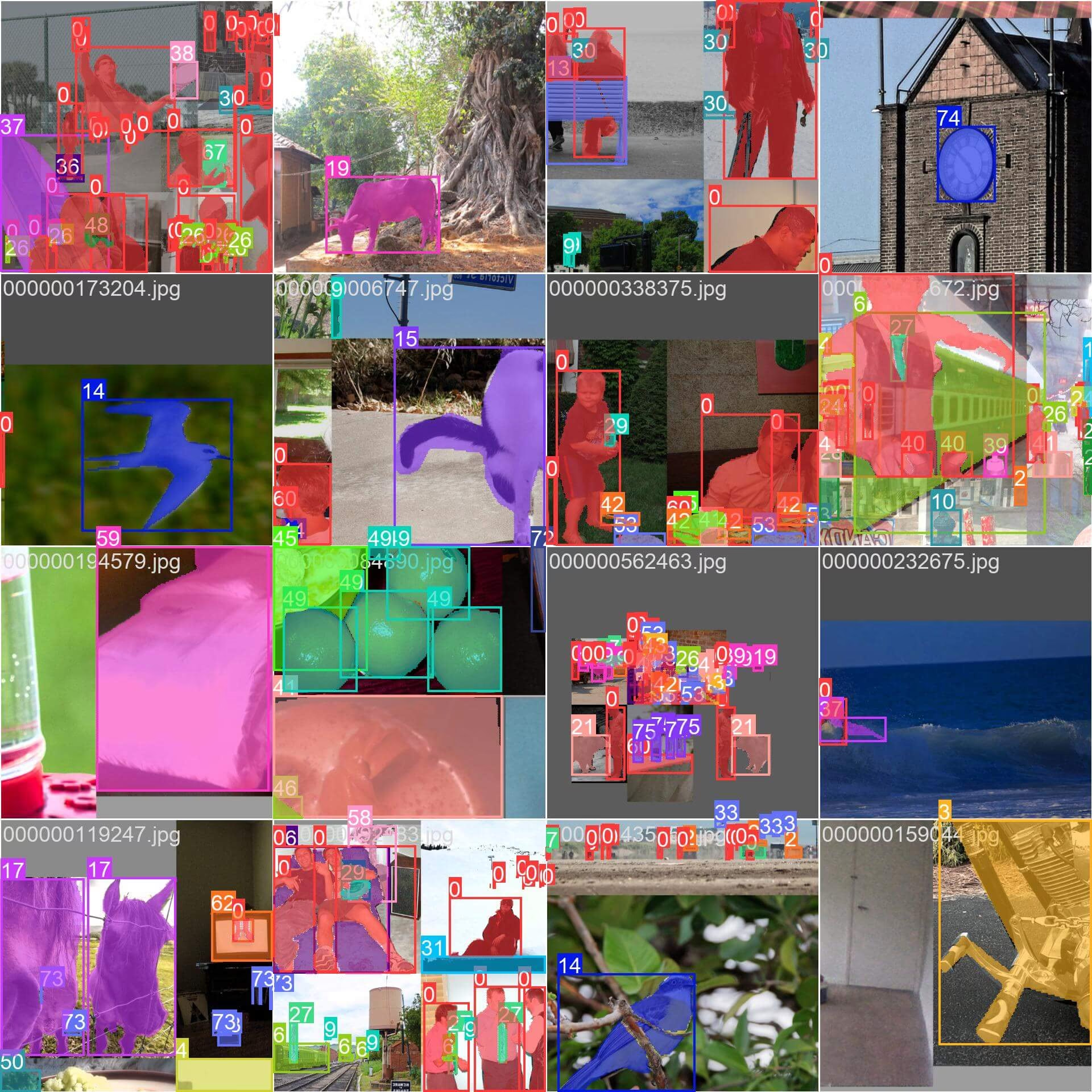
- 모자이크 이미지: 이 이미지는 모자이크 처리된 데이터셋 이미지로 구성된 학습 배치를 보여 줍니다. 모자이크 처리는 학습 중 여러 이미지를 하나의 이미지로 결합해 각 학습 배치에 포함되는 객체와 장면의 다양성을 높이는 기법입니다. 이를 통해 모델은 다양한 객체 크기, 종횡비 및 맥락에 더 잘 일반화할 수 있습니다.
인용 및 감사의 글#
연구 또는 개발 작업에서 COCO-Seg 데이터셋을 사용하는 경우, 원본 COCO 논문을 인용하고 COCO-Seg로의 확장을 다음과 같이 명시해 주세요:
@misc{lin2015microsoft,
      title={Microsoft COCO: Common Objects in Context},
      author={Tsung-Yi Lin and Michael Maire and Serge Belongie and Lubomir Bourdev and Ross Girshick and James Hays and Pietro Perona and Deva Ramanan and C. Lawrence Zitnick and Piotr Dollár},
      year={2015},
      eprint={1405.0312},
      archivePrefix={arXiv},
      primaryClass={cs.CV}
}
컴퓨터 비전 커뮤니티를 위한 이 귀중한 리소스를 만들고 관리해 주신 COCO 컨소시엄에 깊이 감사드립니다.
자주 묻는 질문#
COCO-Seg는 COCO(문맥 속 공통 객체)의 기본 인스턴스 세그멘테이션 마스크를 동일한 train2017 이미지 118,287개와 val2017 이미지 5,000개에 대해 Ultralytics YOLO 형식으로 패키징한 데이터셋입니다. 원본 COCO 주석에는 80개 객체 범주 전체에 대한 폴리곤 마스크가 이미 포함되어 있으며, COCO-Seg는 이를 객체 인스턴스 세그멘테이션 학습에 사용하는 YOLO 라벨 형식으로 변환합니다.
이미지 크기 640으로 COCO-Seg 데이터셋에서 YOLO26n-seg 모델을 100 에폭 동안 학습하려면 다음 코드 예제를 사용할 수 있습니다. 사용 가능한 학습 인수의 자세한 목록은 모델 학습 페이지를 참조하세요.
학습 예제from ultralytics import YOLO # 모델 로드 model = YOLO("yolo26n-seg.pt") # 사전 학습된 모델을 불러옵니다(학습에 권장). # 모델 학습 results = model.train(data="coco.yaml", epochs=100, imgsz=640)COCO-Seg 데이터셋에는 다음과 같은 주요 특징이 있습니다:
- COCO train2017/val2017 이미지 123,287개(Train 118,287개 + Val 5,000개)에 대한 인스턴스 세그멘테이션 마스크를 제공합니다.
- 원본 COCO와 동일한 80개 객체 카테고리에 어노테이션을 지정합니다.
- YOLO 다각형 레이블 형식의 인스턴스 세그멘테이션 마스크를 제공합니다.
- 인스턴스 세그멘테이션 작업에는 평균 정밀도(mAP)와 평균 재현율(mAR) 같은 표준화된 평가 지표를 사용합니다.
COCO-Seg 데이터셋은 다양한 성능 지표를 제공하는 여러 사전 학습 YOLO26 세그멘테이션 모델을 지원합니다. 사용 가능한 모델과 주요 지표를 요약하면 다음과 같습니다:
모델 크기
(픽셀)mAPbox50-95
(e2e)mAPmask50-95
(e2e)속도
CPU ONNX
(ms)속도
T4 TensorRT10
(ms)파라미터
(M)FLOPs
(B)YOLO26n-seg 640 39.6 33.9 53.3 ± 0.5 2.1 ± 0.0 2.7 9.3 YOLO26s-seg 640 47.3 40.0 118.4 ± 0.9 3.3 ± 0.0 10.4 34.5 YOLO26m-seg 640 52.5 44.1 328.2 ± 2.4 6.7 ± 0.1 23.6 121.7 YOLO26l-seg 640 54.4 45.5 387.0 ± 3.7 8.0 ± 0.1 28.0 140.1 YOLO26x-seg 640 56.5 47.0 787.0 ± 6.8 16.4 ± 0.1 62.8 314.0 이 모델은 경량 YOLO26n-seg부터 정확도가 더 높은 YOLO26x-seg까지 다양하며, 다양한 애플리케이션 요구 사항에 맞춰 속도와 정확도 간의 균형이 서로 다릅니다.
COCO-Seg 데이터셋은 특정 학습 및 평가 요구 사항에 따라 세 가지 하위 집합으로 나뉩니다:
- Train2017: 주로 인스턴스 세그멘테이션 모델 학습에 사용되는 이미지 118,287개를 포함합니다.
- Val2017: 학습 과정에서 검증에 사용되는 이미지 5,000개로 구성됩니다.
- Test-dev2017: 학습된 모델의 테스트 및 벤치마킹을 위해 예약된 test2017 이미지 40,670개 중 20,288개를 포함합니다. 이 하위 집합의 정답 주석은 공개되지 않으며, 성능 결과는 평가를 위해 COCO 평가 서버에 제출해야 합니다.
소규모 실험을 원한다면 COCO128-Seg 데이터셋(이미지 128개)이나 COCO train 2017 세트에서 이미지 8개만 포함하는 소형 버전인 COCO8-Seg 데이터셋을 고려해 볼 수도 있습니다.


댓글10
질문을 하거나 결과를 공유하거나 다른 사람을 도와주세요.
liujieKermit
what the label format if I want to train my custom dataset, please give the solution step by step like label, train, val, export, predict
 Glenn JocherUltralytics(수정됨)
@liujieKermit for custom segmentation training with YOLO26, follow these steps:
-
Label Format: Use YOLO segmentation format - one text file per image with class index and normalized polygon coordinates (minimum 3 points per object). Example:
<class> <x1> <y1> <x2> <y2> ... <xn> <yn> -
Dataset YAML: Create a YAML file (example
data.yaml):
path: /path/to/dataset train: images/train val: images/val names: 0: class1 1: class2- Train:
from ultralytics import YOLO model = YOLO('yolo26n-seg.pt') model.train(data='data.yaml', epochs=100, imgsz=640)- Export/Predict:
model.export(format='onnx')  # export
model.predict('image.jpg')  # predict
For full details see our Dataset Format Guide and Auto-Annotation Tools. For commercial use, review our license terms.
-
YingdiZhang
Thanks for the great work. I am new to YOLO and AI. How to download the COCO dataset? is just running python coco.yaml?
- Glenn JocherUltralytics(수정됨)
@YingdiZhang to download the COCO dataset, you can run
yolo segment train data=coco.yamlin your terminal. This will automatically download the dataset for you. For more details, you can visit the Ultralytics documentation.
SacherTorte280
Dear developpers, I need to build a much simpler case where I'll only need <=5 labels, can I remove the others that i'll never use ?
 Paula DerrengerUltralytics(수정됨)
@SacherTorte280 yes, you can customize the dataset to include only the labels you need. To do this, modify the
coco.yamlfile to include only the desired classes in thenamessection and adjust the dataset paths accordingly. Also make sure the class indices in your label files are remapped to match the newnames(0 to N-1) and remove labels of the dropped classes. This will allow you to train your model with a simplified set of labels. For more details on configuring the dataset, please refer to the COCO-Seg documentation.
MoAbbasid
i get a list out of index error when running convert_coco function please help
- Paula DerrengerUltralytics
Hi there! It looks like you're encountering a
list index out of rangeerror with theconvert_cocofunction. This can often happen if the script is trying to access an element that doesn't exist in a list. To help you resolve this issue, please ensure that:- The data paths in your
coco.yamlconfig file are correctly set and point to valid files. - The COCO dataset is correctly downloaded and structured as expected by the script.
If the paths and dataset structure are correct, it might be helpful to check if the specific segment of data causing the error is formatted correctly or missing elements.
Here's a quick check you can perform:
try:
    # Assuming convert_coco is called here
    convert_coco()
except IndexError as e:
    print("An index error occurred: ", e)
    # You can add more debugging information here to understand which part of the data is causing the problem
This snippet will catch the
IndexErrorand print it, potentially providing more insight on what's going wrong. If you need further assistance, please don't hesitate to share a snippet of the data or more details on the error! - The data paths in your
mohamed-ladjal
Greetings, I possess medical imagery depicting bone lesions. These images comprise 3D volumes of dimensions (256, 256, 128), with each volume containing 128 slices. Corresponding masks of identical dimensions are available. My objective is to either fine-tune or train a model using these slices to accurately segment the lesions mohamed mohamed.laadjel2019@gmail.com
- Glenn JocherUltralytics(수정됨)
Hello Mohamed,
Great to hear about your project on segmenting bone lesions from medical imagery! For your 3D volumes, you can approach this by treating each slice as a separate 2D image for segmentation.
Given your setup, you might consider using our YOLO26-seg models, which are well-suited for segmentation tasks. Here’s a basic example of how you could set up your training with YOLO26:
from ultralytics import YOLO

# Load a pretrained segmentation model
model = YOLO('yolo26n-seg.pt')  # Choose the appropriate model size

# Prepare your dataset in a compatible format
# Ensure your dataset directory structure and annotations are correctly set up

# Train the model
results = model.train(data='your_dataset_config.yaml', epochs=100, imgsz=640)
Make sure your dataset is annotated similarly to how COCO-Seg annotations are structured, with masks corresponding to each slice. You might need to adjust the
your_dataset_config.yamlto correctly point to your training, validation, and test images along with their annotations.For more detailed guidance on preparing your dataset and annotations, you can refer to our documentation on COCO-Seg Dataset.
If you have any more questions or need further assistance, feel free to ask. Happy training! 🚀