Link to this section测试时增强 (TTA)#
📚 本指南介绍了如何在 YOLOv5 的测试和推理过程中使用测试时增强 (TTA),以获得更高的 mAP 和 Recall 🚀。
Link to this section在你开始之前#
Clone repo and install requirements.txt in a Python>=3.8.0 environment, including PyTorch>=1.8. Models and datasets download automatically from the latest YOLOv5 release.
git clone https://github.com/ultralytics/yolov5 # clone
cd yolov5
pip install -r requirements.txt # install
Link to this section正常测试#
在尝试 TTA 之前,我们需要建立一个基准性能以便进行比较。此命令在图像尺寸为 640 像素的 COCO val2017 上测试 YOLOv5x。yolov5x.pt 是现有最大且最准确的模型。其他选项包括 yolov5s.pt、yolov5m.pt 和 yolov5l.pt,或者是你从训练自定义数据集得到的检查点 ./weights/best.pt。有关所有可用模型的详细信息,请参阅我们的 YOLOv5 文档。
python val.py --weights yolov5x.pt --data coco.yaml --img 640 --half输出:
val: data=./data/coco.yaml, weights=['yolov5x.pt'], batch_size=32, imgsz=640, conf_thres=0.001, iou_thres=0.65, task=val, device=, single_cls=False, augment=False, verbose=False, save_txt=False, save_conf=False, save_json=True, project=runs/val, name=exp, exist_ok=False, half=True
YOLOv5 🚀 v5.0-267-g6a3ee7c torch 1.9.0+cu102 CUDA:0 (Tesla P100-PCIE-16GB, 16280.875MB)

Fusing layers...
Model Summary: 476 layers, 87730285 parameters, 0 gradients

val: Scanning '../datasets/coco/val2017' images and labels...4952 found, 48 missing, 0 empty, 0 corrupted: 100% 5000/5000 [00:01<00:00, 2846.03it/s]
val: New cache created: ../datasets/coco/val2017.cache
               Class     Images     Labels          P          R     mAP@.5 mAP@.5:.95: 100% 157/157 [02:30<00:00,  1.05it/s]
                 all       5000      36335      0.746      0.626       0.68       0.49
Speed: 0.1ms pre-process, 22.4ms inference, 1.4ms NMS per image at shape (32, 3, 640, 640)  # <--- baseline speed

Evaluating pycocotools mAP... saving runs/val/exp/yolov5x_predictions.json...
...
 Average Precision  (AP) @[ IoU=0.50:0.95 | area=   all | maxDets=100 ] = 0.504  # <--- baseline mAP
 Average Precision  (AP) @[ IoU=0.50      | area=   all | maxDets=100 ] = 0.688
 Average Precision  (AP) @[ IoU=0.75      | area=   all | maxDets=100 ] = 0.546
 Average Precision  (AP) @[ IoU=0.50:0.95 | area= small | maxDets=100 ] = 0.351
 Average Precision  (AP) @[ IoU=0.50:0.95 | area=medium | maxDets=100 ] = 0.551
 Average Precision  (AP) @[ IoU=0.50:0.95 | area= large | maxDets=100 ] = 0.644
 Average Recall     (AR) @[ IoU=0.50:0.95 | area=   all | maxDets=  1 ] = 0.382
 Average Recall     (AR) @[ IoU=0.50:0.95 | area=   all | maxDets= 10 ] = 0.628
 Average Recall     (AR) @[ IoU=0.50:0.95 | area=   all | maxDets=100 ] = 0.681  # <--- baseline mAR
 Average Recall     (AR) @[ IoU=0.50:0.95 | area= small | maxDets=100 ] = 0.524
 Average Recall     (AR) @[ IoU=0.50:0.95 | area=medium | maxDets=100 ] = 0.735
 Average Recall     (AR) @[ IoU=0.50:0.95 | area= large | maxDets=100 ] = 0.826
Link to this section使用 TTA 进行测试#
Append --augment to any existing val.py command to enable TTA, and increase the image size by about 30% for improved results. Note that inference with TTA enabled will typically take about 2-3X the time of normal inference as the images are being left-right flipped and processed at 3 different resolutions, with the outputs merged before NMS. Part of the speed decrease is simply due to larger image sizes (832 vs 640), while part is due to the actual TTA operations, so ensure your GPU has enough memory headroom before increasing --img.
python val.py --weights yolov5x.pt --data coco.yaml --img 832 --augment --half输出:
val: data=./data/coco.yaml, weights=['yolov5x.pt'], batch_size=32, imgsz=832, conf_thres=0.001, iou_thres=0.6, task=val, device=, single_cls=False, augment=True, verbose=False, save_txt=False, save_conf=False, save_json=True, project=runs/val, name=exp, exist_ok=False, half=True
YOLOv5 🚀 v5.0-267-g6a3ee7c torch 1.9.0+cu102 CUDA:0 (Tesla P100-PCIE-16GB, 16280.875MB)

Fusing layers...
/usr/local/lib/python3.7/dist-packages/torch/nn/functional.py:718: UserWarning: Named tensors and all their associated APIs are an experimental feature and subject to change. Please do not use them for anything important until they are released as stable. (Triggered internally at  /pytorch/c10/core/TensorImpl.h:1156.)
  return torch.max_pool2d(input, kernel_size, stride, padding, dilation, ceil_mode)
Model Summary: 476 layers, 87730285 parameters, 0 gradients
val: Scanning '../datasets/coco/val2017' images and labels...4952 found, 48 missing, 0 empty, 0 corrupted: 100% 5000/5000 [00:01<00:00, 2885.61it/s]
val: New cache created: ../datasets/coco/val2017.cache
               Class     Images     Labels          P          R     mAP@.5 mAP@.5:.95: 100% 157/157 [07:29<00:00,  2.86s/it]
                 all       5000      36335      0.718      0.656      0.695      0.503
Speed: 0.2ms pre-process, 80.6ms inference, 2.7ms NMS per image at shape (32, 3, 832, 832)  # <--- TTA speed

Evaluating pycocotools mAP... saving runs/val/exp-2/yolov5x_predictions.json...
...
 Average Precision  (AP) @[ IoU=0.50:0.95 | area=   all | maxDets=100 ] = 0.516  # <--- TTA mAP
 Average Precision  (AP) @[ IoU=0.50      | area=   all | maxDets=100 ] = 0.701
 Average Precision  (AP) @[ IoU=0.75      | area=   all | maxDets=100 ] = 0.562
 Average Precision  (AP) @[ IoU=0.50:0.95 | area= small | maxDets=100 ] = 0.361
 Average Precision  (AP) @[ IoU=0.50:0.95 | area=medium | maxDets=100 ] = 0.564
 Average Precision  (AP) @[ IoU=0.50:0.95 | area= large | maxDets=100 ] = 0.656
 Average Recall     (AR) @[ IoU=0.50:0.95 | area=   all | maxDets=  1 ] = 0.388
 Average Recall     (AR) @[ IoU=0.50:0.95 | area=   all | maxDets= 10 ] = 0.640
 Average Recall     (AR) @[ IoU=0.50:0.95 | area=   all | maxDets=100 ] = 0.696  # <--- TTA mAR
 Average Recall     (AR) @[ IoU=0.50:0.95 | area= small | maxDets=100 ] = 0.553
 Average Recall     (AR) @[ IoU=0.50:0.95 | area=medium | maxDets=100 ] = 0.744
 Average Recall     (AR) @[ IoU=0.50:0.95 | area= large | maxDets=100 ] = 0.833
Link to this section使用 TTA 进行推理#
detect.py TTA inference operates identically to val.py TTA: simply append --augment to any existing detect.py command:
python detect.py --weights yolov5s.pt --img 832 --source data/images --augment输出:
YOLOv5 🚀 v5.0-267-g6a3ee7c torch 1.9.0+cu102 CUDA:0 (Tesla P100-PCIE-16GB, 16280.875MB)

Downloading https://github.com/ultralytics/yolov5/releases/download/v5.0/yolov5s.pt to yolov5s.pt...
100% 14.1M/14.1M [00:00<00:00, 81.9MB/s]

Fusing layers...
Model Summary: 224 layers, 7266973 parameters, 0 gradients
image 1/2 /content/yolov5/data/images/bus.jpg: 832x640 4 persons, 1 bus, 1 fire hydrant, Done. (0.029s)
image 2/2 /content/yolov5/data/images/zidane.jpg: 480x832 3 persons, 3 ties, Done. (0.024s)
Results saved to runs/detect/exp
Done. (0.156s)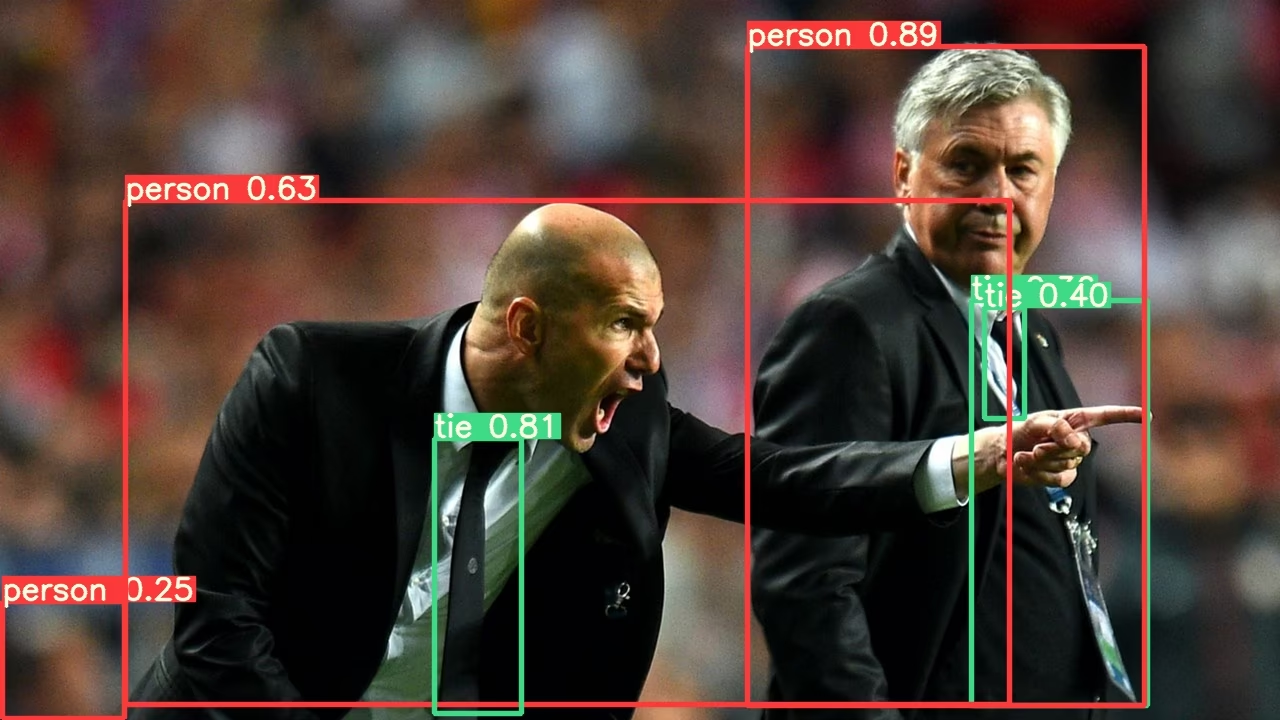
Link to this sectionPyTorch Hub TTA#
TTA 已自动集成到所有 YOLOv5 PyTorch Hub 模型中,可以通过在推理时传递 augment=True 来调用。
import torch

# Model
model = torch.hub.load("ultralytics/yolov5", "yolov5s")  # or yolov5m, yolov5x, custom

# Images
img = "https://ultralytics.com/images/zidane.jpg"  # or file, PIL, OpenCV, numpy, multiple

# Inference
results = model(img, augment=True)  # <--- TTA inference

# Results
results.print()  # or .show(), .save(), .crop(), .pandas(), etc.
Link to this section自定义#
你可以自定义在 YOLOv5 forward_augment() 方法 中应用的 TTA 操作。
Link to this section测试时增强的优势#
测试时增强为 object detection 任务提供了几个关键优势:
- 更高的准确性:如上述结果所示,TTA 将 mAP 从 0.504 提高到 0.516,将 mAR 从 0.681 提高到 0.696。
- 更好的小目标检测:TTA 特别增强了对小目标的检测,小面积 AP 从 0.351 提高到 0.361。
- 更高的鲁棒性:通过测试每张图像的多个变体,TTA 降低了视角、光照和其他环境因素的影响。
- 简单的实现:只需在现有命令中添加
--augment标志即可。
其代价是推理时间增加,这使得 TTA 更适合那些优先考虑准确性而非速度的应用场景。
Link to this section支持的环境#
Ultralytics 提供了一系列开箱即用的环境,每个环境都预装了 CUDA、CUDNN、Python 和 PyTorch 等关键依赖项,助你快速启动项目。
- 免费 GPU Notebooks:



- Google Cloud: GCP 快速入门指南
- Amazon: AWS 快速入门指南
- Azure: AzureML 快速入门指南
- Docker: Docker 快速入门指南

Link to this section项目状态#

此徽章表示所有 YOLOv5 GitHub Actions 持续集成 (CI) 测试均成功通过。这些 CI 测试严格检查 YOLOv5 在各个关键方面的功能和性能:训练、验证、推理、导出和基准测试。它们确保了在 macOS、Windows 和 Ubuntu 上的一致且可靠的运行,测试每 24 小时以及在每次新提交时进行。