Objects365 데이터셋#
Objects365 데이터셋은 365개 객체 클래스를 아우르는 대규모 객체 탐지 벤치마크로, 학습 이미지 1,742,289개와 검증 이미지 80,000개를 포함합니다. 사람, 자동차, 의자부터 병, 개, 가로등까지 다양한 객체를 다룹니다. Megvii 연구진이 제작하여 ICCV 2019에서 발표했으며, 실제 환경의 다양한 객체에 중점을 둡니다. 또한 컴퓨터 비전 모델을 사전 학습하는 데 널리 사용되며, 이 모델은 ImageNet으로 사전 학습된 모델보다 일반화 성능이 뛰어납니다.
시청: Objects365 데이터셋으로 Ultralytics YOLO를 학습하는 방법
Objects365 사전 학습 모델#
Ultralytics는 Objects365v1으로 사전 학습한 YOLO26 탐지 및 세그멘테이션 모델을 제공하므로, 데이터셋을 다운로드하지 않고도 365개 클래스를 탐지할 수 있습니다. 모든 모델은 이미지 크기 640으로 150 에폭 동안 학습되었습니다.
| 모델 | 크기 (픽셀) | mAP검증 50-95 | mAP검증 50 | 파라미터 (M) | FLOPs (B) |
|---|---|---|---|---|---|
| YOLO26n | 640 | 16.3 | 22.3 | 2.5 | 6.1 |
| YOLO26s | 640 | 24.3 | 31.7 | 9.6 | 21.5 |
| YOLO26m | 640 | 30.3 | 38.2 | 20.6 | 69.7 |
| YOLO26l | 640 | 32.2 | 40.1 | 25.0 | 88.0 |
| YOLO26x | 640 | 35.8 | 44.1 | 56.1 | 196.3 |
세그멘테이션 모델은 Objects365v1용으로 생성된 마스크를 사용하며, 박스와 마스크 정확도를 모두 보고합니다.
| 모델 | 크기 (픽셀) | mAP박스 50-95 | mAP마스크 50-95 | 파라미터 (M) | FLOPs (B) |
|---|---|---|---|---|---|
| YOLO26n-seg | 640 | 15.7 | 13.2 | 2.8 | 9.8 |
| YOLO26s-seg | 640 | 23.8 | 19.5 | 10.5 | 35.1 |
| YOLO26m-seg | 640 | 29.5 | 23.8 | 23.8 | 123.0 |
| YOLO26l-seg | 640 | 31.7 | 25.3 | 28.2 | 141.3 |
| YOLO26x-seg | 640 | 35.4 | 27.9 | 63.1 | 315.9 |
- mAPval 값은 Objects365v1 검증 분할에서 단일 모델, 단일 스케일로 측정한 결과입니다.
- Params 및 FLOPs 값은
model.fuse()이후의 융합 모델을 기준으로 합니다.
예측을 실행하거나 다음과 같이 이 체크포인트에서 파인튜닝을 시작할 수 있습니다.
from ultralytics import YOLO

# Objects365 사전 학습 YOLO26n 모델 불러오기
model = YOLO("yolo26n-objv1-150.pt")

# 예측 실행
results = model.predict(source="image.jpg")

# 사전 학습 체크포인트에서 학습 시작
results = model.train(data="coco8.yaml", epochs=100, imgsz=640)
주요 기능#
- Objects365는 365개의 객체 클래스를 정의하며, 원본 릴리스에는 총 약 200만 개의 이미지와 3,000만 개의 바운딩 박스가 보고되어 있습니다.
- 이 데이터셋에는 다양한 실제 환경의 여러 객체가 포함되어 있어 객체 탐지 작업을 위한 풍부하고 도전적인 벤치마크를 제공합니다.
- 주석에는 객체의 바운딩 박스가 포함되어 있어 객체 탐지 모델의 학습 및 평가에 적합합니다.
- ICCV 2019 논문에 따르면 Objects365 사전 학습은 COCO 벤치마크에서 ImageNet 사전 학습보다 5.6포인트 높은 성능을 보입니다(mAP 42.0 대 36.4).
데이터셋 구조#
Ultralytics Objects365.yaml 구성은 두 가지 분할을 정의합니다.
| 분할 | 이미지 | 설명 |
|---|---|---|
| 학습 | 1,742,289 | 모델 학습용 라벨링 이미지 |
| 검증 | 80,000 | 평가 및 벤치마킹용 별도 이미지 |
다운로드는 학습 및 검증 분할을 가져오며, 총 이미지 수는 1,822,289개입니다. 구성의 test: 키는 비어 있는 상태로 유지됩니다.
응용 분야#
Objects365 데이터셋은 객체 탐지 분야의 다양한 딥러닝 애플리케이션을 지원합니다.
- 탐지 백본 사전 학습: 365개 클래스와 조밀한 박스 주석을 갖춘 Objects365 사전 학습은 COCO 및 VOC와 같은 더 작은 데이터셋으로 수행하는 후속 파인튜닝 성능을 향상합니다.
- 소매 및 재고 인식: 병, 컵, 운동화, 핸드백 등 수백 가지 일상 카테고리를 활용하여 진열대 모니터링 및 자동 계산 시스템을 구축할 수 있습니다.
- 로보틱스 및 스마트 환경: 가정 및 거리 객체를 폭넓게 다루므로 로봇과 스마트 카메라가 비정형 장면에서 객체를 인식하는 데 도움이 됩니다.
- 탐지기 벤치마킹: 긴 클래스 목록과 실제 환경 이미지로 인해 탐지 모델의 일반화 성능을 평가하기 까다로운 벤치마크입니다.
자체 이미지에 레이블을 지정하고, 대규모 데이터셋을 브라우저에서 학습 및 관리하려면 Ultralytics Platform에서 전체 워크플로를 실행하세요.
데이터셋 YAML#
Objects365.yaml 파일은 데이터셋 경로, 클래스 이름 및 기타 메타데이터를 포함한 데이터셋 구성을 정의합니다. 이 파일은 Ultralytics 저장소의 https://github.com/ultralytics/ultralytics/blob/main/ultralytics/cfg/datasets/Objects365.yaml에서 관리됩니다.
# Ultralytics 🚀 AGPL-3.0 License - https://ultralytics.com/license

# Objects365 dataset https://www.objects365.org/ by Megvii
# Documentation: https://docs.ultralytics.com/datasets/detect/objects365
# Example usage: yolo train data=Objects365.yaml
# parent
# ├── ultralytics
# └── datasets
#     └── Objects365 ← downloads here (712 GB = 367G data + 345G zips)

# Train/val/test sets as 1) dir: path/to/imgs, 2) file: path/to/imgs.txt, or 3) list: [path/to/imgs1, path/to/imgs2, ..]
path: Objects365 # dataset root dir
train: images/train # train images (relative to 'path') 1742289 images
val: images/val # val images (relative to 'path') 80000 images
test: # test images (optional)

# Classes
names:
  0: Person
  1: Sneakers
  2: Chair
  3: Other Shoes
  4: Hat
  5: Car
  6: Lamp
  7: Glasses
  8: Bottle
  9: Desk
  10: Cup
  11: Street Lights
  12: Cabinet/shelf
  13: Handbag/Satchel
  14: Bracelet
  15: Plate
  16: Picture/Frame
  17: Helmet
  18: Book
  19: Gloves
  20: Storage box
  21: Boat
  22: Leather Shoes
  23: Flower
  24: Bench
  25: Potted Plant
  26: Bowl/Basin
  27: Flag
  28: Pillow
  29: Boots
  30: Vase
  31: Microphone
  32: Necklace
  33: Ring
  34: SUV
  35: Wine Glass
  36: Belt
  37: Monitor/TV
  38: Backpack
  39: Umbrella
  40: Traffic Light
  41: Speaker
  42: Watch
  43: Tie
  44: Trash bin Can
  45: Slippers
  46: Bicycle
  47: Stool
  48: Barrel/bucket
  49: Van
  50: Couch
  51: Sandals
  52: Basket
  53: Drum
  54: Pen/Pencil
  55: Bus
  56: Wild Bird
  57: High Heels
  58: Motorcycle
  59: Guitar
  60: Carpet
  61: Cell Phone
  62: Bread
  63: Camera
  64: Canned
  65: Truck
  66: Traffic cone
  67: Cymbal
  68: Lifesaver
  69: Towel
  70: Stuffed Toy
  71: Candle
  72: Sailboat
  73: Laptop
  74: Awning
  75: Bed
  76: Faucet
  77: Tent
  78: Horse
  79: Mirror
  80: Power outlet
  81: Sink
  82: Apple
  83: Air Conditioner
  84: Knife
  85: Hockey Stick
  86: Paddle
  87: Pickup Truck
  88: Fork
  89: Traffic Sign
  90: Balloon
  91: Tripod
  92: Dog
  93: Spoon
  94: Clock
  95: Pot
  96: Cow
  97: Cake
  98: Dining Table
  99: Sheep
  100: Hanger
  101: Blackboard/Whiteboard
  102: Napkin
  103: Other Fish
  104: Orange/Tangerine
  105: Toiletry
  106: Keyboard
  107: Tomato
  108: Lantern
  109: Machinery Vehicle
  110: Fan
  111: Green Vegetables
  112: Banana
  113: Baseball Glove
  114: Airplane
  115: Mouse
  116: Train
  117: Pumpkin
  118: Soccer
  119: Skiboard
  120: Luggage
  121: Nightstand
  122: Tea pot
  123: Telephone
  124: Trolley
  125: Head Phone
  126: Sports Car
  127: Stop Sign
  128: Dessert
  129: Scooter
  130: Stroller
  131: Crane
  132: Remote
  133: Refrigerator
  134: Oven
  135: Lemon
  136: Duck
  137: Baseball Bat
  138: Surveillance Camera
  139: Cat
  140: Jug
  141: Broccoli
  142: Piano
  143: Pizza
  144: Elephant
  145: Skateboard
  146: Surfboard
  147: Gun
  148: Skating and Skiing shoes
  149: Gas stove
  150: Donut
  151: Bow Tie
  152: Carrot
  153: Toilet
  154: Kite
  155: Strawberry
  156: Other Balls
  157: Shovel
  158: Pepper
  159: Computer Box
  160: Toilet Paper
  161: Cleaning Products
  162: Chopsticks
  163: Microwave
  164: Pigeon
  165: Baseball
  166: Cutting/chopping Board
  167: Coffee Table
  168: Side Table
  169: Scissors
  170: Marker
  171: Pie
  172: Ladder
  173: Snowboard
  174: Cookies
  175: Radiator
  176: Fire Hydrant
  177: Basketball
  178: Zebra
  179: Grape
  180: Giraffe
  181: Potato
  182: Sausage
  183: Tricycle
  184: Violin
  185: Egg
  186: Fire Extinguisher
  187: Candy
  188: Fire Truck
  189: Billiards
  190: Converter
  191: Bathtub
  192: Wheelchair
  193: Golf Club
  194: Briefcase
  195: Cucumber
  196: Cigar/Cigarette
  197: Paint Brush
  198: Pear
  199: Heavy Truck
  200: Hamburger
  201: Extractor
  202: Extension Cord
  203: Tong
  204: Tennis Racket
  205: Folder
  206: American Football
  207: earphone
  208: Mask
  209: Kettle
  210: Tennis
  211: Ship
  212: Swing
  213: Coffee Machine
  214: Slide
  215: Carriage
  216: Onion
  217: Green beans
  218: Projector
  219: Frisbee
  220: Washing Machine/Drying Machine
  221: Chicken
  222: Printer
  223: Watermelon
  224: Saxophone
  225: Tissue
  226: Toothbrush
  227: Ice cream
  228: Hot-air balloon
  229: Cello
  230: French Fries
  231: Scale
  232: Trophy
  233: Cabbage
  234: Hot dog
  235: Blender
  236: Peach
  237: Rice
  238: Wallet/Purse
  239: Volleyball
  240: Deer
  241: Goose
  242: Tape
  243: Tablet
  244: Cosmetics
  245: Trumpet
  246: Pineapple
  247: Golf Ball
  248: Ambulance
  249: Parking meter
  250: Mango
  251: Key
  252: Hurdle
  253: Fishing Rod
  254: Medal
  255: Flute
  256: Brush
  257: Penguin
  258: Megaphone
  259: Corn
  260: Lettuce
  261: Garlic
  262: Swan
  263: Helicopter
  264: Green Onion
  265: Sandwich
  266: Nuts
  267: Speed Limit Sign
  268: Induction Cooker
  269: Broom
  270: Trombone
  271: Plum
  272: Rickshaw
  273: Goldfish
  274: Kiwi fruit
  275: Router/modem
  276: Poker Card
  277: Toaster
  278: Shrimp
  279: Sushi
  280: Cheese
  281: Notepaper
  282: Cherry
  283: Pliers
  284: CD
  285: Pasta
  286: Hammer
  287: Cue
  288: Avocado
  289: Hami melon
  290: Flask
  291: Mushroom
  292: Screwdriver
  293: Soap
  294: Recorder
  295: Bear
  296: Eggplant
  297: Board Eraser
  298: Coconut
  299: Tape Measure/Ruler
  300: Pig
  301: Showerhead
  302: Globe
  303: Chips
  304: Steak
  305: Crosswalk Sign
  306: Stapler
  307: Camel
  308: Formula 1
  309: Pomegranate
  310: Dishwasher
  311: Crab
  312: Hoverboard
  313: Meatball
  314: Rice Cooker
  315: Tuba
  316: Calculator
  317: Papaya
  318: Antelope
  319: Parrot
  320: Seal
  321: Butterfly
  322: Dumbbell
  323: Donkey
  324: Lion
  325: Urinal
  326: Dolphin
  327: Electric Drill
  328: Hair Dryer
  329: Egg tart
  330: Jellyfish
  331: Treadmill
  332: Lighter
  333: Grapefruit
  334: Game board
  335: Mop
  336: Radish
  337: Baozi
  338: Target
  339: French
  340: Spring Rolls
  341: Monkey
  342: Rabbit
  343: Pencil Case
  344: Yak
  345: Red Cabbage
  346: Binoculars
  347: Asparagus
  348: Barbell
  349: Scallop
  350: Noddles
  351: Comb
  352: Dumpling
  353: Oyster
  354: Table Tennis paddle
  355: Cosmetics Brush/Eyeliner Pencil
  356: Chainsaw
  357: Eraser
  358: Lobster
  359: Durian
  360: Okra
  361: Lipstick
  362: Cosmetics Mirror
  363: Curling
  364: Table Tennis

# Download script/URL (optional) ---------------------------------------------------------------------------------------
download: |
  from concurrent.futures import ThreadPoolExecutor
  from pathlib import Path

  import numpy as np

  from ultralytics.utils import TQDM
  from ultralytics.utils.checks import check_requirements
  from ultralytics.utils.downloads import download
  from ultralytics.utils.ops import xyxy2xywhn

  check_requirements("faster-coco-eval")
  from faster_coco_eval import COCO

  # Train, Val Splits
  dir = Path(yaml["path"])
  for split, patches in [("train", 50 + 1), ("val", 43 + 1)]:
      print(f"Processing {split} in {patches} patches ...")
      images, labels = dir / "images" / split, dir / "labels" / split
      images.mkdir(parents=True, exist_ok=True)
      labels.mkdir(parents=True, exist_ok=True)

      # Download
      url = f"https://dorc.ks3-cn-beijing.ksyun.com/data-set/2020Objects365%E6%95%B0%E6%8D%AE%E9%9B%86/{split}/"
      if split == "train":
          download([f"{url}zhiyuan_objv2_{split}.tar.gz"], dir=dir)  # annotations json
          download([f"{url}patch{i}.tar.gz" for i in range(patches)], dir=images, threads=17)  # 51 patches / 17 threads = 3
      elif split == "val":
          download([f"{url}zhiyuan_objv2_{split}.json"], dir=dir)  # annotations json
          download([f"{url}images/v1/patch{i}.tar.gz" for i in range(15 + 1)], dir=images, threads=16)
          download([f"{url}images/v2/patch{i}.tar.gz" for i in range(16, patches)], dir=images, threads=16)

      # Move
      files = list(images.rglob("*.jpg"))
      with ThreadPoolExecutor(max_workers=16) as executor:
          list(TQDM(executor.map(lambda f: f.rename(images / f.name), files), total=len(files), desc=f"Moving {split} images"))

      # Labels
      coco = COCO(dir / f"zhiyuan_objv2_{split}.json")
      names = [x["name"] for x in coco.loadCats(coco.getCatIds())]
      for cid, cat in enumerate(names):
          catIds = coco.getCatIds(catNms=[cat])
          imgIds = coco.getImgIds(catIds=catIds)

          def process_annotation(im):
              """Process and write annotations for a single image."""
              try:
                  width, height = im["width"], im["height"]
                  path = Path(im["file_name"])
                  with open(labels / path.with_suffix(".txt").name, "a", encoding="utf-8") as file:
                      annIds = coco.getAnnIds(imgIds=im["id"], catIds=catIds, iscrowd=None)
                      for a in coco.loadAnns(annIds):
                          x, y, w, h = a["bbox"]  # bounding box in xywh (xy top-left corner)
                          xyxy = np.array([x, y, x + w, y + h])[None]  # pixels(1,4)
                          x, y, w, h = xyxy2xywhn(xyxy, w=width, h=height, clip=True)[0]  # normalized and clipped
                          file.write(f"{cid} {x:.5f} {y:.5f} {w:.5f} {h:.5f}\n")
              except Exception as e:
                  print(e)

          images_list = coco.loadImgs(imgIds)
          with ThreadPoolExecutor(max_workers=16) as executor:
list(TQDM(executor.map(process_annotation, images_list), total=len(images_list), desc=f"Class {cid + 1}/{len(names)} {cat}"))사용법#
Objects365는 처음 사용할 때 자동으로 다운로드되며, 약 712 GB의 여유 디스크 공간이 필요합니다. 다운로드한 ZIP 아카이브에 345 GB, 압축을 푼 데이터셋에 367 GB가 사용됩니다. 다운로드 스크립트는 faster-coco-eval 패키지를 설치하고 주석을 YOLO 형식으로 변환합니다. 연결 상태와 하드웨어에 따라 시간이 오래 걸릴 수 있습니다.
다음 코드 예제를 사용하면 이미지 크기 640으로 Objects365 데이터셋에서 YOLO26n 모델을 100 에폭 동안 학습할 수 있습니다. 사용 가능한 인수의 전체 목록은 모델 학습 페이지를 참조하세요.
from ultralytics import YOLO

# 모델 로드
model = YOLO("yolo26n.pt")  # 사전 학습된 모델을 불러옵니다(학습에 권장).

# 모델 학습
results = model.train(data="Objects365.yaml", epochs=100, imgsz=640)
샘플 이미지 및 어노테이션#
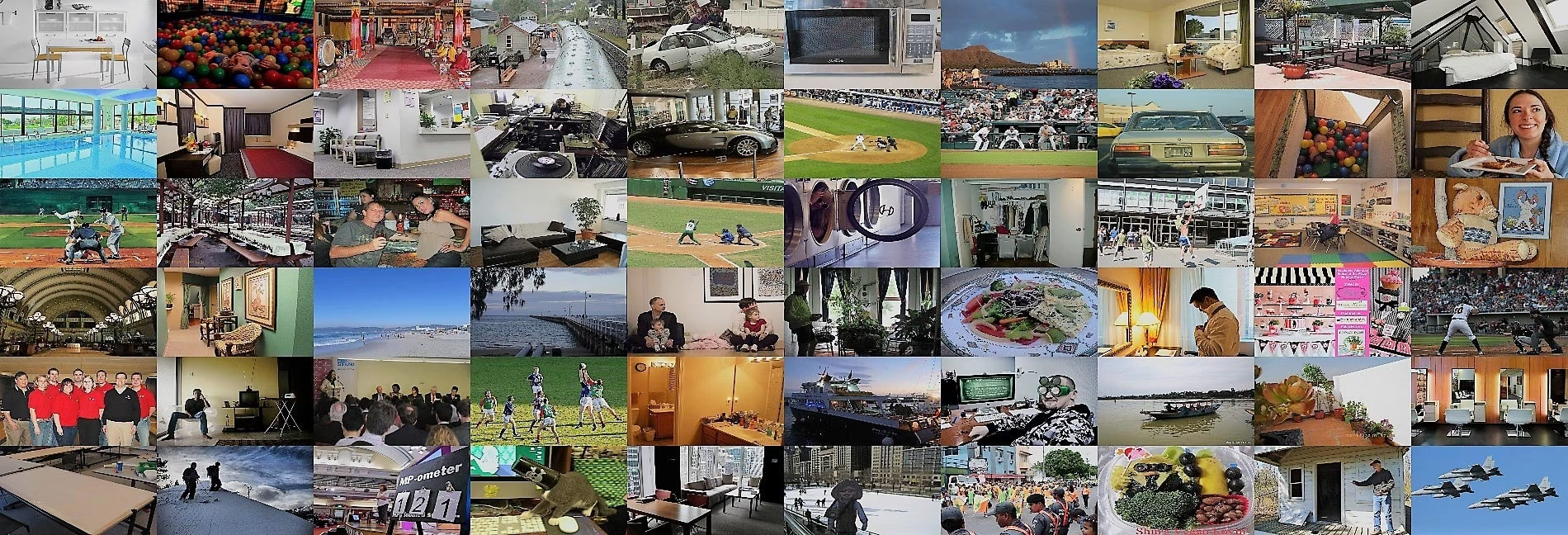
Objects365 데이터셋에는 365개 클래스에 걸쳐 다양하고 고해상도인 이미지와 조밀한 바운딩 박스 주석이 포함되어 있습니다. 아래 샘플은 이 데이터셋에 일반적인 실제 환경 장면과 다중 객체 주석을 보여줍니다.
인용 및 감사의 글#
연구 또는 개발 작업에서 Objects365 데이터셋을 사용하는 경우 다음 논문을 인용해 주세요.
@InProceedings{Shao_2019_ICCV,
  author = {Shao, Shuai and Li, Zeming and Zhang, Tianyuan and Peng, Chao and Yu, Gang and Zhang, Xiangyu and Li, Jing and Sun, Jian},
  title = {Objects365: A Large-Scale, High-Quality Dataset for Object Detection},
  booktitle = {Proceedings of the IEEE/CVF International Conference on Computer Vision (ICCV)},
  month = {October},
  year = {2019}
}
컴퓨터 비전 연구 커뮤니티를 위한 귀중한 리소스인 Objects365 데이터셋을 제작하고 유지 관리하는 연구진에게 감사의 뜻을 전합니다. Objects365 데이터셋과 제작자에 대한 자세한 내용은 Objects365 데이터셋 웹사이트를 참조하세요.
자주 묻는 질문#
Objects365 데이터셋은 머신러닝 및 컴퓨터 비전 분야에서 객체 탐지 모델을 학습하고 평가하는 데 사용됩니다. 365개 객체 클래스에 걸쳐 학습 이미지 1,742,289개와 검증 이미지 80,000개를 제공하며, 특히 탐지기를 사전 학습한 뒤 더 작고 특정 작업에 특화된 데이터셋으로 파인튜닝하는 데 널리 사용됩니다.
Ultralytics
Objects365.yaml구성은 365개 객체 클래스를 포함하며, 학습 이미지 1,742,289개와 검증 이미지 80,000개로 나뉩니다. 총 1,822,289개이며 테스트 분할은 없습니다. 원본 릴리스에는 전체적으로 약 200만 개의 이미지와 3,000만 개의 바운딩 박스가 보고되어 있습니다.Objects365에는 약 712 GB의 디스크 공간이 필요합니다.
data="Objects365.yaml"으로 처음 학습할 때 자동으로 다운로드되는 ZIP 아카이브가 약 345 GB이며, 압축을 푼 데이터셋에 367 GB가 필요합니다. 다운로드 스크립트는faster-coco-eval패키지를 설치하고 주석을 YOLO 형식으로 변환합니다. 더 작은 대안은 탐지 데이터셋 개요에서 확인할 수 있습니다.Objects365 데이터셋을 사용해 이미지 크기 640으로 YOLO26n 모델을 100 에폭 동안 학습하려면 다음 지침을 따르세요.
학습 예제from ultralytics import YOLO # 모델 로드 model = YOLO("yolo26n.pt") # 사전 학습된 모델을 불러옵니다(학습에 권장). # 모델 학습 results = model.train(data="Objects365.yaml", epochs=100, imgsz=640)사용 가능한 인수의 전체 목록은 학습 페이지를 참조하세요.
365개 클래스 어휘와 조밀한 주석을 갖춘 Objects365는 객체 탐지를 위한 가장 강력한 사전 학습 데이터셋 중 하나입니다. ICCV 2019 논문은 COCO에서 ImageNet 사전 학습보다 5.6포인트 향상된 결과를 보고했습니다(mAP 42.0 대 36.4). 다양한 실제 환경을 포괄하는 이미지 덕분에 모델은 후속 탐지 작업에서 더 잘 일반화할 수 있습니다.
Objects365 데이터셋의 YAML 구성 파일은 Objects365.yaml에서 확인할 수 있습니다. 이 파일에는 데이터셋 경로 및 클래스 레이블과 같은 필수 정보가 포함되어 있어 학습 환경 설정에 중요합니다.