Instance Segmentation with Ultralytics YOLO#
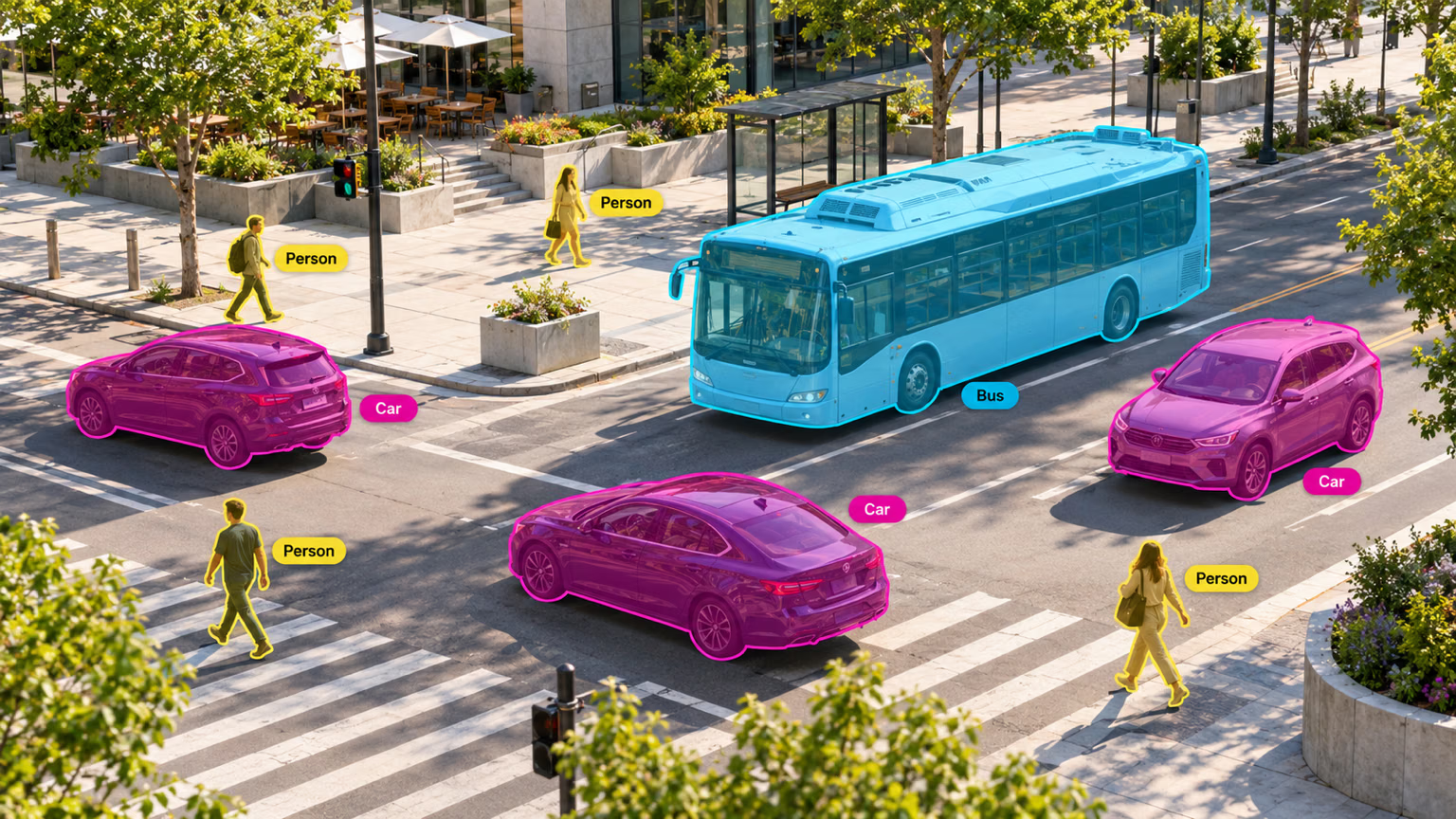
Instance segmentation goes a step further than object detection and involves identifying individual objects in an image and segmenting them from the rest of the image.
The output of an instance segmentation model is a set of masks or contours that outline each object in the image, along with class labels and confidence scores for each object. Instance segmentation is useful when you need to know not only where objects are in an image, but also what their exact shape is.
Watch: Run Segmentation with Pretrained Ultralytics YOLO Model in Python.
YOLO26 Segment models use the -seg suffix, i.e., yolo26n-seg.pt, and are pretrained on COCO.
Models#
YOLO26 Segment models pretrained on the COCO dataset are shown below.
Models download automatically from the latest Ultralytics release on first use.
| Model | size (pixels) | mAPbox 50-95(e2e) | mAPmask 50-95(e2e) | Speed CPU ONNX (ms) | Speed T4 TensorRT10 (ms) | params (M) | FLOPs (B) |
|---|---|---|---|---|---|---|---|
| YOLO26n-seg | 640 | 39.6 | 33.9 | 53.3 ± 0.5 | 2.1 ± 0.0 | 2.7 | 9.3 |
| YOLO26s-seg | 640 | 47.3 | 40.0 | 118.4 ± 0.9 | 3.3 ± 0.0 | 10.4 | 34.5 |
| YOLO26m-seg | 640 | 52.5 | 44.1 | 328.2 ± 2.4 | 6.7 ± 0.1 | 23.6 | 121.7 |
| YOLO26l-seg | 640 | 54.4 | 45.5 | 387.0 ± 3.7 | 8.0 ± 0.1 | 28.0 | 140.1 |
| YOLO26x-seg | 640 | 56.5 | 47.0 | 787.0 ± 6.8 | 16.4 ± 0.1 | 62.8 | 314.0 |
- mAPval values are for single-model single-scale on COCO val2017 dataset.
Reproduce withyolo segment val data=coco.yaml device=0 nms=False - Speed averaged over COCO val images with ONNX on CPU and TensorRT10 on an NVIDIA T4 GPU.
Reproduce withyolo segment val data=coco.yaml batch=1 device=0|cpu nms=False - Params and FLOPs values are for fused models after Conv/BatchNorm folding and removal of the unused detection branch. Pretrained checkpoints retain the full training architecture and may show higher counts.
These checkpoints segment the 80 COCO classes. To segment categories outside that list without retraining, see YOLOE, which takes the classes as a text prompt, a visual example, or a built-in vocabulary.
See the unreleased YOLO27 preview for preliminary COCO box and mask results.
Train#
Train YOLO26n-seg on the COCO8-seg dataset for 100 epochs at image size 640. For a full list of available arguments see the Configuration page.
from ultralytics import YOLO

# Load a model
model = YOLO("yolo26n-seg.yaml")  # build a new model from YAML
model = YOLO("yolo26n-seg.pt")  # load a pretrained model (recommended for training)
model = YOLO("yolo26n-seg.yaml").load("yolo26n-seg.pt")  # build from YAML and transfer weights

# Train the model
results = model.train(data="coco8-seg.yaml", epochs=100, imgsz=640)
See full train mode details in the Train page. Segmentation models can also be trained with Ultralytics Platform cloud training.
Dataset format#
YOLO segmentation dataset format can be found in detail in the Dataset Guide. To convert an existing COCO JSON dataset to YOLO format, use the built-in convert_coco function with use_segments=True, as described in the COCO to YOLO guide. You can also create segmentation masks with Ultralytics Platform annotation using polygon tools and SAM-powered smart annotation.
Val#
Validate trained YOLO26n-seg model accuracy. No arguments are needed, as the model retains its training data and arguments as model attributes: path/to/best.pt from the Train example validates on COCO8-seg. Official weights record a training dataset path that doesn't exist on your machine, so they fall back to the task default coco8-seg.yaml with a warning. Pass data to validate on another dataset.
from ultralytics import YOLO

# Load a model
model = YOLO("yolo26n-seg.pt")  # load an official model
model = YOLO("path/to/best.pt")  # load a custom model

# Validate the model
metrics = model.val()  # no arguments needed, dataset and settings remembered
metrics.box.map  # map50-95(B)
metrics.box.map50  # map50(B)
metrics.box.map75  # map75(B)
metrics.box.maps  # a list containing mAP50-95(B) for each category
metrics.box.image_metrics  # per-image metrics dictionary for det with precision, recall, F1, TP, FP, and FN
metrics.seg.map  # map50-95(M)
metrics.seg.map50  # map50(M)
metrics.seg.map75  # map75(M)
metrics.seg.maps  # a list containing mAP50-95(M) for each category
metrics.seg.image_metrics # per-image metrics dictionary for seg with precision, recall, F1, TP, FP, and FNPredict#
Use a trained YOLO26n-seg model to run predictions on images.
from ultralytics import YOLO

# Load a model
model = YOLO("yolo26n-seg.pt")  # load an official model
model = YOLO("path/to/best.pt")  # load a custom model

# Predict with the model
results = model("https://ultralytics.com/images/bus.jpg")  # predict on an image

# Access the results
for result in results:
    xy = result.masks.xy  # mask polygons in pixel coordinates
    xyn = result.masks.xyn  # normalized mask polygons
    masks = result.masks.data  # binary masks, shape (N,H,W), dtype torch.uint8
See full predict mode details in the Predict page.
Results Output#
YOLO instance segmentation returns one Results object per image. Each result stores object-level predictions, where
each detected instance has its own binary mask, class, confidence, and box.
| Attribute | Type | Shape | Description |
|---|---|---|---|
result.masks | Masks | (N) | Instance masks. |
result.masks.data | torch.uint8 | (N,H,W) | Binary masks, values 0 or 1. |
result.masks.xy | np.float32 | list[(P,2)] | Pixel polygons. |
result.masks.xyn | np.float32 | list[(P,2)] | Normalized polygons. |
result.boxes | Boxes | (N) | Instance boxes/classes/confidences. |
result.boxes.cls | torch.float32 | (N,) | Class IDs; cast to int for names. |
For task-specific Results fields across every task, see the Predict Results by Task section.
Instance vs Semantic Segmentation#
Instance segmentation is object-level segmentation: two cars produce two masks, two boxes, and two confidence scores. Semantic segmentation is pixel-level classification: those same cars become pixels with the same class ID in one image-sized class map, with no per-object boxes, confidences, or default polygon list. See the field-by-field comparison on the semantic segmentation page.
Export#
Export a YOLO26n-seg model to a different format like ONNX, CoreML, etc.
from ultralytics import YOLO

# Load a model
model = YOLO("yolo26n-seg.pt")  # load an official model
model = YOLO("path/to/best.pt")  # load a custom model

# Export the model
model.export(format="onnx")
Available YOLO26-seg export formats are in the table below. You can export to any format using the format argument, i.e., format='onnx' or format='engine'. You can predict or validate directly on exported models, i.e., yolo predict model=yolo26n-seg.onnx. Usage examples are shown for your model after export completes.
CoreML supports embedded NMS (nms=True) for detection, instance segmentation and pose with static shapes. Default segmentation exports (nms=None) leave NMS to the consumer.
| Format | format Argument | Model | Metadata | Arguments |
|---|---|---|---|---|
| PyTorch | - | yolo26n-seg.pt | ✅ | - |
| TorchScript | torchscript | yolo26n-seg.torchscript | ✅ | imgsz, quantize, dynamic, nms, batch, device |
| ONNX | onnx | yolo26n-seg.onnx | ✅ | imgsz, quantize, dynamic, simplify, opset, nms, batch, data, fraction, device |
| OpenVINO | openvino | yolo26n-seg_openvino_model/ | ✅ | imgsz, quantize, dynamic, nms, batch, data, fraction, device |
| TensorRT | engine | yolo26n-seg.engine | ✅ | imgsz, quantize, dynamic, simplify, opset, workspace, nms, batch, data, fraction, device |
| CoreML | coreml | yolo26n-seg.mlpackage | ✅ | imgsz, dynamic, quantize, nms, batch, device |
| Apple Core AI | coreai | yolo26n-seg.aimodel | ✅ | imgsz, batch, quantize |
| TF SavedModel | saved_model | yolo26n-seg_saved_model/ | ✅ | imgsz, quantize, opset, nms, batch, data, fraction, device |
| TF GraphDef | pb | yolo26n-seg.pb | ❌ | imgsz, opset, batch, device |
| TF Edge TPU | edgetpu | yolo26n-seg_edgetpu.tflite | ✅ | imgsz, quantize, opset, data, fraction, device |
| LiteRT | litert | yolo26n-seg.tflite | ✅ | imgsz, quantize, batch, data, fraction, device |
| PaddlePaddle | paddle | yolo26n-seg_paddle_model/ | ✅ | imgsz, batch, device |
| MNN | mnn | yolo26n-seg.mnn | ✅ | imgsz, batch, dynamic, quantize, simplify, opset, nms, device |
| NCNN | ncnn | yolo26n-seg_ncnn_model/ | ✅ | imgsz, quantize, batch, device |
| IMX500 | imx | yolo26n-seg_imx_model/ | ✅ | imgsz, quantize, data, fraction, nms, device |
| RKNN | rknn | yolo26n-seg_rknn_model/ | ✅ | imgsz, batch, name, quantize, simplify, opset, data, fraction, device |
| ExecuTorch | executorch | yolo26n-seg_executorch_model/ | ✅ | imgsz, batch, device |
| Axelera | axelera | yolo26n-seg_axelera_model/ | ✅ | imgsz, batch, quantize, data, fraction, device |
| DEEPX | deepx | yolo26n-seg_deepx_model/ | ✅ | imgsz, quantize, simplify, opset, data, optimize, device |
| Qualcomm QNN | qnn | yolo26n-seg_qnn.onnx | ✅ | imgsz, batch, name, quantize, simplify, opset, data, fraction, device |
| Hailo | hailo | yolo26n-seg_hailo_model/ | ✅ | imgsz, name, quantize, data, fraction, simplify, conf, iou, device |
| Huawei Ascend | ascend | yolo26n-seg_ascend_model/ | ✅ | imgsz, batch, name, quantize, opset, simplify, nms, device |
| AMD Xilinx | xilinx | yolo26n-seg_xilinx_model/ | ✅ | imgsz, name, quantize, data, fraction, opset, simplify, device |
nms=None defaults to raw outputs for external NMS. Set nms=False to select an available NMS-free head; unsupported formats fall back to their native output path. The nms entries above identify formats that can embed NMS with nms=True.
See full export details in the Export page.
FAQ#
To train a YOLO26 segmentation model on a custom dataset, you first need to prepare your dataset in the YOLO segmentation format. You can use the built-in
convert_cocoutility to convert COCO JSON datasets. Once your dataset is ready, you can train the model using Python or CLI commands:Examplefrom ultralytics import YOLO # Load a pretrained YOLO26 segment model model = YOLO("yolo26n-seg.pt") # Train the model results = model.train(data="path/to/your_dataset.yaml", epochs=100, imgsz=640)Check the Configuration page for more available arguments.
Object detection identifies and localizes objects within an image by drawing bounding boxes around them, whereas instance segmentation not only identifies the bounding boxes but also delineates the exact shape of each object. YOLO26 instance segmentation models provide masks or contours that outline each detected object, which is particularly useful for tasks where knowing the precise shape of objects is important, such as medical imaging or autonomous driving.
Ultralytics YOLO26 is a state-of-the-art model recognized for its high accuracy and real-time performance, making it ideal for instance segmentation tasks. YOLO26 Segment models come pretrained on the COCO dataset, ensuring robust performance across a variety of objects. Additionally, YOLO supports training, validation, prediction, and export functionalities with seamless integration, making it highly versatile for both research and industry applications.
Loading and validating a pretrained YOLO segmentation model is straightforward. Here's how you can do it using both Python and CLI:
Examplefrom ultralytics import YOLO # Load a pretrained model model = YOLO("yolo26n-seg.pt") # Validate the model metrics = model.val() print("Mean Average Precision for boxes:", metrics.box.map) print("Mean Average Precision for masks:", metrics.seg.map)These steps will provide you with validation metrics like Mean Average Precision (mAP), crucial for assessing model performance.
Exporting a YOLO segmentation model to ONNX format is simple and can be done using Python or CLI commands:
Examplefrom ultralytics import YOLO # Load a pretrained model model = YOLO("yolo26n-seg.pt") # Export the model to ONNX format model.export(format="onnx")For more details on exporting to various formats, refer to the Export page.