Hướng dẫn bắt đầu nhanh với Modal cho Ultralytics#
Hướng dẫn này cung cấp phần giới thiệu toàn diện về cách chạy Ultralytics YOLO26 trên Modal, bao gồm suy luận GPU serverless và huấn luyện model.
Modal là gì?#
Modal là nền tảng điện toán đám mây serverless dành cho các workload AI và machine learning. Modal tự động xử lý việc cấp phát, mở rộng quy mô và thực thi — bạn viết code Python trên máy cục bộ, còn Modal chạy code trên đám mây với quyền truy cập GPU. Nhờ đó, Modal là lựa chọn lý tưởng để chạy các model deep learning như YOLO26 mà không cần quản lý hạ tầng.
Bạn sẽ tìm hiểu#
- Thiết lập Modal và xác thực
- Chạy suy luận YOLO26 trên Modal
- Sử dụng GPU để suy luận nhanh hơn
- Huấn luyện model YOLO26 trên Modal
Điều kiện tiên quyết#
- Tài khoản Modal (đăng ký miễn phí tại modal.com)
- Đã cài đặt Python 3.9 trở lên trên máy cục bộ
Cài đặt#
Cài đặt package Modal Python:
pip install modalSau đó, xác thực CLI bằng tài khoản Modal của bạn:
modal token newLệnh modal token new sẽ mở cửa sổ trình duyệt để xác thực tài khoản Modal của bạn. Sau khi xác thực, bạn có thể chạy các lệnh Modal từ terminal.
Chạy suy luận YOLO26#
Tạo một file Python mới có tên modal_yolo.py để chạy suy luận bằng đoạn code sau:
"""
Modal + Ultralytics YOLO26 Quickstart
Run: modal run modal_yolo.py.
"""

import modal

app = modal.App("ultralytics-yolo")

image = modal.Image.debian_slim(python_version="3.11").apt_install("libgl1", "libglib2.0-0").pip_install("ultralytics")

@app.function(image=image)
def predict(image_url: str):
    """Run YOLO26 inference on an image URL."""
    from ultralytics import YOLO

    model = YOLO("yolo26n.pt")
    results = model(image_url)

    for r in results:
        print(f"Detected {len(r.boxes)} objects:")
        for box in r.boxes:
            print(f"  - {model.names[int(box.cls)]}: {float(box.conf):.2f}")

@app.local_entrypoint()
def main():
    """Test inference with sample image."""
    predict.remote("https://ultralytics.com/images/bus.jpg")
Chạy suy luận:
modal run modal_yolo.pyKết quả dự kiến:
✓ Initialized. View run at https://modal.com/apps/your-username/main/ap-xxxxxxxx
✓ Created objects.
├── 🔨 Created mount modal_yolo.py
└── 🔨 Created function predict.
Downloading https://github.com/ultralytics/assets/releases/download/v8.4.0/yolo26n.pt to 'yolo26n.pt'...
Downloading https://ultralytics.com/images/bus.jpg to 'bus.jpg'...
image 1/1 /root/bus.jpg: 640x480 4 persons, 1 bus, 377.8ms
Speed: 5.8ms preprocess, 377.8ms inference, 0.3ms postprocess per image at shape (1, 3, 640, 480)

Detected 5 objects:
  - bus: 0.92
  - person: 0.91
  - person: 0.91
  - person: 0.87
  - person: 0.53
✓ App completed.
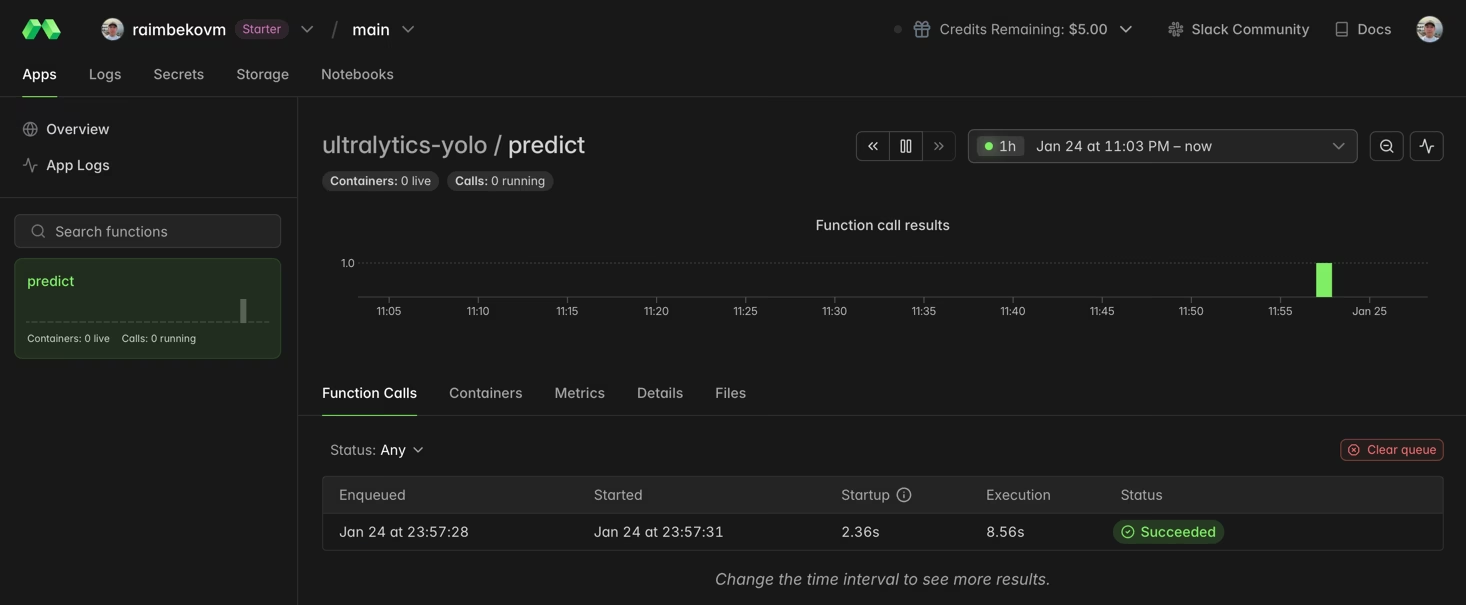
Bạn có thể theo dõi quá trình thực thi hàm trong dashboard Modal:
Sử dụng GPU để suy luận nhanh hơn#
Thêm GPU vào hàm bằng cách chỉ định tham số gpu:
@app.function(image=image, gpu="T4")  # Options: "T4", "A10G", "A100", "H100"
def predict_gpu(image_url: str):
    """Run YOLO26 inference on GPU."""
    from ultralytics import YOLO

    model = YOLO("yolo26n.pt")
    results = model(image_url)
print(results[0].boxes)| GPU | Bộ nhớ | Phù hợp nhất cho |
|---|---|---|
| T4 | 16 GB | Suy luận, huấn luyện model nhỏ |
| A10G | 24 GB | Tác vụ huấn luyện quy mô trung bình |
| A100 | 40 GB | Huấn luyện quy mô lớn |
| H100 | 80 GB | Hiệu năng tối đa |
Huấn luyện YOLO26 trên Modal#
Để huấn luyện, hãy sử dụng GPU và Volumes của Modal để lưu trữ lâu dài. Tạo một file Python mới có tên train_yolo.py:
import modal

app = modal.App("ultralytics-training")

volume = modal.Volume.from_name("yolo-training-vol", create_if_missing=True)

image = modal.Image.debian_slim(python_version="3.11").apt_install("libgl1", "libglib2.0-0").pip_install("ultralytics")

@app.function(image=image, gpu="T4", timeout=3600, volumes={"/data": volume})
def train():
    """Train YOLO26 model on Modal."""
    from ultralytics import YOLO

    model = YOLO("yolo26n.pt")
    model.train(data="coco8.yaml", epochs=3, imgsz=640, project="/data/runs")

@app.local_entrypoint()
def main():
    train.remote()
Chạy huấn luyện:
modal run train_yolo.pyModal Volumes lưu giữ dữ liệu giữa các lần chạy hàm. Trọng số đã huấn luyện được lưu vào /data/runs/train/weights/.
Chúc mừng! Bạn đã thiết lập thành công Ultralytics YOLO26 trên Modal. Để tìm hiểu thêm:
- Khám phá tài liệu Ultralytics YOLO26 để tìm hiểu các tính năng nâng cao
- Tìm hiểu về huấn luyện model tùy chỉnh bằng dataset của riêng bạn
- Thử Hướng dẫn bắt đầu nhanh với Docker để triển khai bằng container
- Truy cập tài liệu Modal để tìm hiểu các tính năng nền tảng nâng cao
Câu hỏi thường gặp#
Đối với suy luận, NVIDIA T4 (16 GB) thường là lựa chọn đủ dùng và tiết kiệm chi phí. Để huấn luyện hoặc chạy các model lớn hơn như YOLO26x, hãy cân nhắc GPU A10G hoặc A100.
Modal áp dụng mức giá tính theo giây. Mức giá ước tính: CPU ~$0.05/giờ, T4 ~$0.59/giờ, A10G ~$1.10/giờ, A100 ~$2.10/giờ. Xem giá Modal để biết mức giá hiện tại.
Có, bạn có thể chạy model YOLO tự huấn luyện trên Modal bằng cách tải file trọng số từ Modal Volume:
model = YOLO("/data/my_custom_model.pt")Để biết thêm thông tin về huấn luyện model tùy chỉnh, hãy xem hướng dẫn huấn luyện.