Ultralytics için Modal Hızlı Başlangıç Kılavuzu#
Bu kılavuz, sunucusuz GPU çıkarımını ve model eğitimini kapsayarak Ultralytics YOLO26 modelini Modal üzerinde çalıştırmaya yönelik kapsamlı bir giriş sunar.
Modal nedir?#
Modal, yapay zekâ ve makine öğrenimi iş yükleri için sunucusuz bir bulut bilişim platformudur. Kaynak sağlama, ölçeklendirme ve yürütme işlemlerini otomatik olarak yönetir — Python kodunu yerel olarak yazarsın, Modal ise GPU erişimiyle kodu bulutta çalıştırır. Böylece altyapıyı yönetmeden YOLO26 gibi derin öğrenme modellerini çalıştırmak için ideal bir platform hâline gelir.
Öğreneceklerin#
- Modal'ı kurma ve kimlik doğrulama
- YOLO26 çıkarımını Modal'da çalıştırma
- Daha hızlı çıkarım için GPU kullanma
- YOLO26 modellerini Modal'da eğitme
Ön koşullar#
- Bir Modal hesabı (modal.com adresinden ücretsiz kaydol)
- Yerel makinede Python 3.9 veya sonraki bir sürüm yüklü olmalı
Kurulum#
Modal Python paketini yükle:
pip install modalArdından CLI'de Modal hesabınla kimlik doğrulaması yap:
modal token newmodal token new komutu, Modal hesabının kimliğini doğrulamak için bir tarayıcı penceresi açar. Kimlik doğrulaması tamamlandıktan sonra terminalden Modal komutlarını çalıştırabilirsin.
YOLO26 Çıkarımını Çalıştırma#
Aşağıdaki kodla çıkarım çalıştırmak için modal_yolo.py adlı yeni bir Python dosyası oluştur:
"""
Modal + Ultralytics YOLO26 Quickstart
Run: modal run modal_yolo.py.
"""

import modal

app = modal.App("ultralytics-yolo")

image = modal.Image.debian_slim(python_version="3.11").apt_install("libgl1", "libglib2.0-0").pip_install("ultralytics")

@app.function(image=image)
def predict(image_url: str):
    """Run YOLO26 inference on an image URL."""
    from ultralytics import YOLO

    model = YOLO("yolo26n.pt")
    results = model(image_url)

    for r in results:
        print(f"Detected {len(r.boxes)} objects:")
        for box in r.boxes:
            print(f"  - {model.names[int(box.cls)]}: {float(box.conf):.2f}")

@app.local_entrypoint()
def main():
    """Test inference with sample image."""
    predict.remote("https://ultralytics.com/images/bus.jpg")
Çıkarımı çalıştır:
modal run modal_yolo.pyBeklenen çıktı:
✓ Initialized. View run at https://modal.com/apps/your-username/main/ap-xxxxxxxx
✓ Created objects.
├── 🔨 Created mount modal_yolo.py
└── 🔨 Created function predict.
Downloading https://github.com/ultralytics/assets/releases/download/v8.4.0/yolo26n.pt to 'yolo26n.pt'...
Downloading https://ultralytics.com/images/bus.jpg to 'bus.jpg'...
image 1/1 /root/bus.jpg: 640x480 4 persons, 1 bus, 377.8ms
Speed: 5.8ms preprocess, 377.8ms inference, 0.3ms postprocess per image at shape (1, 3, 640, 480)

Detected 5 objects:
  - bus: 0.92
  - person: 0.91
  - person: 0.91
  - person: 0.87
  - person: 0.53
✓ App completed.
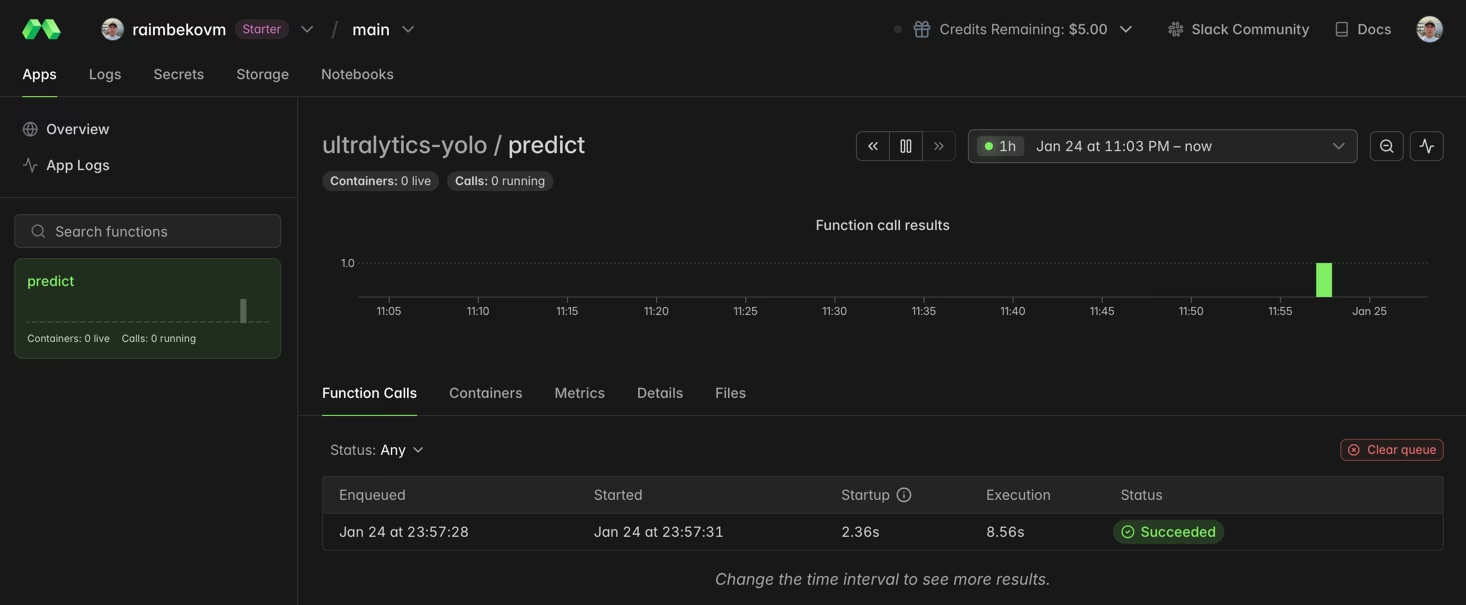
İşlev yürütme sürecini Modal kontrol panelinden izleyebilirsin:
Daha Hızlı Çıkarım için GPU Kullanma#
gpu parametresini belirterek işlevine GPU ekle:
@app.function(image=image, gpu="T4")  # Options: "T4", "A10G", "A100", "H100"
def predict_gpu(image_url: str):
    """Run YOLO26 inference on GPU."""
    from ultralytics import YOLO

    model = YOLO("yolo26n.pt")
    results = model(image_url)
print(results[0].boxes)| GPU | Bellek | En Uygun Kullanım Alanı |
|---|---|---|
| T4 | 16 GB | Çıkarım, küçük model eğitimi |
| A10G | 24 GB | Orta ölçekli eğitim işleri |
| A100 | 40 GB | Büyük ölçekli eğitim |
| H100 | 80 GB | Maksimum performans |
YOLO26'yı Modal'da Eğitme#
Eğitim için GPU ve kalıcı depolama sağlayan Modal Volumes özelliğini kullan. train_yolo.py adlı yeni bir Python dosyası oluştur:
import modal

app = modal.App("ultralytics-training")

volume = modal.Volume.from_name("yolo-training-vol", create_if_missing=True)

image = modal.Image.debian_slim(python_version="3.11").apt_install("libgl1", "libglib2.0-0").pip_install("ultralytics")

@app.function(image=image, gpu="T4", timeout=3600, volumes={"/data": volume})
def train():
    """Train YOLO26 model on Modal."""
    from ultralytics import YOLO

    model = YOLO("yolo26n.pt")
    model.train(data="coco8.yaml", epochs=3, imgsz=640, project="/data/runs")

@app.local_entrypoint()
def main():
    train.remote()
Eğitimi çalıştır:
modal run train_yolo.pyModal Volumes, işlev çalıştırmaları arasında verileri kalıcı olarak saklar. Eğitilmiş ağırlıklar /data/runs/train/weights/ konumuna kaydedilir.
Tebrikler! Ultralytics YOLO26'yı Modal'da başarıyla kurdun. Öğrenmeye devam etmek için:
- Gelişmiş özellikler için Ultralytics YOLO26 belgelerini incele
- Kendi veri kümelerinle özel modelleri eğitme hakkında bilgi edin
- Kapsayıcı tabanlı dağıtım için Docker Hızlı Başlangıç kılavuzunu dene
- Gelişmiş platform özellikleri için Modal belgelerini ziyaret et
Sık Sorulan Sorular#
Çıkarım için NVIDIA T4 (16 GB) genellikle yeterli ve uygun maliyetlidir. Eğitim veya YOLO26x gibi daha büyük modeller için A10G ya da A100 GPU'ları değerlendirebilirsin.
Modal, saniye başına ücretlendirme uygular. Yaklaşık ücretler: CPU ~$0.05/saat, T4 ~$0.59/saat, A10G ~$1.10/saat, A100 ~$2.10/saat. Güncel ücretler için Modal fiyatlandırma sayfasını kontrol et.
Evet, ağırlık dosyasını Modal Volume'dan yükleyerek kendi özel eğitimli YOLO modelini Modal'da çalıştırabilirsin:
model = YOLO("/data/my_custom_model.pt")Özel modelleri eğitme hakkında daha fazla bilgi için eğitim kılavuzuna bak.