Modal-Schnellstartanleitung für Ultralytics#
Diese Anleitung bietet eine umfassende Einführung in die Ausführung von Ultralytics YOLO26 auf Modal und behandelt serverlose GPU-Inferenz sowie das Modelltraining.
Was ist Modal?#
Modal ist eine serverlose Cloud-Computing-Plattform für KI- und Machine-Learning-Workloads. Die Plattform übernimmt automatisch die Bereitstellung, Skalierung und Ausführung – du schreibst Python-Code lokal, und Modal führt ihn in der Cloud mit GPU-Zugriff aus. Dadurch eignet sich Modal ideal für Deep-Learning-Modelle wie YOLO26, ohne dass du die Infrastruktur verwalten musst.
Das lernst du#
- Modal einrichten und authentifizieren
- YOLO26-Inferenz auf Modal ausführen
- GPUs für schnellere Inferenz verwenden
- YOLO26-Modelle auf Modal trainieren
Voraussetzungen#
- Ein Modal-Konto (kostenlos anmelden auf modal.com)
- Python 3.9 oder höher muss auf deinem lokalen Rechner installiert sein
Installation#
Installiere das Modal-Python-Paket:
pip install modalAuthentifiziere anschließend die CLI mit deinem Modal-Konto:
modal token newDer Befehl modal token new öffnet ein Browserfenster, in dem du dein Modal-Konto authentifizieren kannst. Nach der Authentifizierung kannst du Modal-Befehle im Terminal ausführen.
YOLO26-Inferenz ausführen#
Erstelle eine neue Python-Datei namens modal_yolo.py, um mit dem folgenden Code Inferenz auszuführen:
"""
Modal + Ultralytics YOLO26 Quickstart
Run: modal run modal_yolo.py.
"""

import modal

app = modal.App("ultralytics-yolo")

image = modal.Image.debian_slim(python_version="3.11").apt_install("libgl1", "libglib2.0-0").pip_install("ultralytics")

@app.function(image=image)
def predict(image_url: str):
    """Run YOLO26 inference on an image URL."""
    from ultralytics import YOLO

    model = YOLO("yolo26n.pt")
    results = model(image_url)

    for r in results:
        print(f"Detected {len(r.boxes)} objects:")
        for box in r.boxes:
            print(f"  - {model.names[int(box.cls)]}: {float(box.conf):.2f}")

@app.local_entrypoint()
def main():
    """Test inference with sample image."""
    predict.remote("https://ultralytics.com/images/bus.jpg")
Führe die Inferenz aus:
modal run modal_yolo.pyErwartete Ausgabe:
✓ Initialized. View run at https://modal.com/apps/your-username/main/ap-xxxxxxxx
✓ Created objects.
├── 🔨 Created mount modal_yolo.py
└── 🔨 Created function predict.
Downloading https://github.com/ultralytics/assets/releases/download/v8.4.0/yolo26n.pt to 'yolo26n.pt'...
Downloading https://ultralytics.com/images/bus.jpg to 'bus.jpg'...
image 1/1 /root/bus.jpg: 640x480 4 persons, 1 bus, 377.8ms
Speed: 5.8ms preprocess, 377.8ms inference, 0.3ms postprocess per image at shape (1, 3, 640, 480)

Detected 5 objects:
  - bus: 0.92
  - person: 0.91
  - person: 0.91
  - person: 0.87
  - person: 0.53
✓ App completed.
Du kannst die Ausführung deiner Funktion im Modal-Dashboard überwachen:
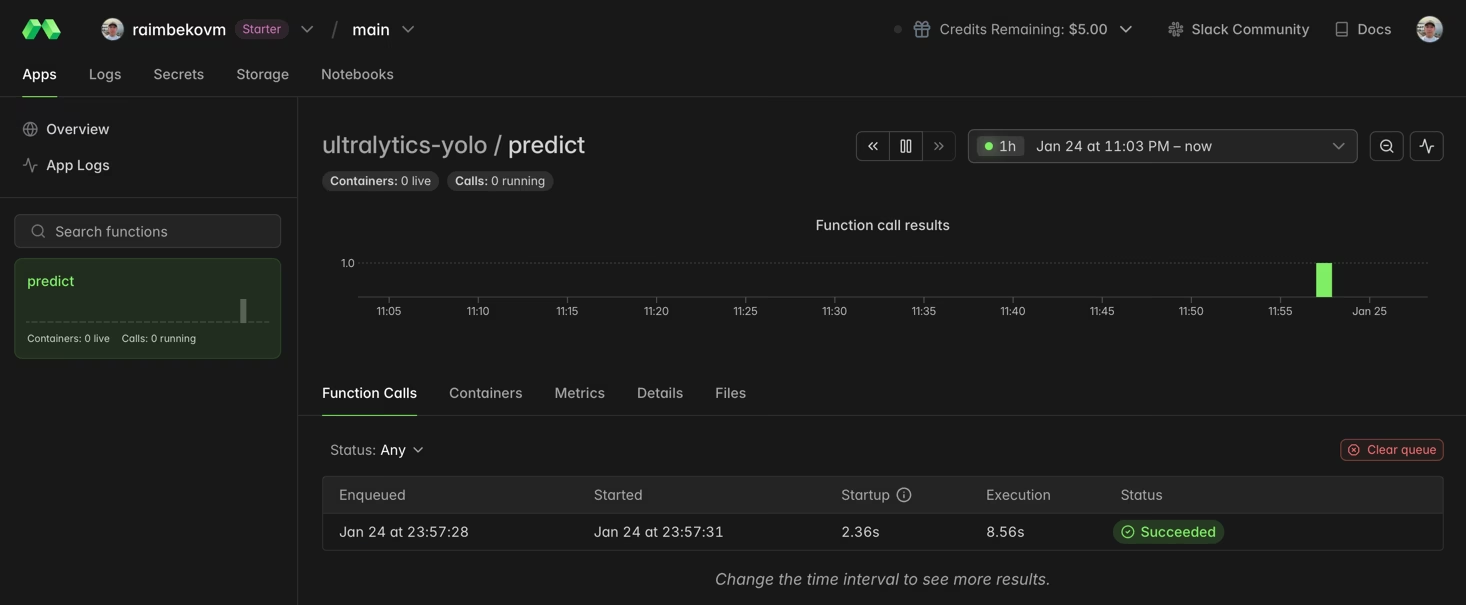
GPU für schnellere Inferenz verwenden#
Füge deiner Funktion eine GPU hinzu, indem du den Parameter gpu angibst:
@app.function(image=image, gpu="T4")  # Options: "T4", "A10G", "A100", "H100"
def predict_gpu(image_url: str):
    """Run YOLO26 inference on GPU."""
    from ultralytics import YOLO

    model = YOLO("yolo26n.pt")
    results = model(image_url)
print(results[0].boxes)| GPU | Speicher | Am besten geeignet für |
|---|---|---|
| T4 | 16 GB | Inferenz, Training kleiner Modelle |
| A10G | 24 GB | Mittlere Trainingsaufgaben |
| A100 | 40 GB | Training im großen Maßstab |
| H100 | 80 GB | Maximale Leistung |
YOLO26 auf Modal trainieren#
Verwende zum Trainieren eine GPU und Modal-Volumes für dauerhaften Speicher. Erstelle eine neue Python-Datei namens train_yolo.py:
import modal

app = modal.App("ultralytics-training")

volume = modal.Volume.from_name("yolo-training-vol", create_if_missing=True)

image = modal.Image.debian_slim(python_version="3.11").apt_install("libgl1", "libglib2.0-0").pip_install("ultralytics")

@app.function(image=image, gpu="T4", timeout=3600, volumes={"/data": volume})
def train():
    """Train YOLO26 model on Modal."""
    from ultralytics import YOLO

    model = YOLO("yolo26n.pt")
    model.train(data="coco8.yaml", epochs=3, imgsz=640, project="/data/runs")

@app.local_entrypoint()
def main():
    train.remote()
Starte das Training:
modal run train_yolo.pyModal-Volumes speichern Daten dauerhaft zwischen Funktionsaufrufen. Trainierte Gewichte werden unter /data/runs/train/weights/ gespeichert.
Glückwunsch! Du hast Ultralytics YOLO26 erfolgreich auf Modal eingerichtet. Weitere Informationen:
- Entdecke die Ultralytics-YOLO26-Dokumentation, um mehr über erweiterte Funktionen zu erfahren
- Erfahre, wie du mit eigenen Datensätzen benutzerdefinierte Modelle trainierst
- Probiere den Docker-Schnellstart für die Bereitstellung in Containern aus
- Besuche die Modal-Dokumentation, um mehr über erweiterte Plattformfunktionen zu erfahren
Häufig gestellte Fragen#
Für Inferenz reicht in der Regel eine NVIDIA T4 (16 GB) aus und sie ist kostengünstig. Für das Training oder größere Modelle wie YOLO26x solltest du A10G- oder A100-GPUs in Betracht ziehen.
Modal rechnet sekundengenau ab. Ungefähre Preise: CPU ~0,05 $/Std., T4 ~0,59 $/Std., A10G ~1,10 $/Std., A100 ~2,10 $/Std. Die aktuellen Preise findest du unter Modal-Preise.
Ja, du kannst dein eigenes, benutzerdefiniert trainiertes YOLO-Modell auf Modal ausführen, indem du die Gewichtsdatei aus einem Modal-Volume lädst:
model = YOLO("/data/my_custom_model.pt")Weitere Informationen zum Training benutzerdefinierter Modelle findest du in der Trainingsanleitung.