Ultralytics용 Modal 빠른 시작 가이드#
이 가이드에서는 서버리스 GPU 추론 및 모델 학습을 다루며, Modal에서 Ultralytics YOLO26을 실행하는 방법을 종합적으로 소개합니다.
Modal이란 무엇인가요?#
Modal은 AI 및 머신러닝 워크로드를 위한 서버리스 클라우드 컴퓨팅 플랫폼입니다. 프로비저닝, 확장, 실행을 자동으로 처리하므로, 로컬에서 Python 코드를 작성하면 Modal이 GPU 액세스를 지원하는 클라우드에서 코드를 실행합니다. 따라서 인프라를 관리하지 않고도 YOLO26과 같은 딥러닝 모델을 실행하기에 적합합니다.
이 가이드에서 배울 내용#
- Modal 설정 및 인증
- Modal에서 YOLO26 추론 실행
- 더 빠른 추론을 위한 GPU 사용
- Modal에서 YOLO26 모델 학습
사전 요구 사항#
- Modal 계정(modal.com에서 무료로 가입)
- 로컬 컴퓨터에 Python 3.9 이상이 설치되어 있어야 합니다.
설치#
Modal Python 패키지를 설치합니다:
pip install modal그런 다음 Modal 계정으로 CLI를 인증합니다:
modal token newmodal token new 명령은 Modal 계정을 인증하기 위해 브라우저 창을 엽니다. 인증이 완료되면 터미널에서 Modal 명령을 실행할 수 있습니다.
YOLO26 추론 실행#
다음 코드로 추론을 실행하려면 modal_yolo.py이라는 새 Python 파일을 만듭니다:
"""
Modal + Ultralytics YOLO26 Quickstart
Run: modal run modal_yolo.py.
"""

import modal

app = modal.App("ultralytics-yolo")

image = modal.Image.debian_slim(python_version="3.11").apt_install("libgl1", "libglib2.0-0").pip_install("ultralytics")

@app.function(image=image)
def predict(image_url: str):
    """Run YOLO26 inference on an image URL."""
    from ultralytics import YOLO

    model = YOLO("yolo26n.pt")
    results = model(image_url)

    for r in results:
        print(f"Detected {len(r.boxes)} objects:")
        for box in r.boxes:
            print(f"  - {model.names[int(box.cls)]}: {float(box.conf):.2f}")

@app.local_entrypoint()
def main():
    """Test inference with sample image."""
    predict.remote("https://ultralytics.com/images/bus.jpg")
추론을 실행합니다:
modal run modal_yolo.py예상 출력:
✓ Initialized. View run at https://modal.com/apps/your-username/main/ap-xxxxxxxx
✓ Created objects.
├── 🔨 Created mount modal_yolo.py
└── 🔨 Created function predict.
Downloading https://github.com/ultralytics/assets/releases/download/v8.4.0/yolo26n.pt to 'yolo26n.pt'...
Downloading https://ultralytics.com/images/bus.jpg to 'bus.jpg'...
image 1/1 /root/bus.jpg: 640x480 4 persons, 1 bus, 377.8ms
Speed: 5.8ms preprocess, 377.8ms inference, 0.3ms postprocess per image at shape (1, 3, 640, 480)

Detected 5 objects:
  - bus: 0.92
  - person: 0.91
  - person: 0.91
  - person: 0.87
  - person: 0.53
✓ App completed.
Modal 대시보드에서 함수 실행을 모니터링할 수 있습니다:
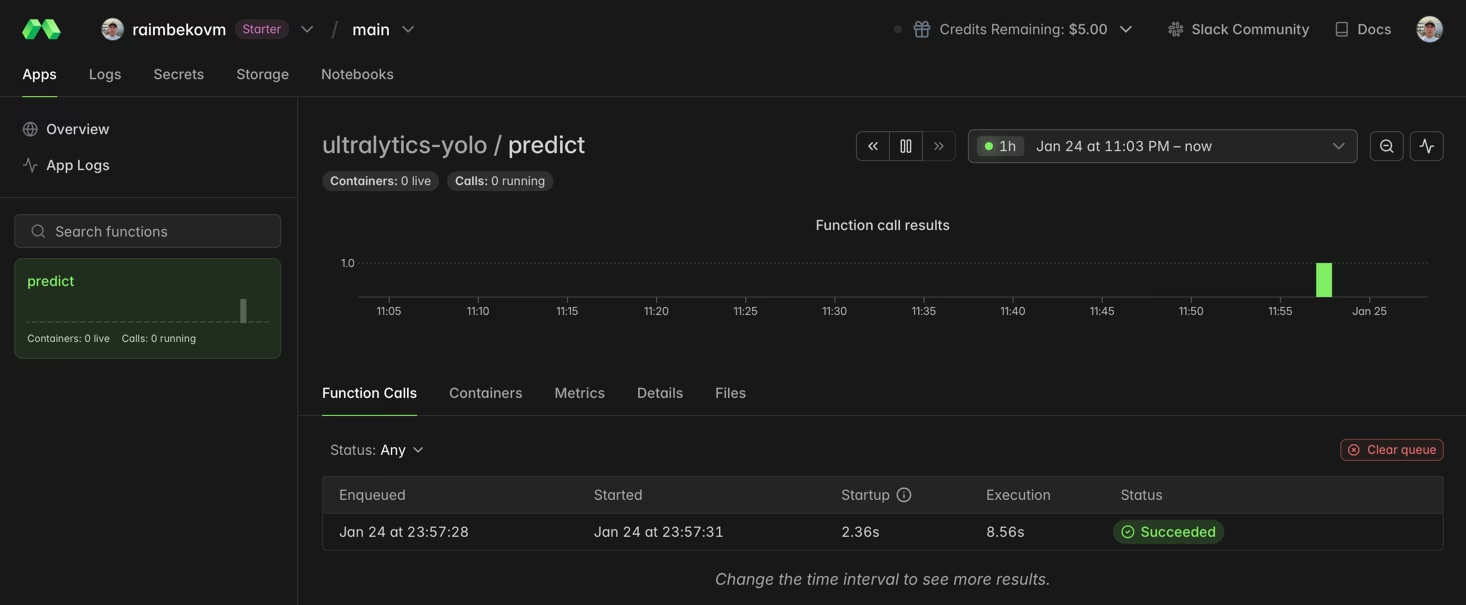
더 빠른 추론을 위한 GPU 사용#
gpu 매개변수를 지정하여 함수에 GPU를 추가합니다:
@app.function(image=image, gpu="T4")  # Options: "T4", "A10G", "A100", "H100"
def predict_gpu(image_url: str):
    """Run YOLO26 inference on GPU."""
    from ultralytics import YOLO

    model = YOLO("yolo26n.pt")
    results = model(image_url)
print(results[0].boxes)| GPU | 메모리 | 권장 용도 |
|---|---|---|
| T4 | 16 GB | 추론, 소규모 모델 학습 |
| A10G | 24 GB | 중간 규모 학습 작업 |
| A100 | 40 GB | 대규모 학습 |
| H100 | 80 GB | 최고 성능 |
Modal에서 YOLO26 학습#
학습에는 GPU와 지속성 스토리지를 위한 Modal Volumes를 사용합니다. train_yolo.py이라는 새 Python 파일을 만듭니다:
import modal

app = modal.App("ultralytics-training")

volume = modal.Volume.from_name("yolo-training-vol", create_if_missing=True)

image = modal.Image.debian_slim(python_version="3.11").apt_install("libgl1", "libglib2.0-0").pip_install("ultralytics")

@app.function(image=image, gpu="T4", timeout=3600, volumes={"/data": volume})
def train():
    """Train YOLO26 model on Modal."""
    from ultralytics import YOLO

    model = YOLO("yolo26n.pt")
    model.train(data="coco8.yaml", epochs=3, imgsz=640, project="/data/runs")

@app.local_entrypoint()
def main():
    train.remote()
학습을 실행합니다:
modal run train_yolo.pyModal Volumes는 함수가 실행되는 동안 데이터를 유지합니다. 학습된 가중치는 /data/runs/train/weights/에 저장됩니다.
축하합니다! Modal에서 Ultralytics YOLO26 설정을 완료했습니다. 더 자세히 알아보려면 다음을 참조하세요:
- 고급 기능은 Ultralytics YOLO26 문서를 살펴보세요.
- 자신의 데이터셋으로 사용자 지정 모델을 학습하는 방법을 알아보세요.
- 컨테이너 배포를 위한 Docker 빠른 시작을 사용해 보세요.
- 고급 플랫폼 기능은 Modal 문서를 참조하세요.
자주 묻는 질문#
추론에는 일반적으로 NVIDIA T4(16 GB)면 충분하며 비용 효율적입니다. 학습이나 YOLO26x와 같은 대형 모델에는 A10G 또는 A100 GPU를 고려하세요.
Modal은 초 단위 종량제 요금을 적용합니다. 대략적인 요금은 CPU ~$0.05/hr, T4 ~$0.59/hr, A10G ~$1.10/hr, A100 ~$2.10/hr입니다. 최신 요금은 Modal 요금에서 확인하세요.
예, Modal Volume에서 가중치 파일을 불러오면 Modal에서 직접 학습한 사용자 지정 YOLO 모델을 실행할 수 있습니다:
model = YOLO("/data/my_custom_model.pt")사용자 지정 모델 학습에 대한 자세한 내용은 학습 가이드를 참조하세요.